N7201A616E00_0317.pdf - 第407页
NPM-W 2 EJM7DE-MB-06O-0 0 Setting the multipoint coordinates From [Dispensing condition] screen ( → P.6-1-15- 1 ) Only when the multipoint dispensing data exists A B A Pos Cnt The number of points of multipoint dummy dis…
NPM-W2 EJM7DE-MB-06O-00
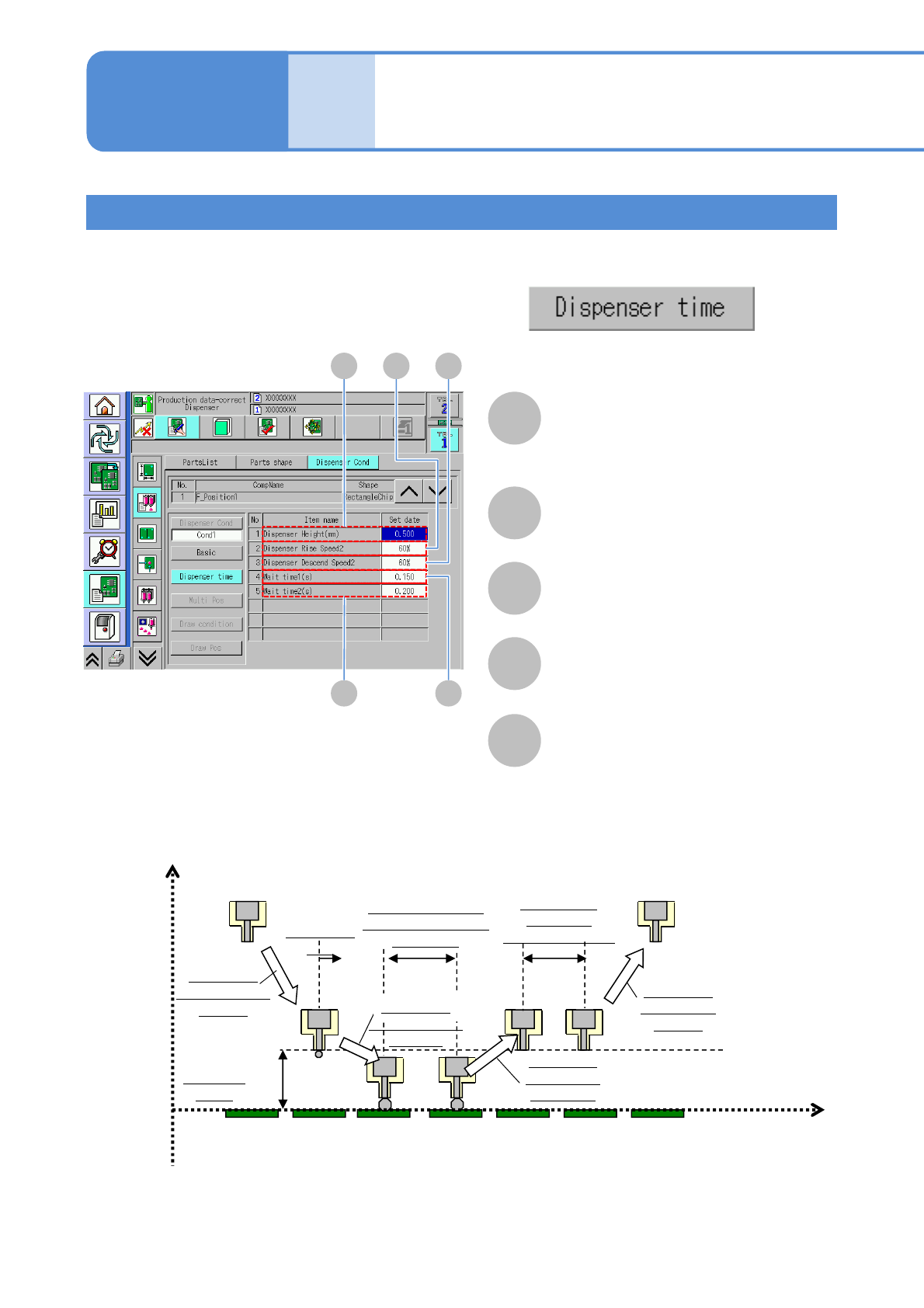
Setting the dispensing timing condition
From [Dispensing condition] screen (→ P.6-1-15-1)
Only when the dispensing timing control is set to[ON]
A B C
E D
A
Dispenser height (mm)
The distance from the nozzle tip to the
upper surface of the PCB where
dispensing is started is displayed.
B
Dispenser Rise Speed2
The dispensing rising speed (second
step) is displayed.
C
Dispenser Descend Speed2
The dispensing lowering speed (second
step) is displayed
D
Wait time1 (s)
The waiting time at the bottom dead
point in dispensing is displayed.
E
Wait time2 (s)
The waiting time after rising in
dispensing is displayed.
Z
Dispenser
height
Dispensing
lowering speed
1st step
Dispensing
start
Waiting time at the
bottom dead point in
dispensing
Dispensing
rising speed
2nd step b
Waiting time
after rising
During dispending
Dispensing
rising speed
1st step
Time
PCB top
surface
a
d
e
Dispensing
lowering speed
2nd step
c
Data
editing
Dispensing condition
data edit 2 (dispensing head)
Operating procedure
6-1-15
6-1-15-3
NPM-W2 EJM7DE-MB-06O-00
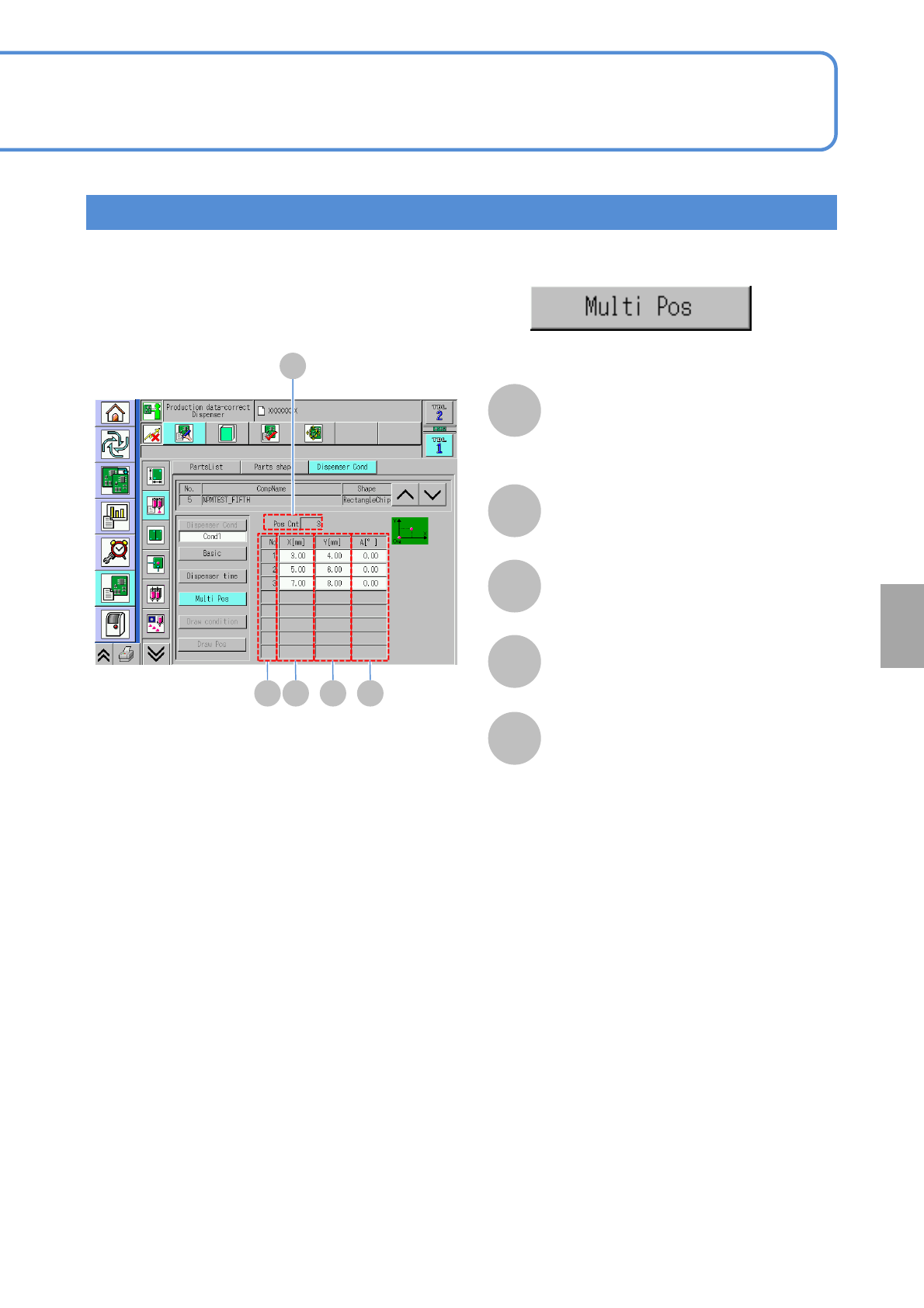
Setting the multipoint coordinates
From [Dispensing condition] screen (→ P.6-1-15-1)
Only when the multipoint dispensing data exists
A
B
A
Pos Cnt
The number of points of multipoint
dummy dispensing for the applicable
component list is displayed.
B
No
The number in sequence is displayed.
C
X[mm]
X dispensing coordinate is displayed.
D
Y[mm]
Y dispensing coordinate is displayed.
E
A[°]
θ dispensing coordinate is displayed.
C D E
6-1-15-4
Setting
change
NPM-W2 EJM7DE-MB-06O-00
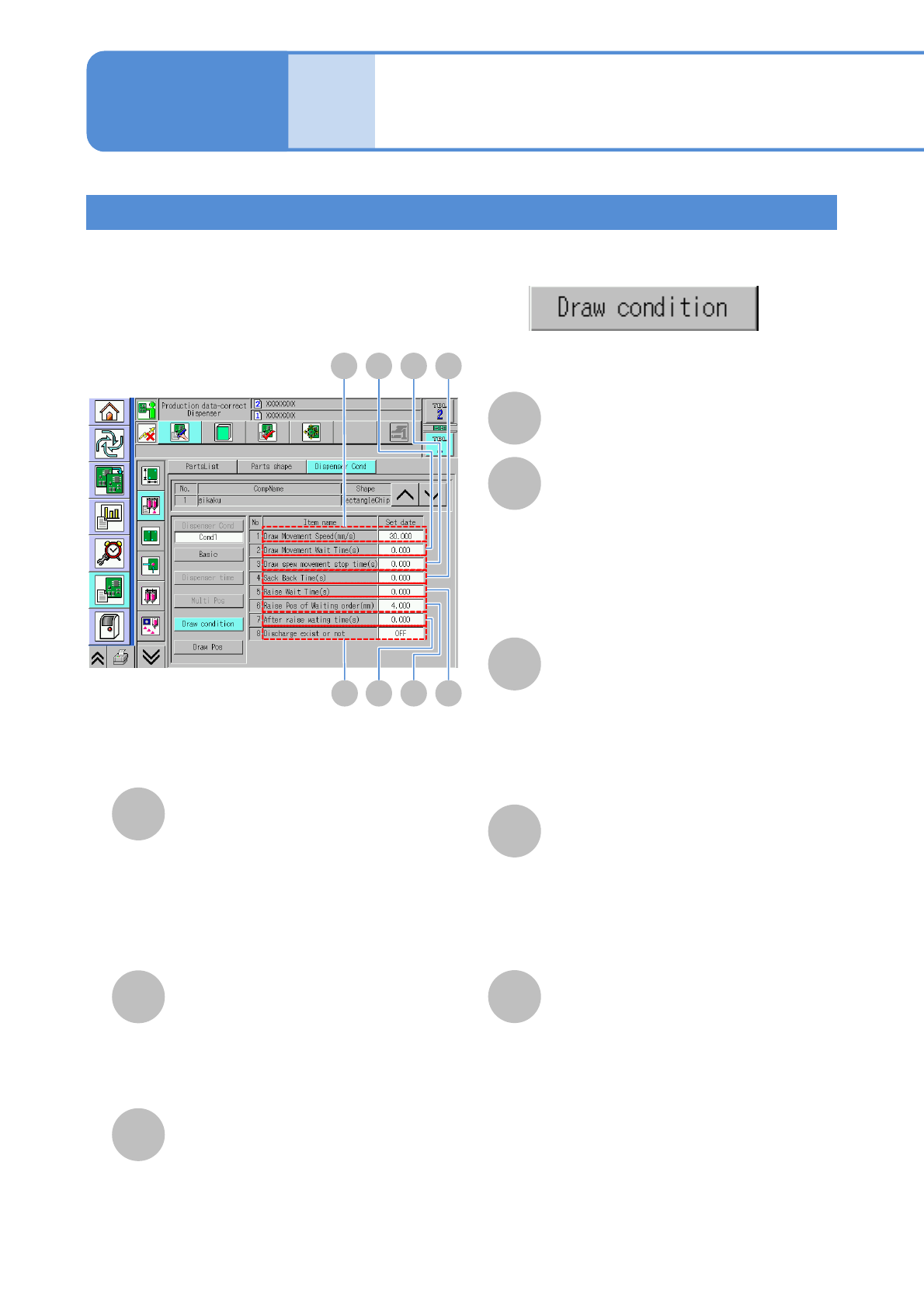
Setting the drawing condition
From [Dispensing condition] screen (→ P.6-1-15-1)
Only when the drawing data exists
A C D
E
A
Draw Movement Speed (mm/s)
B
‘Draw Movement Wait Time (s)
Set the wait time (the time from when the
nozzle starts descending after traveling on
the XY unit until when it travels the
descending XY distance).
( 0.00 s to 9.99 s)
Use this in such a case that the dispensing
shape of the starting point of drawing is
unstable.
C
Draw Movement Stop Time (s)
Set the draw movement stop time (the time
during which the dispenser movement stops
in order to change the draw direction).
( 0.00 s to 9.99 s)
Use this in such a case that the dispensing
becomes excessive in amount when the
draw direction is changed.
D
Sack Back Time (s)
Set the sack back time (the time to put
materials back in the nozzle by
reversing the nozzle at the end of draw
movement.
( 0.00 s to 9.99 s)
Use this in such a case that the draw
shape is unstable at the end of drawing.
E
‘Rise Wait Time (s)
Set the raise wait time (the time
between the end of drawing and the
nozzle raised).
( 0.00 s to9.99 s)
Use this in such a case that the draw
shape is unstable at the end of drawing.
(the time following the Sack Back Time.)
B
FGH
F
Rise Waiting Pos(mm)
Set the raise pos of waiting pos order
(the raised position of the nozzle before
making the next draw movement at the
completion of a draw movement).
( 2.500 mm to 25.000 mm)
You can set it below the setting value of
“Head raised position” in the Dispenser
Condition.
G
Wait Time After Rise (s)
Set the wait time after raise (the time
from when the nozzle rises after draw
movement until when the XY unit starts
to make the next draw movement).
( 0.00 s to 9.99 s)
H
Dummy dispensing existence
Whether dummy dispensing is
performed or not before drawing is
displayed.
Data
editing
Dispensing condition
data edit 3 (dispensing head)
Operating procedure
6-1-15
6-1-15-5