N7201A616E00_0317.pdf - 第526页
NPM-W 2 EJM7DE-MB-06O-0 0 6-2-14 -5 Dummy dispensing teac h 3 (dispensing head) Produc- tion data teaching Operating procedure 6-2-14 Standard area (mm 2 ) The value of [Ref. area value] of the dummy dispensing recog nit…
NPM-W2 EJM7DE-MB-06O-00
6-2-14-4
Setting
change
5
+
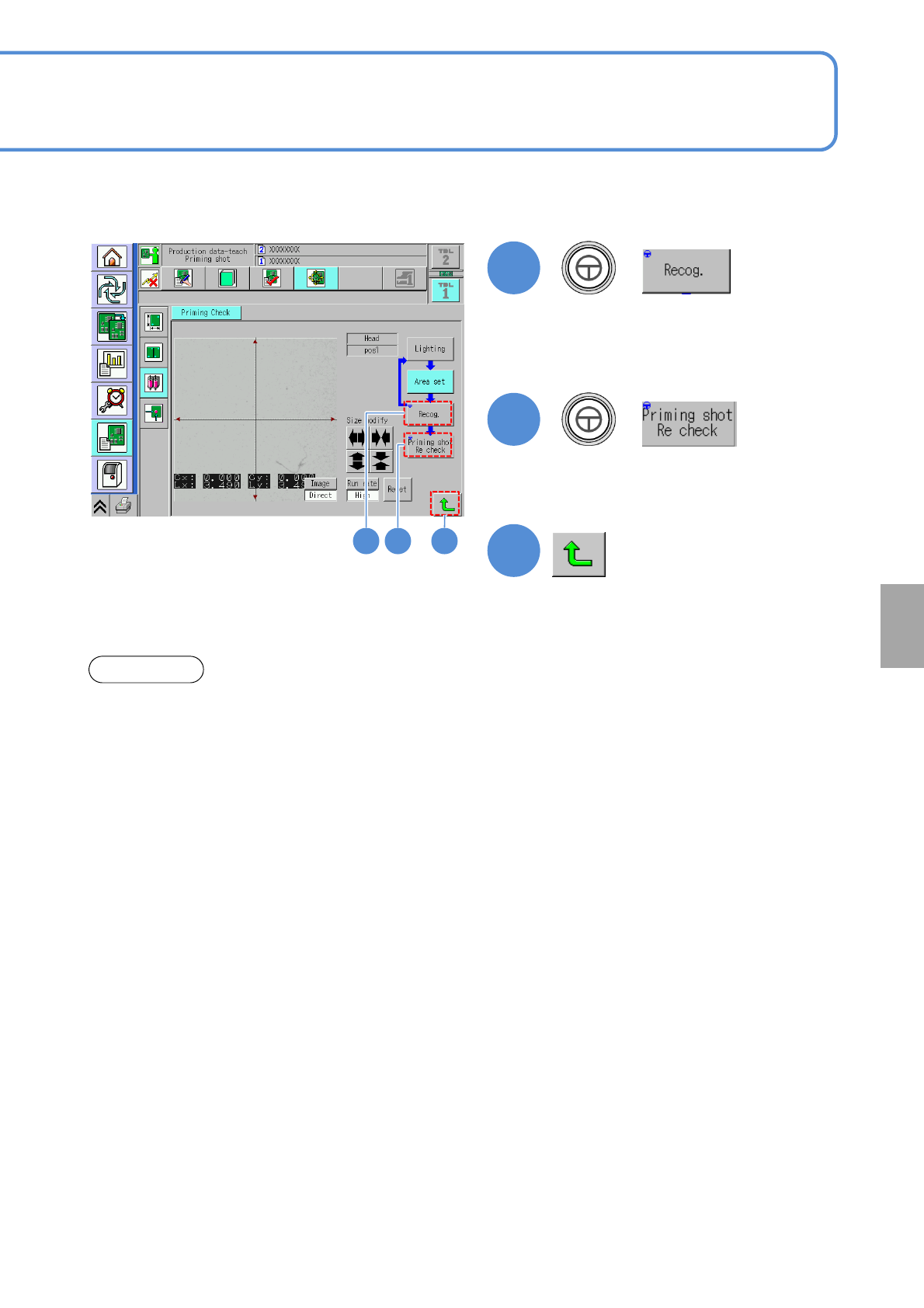
●The recognition is carried out against
the current coordinate position.
When recognition is judged OK, the
data is saved.
6
+
●Over 20 minutes elapsed after the current temperature reaches the preset temperature of the heater,
dummy dispensing teach should be performed.
●Confirm ejection before dummy dispensing teaching (more than 10 seconds).
●As for the reconfirmation of dummy dispensing, be sure to confirm more than 10 points.
NOTICE
7
(Returns to the dummy dispensing teach
screen)
65 7
●Make sure that a recognition is
normally activated.
NPM-W2 EJM7DE-MB-06O-00
6-2-14-5
Dummy dispensing
teach 3 (dispensing head)
Produc-
tion data
teaching
Operating procedure
6-2-14
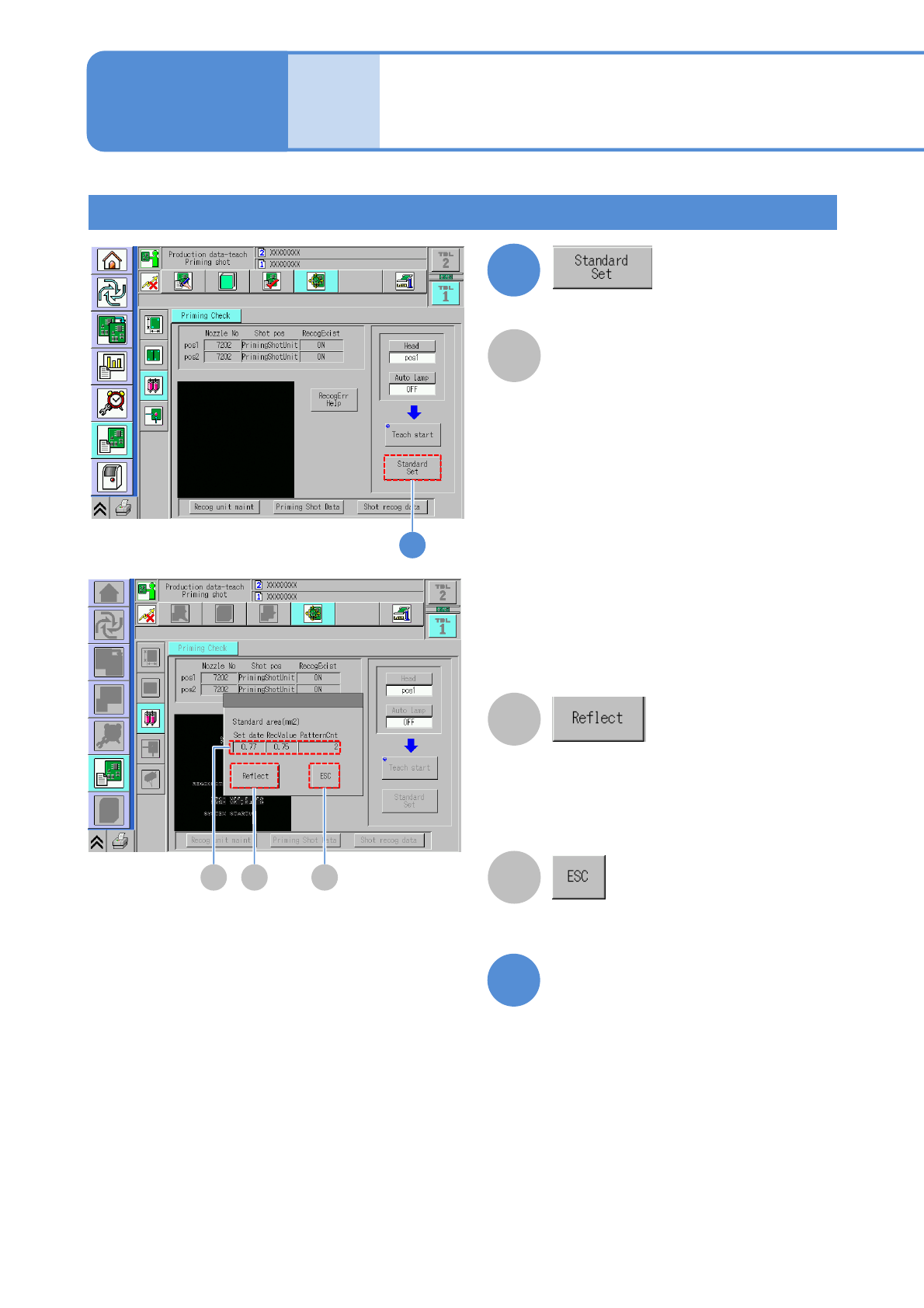
Standard area (mm
2
)
The value of [Ref. area value] of the
dummy dispensing recognition data is
displayed. (Unit: mm
2
)
RecValue:
The value of [Total area value]
obtained by dummy dispensing
recognition is displayed.
(When the result of recognition is not
normal, [---] appears.)
PatternCnt:
The number of detected adhesive
patterns is displayed.
(When the result of recognition is not
normal, [---] appears.)
On the occurrence of a dummy
dispensing recognition error, it is
displayed in yellow.
Confirming the reference area value
A
8
8
9
The values of [Reference area value] in
the Shot recog data is update to [Total
area value]. If an error occurs in dummy
dispensing recognition, the data cannot e
reflected.
The reference value setting screen is
ended.
Exit the dummy dispensing
teaching screen by entering
into other screen
B CA
B
C

NPM-W2 EJM7DE-MB-06O-00
6-2-14-6
Setting
change
Solutions to defective adhesive-dispensing
■When stringiness (part of an adhesive forming filaments) occurs
Lower the adhesive viscosity and raise the set nozzle temperature so as to improve adhesive flow control
and fluidity.
(Set on the adhesive library editor)
Adjust the head height position so that the XY travel starts after the flow of adhesive stops.
(Set in the dispensing condition setting)
Lower the nozzle rising speed. (Set in the dispensing condition setting)
■When adhesive splatters
Raise the adhesive viscosity and lower the set temperature of the temperature control unit so as to
prevent adhesive from splattering.
(Set on the adhesive library editor)
Lower the nozzle rising speed. (Set in the dispensing condition setting)
■Others
Decrease the nozzle lowering speed so as to reduce damages to a PCB and components on its
reverse side.
(Set in the dispensing condition setting)
●The setting is configured with NPM-DGS. (→[NPM-DGS] Operating instruction)