00198178-04_GS_FeederManager_3.3_R18-1_EN.pdf - 第106页
SIPLACE Feeder Ma nager 3.3 (R18 -1) / Getting S tarted 08/2018 Edition 106 General Settings f or details. Example: Alert message displa yed on the station co mputer Figure 11 -5: SIPLACE Display Ser v ice alert Note: Fo…
SIPLACE Feeder Manager 3.3 (R18-1) / Getting Started 08/2018 Edition
105
11.2 Alerts on the station computer via SIPLACE OIB Display Viewer
Alert messages are also displayed on the station computer. This helps the operator to quickly
identify the feeders that need attention, for example to swap an overdue feeder.
In order to use this function, the station computer must have Display Service Viewer
(“Viewer”) installed, which is from the SIPLACE OIB installation CD. Alert messages will be
displayed in this Viewer.
The SIPLACE OIB Display Viewer is the client application for SIPLACE OIB Display
Service. It is a Windows-based application that runs on station computers. Once installed, the
SIPLACE Display Viewer will automatically popup whenever there is a feeder problem. After
the operator closes this Viewer, Feeder Manager will check the problem status again after a
predefined time interval, and if the problem persists, Feeder Manager will send the alert
message to SIPLACE Display Service again. The time interval is configurable in FM Client –
Global Settings. See section 9.1.5 Description of the buttons
Save
Click on this button to save the changed configuration.
Restore to default
Click on this button to restore all the configurations to default value.
SIPLACE Feeder Manager 3.3 (R18-1) / Getting Started 08/2018 Edition
106
General Settings for details.
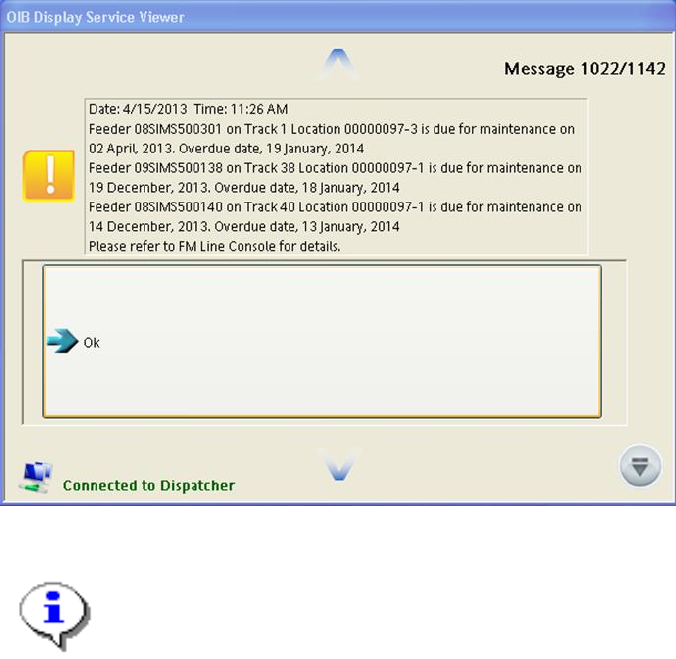
Example: Alert message displayed on the station computer
Figure 11-5: SIPLACE Display Service alert
Note:
For how to install and administrate SIPLACE OIB Display Service and its
Viewer, please refer to Chapter 7, “Installation Display Service Viewer” and
Chapter 8, “Administration of the Display Service” of document 00900028-04,
Installation and Configuration Manual SIPLACE OIB.
SIPLACE Feeder Manager 3.3 (R18-1) / Getting Started 08/2018 Edition
107
12 FM Line Console
FM Line Console is a Windows application that typically runs on line computers and connects
to the stations and SIPLACE Pro.
In the Offline Area , FM Line Console shall be deployed on the computer that is physically
connected to the docking stations.
Once installed, FM Line Console will appear under Start All Programs SIPLACE
Feeder Manager FM Line Console.
FM Line Console contains the following functions:
Feeder Tracking for X-feeders in the Production Area and the Offline Area
Gets line and setup information from SIPLACE Pro OIB Adapter
Sends alerts to the SIPLACE Display Service on the station GUI
12.1 Line Console Server service
After FM Line Console is installed successfully, the Line Console Server service will be
started automatically. You can also manually start it as below if it is stopped for any reason.
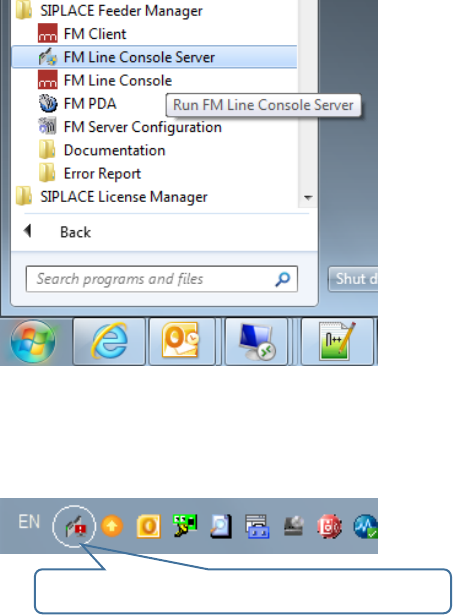
Figure 12-1 Start FM Line Console Server from Windows Start Menu
Once started, you can find the FM Line Console Server Manager at the System Tray as
following:
FM Line Console Server System Tray Icon