00198178-04_GS_FeederManager_3.3_R18-1_EN.pdf - 第121页
SIPLACE Feeder Ma nager 3.3 (R18 -1) / Getting S tarted 08/2018 Edition 121 13.2 Feed er location tracking in the Production A rea (X-feeders) W ith this function the user can m onitor and keep track of feeder status and…

SIPLACE Feeder Manager 3.3 (R18-1) / Getting Started 08/2018 Edition
120
13.1.3 Placed and removed feeders
When a feeder is inserted into a docking station, Feeder Manager will be notified and reads
the serial number of the inserted feeder. Based on the serial number, Feeder Manager checks
if the feeder exists in the database. If not, Feeder Manager creates a new feeder ID and
assigns the feeder type based on the feeder type code.
When a feeder is placed, the feeder status and maintenance message will be updated and
the feeder location will be associated to the table.
When a feeder is removed, the feeder location will be updated to the registered offline
location.
Note:
If FM Line Console and Setup Center are installed on the same computer, FM Line
Console will depend on Setup Center to obtain offline feeder movement events.
Therefore it will constantly check the running status of the Setup Center GUI and the
Setup Center OIB adapter.
If the Setup Center version is 5.2 or lower, there are following limitations with regards to
the docking station connection.
1) Limitation #1:
Whenever Setup Center GUI or Setup Center OIB adapter is restarted, the user will
be prompted to do the following
• Scan Quick-start barcode
• Scan Docking station ID
• Scan COT ID
in order for FM to keep updating the feeder movements on Docking Station in real-
time.
Failing to do so will result in data inconsistency between Setup Center and Feeder
Manager.
2) Limitation #2:
If a feeder placed on the table is marked as type-mismatched in Setup Center after
setup verification, and consequently removed from the table, Setup Center will not
notify FM Line Console of the removal in real-time.
In order to solve this inconsistency, you need to follow the above scanning
sequence again.
If the Setup Center version is 6 or higher, or if the FM Line Console is installed alone,
then there are no such limitations.
SIPLACE Feeder Manager 3.3 (R18-1) / Getting Started 08/2018 Edition
121
13.2 Feeder location tracking in the Production Area (X-feeders)
With this function the user can monitor and keep track of feeder status and feeder location on
the station.
Requirements:
FM Line Console is running
Station is running with a setup downloaded
Feeder(s) are placed on the station
13.2.1 Setting up lines and stations
When using FM Line Console for the first time, it will retrieve all the lines from SIPLACE Pro.
The user can select one or multiple lines for monitoring. Once the lines are connected, FM
Line Console will maintain up-to-date station and line relationship.
FM Line Console will create station location(s) and line if not already present in the system.
FM Line Console will save the last download setup information in the selected line(s) into the
database for recovery and setup verification purpose.
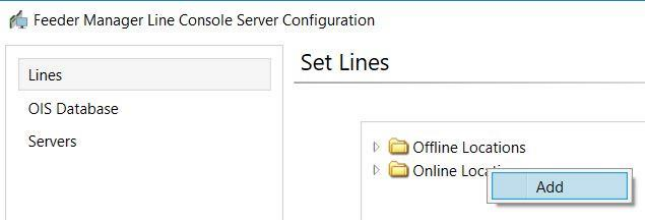
Right click on the Online folder and click Add to start
Figure 13-10 FM Line Console Online Area Line Configuration Context Menu
SIPLACE Feeder Manager 3.3 (R18-1) / Getting Started 08/2018 Edition
122
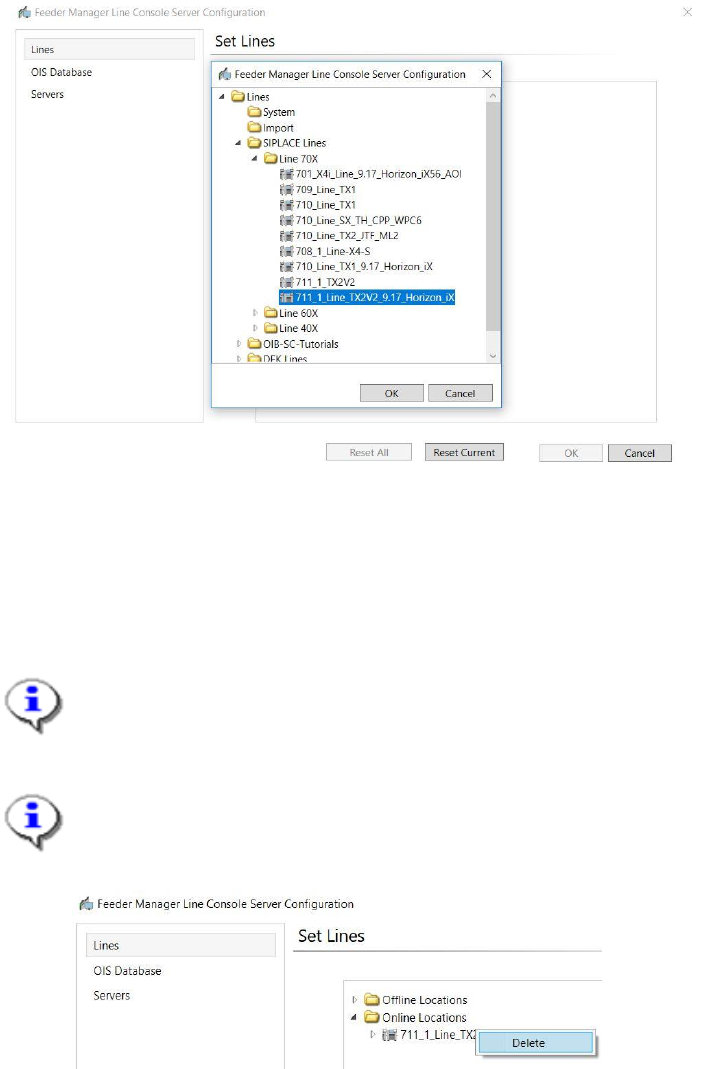
Figure 13-11 Line Selection
A list of lines retrieved from SIPLACE Pro will be displayed.
Select the line(s) to be monitored and click on the OK button.
The selected line will be added and connected.
Note:
Unlike previous version, the added line will be connected automatically.
Note:
At any time, the user can right click on the line or any station under it and click Delete to
delete the line from the monitoring list.
Figure 13-12 Delete Line
13.2.2 Placed and removed feeders
FM Line Console will monitor feeders that are placed and removed on the connected line(s).
When a feeder is placed, the feeder will be updated to FM Line Console and the feeder
location will be associated to the station location.
The feeder information will be displayed by the station. The user can select a station location
to view all the feeders on that location.