00198178-04_GS_FeederManager_3.3_R18-1_EN.pdf - 第66页
SIPLACE Feeder Ma nager 3.3 (R18 -1) / Getting S tarted 08/2018 Edition 66 Cycle Count to Due Maintenance due c ycles. Allows the user t o view th e num ber of cycle counts before a f eeder of this particular f eeder typ…
SIPLACE Feeder Manager 3.3 (R18-1) / Getting Started 08/2018 Edition
65
7.3.1 Description of the fields
Path to the feeder type(.xml)
Allows the user to enter the path to the xml file used for feeder type import.
Name
Allows the user to view the feeder type name.
Abbreviation
Allows the user to view the abbreviated name for the feeder type.
Division
Allows the user to view the number of divisions on which the components are transported.
Category
Allows the user to view the feeder type category, whether it is an S- or X-feeder.
Track count
Allows the user to view the number of tracks that are occupied on the table (depends on the
feeder width).
Feeder Type Code
Allows the user to view the feeder type code.
Feeder Type Sub Code
Allows the user to view the second feeder type code.
Part Number
Allows the user to view the part numbers for the feeder type.
ID Format
Allows the user to view the feeder id format for this feeder type.
Date to Due
Maintenance due days. Allows the user to view the number of days before a feeder of this
particular feeder type is due for servicing.
Date to Overdue
Maintenance overdue days. Allows the user to view the number of days before a feeder of this
particular feeder type is overdue for servicing.
SIPLACE Feeder Manager 3.3 (R18-1) / Getting Started 08/2018 Edition
66
Cycle Count to Due
Maintenance due cycles. Allows the user to view the number of cycle counts before a feeder
of this particular feeder type is due for servicing.
Cycle Count to Overdue
Maintenance overdue cycles. Allows the user to view the number of cycle counts before a
feeder of this particular feeder type is overdue for servicing.
7.3.2 Description of the buttons
Browse
Click on this button to browse for the xml file to import a new feeder type.
Save
Click on this button to save the feeder type based on the imported file.
Note:
Only feeder type definition files released by SIPLACE can be imported. Feeder types
imported with this cannot be deleted once the import is done.
7.3.3 Support of new feeder types as of Feeder Manager 3.3
As of Feeder Manager 3.3 the following new feeder types are supported for high speed
machines TX V2:
Order number
Name
141478
SmartFeeder 4mm Xi
141498
SmartFeeder 4mm Xi Splice
141480
SmartFeeder 8mm Xi
141500
SmartFeeder 8mm Xi Splice
141479
SmartFeeder 2x8mm Xi
141499
SmartFeeder 2x8mm Xi Splice
Table 7-2: Feeder Manager coloring scheme
The corresponding xml file is provided in the installation ISO in the Feeder type definitions
directory. After importing the file the types are displayed under Feeder Type – Search
Feeder Type view.
SIPLACE Feeder Manager 3.3 (R18-1) / Getting Started 08/2018 Edition
67
8 Report centric functions
8.1 Feeder Summary Report view
Click on Report – Feeder Summary Report in the menu bar to open the view.
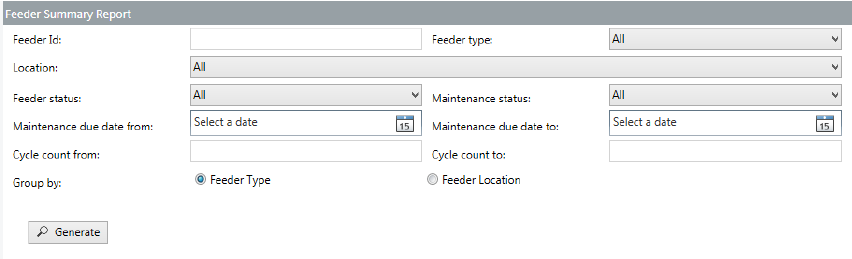
The Feeder Summary Report view is displayed.
Figure 8-1: Feeder Summary Report view
Enter the details and/or set the filters to generate the desired feeder summary report.
8.1.1 Description of the fields
Feeder Id
Allows the user to search for feeders based on the feeder ID to generate the report.
Feeder type
Allows the user to search for feeders based on the feeder type to generate the report.
Location
Allows the user to search for feeders based on the location to generate the report.
Feeder status
Allows the user to search for feeders based on the feeder status to generate the report.
Maintenance status
Allows the user to search for feeders based on the maintenance status to generate the report.
Maintenance due date from
Allows the user to search for feeders based on the maintenance due date to generate the
report. All feeders that are due for maintenance in the system on/after the selected date,
based on the maintenance plan, are included in the report.