00198178-04_GS_FeederManager_3.3_R18-1_EN.pdf - 第62页
SIPLACE Feeder Ma nager 3.3 (R18 -1) / Getting S tarted 08/2018 Edition 62 7.2.3.1 Feeder Type Details This section contains inform ation about the feeder typ e and can b e m odified. The f ields and buttons are describe…
SIPLACE Feeder Manager 3.3 (R18-1) / Getting Started 08/2018 Edition
61
7.2.2 Description of the buttons
Search
Click on this button to search for feeder types based on any or all of the search criteria.
Reset
Click on this button to clear all the field values in the Feeder Type Management dialog
box and reset them to default values (if any).
Refresh
Click on this button to refresh the Feeder Type drop-down list.
Once any feeder type details are updated or a new feeder type is added, and the user returns
to the Feeder Type Management dialog box, a manual refresh by clicking on this button is
required in order for the changes to take effect in the Feeder type drop-down list.
7.2.3 Editing the maintenance plan
Double click any feeder type in the above list to enter the Feeder Type Details window.
For each SIPLACE feeder type, default values for date based and cycle based maintenance
plan are provided from the system. Some of these values can be modified in the Feeder Type
Details – Edit view. For customer feeder types, a date-based or a cycle-based maintenance
plan can be defined or modified.
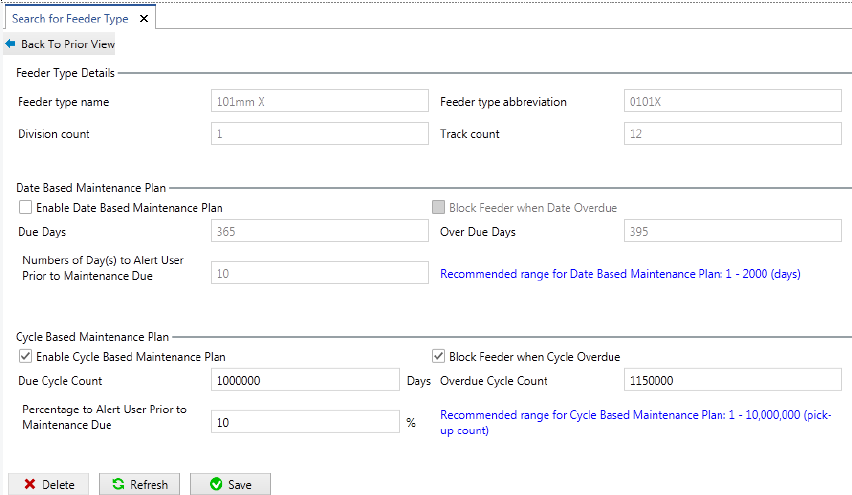
Figure 7-3: Feeder Type Details – Edit view
The Feeder Type Details – Edit view is divided into three sections, Feeder Type Details,
Date Based Maintenance Plan and Cycle Based Maintenance Plan.
SIPLACE Feeder Manager 3.3 (R18-1) / Getting Started 08/2018 Edition
62
7.2.3.1 Feeder Type Details
This section contains information about the feeder type and can be modified. The fields and
buttons are described in the sections above.
7.2.3.2 Date Based Maintenance Plan
This section contains information about the date-based maintenance plan for a particular
feeder type and can be modified.
Enable date based maintenance
Allows the user to enable date-based maintenance.
Block feeder when date overdue
Allows the user to define, that a feeder shall be marked as blocked, when the overdue date is
exceeded. If this field is unchecked, the status of the feeder remains Available even after the
feeder is overdue for maintenance and the feeder can still be used.
Note: If this option is checked, Feeder Manager will set the feeder to the “Blocked” status
when it’s maintenance status becomes overdue. This “Blocked” status is only visible from
inside Feeder Manager Client and Line Console.
For Enforced Feeder Block feature, please refer to the Settings Enforce Feeder
Block.
Maintenance due days
Allows the user to define/modify the number of days before a feeder of this particular feeder
type is due for servicing.
Maintenance overdue days
Allows the user to define/modify the number of days before a feeder of this particular feeder
type is overdue for servicing. The recommended range for the date-based maintenance plan
is displayed.
Number of day(s) to alert user prior maintenance due
Allows the user to define/modify a number of days that remains before a feeder of this
particular feeder type is due for servicing. When the defined number of days is reached, the
user will be alerted by the system.
7.2.3.3 Cycle Based Maintenance Plan
This section contains information about the cycle-based maintenance plan for a particular
feeder type and can be modified.
Enable cycle based maintenance
Allows the user to enable cycle-based maintenance.
SIPLACE Feeder Manager 3.3 (R18-1) / Getting Started 08/2018 Edition
63
Block feeder when cycle overdue
Allows the user to define, that a feeder shall be marked as blocked, when the overdue value is
exceeded. If this field is unchecked, the status of the feeder remains Available even after the
feeder is overdue for maintenance and the feeder can still be used.
Maintenance due cycles
Allows the user to define/modify the number of cycle counts before a feeder of this particular
feeder type is due for servicing.
Maintenance overdue cycles
Allows the user to define/modify the number of cycle counts before a feeder of this particular
feeder type is overdue for servicing. The recommended range for the cycle-based
maintenance plan is displayed.
Percentage to alert user prior maintenance due
Allows the user to define/modify a cycle count percentage that remains before a feeder of this
particular feeder type is due for servicing. When the defined percentage is reached, the user
will be alerted by the system.
7.2.3.4 Buttons
Save
Click on this button to save the changes to the maintenance plan.
Refresh
Click on this button to refresh the display of the maintenance plan.
Delete
Click on this button to delete the feeder type selected.
Note: System Default types cannot be deleted.
Note: Starting from Feeder Manager 3.0, there is no individual maintenance plan per each
feeder. i.e. feeder maintenance plan is updated on feeder type. Individual editing of feeder
maintenance plan is no longer possible.
Any change of feeder maintenance plan won’t take immediate effect. Instead, it only takes
effect when the feeders of the corresponding type are “maintained”, i.e. completed with the
Feeder Maintenance workflow.
It is still possible to continue to use the feeder are it becomes due or overdue for maintenance,
by clicking on the “Extend” button.