00198178-04_GS_FeederManager_3.3_R18-1_EN.pdf - 第96页
SIPLACE Feeder Ma nager 3.3 (R18 -1) / Getting S tarted 08/2018 Edition 96 1D feeder barcode l abels: Figure 9- 26 : Feeder Barcode Labe l Printing Form at for 1D bar c ode labels Tick the check boxes for the inform at…

SIPLACE Feeder Manager 3.3 (R18-1) / Getting Started 08/2018 Edition
95
Barcode Setting
This setting allows the user to configure barcode label related settings.
Feeder Barcode Type
Allows the user to select to print 1D or 2D barcode labels for feeder barcodes.
Location Barcode Type
Allows the user to select to print 1D or 2D barcode labels for location barcodes.
Barcode label Y axis offset
Allows the user to modify the barcode label Y-axis offset. Default value = 50.
Barcode label X axis offset
Allows the user to modify the barcode label X-axis offset. Default value = 25.
Offline Setup Print Font
The offline setup font sizing for printing is displayed with preset values (Microsoft font size
standard in pixels). The values are by default disabled for editing. However, the user can click
on Modify Font Size button to modify the values.
Title font size
Allows the user to modify the font size for the title.
Barcode font size
Allows the user to modify the font size for the barcode.
Word font size
Allows the user to modify the font size for text.
Warning:
Default font size values are optimized for barcode printing on A4 paper. If you modify
them, the printing result may not be usable for scanning.
9.4.1.2 Description of the buttons
Save
Click on this button to save the modified print options.
Restore Default Values
Click on this button to restore the factory settings.
9.4.2 Feeder Barcode Label Printing Format view
Click on Feeder Barcode Label Printing Format tab to open the view.
SIPLACE Feeder Manager 3.3 (R18-1) / Getting Started 08/2018 Edition
96
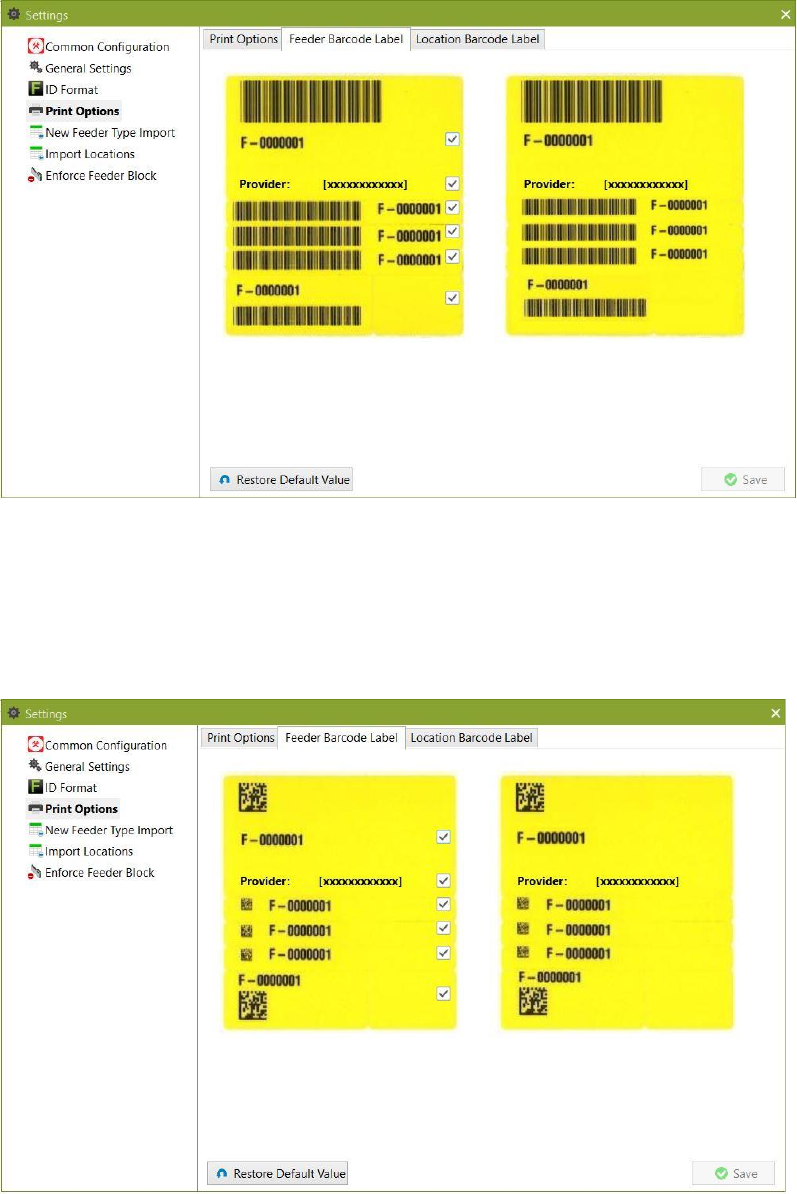
1D feeder barcode labels:
Figure 9-26: Feeder Barcode Label Printing Format for 1D barcode labels
Tick the checkboxes for the information that shall appear on the barcode label.
To the right a preview of the selected printing format is shown.
2D feeder barcode labels:
Figure 9-27: Feeder Barcode Label Printing Format dialog box for 2D barcode labels
Tick the checkboxes for the information that shall appear on the barcode label.
To the right a preview of the selected printing format is shown.
SIPLACE Feeder Manager 3.3 (R18-1) / Getting Started 08/2018 Edition
97
9.4.3 Location Barcode Label Printing Format view
Click on Settings – Location Barcode Label Printing Format in the menu bar to open
the view.
The Location Barcode Label Printing Format dialog box is displayed.
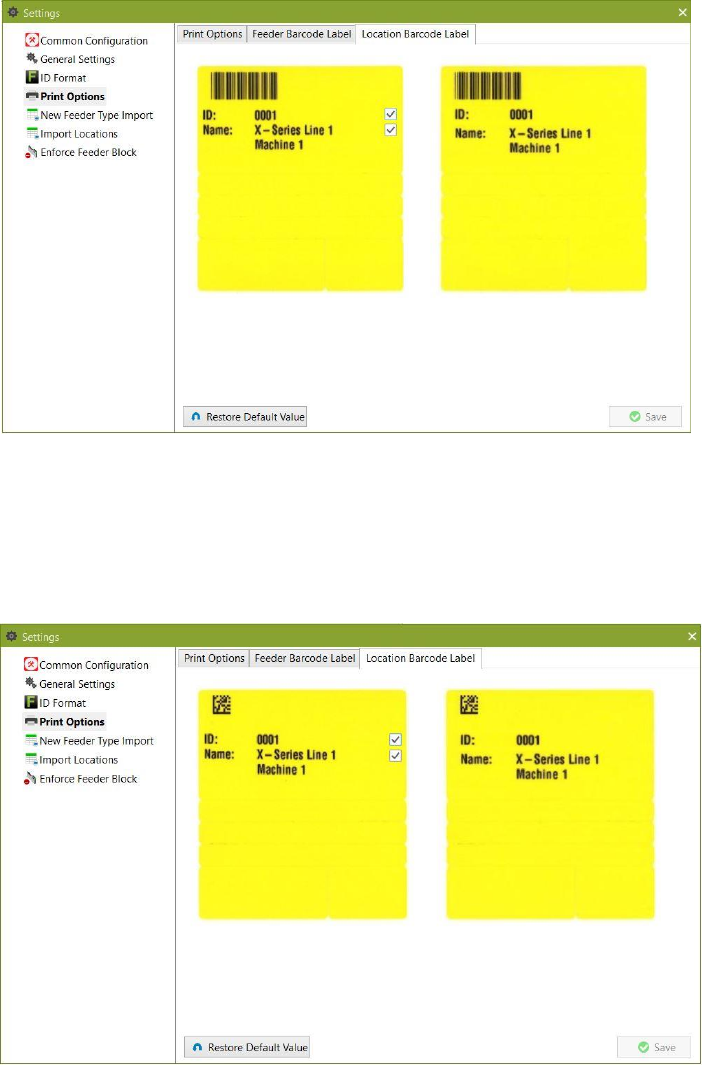
1D location barcode labels:
Figure 9-28: Location Barcode Label Printing Format for 1D barcode labels
Tick the checkboxes for the information that shall appear on the barcode label.
To the right a preview of the selected printing format is shown.
2D location barcode labels:
Figure 9-29: Location Barcode Label Printing Format for 2D barcode labels
Tick the checkboxes for the information that shall appear on the barcode label.
To the right a preview of the selected printing format is shown.