00198178-04_GS_FeederManager_3.3_R18-1_EN.pdf - 第68页
SIPLACE Feeder Ma nager 3.3 (R18 -1) / Getting S tarted 08/2018 Edition 68 Maintenan ce due date to Allows the user to searc h for feeders based on the maintena nce due date to g enerate the report. All feeders that ar e…
SIPLACE Feeder Manager 3.3 (R18-1) / Getting Started 08/2018 Edition
67
8 Report centric functions
8.1 Feeder Summary Report view
Click on Report – Feeder Summary Report in the menu bar to open the view.
The Feeder Summary Report view is displayed.
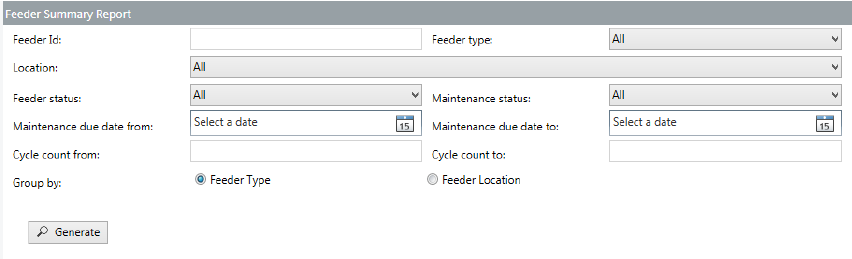
Figure 8-1: Feeder Summary Report view
Enter the details and/or set the filters to generate the desired feeder summary report.
8.1.1 Description of the fields
Feeder Id
Allows the user to search for feeders based on the feeder ID to generate the report.
Feeder type
Allows the user to search for feeders based on the feeder type to generate the report.
Location
Allows the user to search for feeders based on the location to generate the report.
Feeder status
Allows the user to search for feeders based on the feeder status to generate the report.
Maintenance status
Allows the user to search for feeders based on the maintenance status to generate the report.
Maintenance due date from
Allows the user to search for feeders based on the maintenance due date to generate the
report. All feeders that are due for maintenance in the system on/after the selected date,
based on the maintenance plan, are included in the report.

SIPLACE Feeder Manager 3.3 (R18-1) / Getting Started 08/2018 Edition
68
Maintenance due date to
Allows the user to search for feeders based on the maintenance due date to generate the
report. All feeders that are due for maintenance in the system on/before the selected date,
based on the maintenance plan, are included in the report.
Cycle count from
Allows the user to search for feeders based on the cycle count to generate the report. All
feeders that have a cycle count value in the system = or > the selected number of cycles,
based on the maintenance plan, are included in the report.
Cycle count to
Allows the user to search for feeders based on the cycle count to generate the report. All
feeders that have a cycle count value in the system = or < the selected number of cycles,
based on the maintenance plan, are included in the report.
Group by
Two options are available for grouping the records in the report:
– Feeder Type
The records in the report are grouped based on their feeder type.
– Feeder Location
The records in the report are grouped based on their feeder location.
8.1.2 Description of the buttons
Generate
Click on this button to search for feeders matching the criteria and generate the report.
Reset
Click on this button to clear all fields and reset them to their respective default values.
Note:
Maintenance due date to must be >= Maintenance due date from and Today's date
Cycle count to must be >= Cycle count from
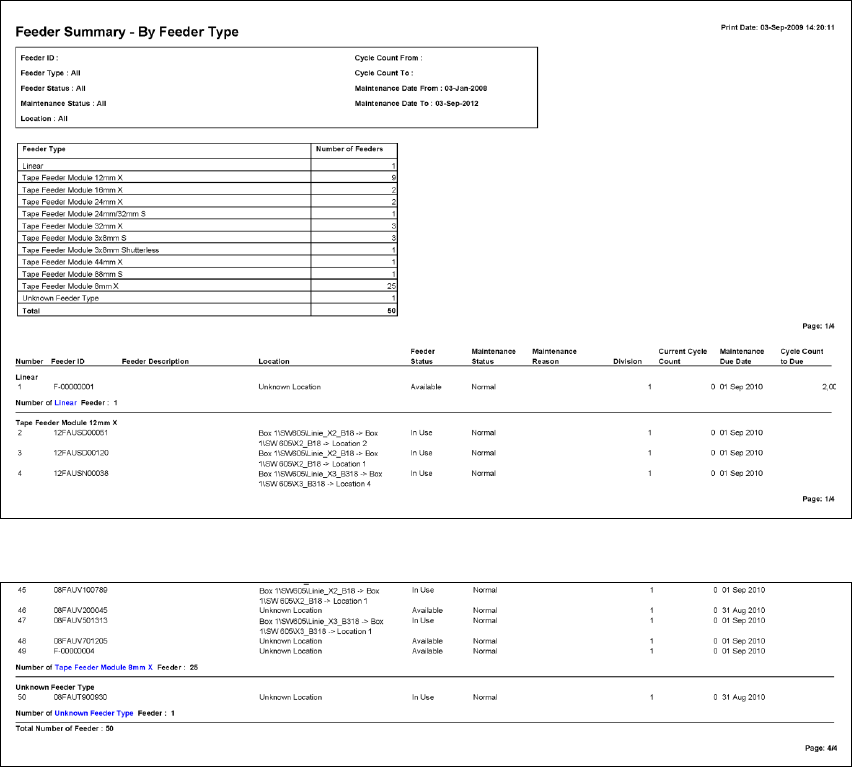
Example: Feeder Summary Report Grouped By Feeder Type
SIPLACE Feeder Manager 3.3 (R18-1) / Getting Started 08/2018 Edition
69
:
Figure 8-2: Feeder Summary Report Grouped By Feeder Type