00198178-04_GS_FeederManager_3.3_R18-1_EN.pdf - 第32页
SIPLACE Feeder Ma nager 3.3 (R18 -1) / Getting S tarted 08/2018 Edition 32 Division This is the target di vision of the feeder v erification/test. For singl e-d ivision feeders, this value is always 1. Test Result This i…
SIPLACE Feeder Manager 3.3 (R18-1) / Getting Started 08/2018 Edition
31
Next Due Cycle
The number of cycle counts to the next due value is displayed for the defective/serviced
feeder.
Next Overdue Cycle
The number of cycle counts to the next overdue value is displayed for the defective/serviced
feeder.
Maintenance Due Date
The maintenance due date is displayed for the defective/serviced feeder.
Maintenance Overdue Date
The maintenance overdue date is displayed for the defective/serviced feeder.
Result
This is the result of the feeder verification test. This field is only applicable for maintenance
category Verification.
When the record is selected, a detail pane for the record is shown below the Maintenance
History table. Based on the maintenance category, the detail pane will show following fields.
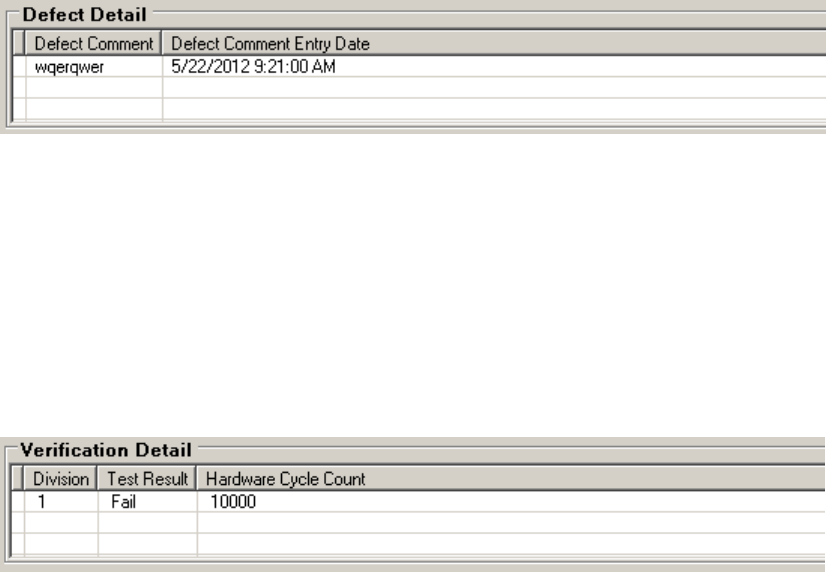
Figure 5-9 Feeder Maintenance History - Defect Detail
Defect Comment
This is the comment entered when the feeder defect is reported.
Defect Comment Entry Date
This is the Date/Time when the defect comment is entered.
Figure 5-10 Feeder Maintenance History - Verification Detail

SIPLACE Feeder Manager 3.3 (R18-1) / Getting Started 08/2018 Edition
32
Division
This is the target division of the feeder verification/test. For single-division feeders, this value
is always 1.
Test Result
This is the result of the feeder verification/test.
Hardware Cycle Count
This is the feeder cycle count that feeder verification and repair station reads from the feeder.
Figure 5-11 Feeder Maintenance History - Complete Maintenance Detail
Defect Category
This is the defect category that was selected on completing maintenance for the
defective/serviced feeder.
The following defect categories are provided for selection:
– Electrical error
– Foil disposal unit
– Foil rocker
– Mechanical error
– Normal maintenance
– Pick up window
– Tape drive unit
Serviced By
This is the name of the person that serviced the feeder.
Part Number
This is the part number of an exchanged spare part.
Feeder Service Comment
This is the feeder service comment that was entered when maintenance was marked as
complete for the defective/serviced feeder.
Service Comment Entry Date
This is the date and time when the service comment was entered for the defective/serviced
feeder.
SIPLACE Feeder Manager 3.3 (R18-1) / Getting Started 08/2018 Edition
33
Click on this button to export the complete maintenance history, including all the details, to an
excel file.
For all three categories (Defect, Verification and Complete Maintenance), the exported excel
will append the detail fields to each of the maintenance records and combine them into one
excel sheet. Fields without any data will be omitted.
Note:
Exported excel files require Microsoft Office Excel or Excel Viewer 2007 or higher to open.
5.2 Add New Feeders (Batch) view
Click on Feeder – Add New Feeders (Batch) or on New… – Add New Feeders (Batch)
in the menu bar to open the view.
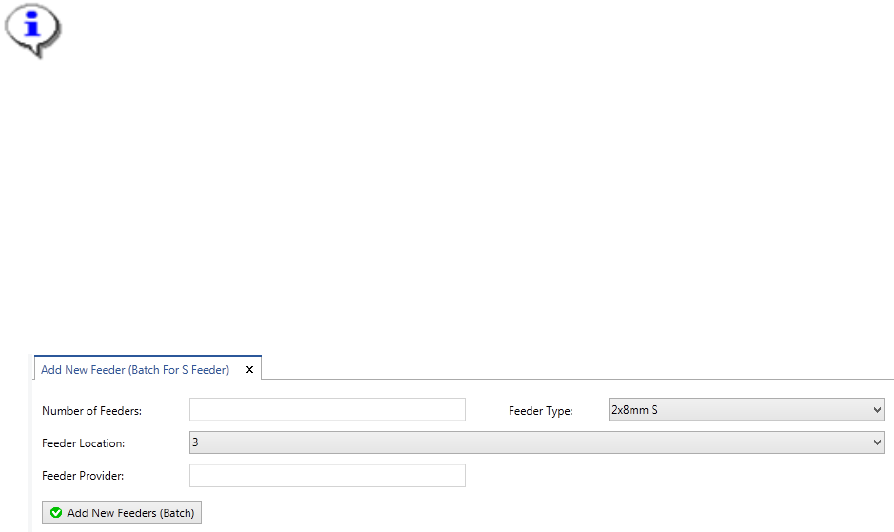
The Add New Feeders (Batch For S Feeder) view is displayed.
Figure 5-12: Add New Feeders (Batch For S Feeder) view
Enter the details for new feeder barcodes that shall be printed.