00198178-04_GS_FeederManager_3.3_R18-1_EN.pdf - 第90页
SIPLACE Feeder Ma nager 3.3 (R18 -1) / Getting S tarted 08/2018 Edition 90 9.2.2 Description of the buttons Restore Factory S ettings Click on this button to res tore the factor y settings. Save Settings Click on thi…
SIPLACE Feeder Manager 3.3 (R18-1) / Getting Started 08/2018 Edition
89
Feeder Maintenance Extension Times
Allows the user to set the maximum times a feeder’s due date or cycle count can be
extended. Minimum value is 1 while maximum is 3 times.
Enforced Feeder Block Options
Allows the user to enable / disable the enforced feeder blocking function.
If this option is enabled, when Setup Center or station software enquires about a certain
feeder’s status, Feeder Manager will return the status as either Normal, Defective, Due,
Overdue or Scrapped. If the feeder is not in Normal status, the online / offline verification will
fail.
If this option is disabled (unchecked), the feeder status will not affect the setup verification or
production.
The user can enable this option for either Online, Offline, or both.
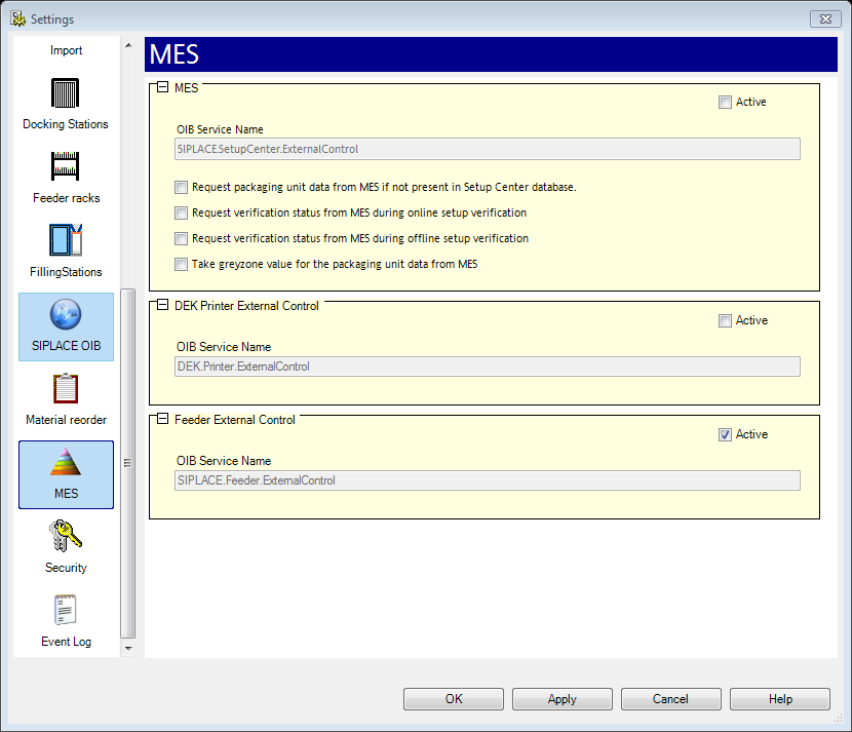
Please take note that for this function to work, the user must enable the “Feeder External
Control” option inside Setup Center’s Settings page. See below.
Figure 9-22 Setup Center's Feeder External Control settings
SIPLACE Feeder Manager 3.3 (R18-1) / Getting Started 08/2018 Edition
90
9.2.2 Description of the buttons
Restore Factory Settings
Click on this button to restore the factory settings.
Save Settings
Click on this button to save the modified settings.
9.3 ID Format
Click on Settings – ID Format to open the tab.
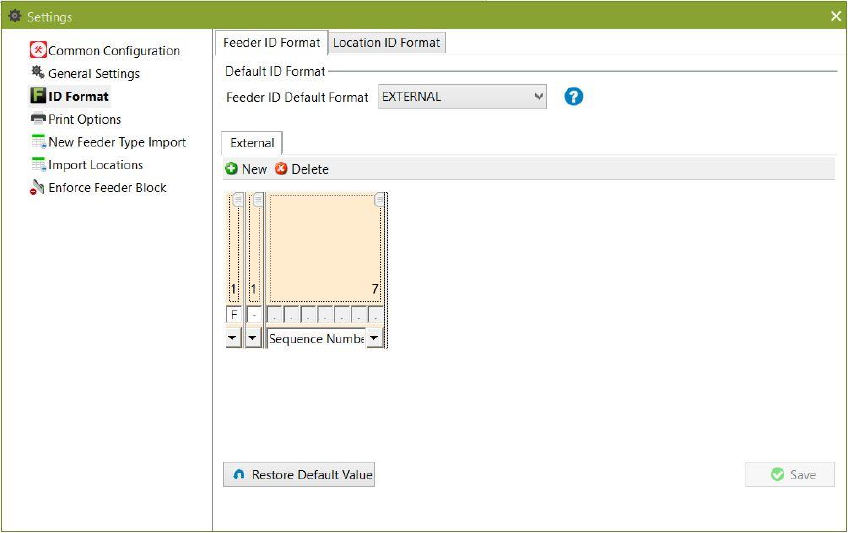
The ID Format setting is divided into Feeder ID format and Location ID format tabs. Feeder ID
Format is selected by default.
Figure 9-23 ID Format setting with Feeder ID Format selected
9.3.1 Feeder ID Format
This setting allows the user to select the default format for feeder IDs. Two types of feeder ID
formats are supported:
INTERNAL
o A unique feeder ID is generated automatically by the system (default value).
EXTERNAL
o A customer specific feeder ID must be entered.
Define the format for an internal feeder ID format and save it.
SIPLACE Feeder Manager 3.3 (R18-1) / Getting Started 08/2018 Edition
91
A unique feeder ID with the pre-defined format will be automatically generated for each new
feeder added.
Note: In the External tab any kind of external feeder ID format can be defined.
Define the format for an external feeder ID format and save it.
When a feeder with an external feeder ID is added, the feeder ID must match with the pre-
defined format. Otherwise the feeder will not be registered and a corresponding error
message is displayed.
9.3.1.1 Description of segments
Following segments are allowed for a Feeder ID.
Control Barcode
Allows the user to enter characters to identify the barcode type. This is a mandatory field.
Max. length = 6 characters.
Feeder Type
Allows the user to u select the abbreviation of the feeder type. When this segment is selected,
it will be automatically changed to 5 characters, as the feeder type is pre-defined with this
length in the database table.
Sequence Number
Allows the user to select a running number for the feeder ID. This is a mandatory field. The
length of the sequence number:
can only be extended once defined
must be greater than the length of the next sequence number to be generated
Ignore
Allows the user to enter any text. Max. length = 20 characters. The segment can be used to
define a separator.
9.3.1.2 Description of the buttons
New
Click on this button to add a segment to the feeder ID format.
Delete
Click on this button to delete a segment from the feeder ID format.