00198178-04_GS_FeederManager_3.3_R18-1_EN.pdf - 第50页
SIPLACE Feeder Ma nager 3.3 (R18 -1) / Getting S tarted 08/2018 Edition 50 6 Location centric functions Feeder Manager prov ides f ollowing location centric f unctions 1) Add New Location 2) Search Location 3) Print Offl…
SIPLACE Feeder Manager 3.3 (R18-1) / Getting Started 08/2018 Edition
49
5.5.6 Step 6 – Summary
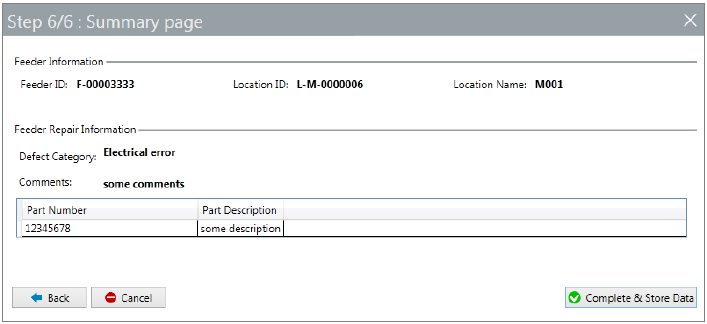
Figure 5-37 Feeder Maintenance Workflow Summary page
The 6
th
and last step gives you the summary of all the repair information entered for the
subject feeder.
Check the content to make sure they are correct. You can use the Back button to go to any
previous step for modifications.
Once satisfied, press the Complete & Store Data button to complete the maintenance
workflow for this feeder and store the relevant maintenance data into Feeder Manager
database.
SIPLACE Feeder Manager 3.3 (R18-1) / Getting Started 08/2018 Edition
50
6 Location centric functions
Feeder Manager provides following location centric functions
1) Add New Location
2) Search Location
3) Print Offline Area Setup
4) Import Location
See also chapter 13 Feeder location tracking for more details.
6.1 Add New Location view
New locations can be added from main menu either via
1) Location Add New Location, or
2) Add Add New Location.
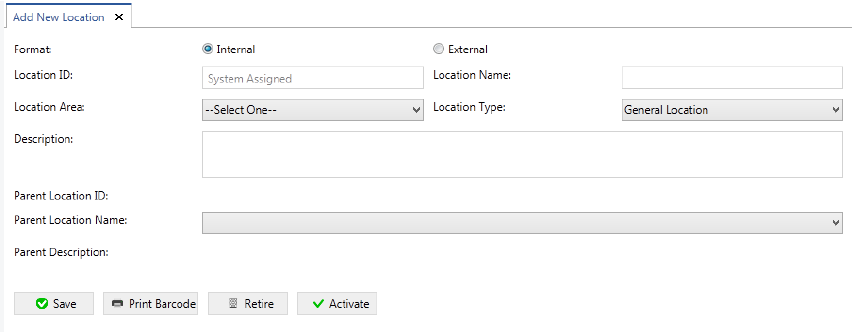
The Add New Location view is displayed.
Figure 6-1: Add New Location
Enter the details to add a new location to the system.
6.1.1 Description of the fields
Format
The Feeder Manager supports two types of location ID formats that are selected in the Feeder
ID Format view.
Internal
A unique location ID is generated automatically by the system.
External
A customer specific location ID must be entered.

SIPLACE Feeder Manager 3.3 (R18-1) / Getting Started 08/2018 Edition
51
Location ID
If Internal is selected, the value System Assigned is set. If External is selected, this is a
mandatory field, in which a location ID can be entered in any form.
Location name
Allows the user to enter the location name. This is a mandatory field.
Location area
Allows the user to select a location area from the drop-down list. This is a mandatory field.
The following location areas are available:
– Maintenance Area
– Offline Area
– Outside Factory
– Production Area
– Storage Area
Location type
Allows the user to select a location type from the drop-down list. This is a mandatory field.
The following location types are available:
– General Location
– Changeover Table
Note:
Starting from Feeder Manager 2.2 SP1, following location types shall only be imported
from Siplace Pro. Manual creation of these location types are not allowed.
– Docking Station
– Production Line
– Production Line Station
– Production Line Station Location
Description
Allows the user to enter a description for the location.
Parent location ID
The location ID of the parent location is displayed (if any).
Parent name
Allows the user to select the parent location, if the location shall be created as a sub-location
of another location.
Parent description
A description for the parent location is displayed (if any).