00198178-04_GS_FeederManager_3.3_R18-1_EN.pdf - 第59页
SIPLACE Feeder Ma nager 3.3 (R18 -1) / Getting S tarted 08/2018 Edition 59 Division count Allows the user to e nter the num ber of divisions o n whic h the components are trans ported. Track count Allows the user to e nt…
SIPLACE Feeder Manager 3.3 (R18-1) / Getting Started 08/2018 Edition
58
7 Feeder Type centric functions
Feeder Manager provides following feeder type centric functions
1) Add New Feeder Type
2) Search Feeder Type
3) New Feeder Type Import
7.1 Add New Feeder Type view
Add New Feeder Type is accessed from the main menu via either
1) Add Add New Feeder Type, or
2) Feeder Type Add New Feeder Type
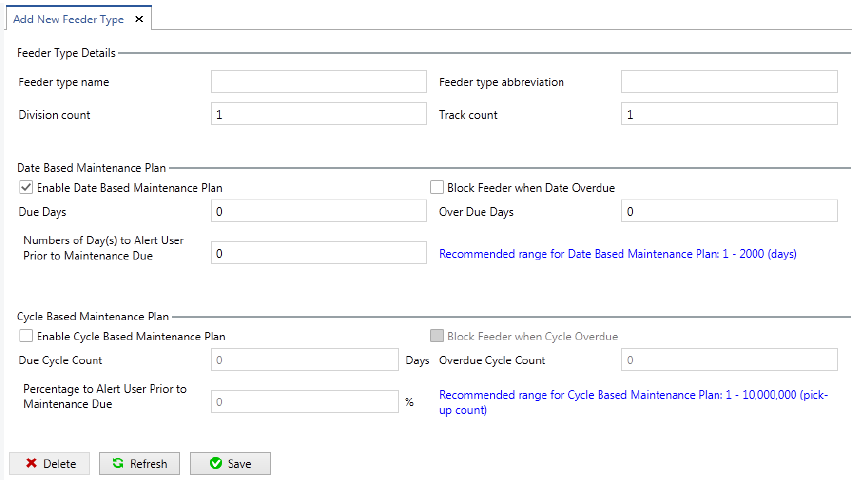
The Add New Feeder Type view is displayed.
Figure 7-1: Feeder Type Details – New dialog box
Enter the details to add a new feeder type to the system.
7.1.1 Description of the fields
Feeder type name
Allows the user to enter the feeder type name.
Feeder type abbreviation
Allows the user to enter the abbreviated name for the feeder type. The abbreviated name
must have 5 characters.

SIPLACE Feeder Manager 3.3 (R18-1) / Getting Started 08/2018 Edition
59
Division count
Allows the user to enter the number of divisions on which the components are transported.
Track count
Allows the user to enter the number of tracks that are occupied on the table (depends on the
feeder width).
Date Based Maintenance Plan
Indicate whether you want to enable Date Based Maintenance plan for the new feeder type,
and if yes, enter the due and overdue days, as well as how many days you want to alert the
user before the due date.
Cycle Based Maintenance Plan
Indicate whether you want to enable Cycle Based Maintenance plan for the new feeder type,
and if yes, enter the due and overdue cycle counts, as well as how many days you want to
alert the user before the due cycle count is reached.
7.1.2 Description of the buttons
Save
Click on this button to save the feeder type details.
Delete
Click on this button to delete a feeder type from the system.
Note:
A feeder type can only be deleted if no feeder IDs are assigned to it. Otherwise this
button is disabled.
A system-defined feeder type cannot be deleted.
Refresh
Click on this button to refresh the display.
SIPLACE Feeder Manager 3.3 (R18-1) / Getting Started 08/2018 Edition
60
7.2 Search Feeder Type view
Search Feeder Type is accessed from the main menu via either
3) Search Search Feeder Type, or
4) Feeder Type Search New Feeder Type
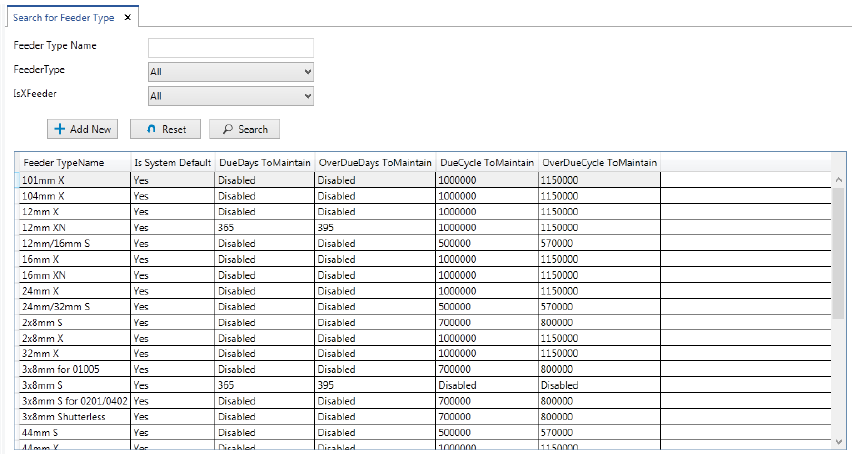
The Search For Feeder Type view displayed as following.
Figure 7-2: Search Feeder Type view
By default all the available feeder types are listed out in the table below the search criteria
area to search a convenient list.
Enter the details to search for a particular feeder type.
7.2.1 Description of the fields
Feeder type name
Allows the user to enter a feeder type name to search for.
Feeder type
Allows the user to select a specific feeder type or all feeder types to search for from the drop-
down list.
Is X feeder
Allows the user to search for all feeder types belonging to the X-feeder family (or not) from the
drop-down list. The following options are available:
– All (X- and non-X-feeders)
– No (non-X-feeders)
– Yes (X-feeders)