00198178-04_GS_FeederManager_3.3_R18-1_EN.pdf - 第89页
SIPLACE Feeder Ma nager 3.3 (R18 -1) / Getting S tarted 08/2018 Edition 89 Feeder Maintenance Extension T imes Allows the user to set t he m aximum times a feeder’s due date or cycle count can be extended. Minim um value…
SIPLACE Feeder Manager 3.3 (R18-1) / Getting Started 08/2018 Edition
88
9.2 General Settings
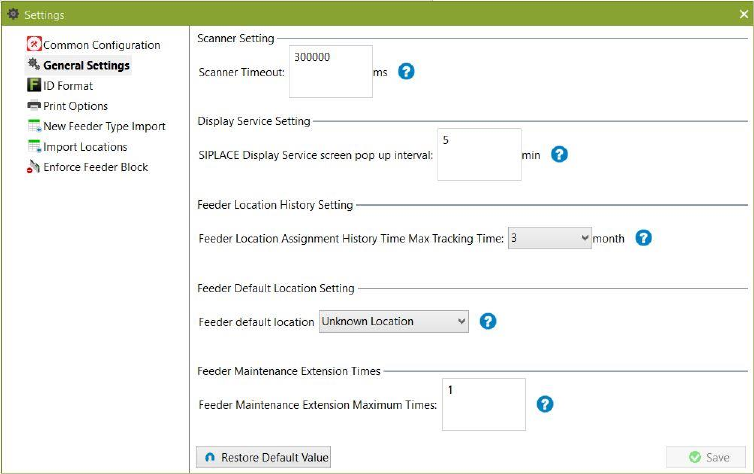
Click on Settings – General Settings tab to open the view.
Figure 9-21: General Settings tab
9.2.1 Description of the fields
Scanner Timeout
Allows the user to modify the timeout in milliseconds (ms) for the scanner. If no input is
captured in the timeout period, the screen is reset. Default value is 300000 ms (5 minutes).
Display Service screen pop up interval
Allows the user to modify the time interval in minutes (min) for the SIPLACE Display Service
window to reappear on the station computer screen after last dismissal by the operator.
Feeder Location History Setting
Allows the user to set the maximum time for the feeder location assignment history to be
maintained by Feeder Manager. Assignment history records which are older than the time set
here will be deleted automatically. Default value is 3 months.
Feeder Default Location Setting
Allows the user to set the default location when adding new S feeders manually. Default value
is “Unknown location”.
SIPLACE Feeder Manager 3.3 (R18-1) / Getting Started 08/2018 Edition
89
Feeder Maintenance Extension Times
Allows the user to set the maximum times a feeder’s due date or cycle count can be
extended. Minimum value is 1 while maximum is 3 times.
Enforced Feeder Block Options
Allows the user to enable / disable the enforced feeder blocking function.
If this option is enabled, when Setup Center or station software enquires about a certain
feeder’s status, Feeder Manager will return the status as either Normal, Defective, Due,
Overdue or Scrapped. If the feeder is not in Normal status, the online / offline verification will
fail.
If this option is disabled (unchecked), the feeder status will not affect the setup verification or
production.
The user can enable this option for either Online, Offline, or both.
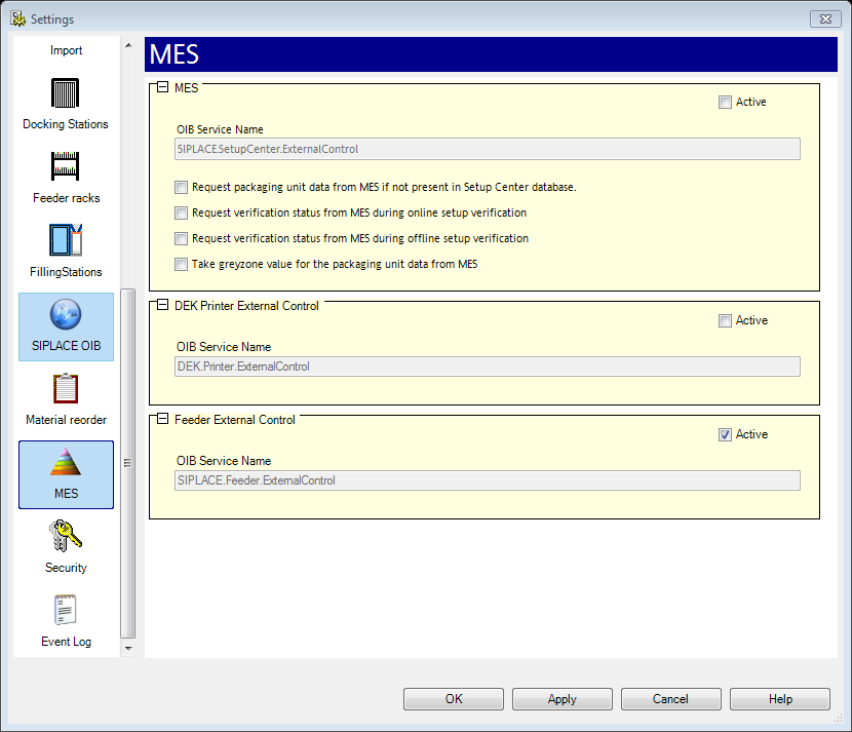
Please take note that for this function to work, the user must enable the “Feeder External
Control” option inside Setup Center’s Settings page. See below.
Figure 9-22 Setup Center's Feeder External Control settings
SIPLACE Feeder Manager 3.3 (R18-1) / Getting Started 08/2018 Edition
90
9.2.2 Description of the buttons
Restore Factory Settings
Click on this button to restore the factory settings.
Save Settings
Click on this button to save the modified settings.
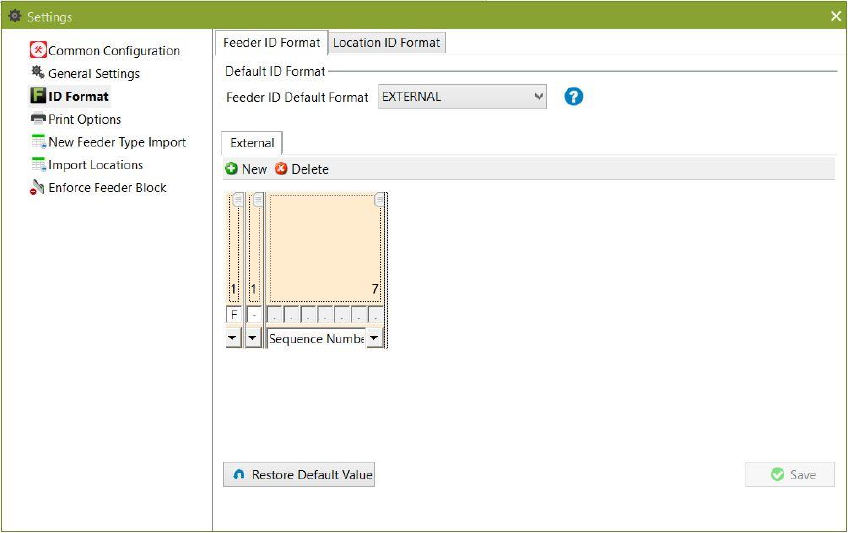
9.3 ID Format
Click on Settings – ID Format to open the tab.
The ID Format setting is divided into Feeder ID format and Location ID format tabs. Feeder ID
Format is selected by default.
Figure 9-23 ID Format setting with Feeder ID Format selected
9.3.1 Feeder ID Format
This setting allows the user to select the default format for feeder IDs. Two types of feeder ID
formats are supported:
INTERNAL
o A unique feeder ID is generated automatically by the system (default value).
EXTERNAL
o A customer specific feeder ID must be entered.
Define the format for an internal feeder ID format and save it.