00198178-04_GS_FeederManager_3.3_R18-1_EN.pdf - 第27页
SIPLACE Feeder Ma nager 3.3 (R18 -1) / Getting S tarted 08/2018 Edition 27 Days to next due The num ber of days remaining until the aforem entioned Due date. Days to next ov erdue The num ber of days remaining until the …
SIPLACE Feeder Manager 3.3 (R18-1) / Getting Started 08/2018 Edition
26
Note: starting from Feeder Manager 3.0, the maintenance plans of all the feeders are
managed under the feeder types they belong to. In other words, feeder maintenance plan can
only be modified based on feeder types.
Modification of maintenance plan by each individual feeder is no longer supported.
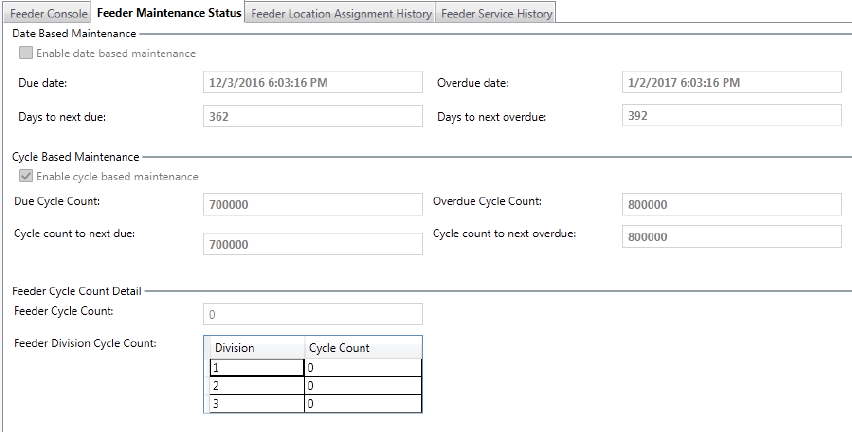
Figure 5-6: Feeder Maintenance Status tab
Note: in the Feeder Maintenance Status of feeder detail, following fields are visible for viewing
information only and cannot be edited. For maintenance plan editing, please see chapter 7,
Feeder Type centric functions, section 7.2.3, Editing the maintenance plan.
5.1.3.1 Date Based Maintenance:
The monitoring is based on the values specified in the Days to next due and Days to next
overdue fields, starting from the feeder's creation date or the last service date.
Enable date based maintenance
If this option shown to be checked, the feeder will be monitored under the date-based
maintenance plan.
Due date
The date this feeder shall become due for servicing, which is based on the maintenance plan
of the particular type this feeder belongs to.
Overdue date
The date this feeder shall become overdue for servicing, which is based on the maintenance
plan of the particular type this feeder belongs to.

SIPLACE Feeder Manager 3.3 (R18-1) / Getting Started 08/2018 Edition
27
Days to next due
The number of days remaining until the aforementioned Due date.
Days to next overdue
The number of days remaining until the aforementioned Overdue date.
5.1.3.2 Cycle Based Maintenance
The Feeder Manager keeps track of the number of pick-ups for each feeder, which is
calculated based on the production data obtained from OIS database and the monitoring is
based on the values specified in the Cycle count to next due and Cycle count to next
overdue fields.
Note: this function relies on the Feeder Manager being able to access OIS database
successfully.
Enable cycle based maintenance
If this option is shown to be checked, the feeder will be monitored under the Cycle Base
maintenance plan.
Due cycle count
The overall pickup cycles which this feeder can endure until it becomes due for servicing. The
value is based on the maintenance plan of the particular type this feeder belongs to.
Overdue cycle count
The overall pickup cycles which this feeder can endure until it becomes overdue for servicing.
The value is based on the maintenance plan of the particular type this feeder belongs to.
Cycle count to next due
The actual remaining cycle counts of this feeder until it becomes due for maintenance.
Cycle count to next overdue
The actual remaining cycle counts of this feeder until it becomes overdue for maintenance.
Note:
It is possible that both date-based and cycle-based maintenance plan are enabled
for one feeder (type).

SIPLACE Feeder Manager 3.3 (R18-1) / Getting Started 08/2018 Edition
28
5.1.3.3 Feeder Cycle Count Detail
This section shows the detail of the feeder’s current cycle count
Feeder Cycle Count
The current cycle count of the feeder. The feeder is due or overdue to maintenance, as soon
as the cycle count of a track has reached the corresponding threshold.
Note: if there are more than 1 division, this value is the highest value of the cycle counts of all
the divisions. See below.
Feeder Division Cycle Count:
Detail cycle count data for each available division of the feeder is shown in the table format.
5.1.4 Feeder Location Assignment History tab
In the Feeder Location Assignment tab, the location assignment history associated to the
feeder is displayed. The history is updated every time the feeder is assigned to a new
location.
Note:
Feeder Location Assignment history records will be automatically deleted once it
becomes older than the retaining period. The default retaining period for each record is
3 months. The user can modify the retaining period within a 1 to 12 month range. See
section 9.1.5, Description of the buttons
Save
Click on this button to save the changed configuration.
Restore to default
Click on this button to restore all the configurations to default value.
General Settings for details.