00196625-03_AI_SX12_PCB_Barcode_de_en.pdf - 第123页
Setting up and Commissioning Installing the 1D PCB Barcode Scanner Installing the PCB Barcode Scanner PCB Barcode LP-Barcode 123 3.2.2 Installing the 1D PCB Barcode Scanner 3.2.2.1 Fixing the 1D PCB Barcode Scanner to th…
Setting up and Commissioning
Installing the PCB Barcode Scanner Installation Position in the Holder
122 PCB Barcode LP-Barcode
3.2.1 Installation Position in the Holder
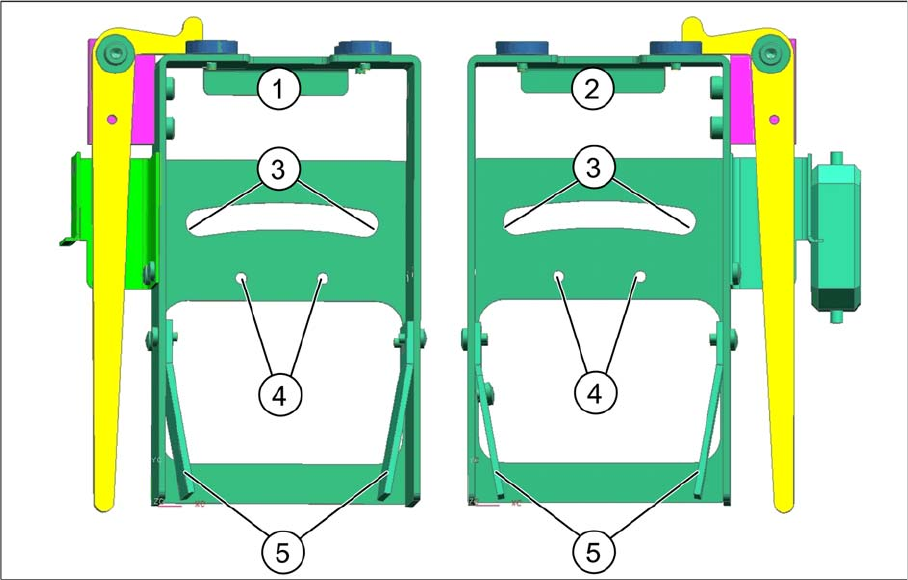
The various installation positions for 1D and 2D PCB barcode scanners are realized in the holder, as
shown in the diagram.
Legend
1 Holder for BC scanner, mirrored
[03078730-xx]
2 Holder for BC scanner [03077716-xx]
3 Arched aperture with mounting position for fix-
ing bracket and clamping piece, BC scanner
right / left
4 Mounting position for BC scanner, cross an-
gles (1D only)
5 Park positions for unused BC holding brackets
Setting up and Commissioning
Installing the 1D PCB Barcode Scanner Installing the PCB Barcode Scanner
PCB Barcode LP-Barcode 123
3.2.2 Installing the 1D PCB Barcode Scanner
3.2.2.1 Fixing the 1D PCB Barcode Scanner to the Bracket
The following holding rackets are supplied:
▪ 1D BC holding bracket right and left [03084154-xx]
▪ 2D BC holding bracket left [03083915-xx]
▪ 2D BC holding bracket right [03084153-xx]
The 1D PCB barcode scanner is already preinstalled on its cover angle. For the 1D PCB barcode scan-
ner, use the 1D BC bracket, right and left [03084154-xx].
Unused holding brackets are fixed into the holder to ensure that are not lost (see position 5 in "3.2.1 In-
stallation Position in the Holder" [ ➙ 122]).
Fixing barcode scanner to bracket
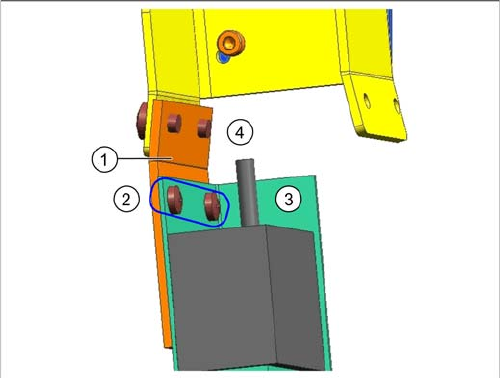
Legend
1. 1D BC holding bracket right and left [03084154-xx]
2. Screws DIN 7985-M3 x 3-A2-Z [00368583-xx]
3. Barcode scanner with cover angle
4. Drilled holes for fixture to fixing bracket or holder
► Fix the barcode scanner with its cover angle (3) to the
bracket (1) with the help of the two screws (2).
The installation position on the bracket is the same for all
barcode scanner fitting options.
When installing the barcode scanner parallel to the direc-
tion of travel, the holding bracket must be screwed to the
fixing bracket in the position shown at (4) (see "3.2.2.3.1
Parallel to the Direction of Travel, Left" [ ➙ 125] and
"3.2.2.3.2 Parallel to the Direction of Travel, Right" [ ➙
128]).
When installing the barcode scanner at cross angles to
the direction of travel, the holding bracket is screwed di-
rectly to the holder in the position shown at (4) (see
"3.2.2.2 Installing the 1D PCB Barcode Scanner at Cross
Angles to the Direction of Travel" [ ➙ 124]).
Setting up and Commissioning
Installing the PCB Barcode Scanner Installing the 1D PCB Barcode Scanner
124 PCB Barcode LP-Barcode
3.2.2.2 Installing the 1D PCB Barcode Scanner at Cross Angles to the Direction of Travel
Installing the barcode scanner at cross angles to the direction of travel
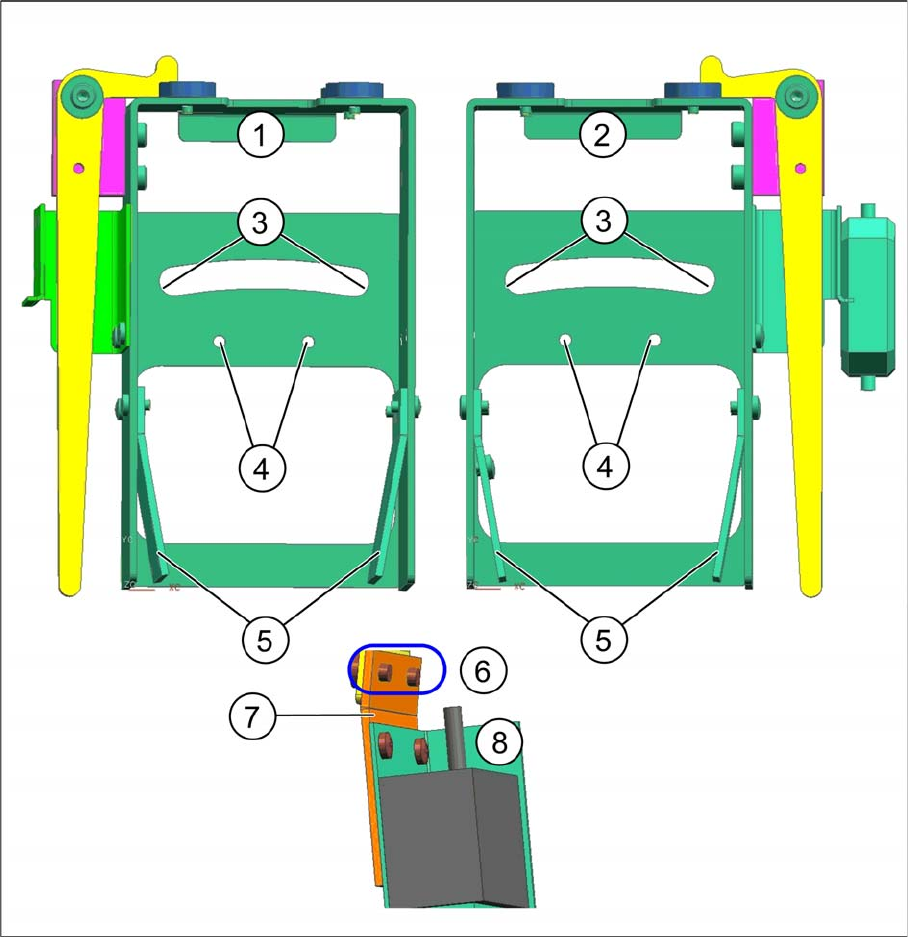
Legend
► Insert the holding bracket with the barcode scanner into the holder, so that the bracket can be fixed
to the positions at (4) with the two screws 00323152-DIN 7985-M3 x 6-A4.
1 Holder for BC scanner, mirrored [03078730-
xx]
2 Holder for BC scanner [03083937-xx]
3 Arched aperture with mounting position for fix-
ing bracket and clamping piece, BC scanner
right / left
4 Mounting position for BC scanner, cross an-
gles
5 Park positions for unused BC holding brackets 6 2 screws
(00323152-DIN 7985-M3 x 6-A4-Z)
7 1D BC-holding bracket right and left
[03084154-xx]
8 1D BC scanner with cover angle