00196625-03_AI_SX12_PCB_Barcode_de_en.pdf - 第126页
Setting up and Commissioning Installing the PCB Barcode Scanner Installing the 1D PCB Barcode Scanner 126 PCB Barcode LP-Barcode Fitting the fixing bracket into the holder Installation position in the holder Legend ► Pos…
Setting up and Commissioning
Installing the 1D PCB Barcode Scanner Installing the PCB Barcode Scanner
PCB Barcode LP-Barcode 125
► Screw the holding bracket tight from below.
The holding bracket creates an angle of approx. 10°.
► To ensure that the fixing bracket and camping piece are at hand when needed for future conversion,
fix both to a suitable position along the arched aperture (3). Position the fixing bracket from above
into the holder and the arched clamping piece from below, against the holder. Now screw both parts
together.
► Fasten unused BC holding brackets to the positions shown at (5).
See also
3.2.2.3.1 Parallel to the Direction of Travel, Left [ ➙ 125]
3.2.2.3 Installing the 1D PCB Barcode Scanner Parallel to the Direction of Travel
Parallel to the Direction of Travel, Left
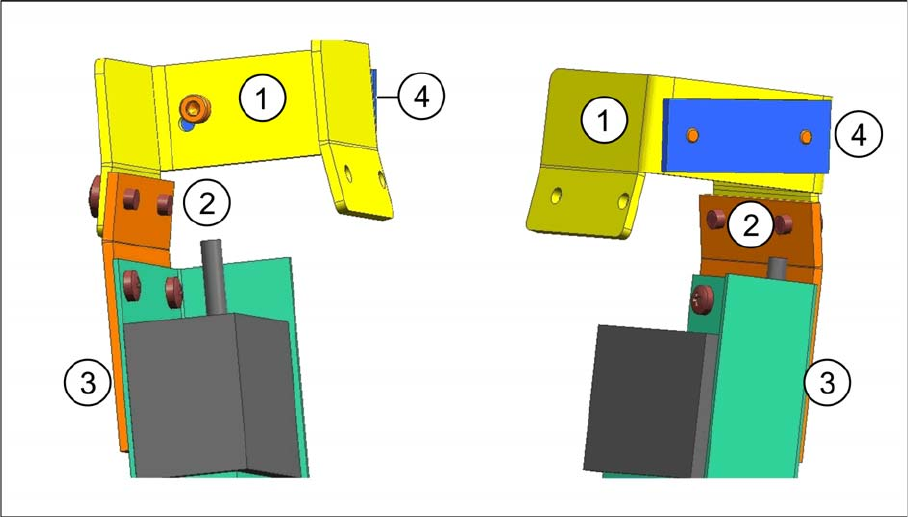
Fitting the barcode scanner on the left, into the fixing bracket
Fitting the barcode scanner on the left, into the fixing bracket - two views
Legend
► Fasten the holding bracket with the barcode scanner (3) to the left side of the fixing bracket (1). Insert
the screws (2) from the outside to do this.
1 Fixing bracket [03084155-xx] 2 Two screws [03007733-xx]
3 Holding bracket with barcode scanner 4 Clamping piece [03071701-xx]
Setting up and Commissioning
Installing the PCB Barcode Scanner Installing the 1D PCB Barcode Scanner
126 PCB Barcode LP-Barcode
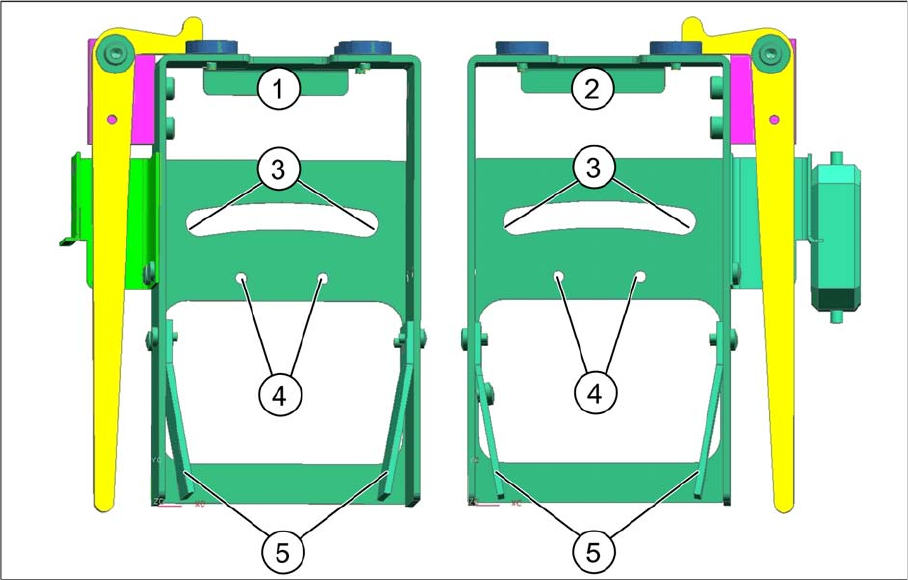
Fitting the fixing bracket into the holder
Installation position in the holder
Legend
► Position the fixing bracket from above onto the arched aperture (3) and the arched clamping piece
from below, against the aperture and then screw both together from above.
By moving the fixing bracket along the arched aperture, you can adjust the angle from approx. 5° to
15°. Fixing the bracket in the center of the aperture (3) achieves approx. 10°.
► Fasten unused BC holding brackets to the positions shown at (5).
1 Holder for BC scanner, mirrored [03078730-
xx]
2 Holder for BC scanner [03083937-xx]
3 Arched aperture with mounting position for fix-
ing bracket and clamping piece, BC scanner
right / left
4 Mounting position for BC scanner, cross an-
gles
5 Park positions for unused BC holding brackets
Setting up and Commissioning
Installing the 1D PCB Barcode Scanner Installing the PCB Barcode Scanner
PCB Barcode LP-Barcode 127
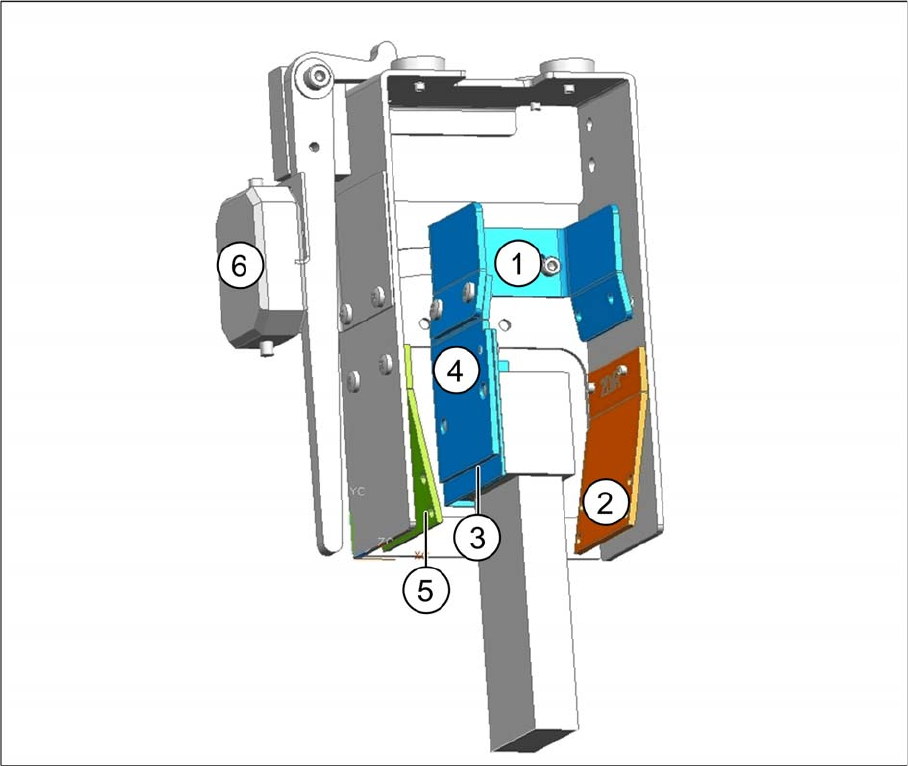
1D barcode scanner parallel to the direction of travel, installation on left
Legend
► Wind up the cable and fix it into place (see "3.2.3.4 Winding and Fixing the Cable" [ ➙ 138]).
1 Fixing bracket 2 2D BC holding bracket right
3 Barcode scanner with cover angle 4 1D BC holding bracket right and left
5 2D BC holding bracket left 6 Position for connector