00196625-03_AI_SX12_PCB_Barcode_de_en.pdf - 第141页
Setting up and Commissioning Running the Cables Installing the PCB Barcode Scanner PCB Barcode LP-Barcode 141 Holder on Conveyor Lane 1 Top - Running Cables Holder on Conveyor Lane 1 Bottom - Running Cables ► Run the cab…
Setting up and Commissioning
Installing the PCB Barcode Scanner Running the Cables
140 PCB Barcode LP-Barcode
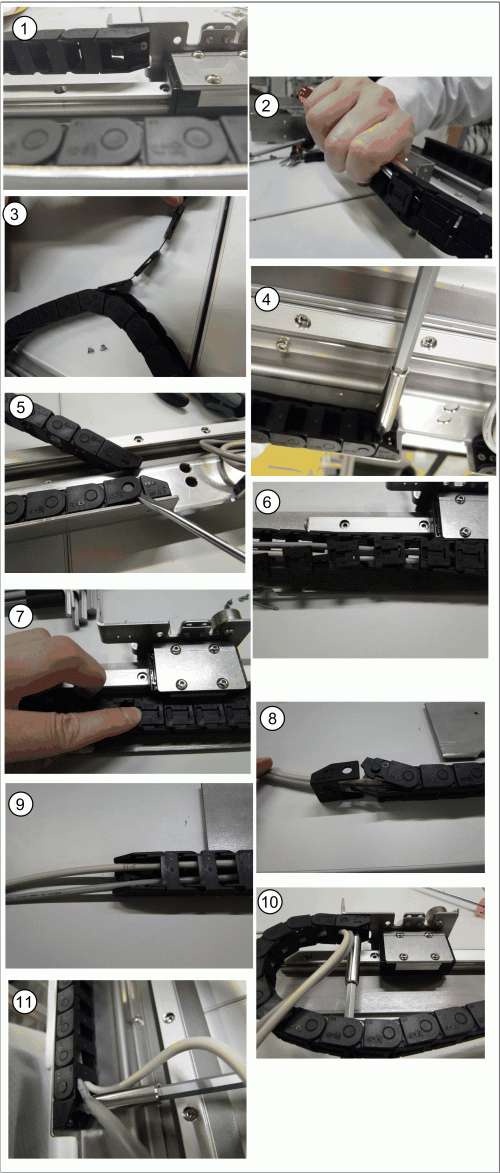
Inserting the Cables into the Trailing Cable - Example
See also
3.2.4 Running the Cables [ ➙ 138]
Inserting the cables into the trailing cable - scanner on
conveyor lane 2, bottom
► Release the trailing cable from the PCB barcode re-
ceptacle (1).
► Loosen the fixture clips on the trailing cable by taking
a screwdriver to the first chain link and carefully eas-
ing out (levering) the clip (2).
► Now pull the other clips off the chain links (3).
► Take the trailing cable off the holder for the PCB bar-
code assembly plate (4).
► Lever the end piece of the trailing cable off by gently
pushing it apart (5).
► Place the cable into the trailing cable (6).
► Gently press the clips back onto the trailing cable so
that these engage audibly. Pay attention to the orien-
tation of the trailing cable (7).
► Push apart the end piece of the trailing cable to rein-
sert it (8 and 9).
► Fix the end of the chain back onto the PCB barcode
receptacle (10).
► Fix the trailing cable back onto the PCB assembly
plate holder (11).
Setting up and Commissioning
Running the Cables Installing the PCB Barcode Scanner
PCB Barcode LP-Barcode 141
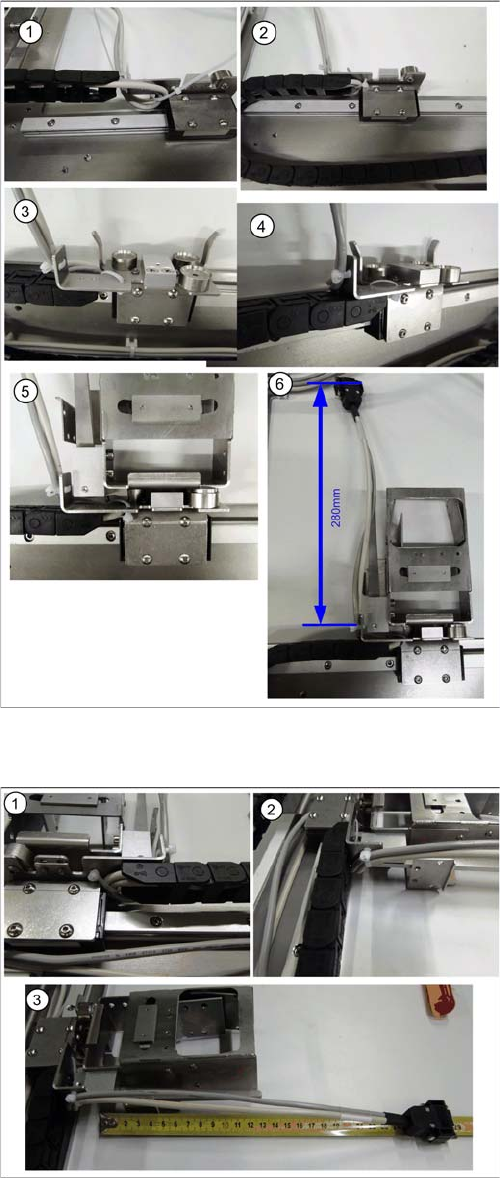
Holder on Conveyor Lane 1 Top - Running Cables
Holder on Conveyor Lane 1 Bottom - Running Cables
► Run the cable to the receptacle for the holder as
shown in diagrams (1 to 6).
► Run the cable between the receptacle for the holder
and the guide rails and fix it into place.
► Fix the cable into place with the two cable ties and the
receptacle for the holder, so that the holder is posi-
tioned level on the magnets, when inserted.
► Cut any excess cable tie. The cables or cable ties
must never protrude beyond the receptacle, other-
wise the mounting frame will not fit when pushed into
the machine installation point (backpack).
► Run the cable to the receptacle for the holder as
shown in diagrams (1 to 3).
► Run the cable between the receptacle for the holder
and the guide rails and fix it into place.
► Fix the cable into place with the two cable ties and the
receptacle for the holder, so that the holder is posi-
tioned level on the magnets, when inserted.
► Cut any excess cable tie. The cables or cable ties
must never protrude beyond the receptacle, other-
wise the mounting frame will not fit when pushed into
the machine installation point (backpack).
Setting up and Commissioning
Installing the PCB Barcode Scanner Running the Cables
142 PCB Barcode LP-Barcode
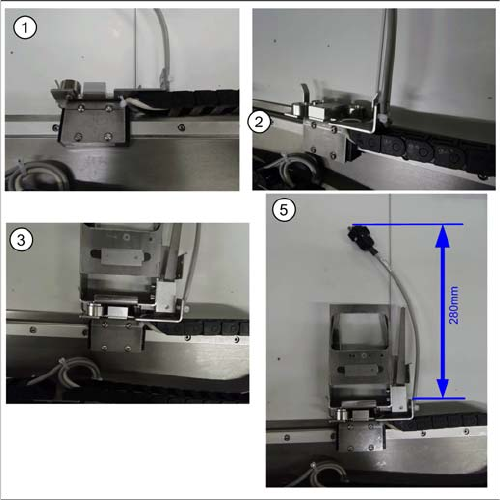
Holder on Conveyor Lane 2 Top - Running Cables
► Run the cable to the receptacle for the holder as
shown in diagrams (1 to 5).
► Run the cable between the receptacle for the holder
and the guide rails and fix it into place.
► Fix the cable into place with the two cable ties and the
receptacle for the holder, so that the holder is posi-
tioned level on the magnets, when inserted.
► Cut any excess cable tie. The cables or cable ties
must never protrude beyond the receptacle, other-
wise the mounting frame will not fit when pushed into
the machine installation point (backpack).