00196625-03_AI_SX12_PCB_Barcode_de_en.pdf - 第132页
Setting up and Commissioning Installing the PCB Barcode Scanner Installing the 2D PCB Barcode Scanner 132 PCB Barcode LP-Barcode 3.2.3.3 Installing the 2D PCB Barcode Scanner Parallel to the Di rection of Travel Parallel…
Setting up and Commissioning
Installing the 2D PCB Barcode Scanner Installing the PCB Barcode Scanner
PCB Barcode LP-Barcode 131
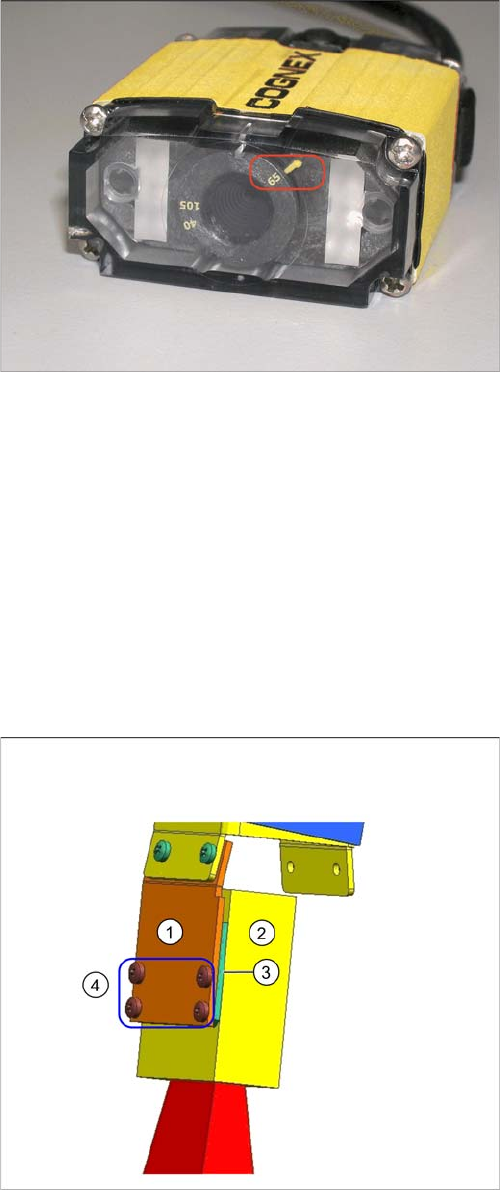
Checking the lens setting
3.2.3.2 Fixing the 2D PCB Barcode Scanner to the Holding Bracket
The following holding rackets are supplied:
▪ 1D BC holding bracket right and left [03084154-xx]
▪ 2D BC holding bracket left [03083915-xx]
▪ 2D BC holding bracket right [03084153-xx]
According to your required installation position, use either the 2D BC holding bracket left [03083915-xx]
or the 2D BC holding bracket right [03084153-xx].
Unused holding brackets are fixed into the holder to ensure that are not lost (see position 5 in "3.2.1 In-
stallation Position in the Holder" [ ➙ 122]).
Lens setting 65
► Check whether the distance setting of the lens is set
to 65.
Barcode scanner fixed to holding bracket - right shown as
example
Legend
1. 2D BC holding bracket right [0308953-xx]
2. 2D barcode scanner
3. Insulating plate
4. Fastening screws
► Place the insulating plate (3) between the 2D barcode
scanner (2) and the holding bracket (1).
► Screw the three parts into place with the four insulat-
ing screws (4) provided.
► The fixture on the holding bracket left is the same.
Setting up and Commissioning
Installing the PCB Barcode Scanner Installing the 2D PCB Barcode Scanner
132 PCB Barcode LP-Barcode
3.2.3.3 Installing the 2D PCB Barcode Scanner Parallel to the Direction of Travel
Parallel to the Direction of Travel, Left
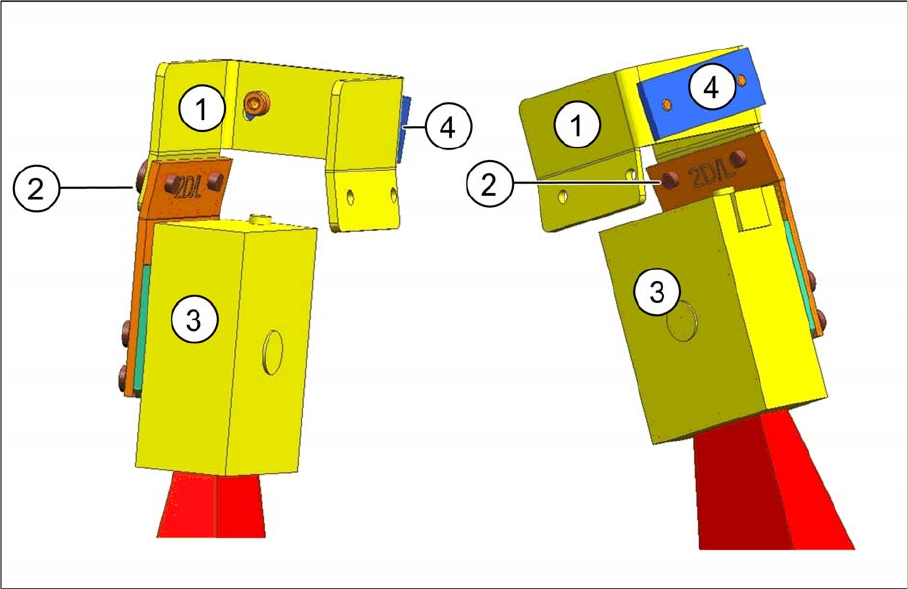
Fitting the barcode scanner on the left, into the fixing bracket
Fitting the barcode scanner on the left, into the fixing bracket - two views
Legend
► Fasten the holding bracket with the barcode scanner (3) to the left side of the fixing bracket (1). Insert
the screws (2) from the outside to do this.
1 Fixing bracket [03084155-xx] 2 Two screws [03007733-xx]
3 Holding bracket with barcode scanner 4 Clamping piece [03071701-xx]
Setting up and Commissioning
Installing the 2D PCB Barcode Scanner Installing the PCB Barcode Scanner
PCB Barcode LP-Barcode 133
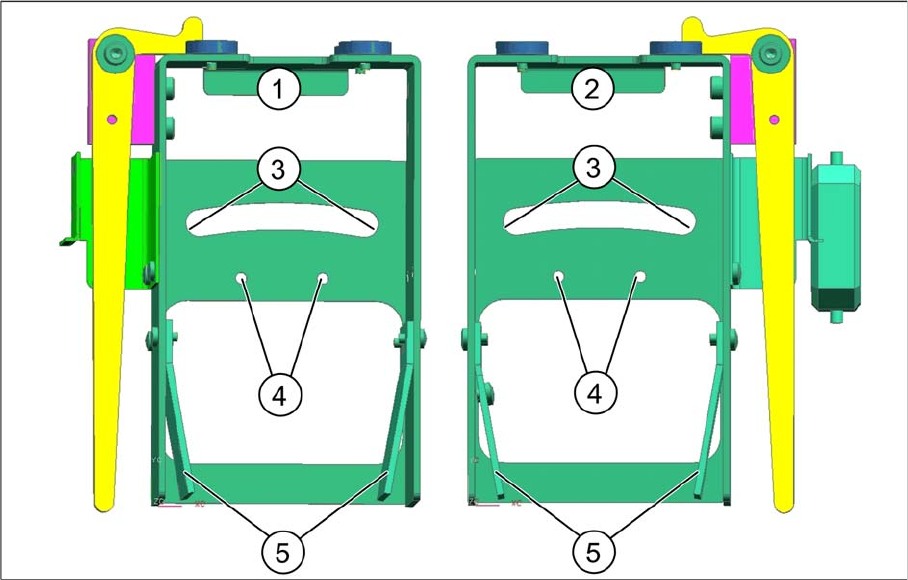
Fitting the fixing bracket into the holder
Installation position in the holder
Legend
► Position the fixing bracket from above onto the arched aperture (3) and the arched clamping piece
from below, against the aperture and then screw both together from above.
By moving the fixing bracket along the arched aperture, you can adjust the angle from approx. 5° to
15°. Fixing the bracket in the center of the aperture (3) achieves approx. 10°.
► Fasten unused BC holding brackets to the positions shown at (5).
1 Holder for BC scanner, mirrored [03078730-
xx]
2 Holder for BC scanner [03083937-xx]
3 Arched aperture with mounting position for fix-
ing bracket and clamping piece, BC scanner
right / left
4 Mounting position for BC scanner, cross an-
gles (1D only)
5 Park positions for unused BC holding brackets