00196625-03_AI_SX12_PCB_Barcode_de_en.pdf - 第142页
Setting up and Commissioning Installing the PCB Barcode Scanner Running the Cables 142 PCB Barcode LP-Barcode Holder on Conveyor Lane 2 Top - Running Cables ► Run the cable to t he recep tacle for the holder as shown in …
Setting up and Commissioning
Running the Cables Installing the PCB Barcode Scanner
PCB Barcode LP-Barcode 141
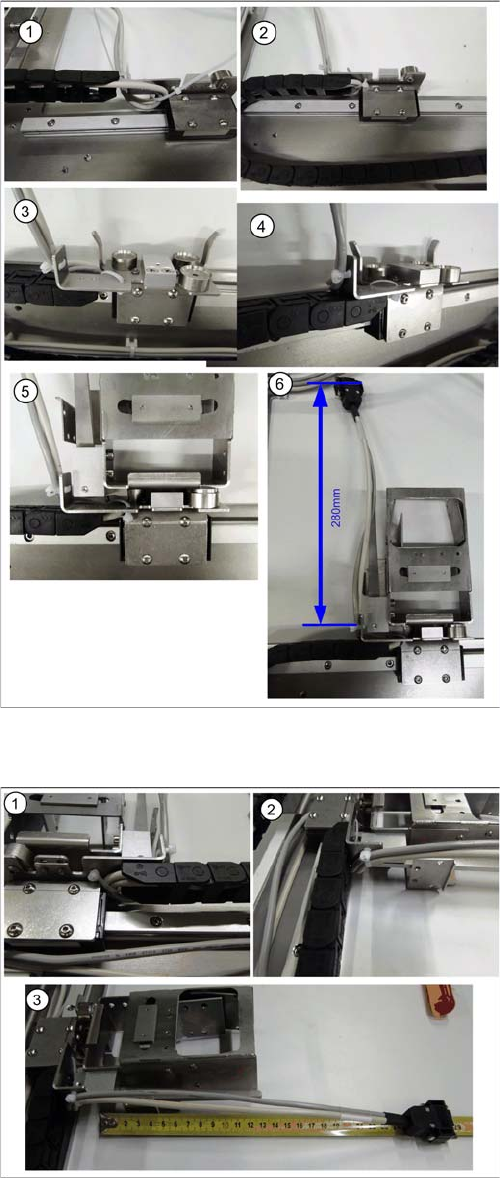
Holder on Conveyor Lane 1 Top - Running Cables
Holder on Conveyor Lane 1 Bottom - Running Cables
► Run the cable to the receptacle for the holder as
shown in diagrams (1 to 6).
► Run the cable between the receptacle for the holder
and the guide rails and fix it into place.
► Fix the cable into place with the two cable ties and the
receptacle for the holder, so that the holder is posi-
tioned level on the magnets, when inserted.
► Cut any excess cable tie. The cables or cable ties
must never protrude beyond the receptacle, other-
wise the mounting frame will not fit when pushed into
the machine installation point (backpack).
► Run the cable to the receptacle for the holder as
shown in diagrams (1 to 3).
► Run the cable between the receptacle for the holder
and the guide rails and fix it into place.
► Fix the cable into place with the two cable ties and the
receptacle for the holder, so that the holder is posi-
tioned level on the magnets, when inserted.
► Cut any excess cable tie. The cables or cable ties
must never protrude beyond the receptacle, other-
wise the mounting frame will not fit when pushed into
the machine installation point (backpack).
Setting up and Commissioning
Installing the PCB Barcode Scanner Running the Cables
142 PCB Barcode LP-Barcode
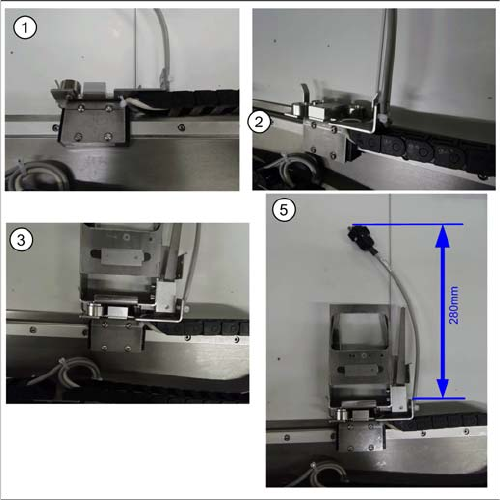
Holder on Conveyor Lane 2 Top - Running Cables
► Run the cable to the receptacle for the holder as
shown in diagrams (1 to 5).
► Run the cable between the receptacle for the holder
and the guide rails and fix it into place.
► Fix the cable into place with the two cable ties and the
receptacle for the holder, so that the holder is posi-
tioned level on the magnets, when inserted.
► Cut any excess cable tie. The cables or cable ties
must never protrude beyond the receptacle, other-
wise the mounting frame will not fit when pushed into
the machine installation point (backpack).
Setting up and Commissioning
Running the Cables Installing the PCB Barcode Scanner
PCB Barcode LP-Barcode 143
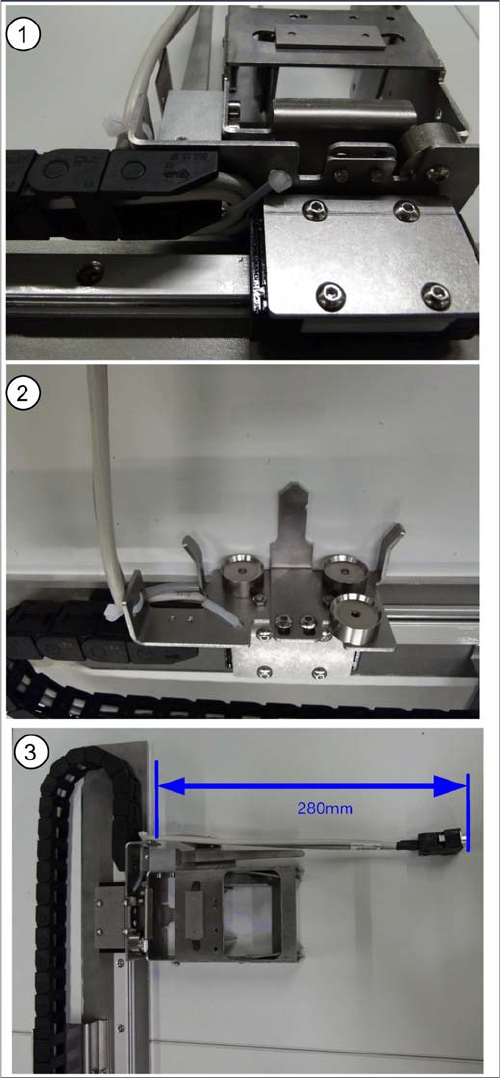
Holder on Conveyor Lane 2 Bottom - Running Cables
► Run the cable to the receptacle for the holder as
shown in diagrams (1 to 3).
► Run the cable between the receptacle for the holder
and the guide rails and fix it into place.
► Fix the cable into place with the two cable ties and the
receptacle for the holder, so that the holder is posi-
tioned level on the magnets, when inserted.
► Cut any excess cable tie. The cables or cable ties
must never protrude beyond the receptacle, other-
wise the mounting frame will not fit when pushed into
the machine installation point (backpack).