YSD_Users_E.pdf - 第114页
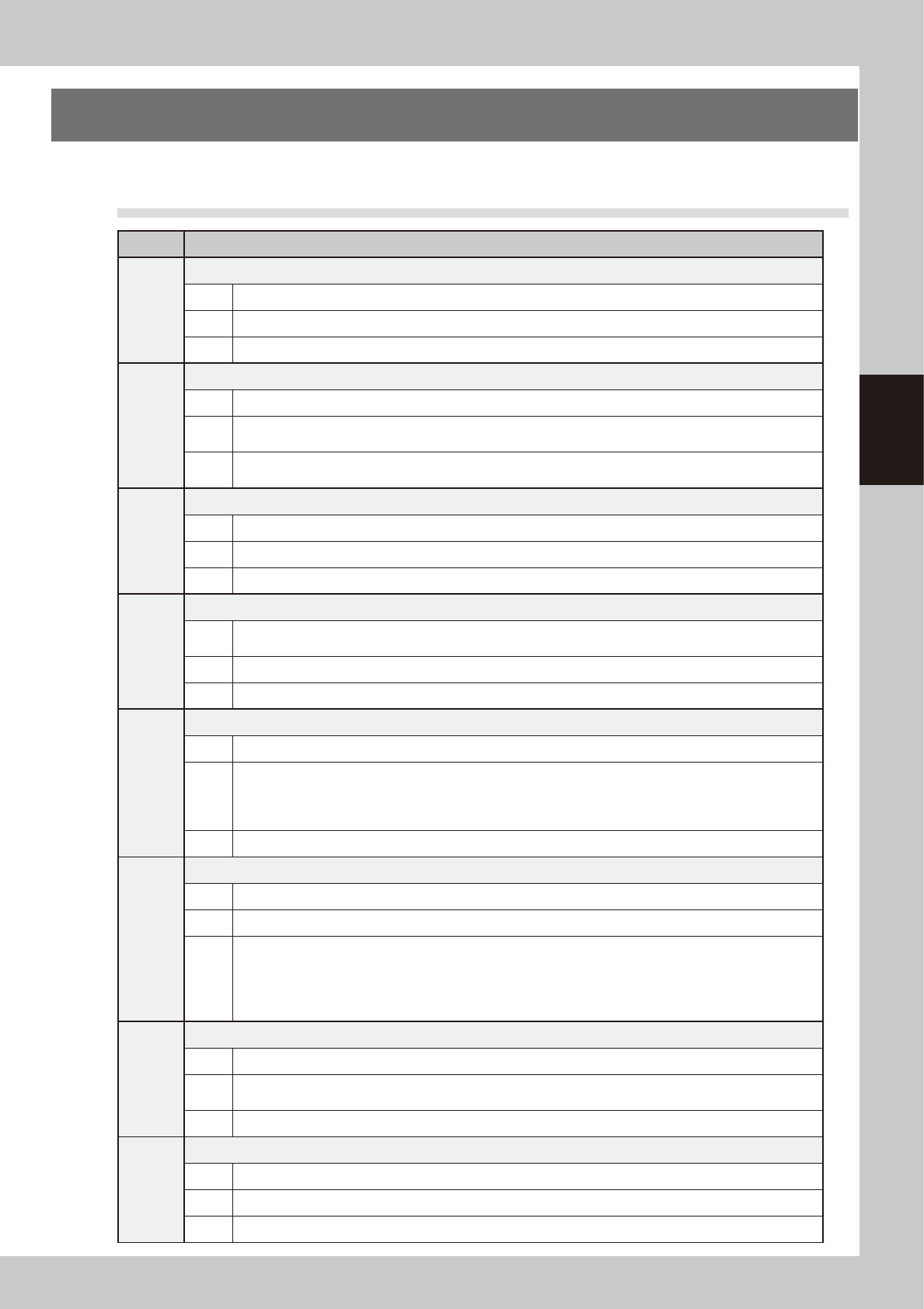
3-1 3 Q & A 1. T roubleshooting The following explains the causes and solutions of errors that might occur during daily operation. 1.1 T ypical errors and troubleshooting Code Error name and description Es00013 Secon…

Chapter 3 Q & A
Contents
1. Troubleshooting 3-1
1.1 Typical errors and troubleshooting 3-1
1.2 Mark recognition errors 3-4
1.3 Conveyor operation errors 3-4
1.4 Other errors 3-5
2. Handling dispensing errors 3-6
3. Reducing paper consumption 3-10
3.1 Predispensing interval setting 3-10
4. Low-liquid sensor functions 3-11
4.1 Remaining amount detection angle setting 3-11
4.1.1 Adjusting the low-liquid sensor (angle setting) 3-12
4.1.2 Making the settings 3-14
3-1
3
Q & A
1. Troubleshooting
The following explains the causes and solutions of errors that might occur during daily operation.
1.1 Typical errors and troubleshooting
Code Error name and description
Es00013
Secondary limit exceeded
State Sensor at the end of the movement range (secondary limit sensor) has responded.
Cause Sensor at the end of the movement range has responded.
Action Move the axis by hand to a position near the center of movement range.
Ea00070
Board transfer error
State More than specified number of boards were carried in on the conveyor.
Cause
Board was carried in from upstream side even though no board request signal was output, or an abnormal
board was detected.
Action
Adjust the position of conveyor exit sensor on upstream side, or readjust the position of conveyor carry-in
sensor or board detection sensor at the entrance stopper of this machine.
Ea00074
Board clamp error
State Board conveyor unit, locate pin, or push-up plate do not move correctly.
Cause Senor position adjustment is inappropriate, or speed control is set too low to maintain stable movement.
Action Check the sensors for conveyor unit height to see if they are operating properly.
Ea00267
FINE mode fiducial correction error
State
Failed to adjust the XY position within specified correction range during FINE mode recognition. FINE mode
correction range is specified in machine data.
Cause Correction range is too narrow.
Action Widen the correction range or use normal fiducial mark data.
Ea00410
Dot recognition error
State Cannot adjust dot size.
Cause
• Number of recognized dots is smaller than the minimum number of samples.
• Correction timer is 0.
• Total of measured areas is less than 0.01 mm^2.
• Measured dots are outside the tolerance specified in the mark information.
Action Adjust the mark data used for dot recognition.
Ea00436
Dot dispensing height in board data is incorrect
State Dot dispensing height is too low.
Cause Incorrect value is entered in dispense sequence.
Action
Recheck the following settings:
• The lower target position is below the “board surface height + 0.5 mm”.
• The Z height for next job is below the “board surface height - 0.5 mm”.
• The lower target position is above the Z height allowed for the next job.
• The Z height allowed for the next job is above the upper target position.
Ea07011
Position correction dispense error
State The number of samples required for position correction is not sufficient.
Cause
The number of dots correctly recognized and obtained during position correction dispensing is lower than the
number of samples required for position correction.
Action Check dispensing condition and mark data.
Ea02652
Interlock error
State X, Y, R and W axes are unable to move since the position of head is at a dangerous height.
Cause The position of head is at a dangerous height.
Action Raise the head to a safe height. If the machine has a lower-end sensor, then check the sensor status.
3-2
3
Q & A
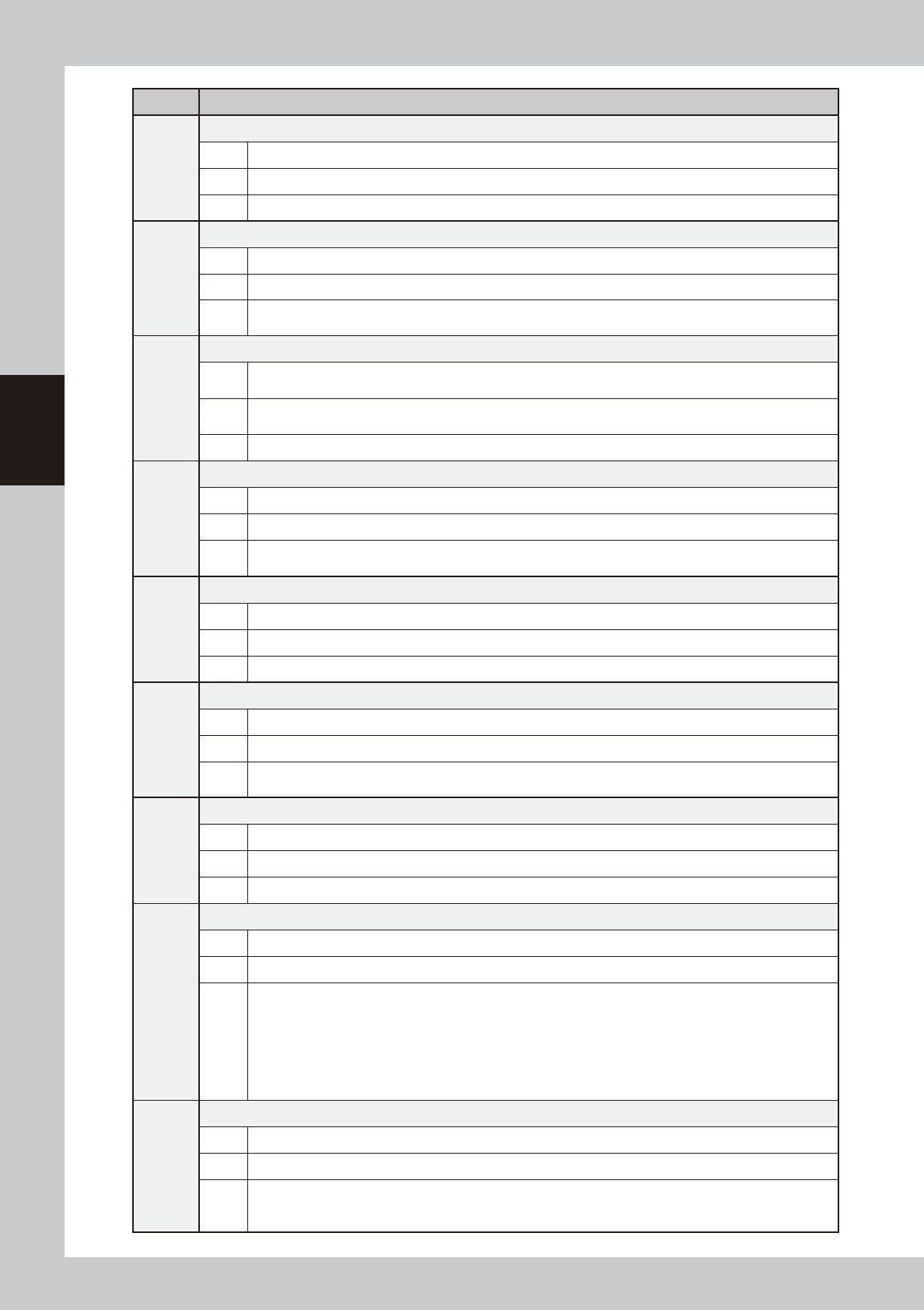
Code Error name and description
Ea02653
Interlock error
State Head height is preventing machine from moving.
Cause Head is at a height where it may collide with other components if machine moves.
Action Move up head to a safe height.
Ea02790
Nozzle height measurement incomplete (option)
State Automatic operation cannot start since nozzle height measurement is incomplete.
Cause Nozzle height measurement has not yet been completed.
Action
To use height correction, the head height must be measured by using the [Nozzle Length] button on the Setup
screen before starting automatic operation.
Ea02895
Emergency stop triggered during dispensing
State
Emergency stop was triggered during dispensing.
Dispensing action might have been unstable and dispensing failed.
Cause
Emergency stop was triggered during dispensing.
Dispensing action might have been unstable.
Action Check the dispensing action.
Ea02896
Laser zero reset incomplete (option)
State Automatic operation cannot start since the laser displacement meter is not reset to zero.
Cause Laser displacement meter is not reset to zero.
Action
To use height correction, the laser displacement meter must be reset to zero by using the [Reset Laser] button
on the Setup screen before starting automatic operation.
Ea03211
W axis interlock error
State W axis was stopped by interlock.
Cause Abnormal condition was detected by the conveyor width sensor.
Action Check and correct the positions of push-up pins or back-up unit.
Ea03248
Heater temperature tolerance error
State Head heater temperature is out of tolerance.
Cause Heater temperature does not reach the set temperature.
Action
Open the [Unit]-[Head] screen and check that the heater temperature has increased to the set temperature,
then start operation.
Ea07004
Paper in dot station used up
State Sensor detects “no paper” in the dot station.
Cause No predispensing paper is left in the dot station.
Action Replace with a new roll of paper.
Ea07006
Production completed after dispense fluid is used up
State Production of the specified number of boards is complete after dispense fluid is used up.
Cause Dispense fluid is used up.
Action
Do either of the following actions and then resume operation.
• Replace the syringe with one full of fluid.
(You may reset or may not have to reset.)
• Reset.
Operation cannot resume without taking measures.
If automatic operation is restarted by reset only, the machine will not stop until production of the next one
board is finished.
Ea07007
Replace syringe
State The number of boards to be continuously produced is not specified after dispense fluid is used up.
Cause Dispense fluid is used up.
Action
Press the emergency stop and replace the syringe with one full of fluid, then resume operation.
If automatic operation is restarted by reset only, the machine will not stop until production of the next one
board is finished.