YSD_Users_E.pdf - 第329页
8-9 8 Managing the data 7 Select the board data. Line up the cursor with the board data you want to copy, Two or more boar d data can be selected while holding down the [Ctrl] key or [Shift] key. If you want to select al…
8-8
8
Managing the data
3
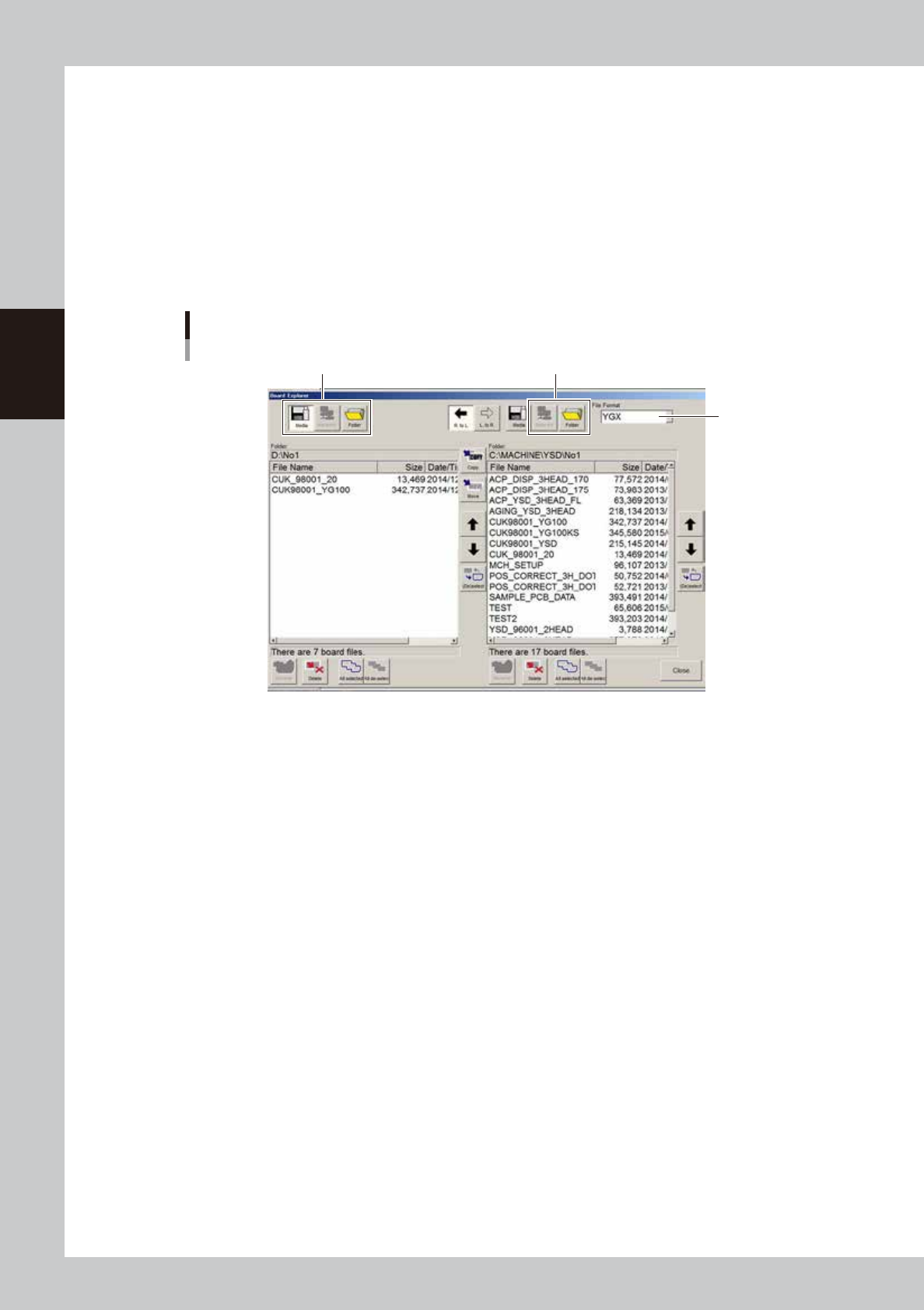
Open the Board Explorer.
Press the [Board Explorer] button on the Setup screen.
4
Select the file format.
Select the file format from the "File Format" drop-down list box.
5
Specify the copy source.
Use the buttons on the left side of the screen and specify the copy source.
To copy from the USB flash drive, press the [Media] button and specify the copy source.
To copy from the network, press the [Network] button and specify the copy source.
To directly specify a folder, press the [Folder] button and specify the folder.
Step5
Specifying the copy source
Step6
Step4
64837-N7-00
6
Specify the location to save the board data.
Press the [Folder] button on the right side of the screen and specify the location to save the board data.
To save the board data on the network, press the [Network] button on the right side of the screen and
specify it.
8-9
8
Managing the data
7
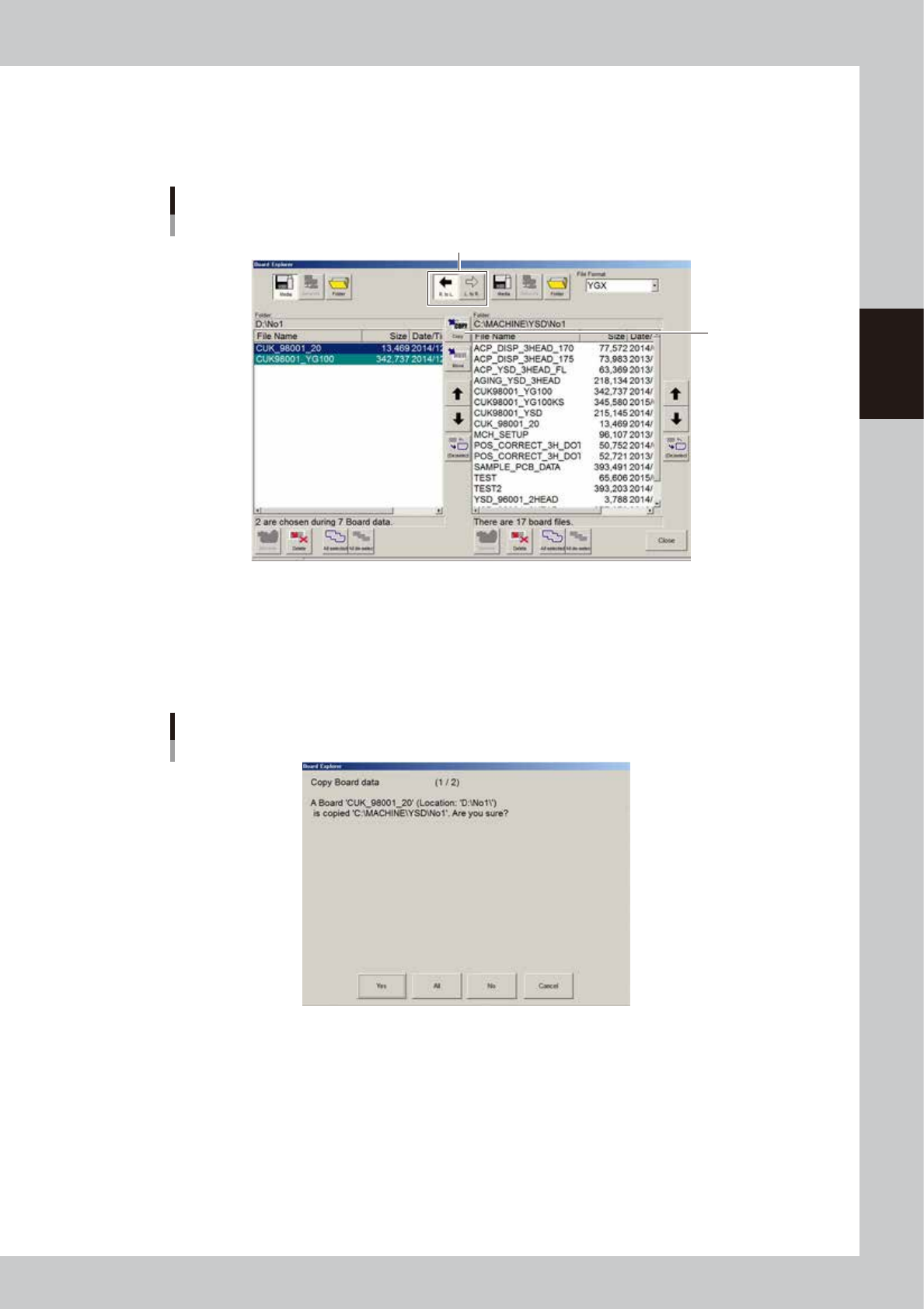
Select the board data.
Line up the cursor with the board data you want to copy, Two or more board data can be selected
while holding down the [Ctrl] key or [Shift] key. If you want to select all board data, press the [All select]
button.
Select the copy direction
[Copy] button
Selecting the board data
64838-N7-00
8
Copy the board data
Select the copy direction and press the [Copy] button. When the confirmation dialog box appears,
press the [Yes] button or [All] button. The selected data will be copied to the location you have
specified. If you want to move the board data, use the same procedure and press the [Move] button
instead of the [Copy] button.
Copy confirmation dialog box
64839-N7-00
8-10
8
Managing the data
1.3 Making a backup of system data
System data can be backed up by two methods: system backup and system full backup.
The backup data can be stored either on a USB memory or network drive.
n
System backup
This function backs up only the machine setting information.
The backed up data is used to register the machine to offline software. For safety reasons, making a system backup is
recommended before upgrading the application software or changing the machine settings.
When restoring system data using the data acquired by the system backup function, only the machine setting parameters
will be restored. The restore task is performed on the machine.
If for some reason the flash disk in the machine is destroyed, the system backup data can be used to restore the machine
settings. However, the system and application software must be reinstalled before restoring the machine settings.
n
NOTE
A free space larger than the capacity of the machine’s flash disk is required in the location where the backup data
will be stored.
n
System full backup
This function backs up all data stored in the machine’s flash disk.
This backup data contains all information including the machine application software, OS, board data, and production
logs.
If for some reason the flash disk in the machine is destroyed, the system full backup data can be used to restore all data
necessary for machine operation into a new replacement flash disk.
A personal computer and dedicated software are needed to restore the system full backup data.
To use this backup function, the machine software version must be V3.27std R2.000 or later.
n
NOTE
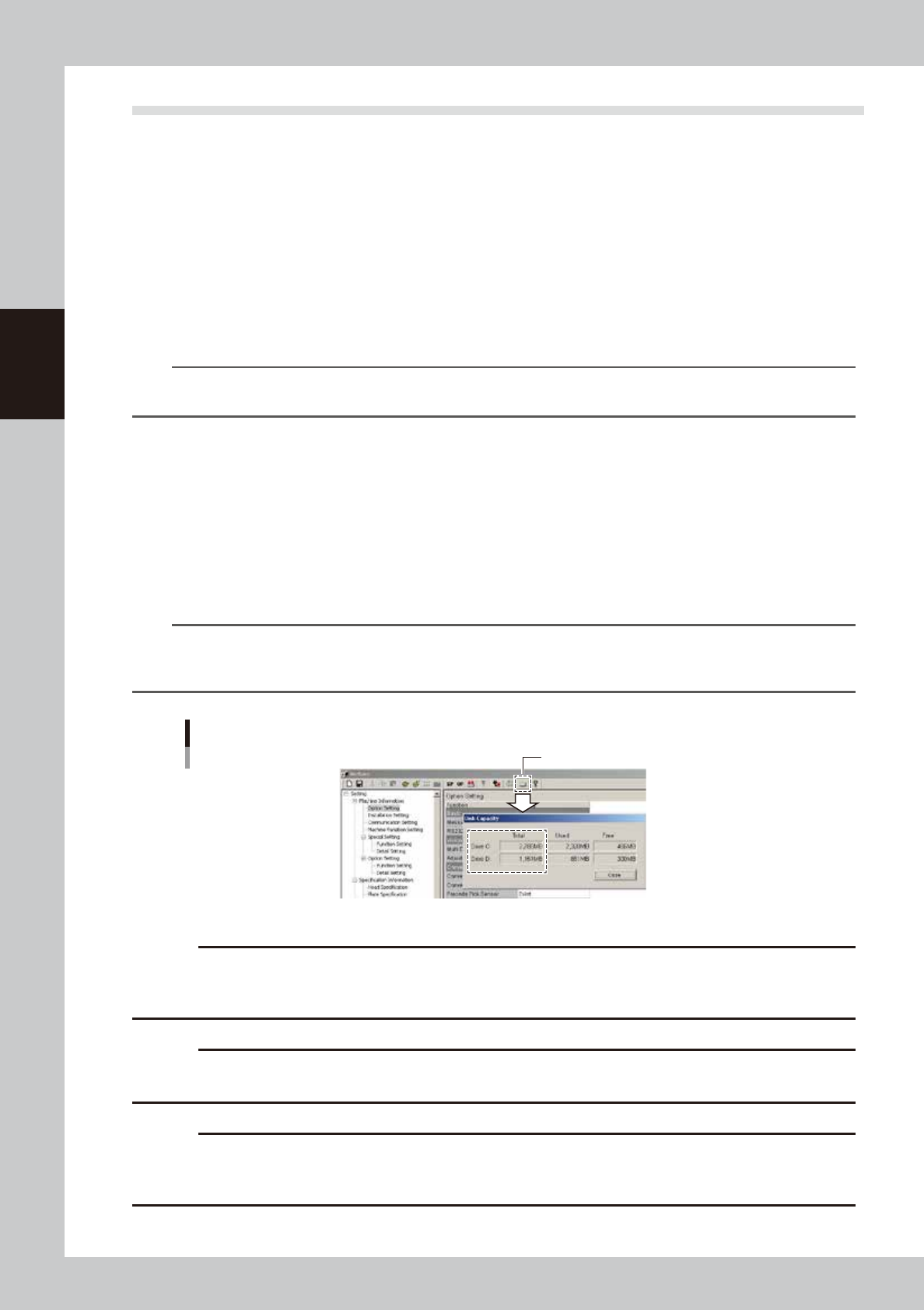
A free space larger than the capacity of the machine’s flash disk is required in the location where the backup data
will be stored. The flash disk capacity may differ depending on the machine model, so check it with the [Check
Capacity] button on the VmSpec window before making a backup.
Checking the disk capacity
[Check Capacity] button
64835-N7-00
c
CAUT ION
Use a USB flash drive (supplied with the machine or purchased from YAMAHA sales reps) specified by YAMAHA Motors
Co., Ltd. Using a USB flash drive other than specified might cause problems. Do not use any other type of USB flash
drive with YAMAHA surface mounters and related machines.
c
CAUT ION
Before copying data to the USB flash drive, always close the media access door to prevent dust from adhering to the
USB port and to protect the USB flash drive from electrostatic noise.
c
CAUT ION
After copying board data or system data into a USB flash drive, do not leave that data in the USB flash drive for a long
time. Use the USB flash drive just as a copy medium for backup data. Prepare other backup media (CD, DVD, MO,
etc.) to store the backup data.