YSD_Users_E.pdf - 第219页
5-30 5 Creating the board data 4.7 Position correction dispense parameters T hese parameters are used for the position correction dispense function that corrects a deviation in the dispensing position whic h ma y occur a…
5-29
5
Creating the board data
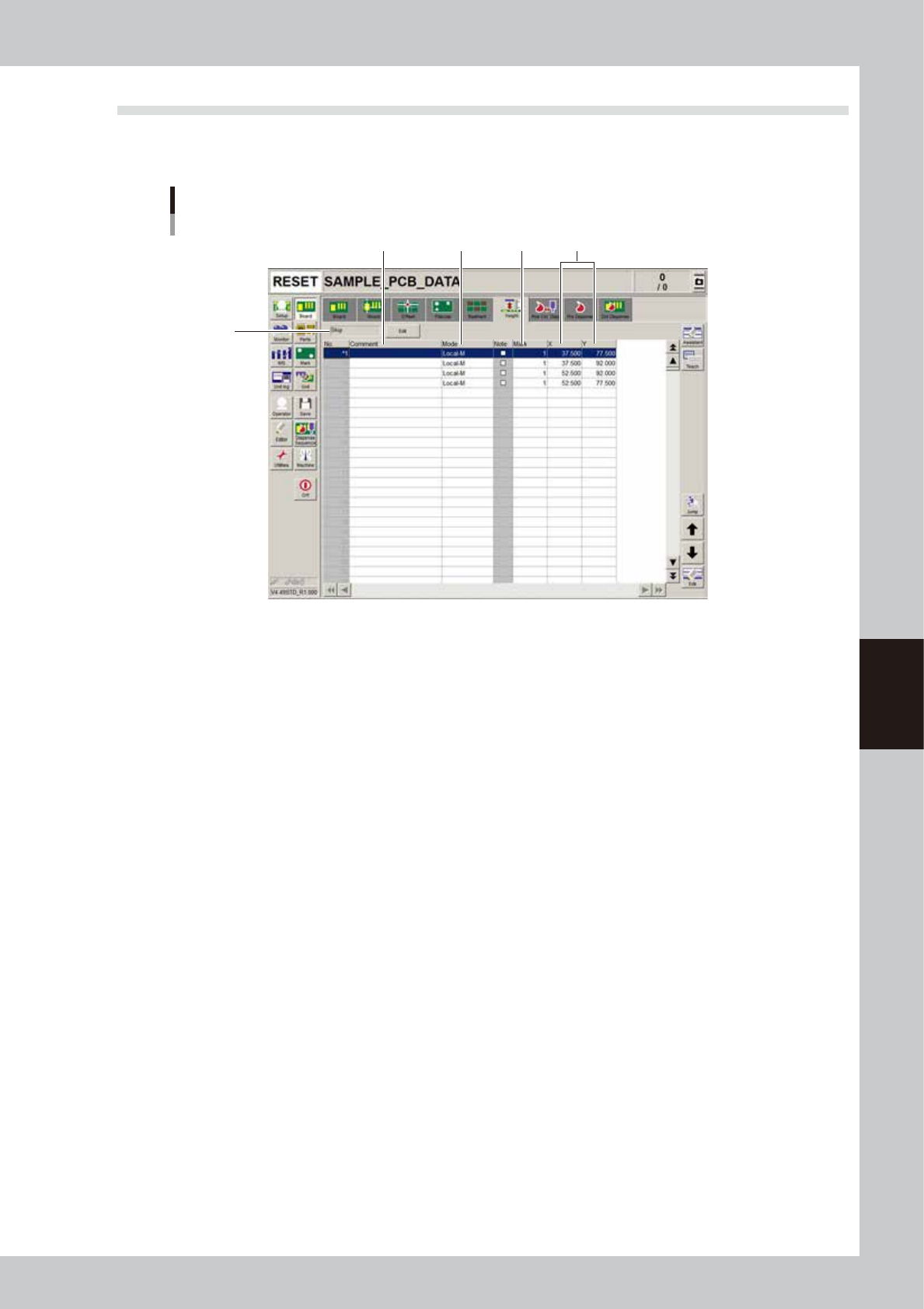
4.6 Height correction parameters (option)
These parameters are used to set the coordinates and method for making height measurement with the laser
displacement meter.
1
5
2 3
Height correction parameter screen
4
64513-N7-00
1. Comment
Enter a comment on the height measurement as necessary.
2. Mode
Make this setting according to the number of height measurement points.
• When measuring 1 point, set to "Local-M".
• When measuring 2 points to take an average, make the settings in 2 rows. Set the first row to "Local-M" and the second
row to "Local-S".
3. Mark
Enter the mark number used to correct the height of mark parameters.
4. X, Y
Set the X and Y coordinates relative to the board origin position.
5. Execute/Skip
Set whether to execute height correction. Height correction will not be performed when set to “Skip”.
5-30
5
Creating the board data
4.7 Position correction dispense parameters
These parameters are used for the position correction dispense function that corrects a deviation in the
dispensing position which may occur after a nozzle is changed, and makes the dispensing position stable.
n
NOTE
Copy the coordinates of the master board data (MCH_SETYP.ygx) as the coordinates for position correction dispense,
and enter the appropriate values for the liquid amount, sequence, and mark No. according to the pre-dispensing
conditions. If not using “pre-dispense”, perform a dispense test to create the liquid amount and mark data, and enter
the obtained values.
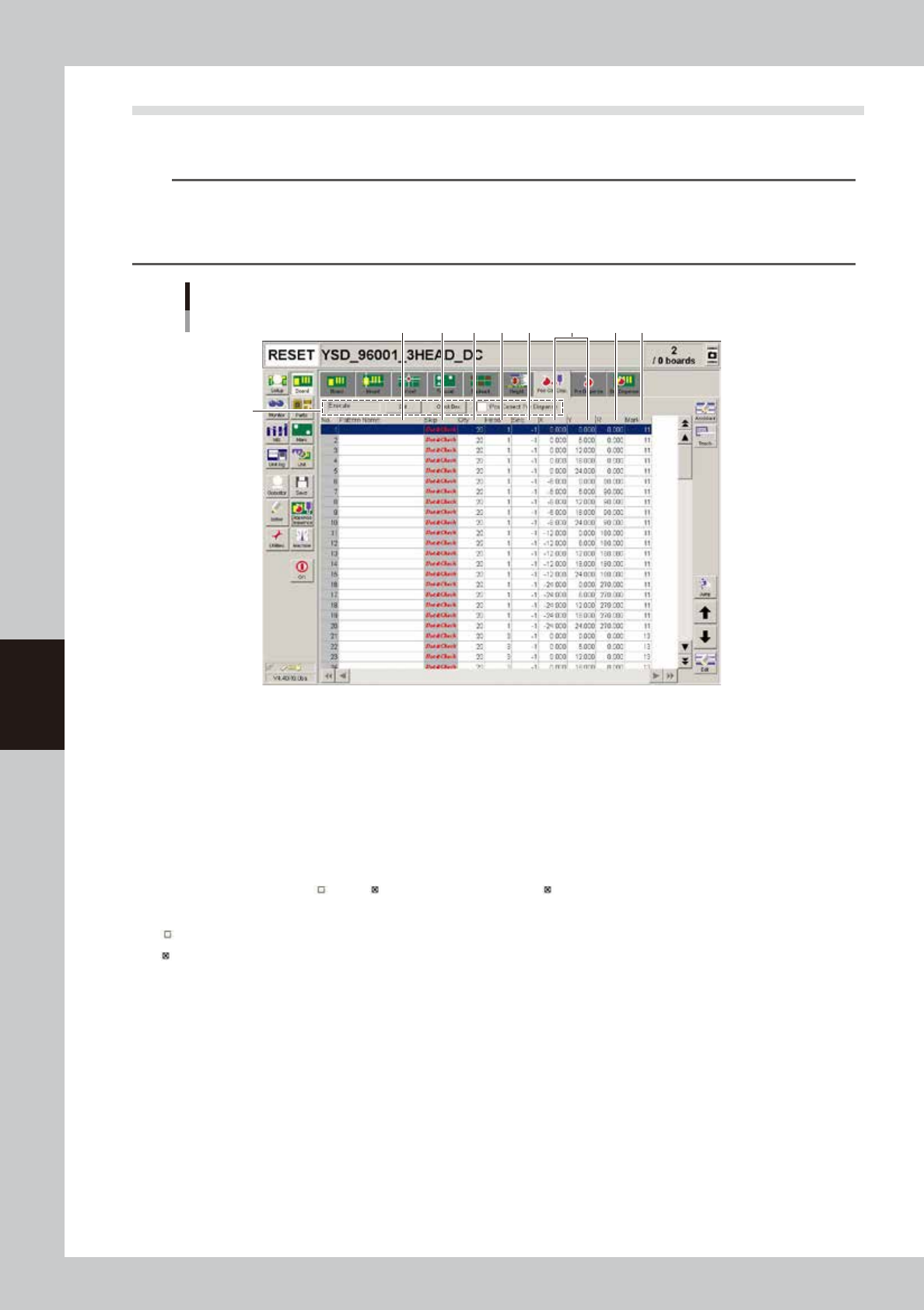
Position correction dispense parameter screen
2
1
3 7 94 5 6 8
64585-N7-00
1. Position correction dispense items
Specify these items to set whether to perform position correction dispense. To change the setting, press the [Edit] button
and select “Execute” or “Skip”. When the “Pos Correct Pre-dispense” check box is selected, dots will be pre-dispensed
before correcting the dispensing position.
2. Pattern Name
Enter the name used for position correction dispense. (This can be left blank.)
3. Skip
Set whether to perform position correction dispense at each dispensing position. Pressing each field in the “Skip” column
changes to “Dot&Check”, “ ” and “ ”. Set this column to “skip ( )” for the heads that are not used for dot dispensing.
“Dot&Check” : Dispenses dots and recognizes them to calculate the dispensing position correction amount.
“
” : Only dispenses dots.
“
” : Skips dispensing dots.
4. Qty
Enter the liquid amount according to the pre-dispensing conditions.
5. Head
Set the head number used for position correction dispense.
6. Seq.
Enter the value according to the pre-dispensing conditions.
7. X, Y
Use the XY coordinates of the master board data (MCH_SETUP.ygx) by copying them.
8. R
Use the R coordinate of the master board data (MCH_SETUP.ygx) by copying them.
9. Mark
Enter the number according to the pre-dispensing conditions.
5-31
5
Creating the board data
4.8 Pre-dispense parameters
Normally, predispensing is performed to ensure that dispensing liquid is smooth and stable before starting dot
dispensing.
To reduce the paper consumption quantity, set pre-dispense parameters so that predispensing is performed at
an interval specified by number of boards or by time, instead of predispensing for each board.
Open the [Board]-[Pre Dispense] tab and check or set pre-dispense parameters as explained below.
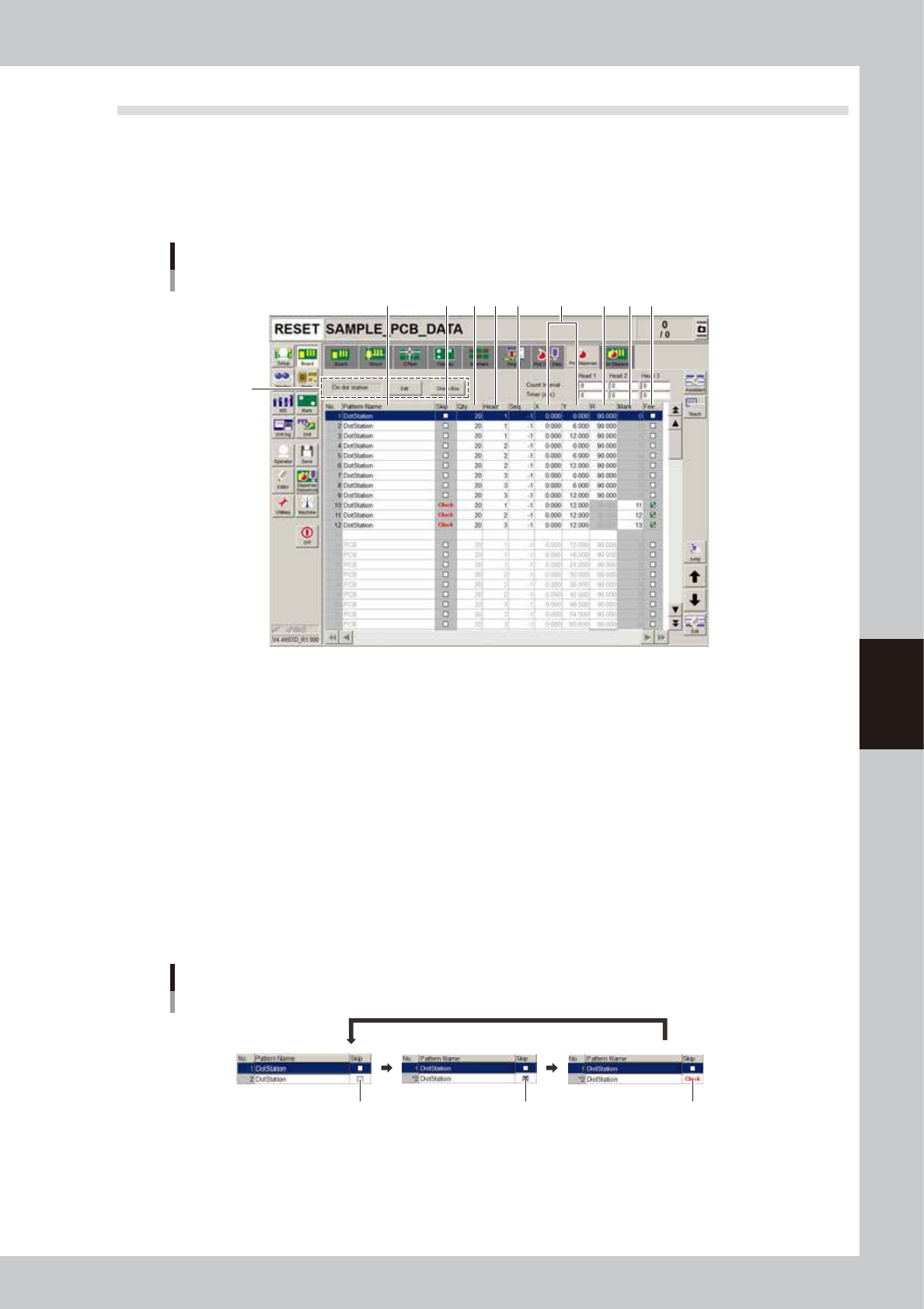
Pre-dispense parameter screen
2
1
3 7 94 5 6 108
64514-N7-00
1. Pre-dispense parameters
Set whether to perform predispensing. Select "On dot station" to perform predispensing on the dot station (option). To
change the current setting, press the [Edit] button.
2. Pattern Name
Enter the desired predispensing name.
3. Skip
Set whether to perform predispensing for each dot. Each time a "Skip" cell is clicked while the [Check Box] button is
depressed, the setting will change in the order "Execute" - "Skip" - "Check".
If "Check" is selected for the Skip parameter, check the following parameters.
• XY: The machine moves the head to the specified XY position and performs dispensed dot recognition.
• Head: Dispensing is performed by the specified head.
• Mark: Specify the mark number to use for dispensed dot recognition.
Changing the Skip parameter
Execute Skip Check
64515-07-00