YSD_Users_E.pdf - 第385页
3-11 3 Periodic maintenance items 4.3 Cleaning and greasing the push-up (PU) axis T he push-up axis is designed to prevent warping of the board when it is clamped in the w ork position. It also prevents depressing of the…
3-10
3
Periodic maintenance items
4.2 Cleaning and greasing the Z axis
4.2.1 Cleaning and greasing the Z-axis guide, ball screw and shafts
e
1
Move the head.
1. Press the [Replace Syringe] button on the
Setup screen.
2. Press the [Move default] button.
3. Press the emergency stop button and
then open the cover.
2
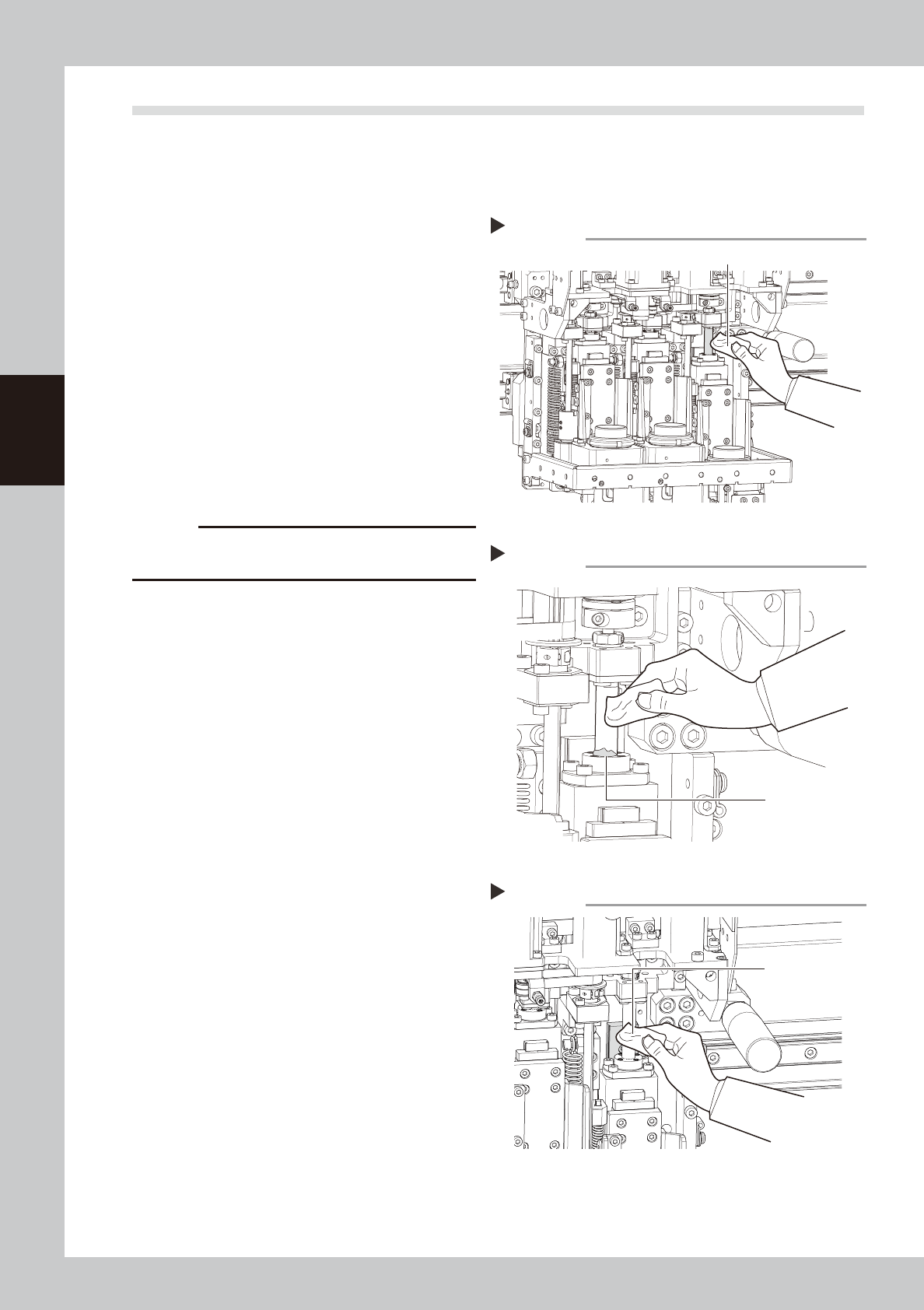
Clean the ball screw and spline
shafts.
Ball screw
Lower the Z axis and wipe the ball screw
with a paper wipe.
Spline shafts
Wipe the spline shaft of each head with a
paper wipe.
53317-N7-00
c
CAUTION
Wipe away the old grease and dirt in the lead groove
of the ball screw.
3
Apply grease.
Ball screws
Apply grease by hand to the entire ball
screw.
Spline shafts
Apply a thin coat of grease by hand to the
entire spline shaft of each head.
4
Wipe away excess grease.
Move the head up and down by hand a few
times and wipe away excess grease which
has collected at the nut section.
53318-N7-00
5
Clean and grease the guide.
Clean and grease the guide with the same
procedure as for the ball screw.
53328-N7-00
Cleaning the Z-axis ball screw
Step 2
Paper wipe
Wiping off grease on the Z-axis ball screw
Step 4
Excess grease
Cleaning the Z-axis guide
Step 5
Paper wipe
3-11
3
Periodic maintenance items
4.3 Cleaning and greasing the push-up (PU) axis
The push-up axis is designed to prevent warping of the board when it is clamped in the work position. It also
prevents depressing of the board during dispensing. Periodically inspect and clean the push-up axis to ensure
it operates correctly.
4.3.1 Cleaning and greasing he PU-axis ball screw and ball guide
1
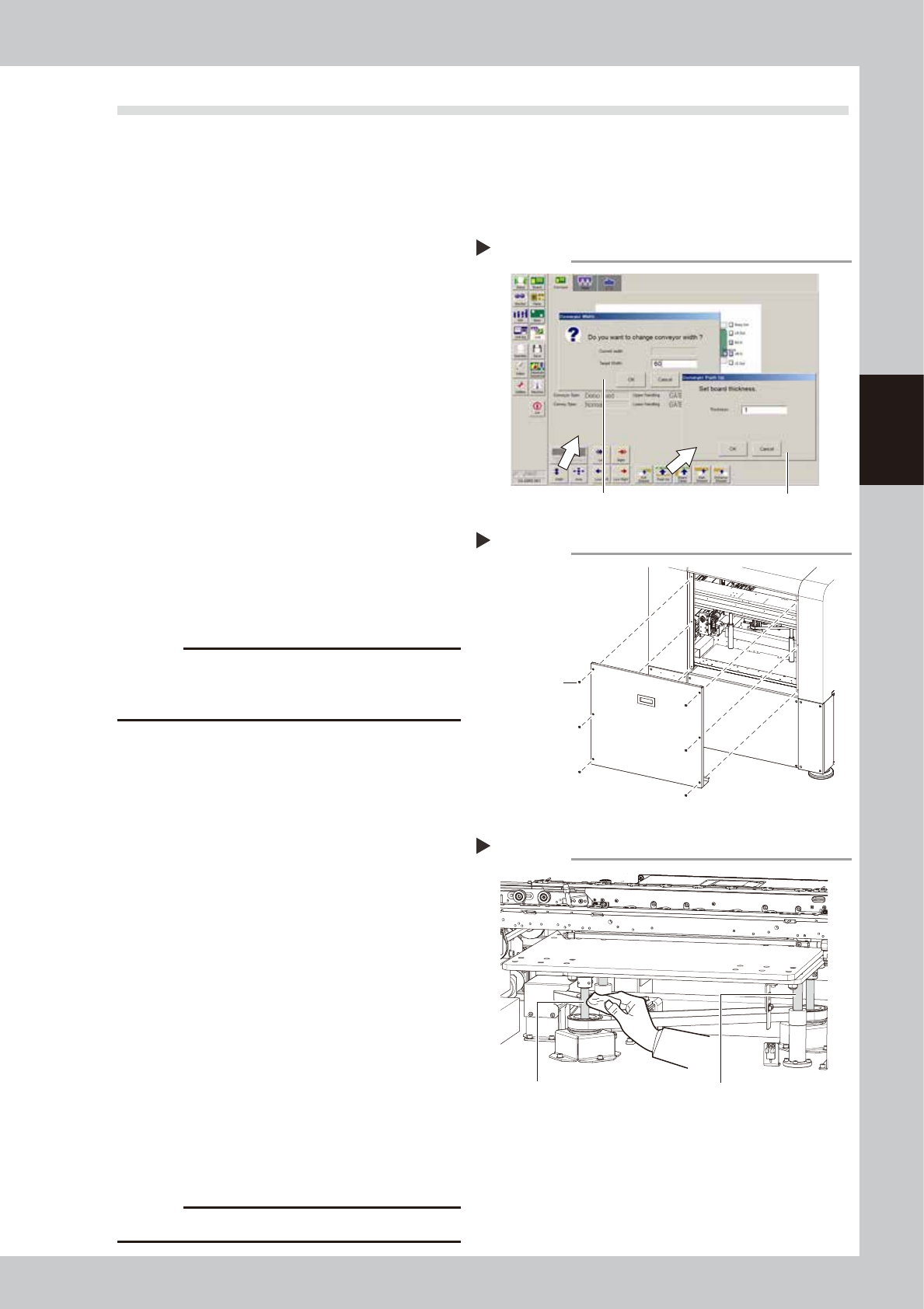
Set the conveyor width to minimum.
1. Remove the push-up pins attached on
the push-up plate.
2. On the Unit screen, select the [Conveyor]
tab.
3. Press the [Width] button to display the
"Conveyor Width" dialog. Enter the
minimum width from the specifications
and press the [OK] button.
2
Raise the push-up unit.
Press the [Push-up] button, enter "1", and
press the [OK] button.
54304-N7-00
e
3
Remove the rear cover.
After pressing the emergency stop button,
use a Philips screwdriver to remove the six
screws securing the rear cover.
53319-N7-00
c
CAUTION
The rear cover does not have a safety device. Always
press the emergency stop button before removing the
rear cover.
4
Remove the old grease by hand.
Using a paper wipe, wipe away the old
grease on the ball screws (2 places) and
ball guides (2 places) shown at the right.
53320-N7-00
5
Apply the new grease by hand.
Apply as much as 2 cm of new grease to
your finger, and apply it evenly into the ball
screw lead grooves and on the ball screw
guides.
6
Raise and lower the push-up unit
manually.
Cancel emergency stop, and raise and
lower the push-up unit manually several
times.
e
7
Wipe away excess grease by hand.
After pressing the emergency stop button,
wipe away excess grease by hand.
8
Reattach the rear cover.
Reattach the rear cover that was removed
in step 3.
c
CAUTION
Do not forget to reattach the rear cover.
Raising the push-up unit
Step 1, 2
Step1
Step2
Removing the rear cover
Step 3
Screws securing
the rear cover
Cleaning the PU-axis ball screw
Step 4
Ball guides (2 places)Ball screws (2 places)
3-12
3
Periodic maintenance items
4.4 Inspecting the board conveyor unit
4.4.1 Inspecting and cleaning the conveyor belt
As the conveyor belt wears away, slippages may occur that prevent securely conveying the boards. Periodically
check for wear of the conveyor belt.
Belt wear may also cause trouble such as erroneous detection of the conveyor sensor due to dust from belt
wear accumulating on the sensor surface, or dust from belt wear accumulating in the belt guide grooves may
cause the belt to stick, etc. To avoid such trouble, periodic cleaning of the belt is recommended.
1
Change the conveyor width to a
width allowing maintenance work.
e
1. Press the [Width] button to display the
"Conveyor Width" dialog. Enter a width
large enough for using the maintenance
tools and press [OK].
2. Press the emergency stop button and
then open the cover.
2
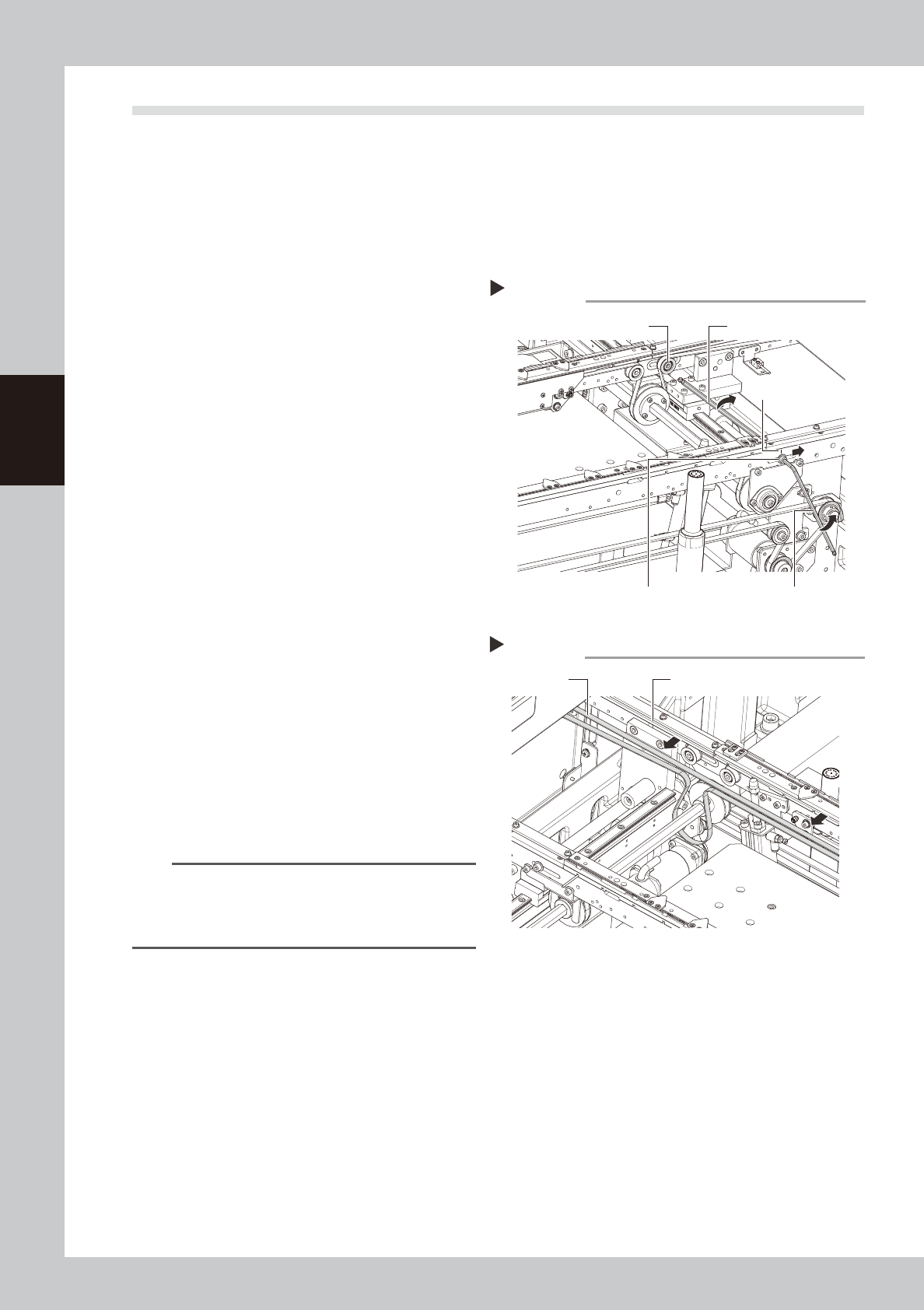
Loosen the tension on the conveyor
belt.
1. Using an oil-based marker pen, put a
mark to indicate the current tension
pulley position.
2. Loosen the tensioner bolt with The hex
wrench (4, 5mm) and slide the bolt fully
along the elongate hole (in the direction
of slackening the belt).
53321-N7-00
3
Detach the belt.
Detach the belt from the pulley and also
from the belt groove on the board guide.
4
Check for wear on the board
conveying side of the belt.
Check for wear on the board conveying
side of the detached belt.
53322-N7-00
n
NOTE
If the board conveying side of the belt is worn and the
belt needs to be replaced, replace it with a new one
by referring to the procedure described in the next
section "Replacing the conveyor belt".
5
Clean the pulley and the belt
groove on the board guide.
Using a vacuum cleaner or similar device,
suction up the belt wear dust deposited in
the belt groove or on the sensor surface.
Also clean the pulley and other parts for the
conveyor belt.
6
Reattach the belt in its original
position.
Removing the conveyor belt
Step 2-3
Hex wrench (5mm)
Marking
Hex wrench (4mm)Tensioner bolt
Tension pulley
Checking and cleaning the conveyor belt
Step 4-5
Belt groove
Conveyor belt