YSD_Users_E.pdf - 第121页
3-8 3 Q & A n Other dispensing errors Possible cause and corrective action Dispensing liquid quantity suddenly increased. Cause Heater temperature setting is too high. Action Set the optimum temperature using the [T …
3-7
3
Q & A
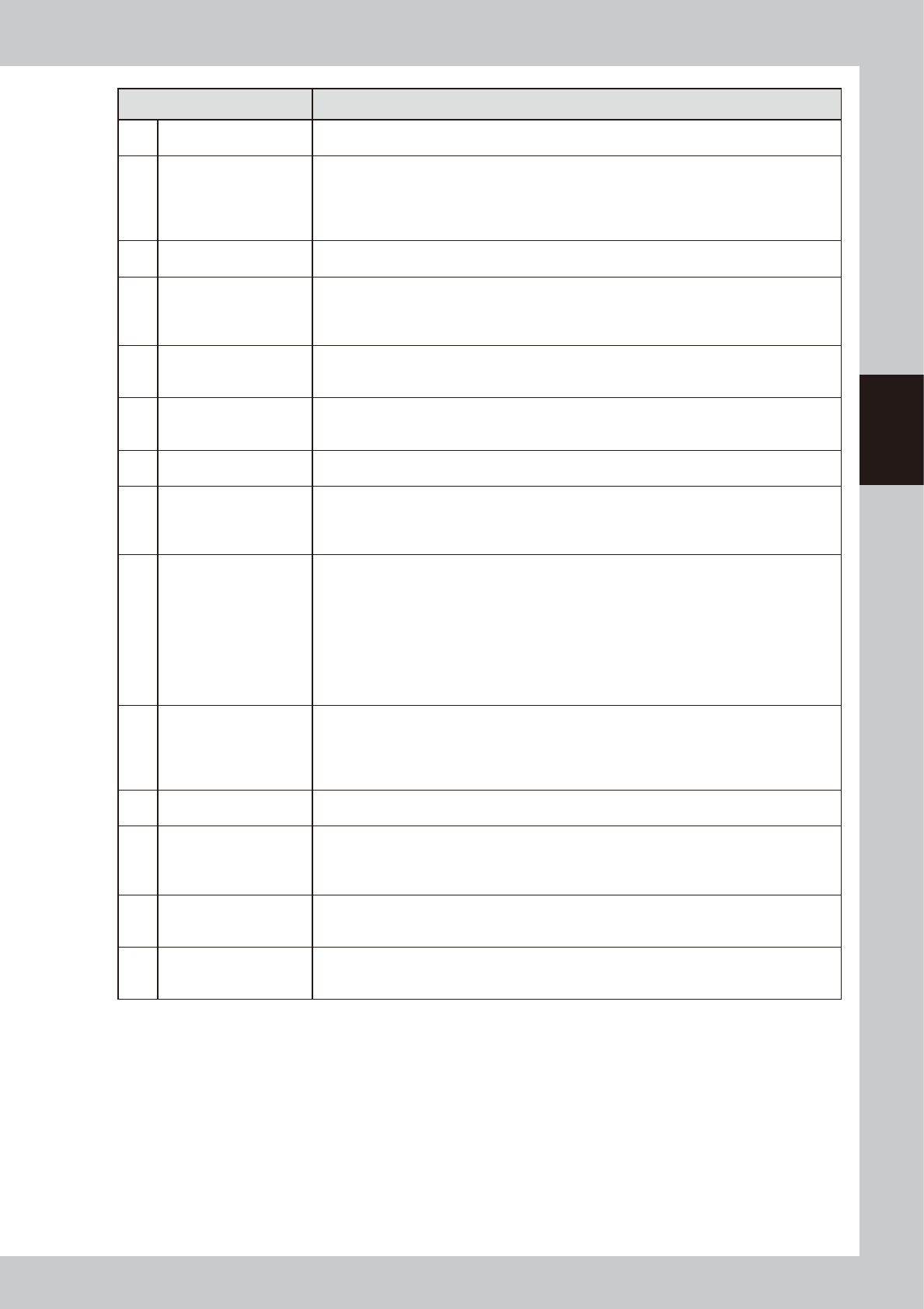
Troubleshooting Description
[1] Bleed the nozzle air
Continue until a fully dispensed bond is obtained with no liquid cutoff. (Sporadic cutoff during
dispensing is usually caused by bubbles.)
[2] Clean the nozzle
• Immerse the nozzle in acetone or other solvents, and use a needle to remove bond adhering on
the paths.
• Clean the nozzle while being careful not to damage the paths since there is a difference
between the left and right nozzles.
(For more details, see “1.2 Cleaning the nozzle” in Chapter 2 of the maintenance manual.)
[3] Increase the back-up pins
Place pins as many as possible to prevent the downward warping of board which may be caused
by syringe nozzles when they make contact with the board.
[4]
Run a dispensing test
to check and adjust the
dispensing pressure
• Manually adjust the pressure around ±20% to reduce the change in the dispensing amount. • •
This increases accuracy of the offset value.
• Reset the offset value after running the dispensing test.
(For more details, see “2. Dispensing test function” in Chapter 4.)
[5]
Increase the dispensing
amount at designated
points
• On the [Board]-[Dot Dispense] screen, change the liquid quantity at required points.
• To change the overall liquid quantity for applicable parts, correct the parts information and re-
perform dispensing.
[6]
Add predispensing
immediately before actual
dispensing.
Add by direct manual input. (For more details, see the section “If not dispensing” in “4.1 Adding
dispensing” in Chapter 7.)
[7]
Check the dispensing
temperature
Inquire to bond manufacturer about the correct temperature.
[8]
Check the standard area
and predispensing values
Check if the predispensing liquid quantity and the liquid quantity for standard area are the same.
The difference between the actual dispensing area and the standard dispensing area is found
from the offset type (map). So if these differ, the predicted area cannot be obtained.
(For more details, see “3.18 Checking that each setting is consistent” in Chapter 4.)
[9] Perform predispensing.
• Perform predispensing for each board and check the results.
(For details, see “Predispensing interval setting” in Chapter 3.)
• Make the following settings for predispensing.
On the [Board] – [Board] tab, set “T: Refresh Dispense” to “Time”.
In the VmSpec window that appears with the [Machine] button, open “Dot Station” and set “Ref.
Timer A” to 240 and “Dot Number” to 10.
*If only standard nozzles are used, add the following settings:
Change “Dot Matrix - Pitch” from 6.000 to 4.00, and “Dot Matrix - Amount” from 6 to 10.
(For details, see “5.1.1 Setting the automatic predispensing function” in Chapter 4.)
[10]
Check the remaining
amount of liquid.
*Readjust the low-liquid
sensor.
The low-liquid sensor has a response range, so always make sure the detected values by turning
each syringe.
(Liquid remains: Position where the value is highest. / No liquid remains: Position where the
value is lowest.)
(For more details, see “4.1.1 Adjusting the low-liquid sensor” in Chapter 2.)
[11]
Check the dispensing
sequence.
Change the dispensing sequence. (For more details, see “6.2 Editing the dispensing sequence”
in Chapter 4.)
[12]
Use the spare correction
table.
• All nozzles: In the VmSpec window, open “Spare correction table” and make settings for each
nozzle.
• Only first point: In the VmSpec window, open “Nozzle Data” and enter the value (timer) in “Spare
liquid amount”.
[13]
Set the minimum and
maximum correction
values.
In the VmSpec window, open “Dot Station” and set “DotDsp Check” under “Position” to “Use”.
Also open “Dispense Correction” and enter the “Minimum Correction” and “Maximum Correction”
values.
[14]
Make overall adjustment
using “Nozzle Data -
Coefficient”.
In the VmSpec window, open “Nozzle Data” and change the “Coefficient” value.
Default value: 1
→
Dispensing amount after changing the coefficient value: 0.9 (small) < 1 < 1.1
(large)
3-8
3
Q & A
n
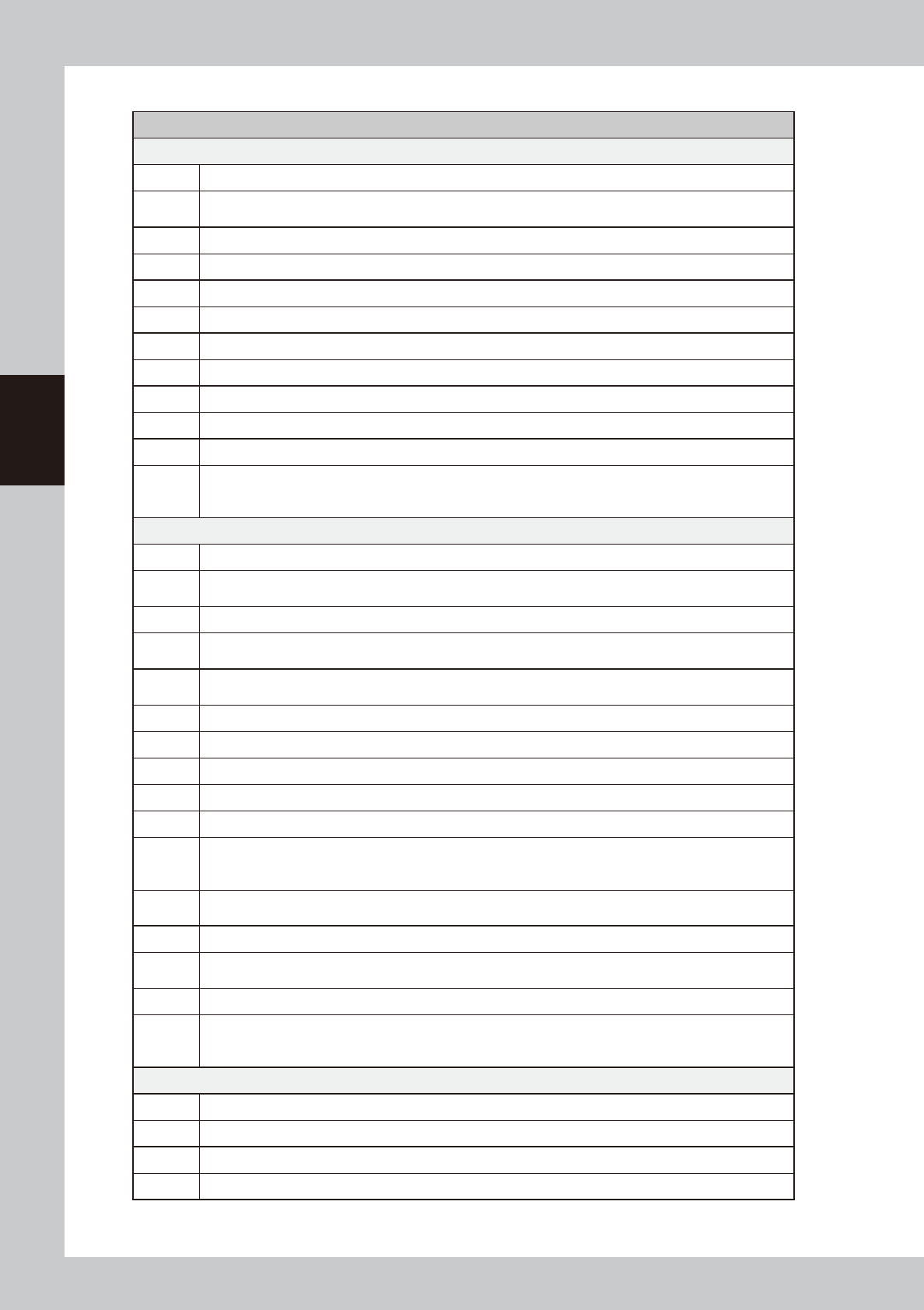
Other dispensing errors
Possible cause and corrective action
Dispensing liquid quantity suddenly increased.
Cause Heater temperature setting is too high.
Action
Set the optimum temperature using the [Temp setting] button on the Setup screen and manually dispense the
liquid from the nozzle, then wait until the temperature drops.
Cause Dispensing air pressure is higher than the optimum level.
Action Return the air pressure to the optimum value.
Cause Liquid quantity setting is too high.
Action Return the liquid quantity setting to the optimum value.
Cause A dispenser nozzle with a large hole was installed.
Action Attach the optimum nozzle.
Cause Liquid temperature in the syringe is below room temperature.
Action Wait until the liquid temperature in the syringe returns to room temperature.
Cause Dispense correction is not used, although predispense check is performed.
Action
Open the "Nozzle Information" dialog box with the [Nozzle] button on the Setup screen and check whether a
proper dispense correction is set for each head. If not, then set the dispense correction or if set to "None",
dispensing liquid quantity may increase suddenly even if predispense check is performed.
Dispensing liquid quantity suddenly decreased or no liquid is discharged.
Cause The liquid in the syringe is used up.
Action
Replace the syringe with a new one filled with liquid and check the low liquid alarm value and sensor setting
("Max Amount" on the Dot Station grid in the VmSpec window that appears with the [Machine] button).
Cause Heater temperature setting is too low.
Action
Set the temperature to the optimum level and wait until the temperature reading on the [Unit]-[Head] tab
reaches the target temperature.
Cause
The syringe was left uncapped, so adhesive at the syringe tip or around the piston in the syringe has dried and
solidified.
Action Replace the syringe.
Cause The board thickness is locally thin, or its copper pattern has become thicker than before.
Action Check the board and change the liquid quantity setting.
Cause The nozzle is clogged with foreign matter which has penetrated inside during installation of the nozzle.
Action Clean the nozzle and blow with air.
Cause
The machine has been left idle for a few days with the syringe and nozzle still installed to the head, so
adhesive at the tip of the nozzle hardened. (Adhesive will solidify if left still installed as well as UV curing
types.)
Action
Remove solid mass in the nozzle and then clean the nozzle. If difficult, replace the nozzle. Then replace the
syringe with another syringe containing adhesive stored in good condition.
Cause The nozzle is not installed securely.
Action
Remove the nozzle and syringe, and clean the nozzle and the nozzle joint completely. Then reinstall the nozzle
and syringe into position securely.
Cause Dispense correction is not used, although predispense check is performed.
Action
Open the "Nozzle Information" dialog box with the [Nozzle] button on the Setup screen and check whether
a proper dispense correction is set for each head. If not properly set or if set to "None", dispensing liquid
quantity may increase suddenly even if predispense check is performed.
Liquid sometimes is not dispensed.
Cause Extremely small air bubbles have entered the syringe.
Action Replace the syringe. Remove the air bubbles sufficiently.
Cause Solidified particles are present in the nozzle or syringe.
Action Replace the nozzle and syringe.
3-9
3
Q & A
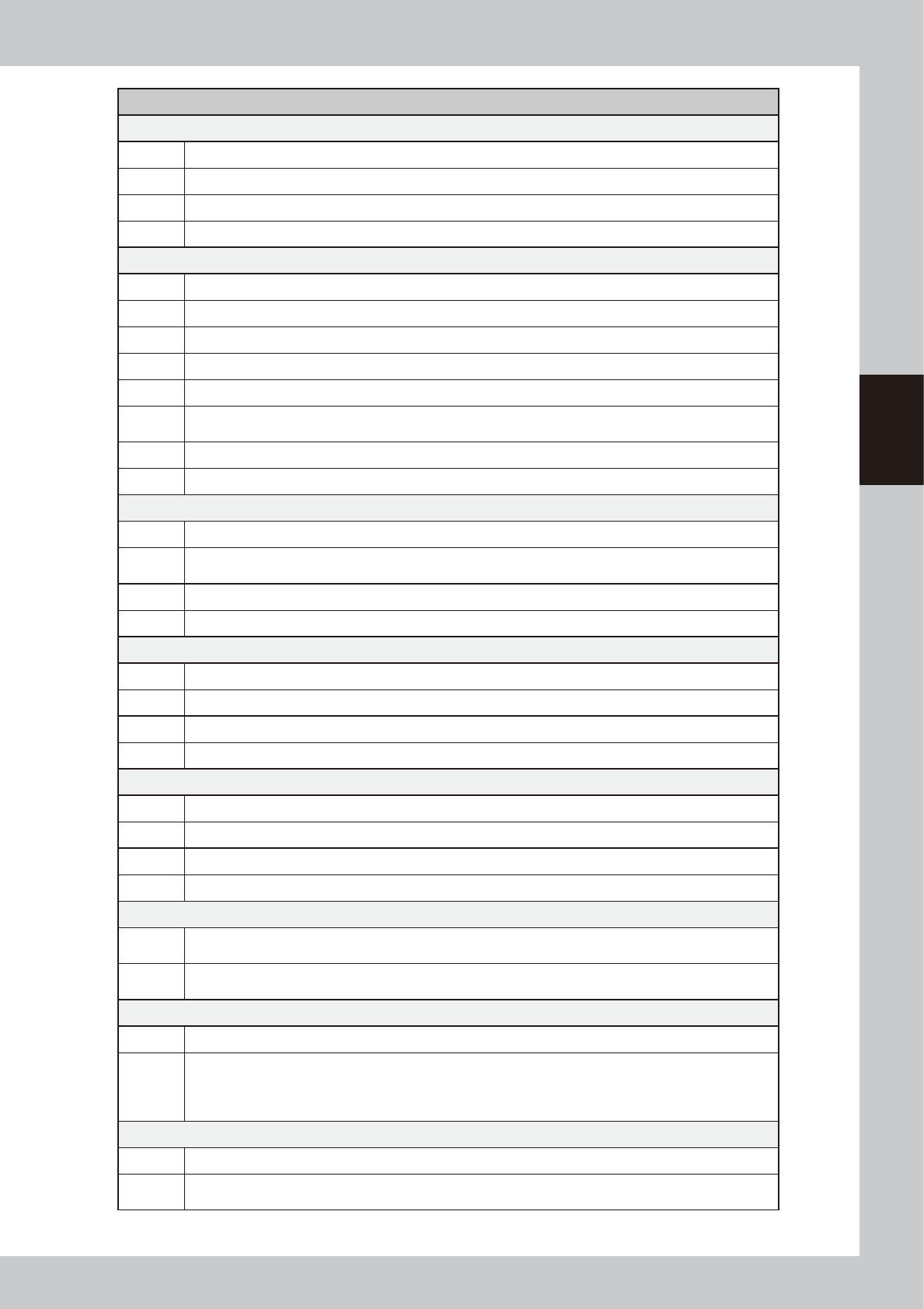
Possible cause and corrective action
The nozzle stopper hits so hard on the board that dent marks are left on the board surface.
Cause The lower end position of the head is too low.
Action Recheck the height of the board surface or the target height for the specified dispensing sequence.
Cause The nozzle is not installed correctly.
Action Reinstall the nozzle correctly.
Adhesive forms strands.
Cause Incorrect dispense data (larger than the nozzle's dispensing capacity) was entered.
Action Check the data or exchange the nozzle with a nozzle having greater dispensing capacity.
Cause The heater temperature setting is too low.
Action Set the optimum temperature.
Cause The head ascent speed is too fast.
Action
Open the VmSpec window with the [Machine] button, select "Dispense Sequence" to display the Dispense
Sequence grid, and reduce the "UP Speed" settings.
Cause An object is adhering to the nozzle tip.
Action Remove it by using a soft brush.
Adhesive is splashing around the dispensing point
Cause The head ascent speed is too fast.
Action
Open the VmSpec window with the [Machine] button, select "Dispense Sequence" to display the Dispense
Sequence grid, and reduce the "UP Speed" settings.
Cause Object is adhering to the nozzle tip.
Action Remove by using a soft brush.
The dispensing point shifts.
Cause Incorrect dispense data was entered.
Action Correct the dispense data.
Cause The nozzle is not installed securely.
Action Reinstall the nozzle securely.
The dispensing angle of a two-shot nozzle varies.
Cause The board is warped excessively.
Action Readjust the push-up pin positions.
Cause The nozzle is not installed correctly.
Action Reinstall the nozzle correctly.
Cycle time becomes longer as the remaining amount of syringe barrel becomes low.
Cause
As the liquid amount of a syringe barrel becomes low, the dispensing amount also bellows low and so the
offset timer increases.
Action
Make setting for the dispensing correction limit check. (For more details, see “5.3 Dispensing correction limit
check” in Chapter 4.)
Dispensing state excessively varies between each machine or between each head.
Cause Valves have deteriorated.
Action
Replace the deteriorated valve or clean the air path to find and eliminate the cause.
As a temporary measures, make overall adjustment by changing the “Nozzle Data” - “Coefficient” value in the
VmSpec window.
Default value: 1
→
Dispensing amount after changing the coefficient value: 0.9 (small) < 1 < 1.1 (large)
XYR fluctuates between each nozzle.
Cause Each nozzle has individual difference.
Action
Use the position correction dispensing function. (For more details, see “4. Position correction dispensing” in
Chapter 4.)