YSD_Users_E.pdf - 第116页
3-3 3 Q & A Code Error name and description Ea07009 Dot station paper fixation timeout error State Failed to hold paper on the dot station. Cause Paper is slack and cannot be held by vacuum. Action T ake up the slack…
3-2
3
Q & A
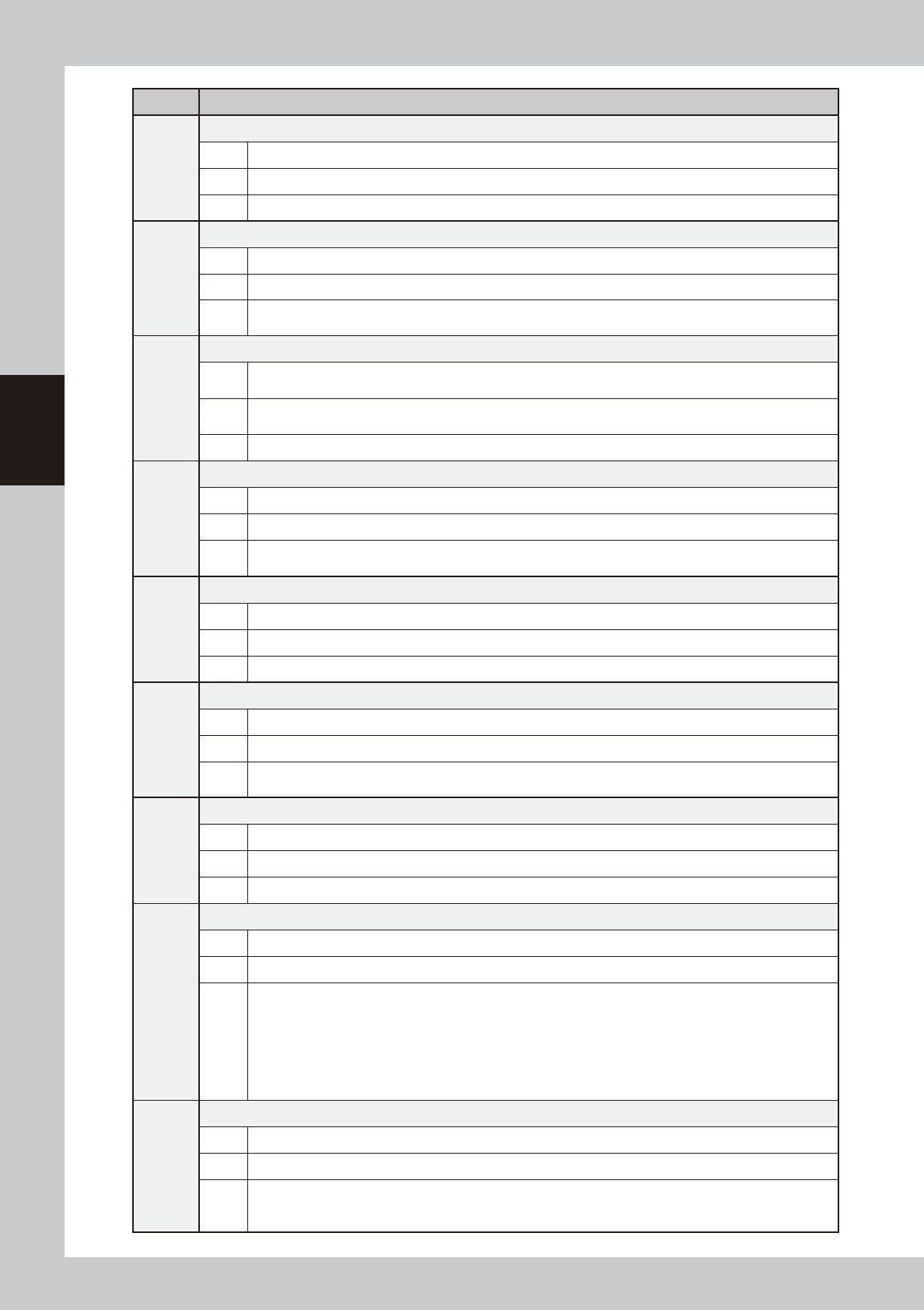
Code Error name and description
Ea02653
Interlock error
State Head height is preventing machine from moving.
Cause Head is at a height where it may collide with other components if machine moves.
Action Move up head to a safe height.
Ea02790
Nozzle height measurement incomplete (option)
State Automatic operation cannot start since nozzle height measurement is incomplete.
Cause Nozzle height measurement has not yet been completed.
Action
To use height correction, the head height must be measured by using the [Nozzle Length] button on the Setup
screen before starting automatic operation.
Ea02895
Emergency stop triggered during dispensing
State
Emergency stop was triggered during dispensing.
Dispensing action might have been unstable and dispensing failed.
Cause
Emergency stop was triggered during dispensing.
Dispensing action might have been unstable.
Action Check the dispensing action.
Ea02896
Laser zero reset incomplete (option)
State Automatic operation cannot start since the laser displacement meter is not reset to zero.
Cause Laser displacement meter is not reset to zero.
Action
To use height correction, the laser displacement meter must be reset to zero by using the [Reset Laser] button
on the Setup screen before starting automatic operation.
Ea03211
W axis interlock error
State W axis was stopped by interlock.
Cause Abnormal condition was detected by the conveyor width sensor.
Action Check and correct the positions of push-up pins or back-up unit.
Ea03248
Heater temperature tolerance error
State Head heater temperature is out of tolerance.
Cause Heater temperature does not reach the set temperature.
Action
Open the [Unit]-[Head] screen and check that the heater temperature has increased to the set temperature,
then start operation.
Ea07004
Paper in dot station used up
State Sensor detects “no paper” in the dot station.
Cause No predispensing paper is left in the dot station.
Action Replace with a new roll of paper.
Ea07006
Production completed after dispense fluid is used up
State Production of the specified number of boards is complete after dispense fluid is used up.
Cause Dispense fluid is used up.
Action
Do either of the following actions and then resume operation.
• Replace the syringe with one full of fluid.
(You may reset or may not have to reset.)
• Reset.
Operation cannot resume without taking measures.
If automatic operation is restarted by reset only, the machine will not stop until production of the next one
board is finished.
Ea07007
Replace syringe
State The number of boards to be continuously produced is not specified after dispense fluid is used up.
Cause Dispense fluid is used up.
Action
Press the emergency stop and replace the syringe with one full of fluid, then resume operation.
If automatic operation is restarted by reset only, the machine will not stop until production of the next one
board is finished.
3-3
3
Q & A
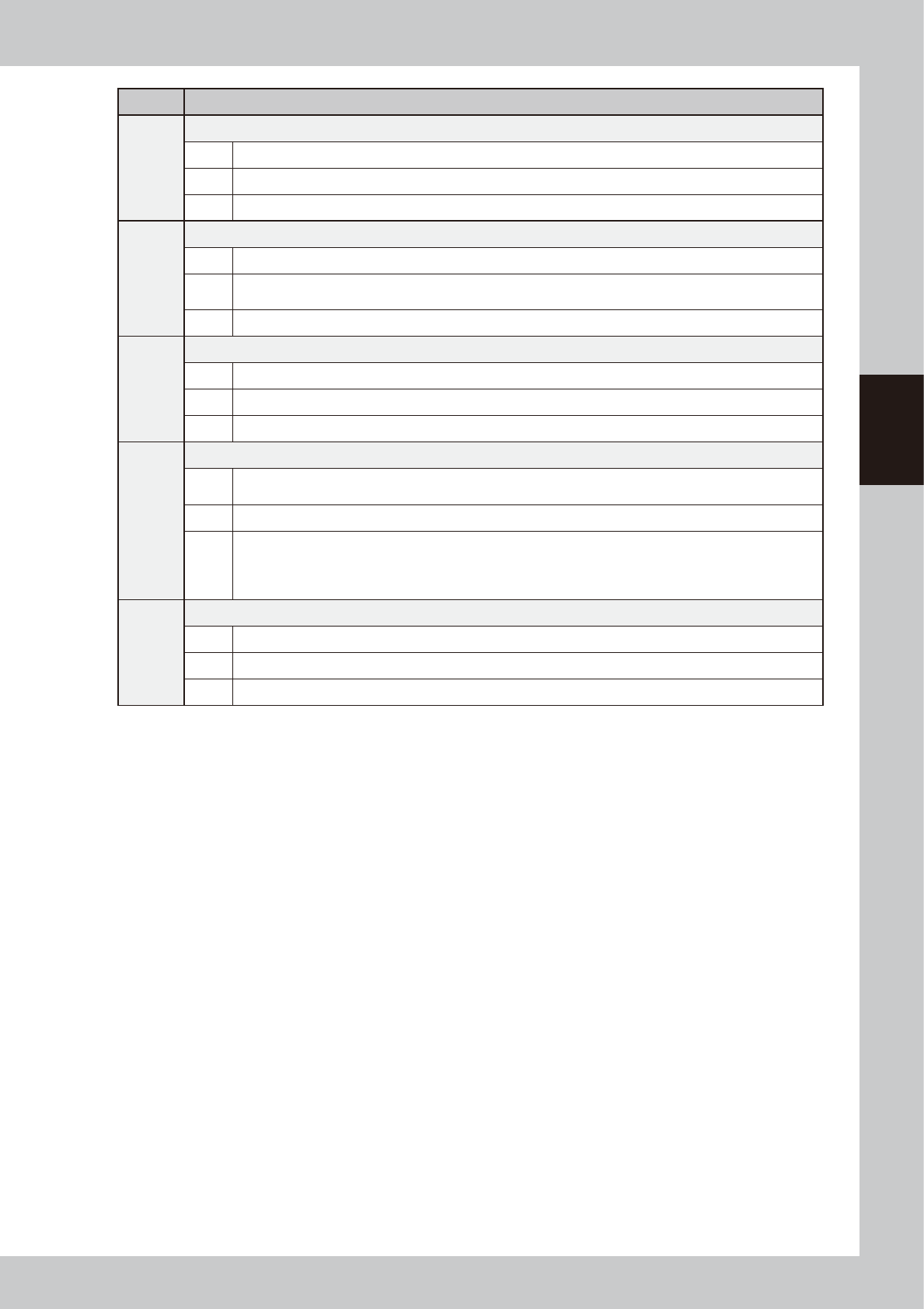
Code Error name and description
Ea07009
Dot station paper fixation timeout error
State Failed to hold paper on the dot station.
Cause Paper is slack and cannot be held by vacuum.
Action Take up the slack in the paper and check the status of the dot station vacuum sensor.
Ea07011
Position correction dispense error
State The number of samples required for position correction is not sufficient.
Cause
The number of dots correctly recognized and obtained during position correction dispensing is lower than the
number of samples required for position correction.
Action Check dispensing condition and mark data.
Ea07876
Cannot run command
State Unable to run this command.
Cause This command cannot be run since servo push-up is not sufficiently lowered.
Action Lower the servo push-up by operating or resetting the conveyor units, then re-run this command.
Ea12622
Halfway continue
State
There is board data whose task was interrupted during operation.
Do you want to resume the operation from the interrupted point?
Cause Operation was interrupted before completing.
Action
To take action on the board in the work position, select either of the following options:
[Yes]: Resumes the operation from the interrupted point.
[No]: Unloads the board in the work position (if loaded) to the exit position and starts automatic operation for
the next board from the beginning, not from the interrupted point.
Ea13001
Position correction dispense failure
State Failed to dispense dots for position correction.
Cause Dispensing condition and data are not correct.
Action Check dispensing condition and position correction dispense formation in board data.
3-4
3
Q & A
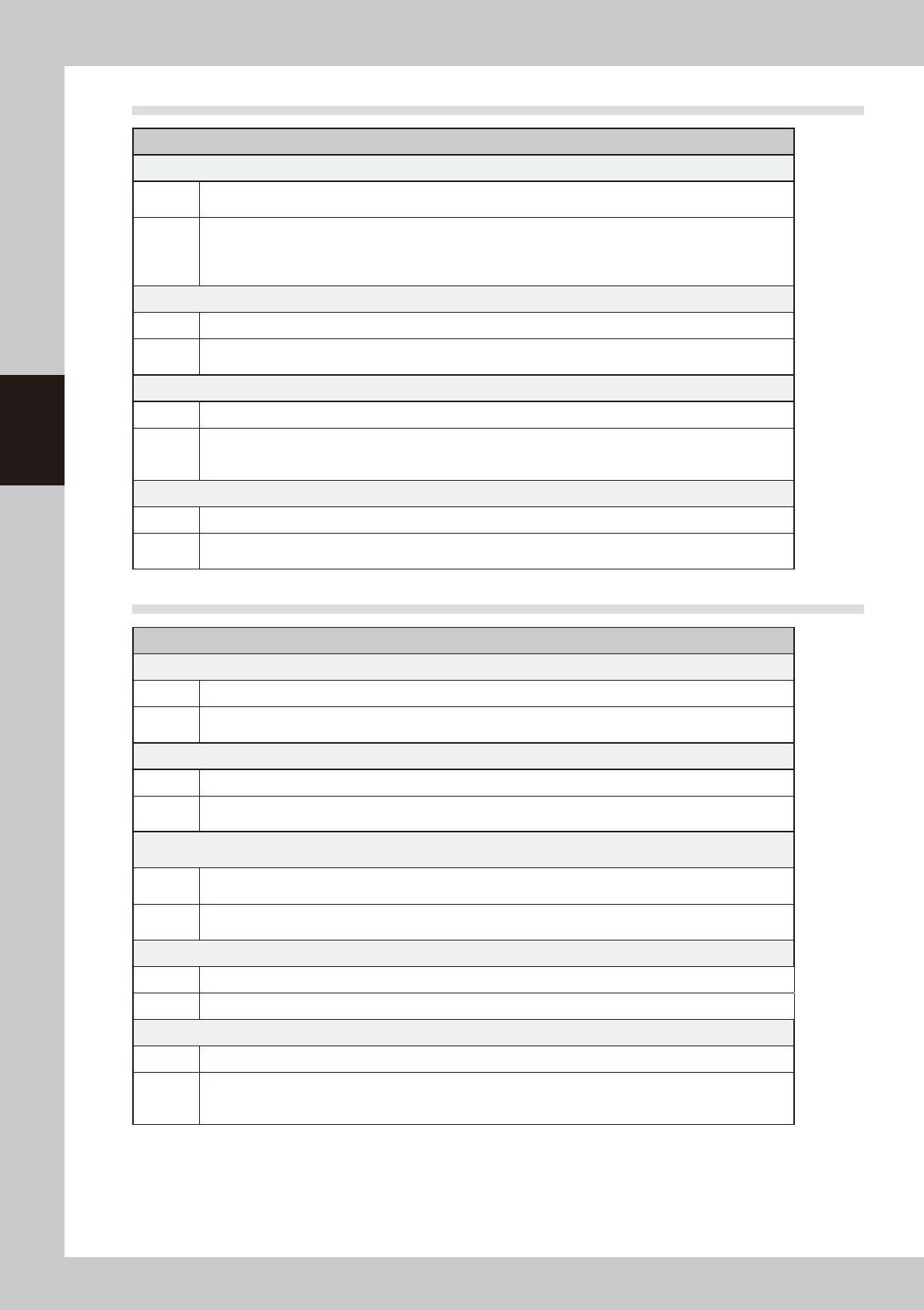
1.2 Mark recognition errors
Possible cause and corrective action
Fiducial mark cannot be recognized.
Cause
The board is not clamped securely, or the mark data is incorrect or the mark shape or size is outside the
specifications.
Action
Check that the board is clamped securely. If no problem, check the mark data and optimize the threshold level
using the Mark Adjust mode so that the mark can be clearly viewed. If there is any noise around the mark,
narrow the mark search area or cut the noise by adjusting the Cut Outer Noise parameter in the [Mark]-[Vision]
tab grid.
Fiducial mark recognition is not reliable.
Cause A solder leveler mark or low-contrast mark cannot be reliably recognized.
Action
Readjust the camera light levels in the [Mark]-[Vision] tab grid and then optimize the threshold level using the
Mark Adjust mode so that the mark can be clearly viewed.
In FINE mode recognition sequence, the recognition position cannot converge on the specified point.
Cause The convergence conditions are too strict.
Action
Open the VmSpec window with the [Machine] button and select "Position" to display the Position grid. Set
easier convergence conditions than those specified in the "Mark FINE mode" field.
As an alternative, set the "Sequence" parameter in the [Mark]-[Vision] tab grid to "Normal".
Fiducial mark recognition is not reliable.
Cause The fiducial correction function is not selected.
Action
Open the teaching window, press the [Setting] button and select the "Fiducial Correction" check box in the
dialog box that appears. Then perform fiducial mark recognition.
1.3 Conveyor operation errors
Possible cause and corrective action
The board hits hard against the main stopper when it is conveyed.
Cause The soft stop has little or no effect.
Action
Slightly reduce the conveyor speed. Open the [Board] - [Board] tab and set the "Conveyor Motor Speed"
parameter to a minus value.
The board does not reach the main stopper when it is conveyed.
Cause The soft stop has too much effect.
Action
Slightly increase the conveyor speed.
Open the [Board] - [Board] tab and set the "Conveyor Motor Speed" parameter to a minus value.
After the board has been conveyed to the mounting position, the board is not clamped. (The conveyor keeps
turning.)
Cause
The sensor at the board clamping position is defective or board has a cutout area just above the sensor so the
sensor cannot detect the board.
Action
Check the sensor operation in manual mode (input monitor).
If the sensor is defective, replace it. If sensitivity seems to be low, adjust the sensor installation height or angle.
The conveyor width cannot be changed.
Cause A board is still on the conveyor.
Action Remove the board and then change the conveyor width again.
Boards detectable before being transferred to the work position cannot be detected after transfer.
Cause The board is still in the work position on the conveyor, but is not being detected with the board sensor.
Action
Remove the board from the conveyor and adjust the position of the board sensor so that it detects the board
correctly. If the board still cannot be transferred properly, check the conveyor unit setups and/or board data
settings and make corrections as needed.