YSD_Users_E.pdf - 第192页
5-3 5 Creating the board data 1.2 Creating the board data from CAD data T his section describes how to create dispenser board data from C AD data. As an example, converting only mount information into dispenser data is e…
5-2
5
Creating the board data
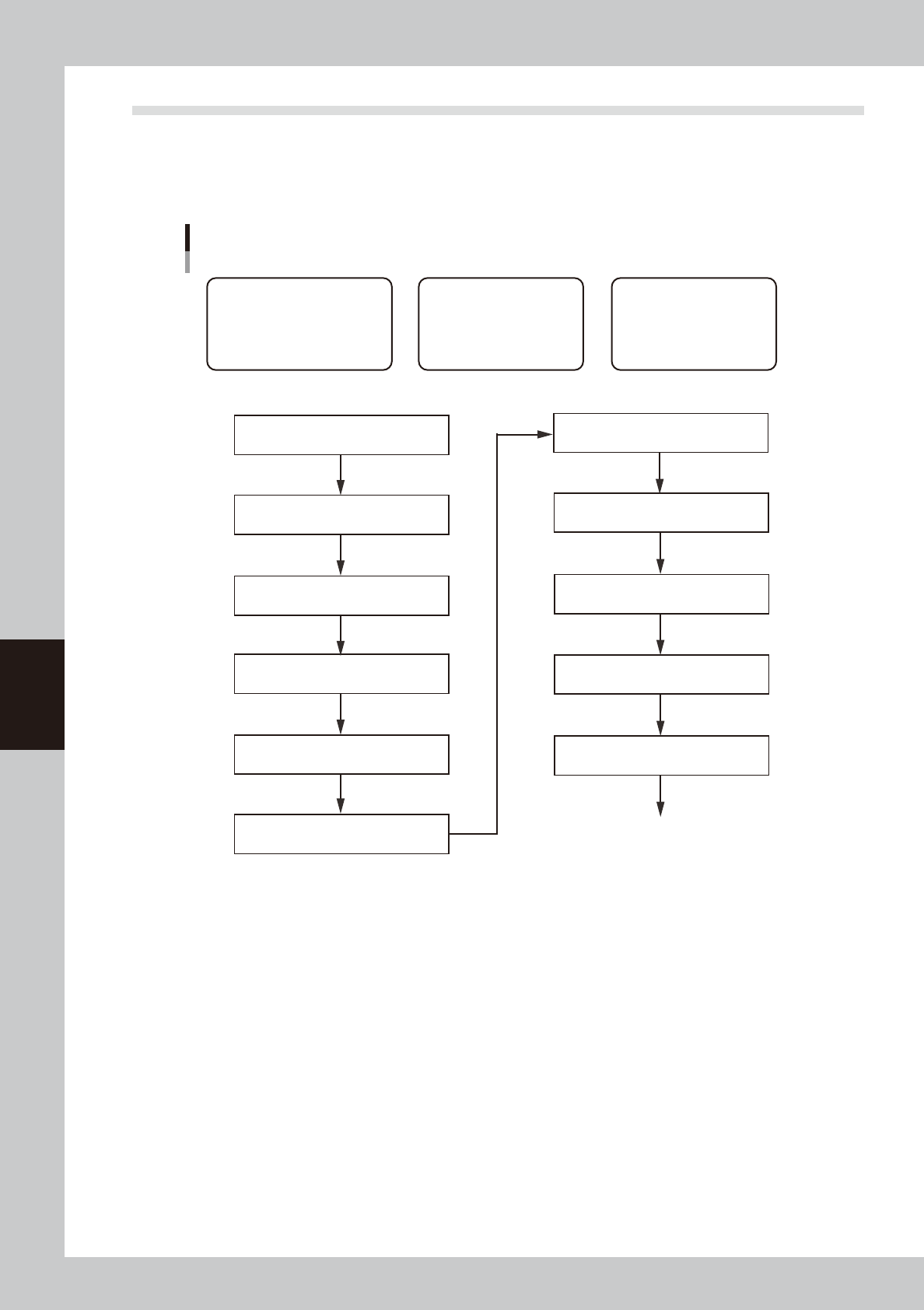
1.1 Creating the board data from mounter data
This section describes how to create dispenser board data using YAMAHA mounter board data. Follow the steps
below to create board data using the data that contains mount information and parts information of parts
requiring dispensing tasks. Since the title of each step is identical with the heading of each section in this
manual, refer to the table of contents to find the information on the steps you want to know.
Basic procedure for creating data from mounter board data
[1] Chapter 7, section 3.1
“Converting VIOS data into YGX data”
* When board data is not YGX
[1] Chapter 8, section 1.2
“Copying and moving the board data”
[2] Chapter 4, section 3
“Creating the predispense information”
[3] Chapter 5, section 5
“Creating the parts information”
Create parts data for dispensing
[3] Chapter 5, section 7.1
“Dispense distribution”
[1] Data related to board
• Basic information on nozzles,
temperature setting, etc.
• Information necessary to clamp
board and make corrections
[2] Predispensing operation
Information necessary to
ensure stable dispensing
[3] Dot dispensing operation
Information necessary to
dispense on board
[1] Chapter 5, section 4.1
“Board parameters (Board)”
[3] Chapter 7, section 4.2
“Deleting the dispensing points”
* When mount data contains parameters not requiring dispensing
[1] Chapter 5, section 3.1
“Nozzle information (Setup)”
[1] Chapter 5, section 3.2
“Temperature setting (Setup)”
[1] Chapter 5, section 6.5
“Mark Adjust mode”
[2] Chapter 4, section 4
“Position correction dispense function”
Perform dispensing test
63551-N7-00
5-3
5
Creating the board data
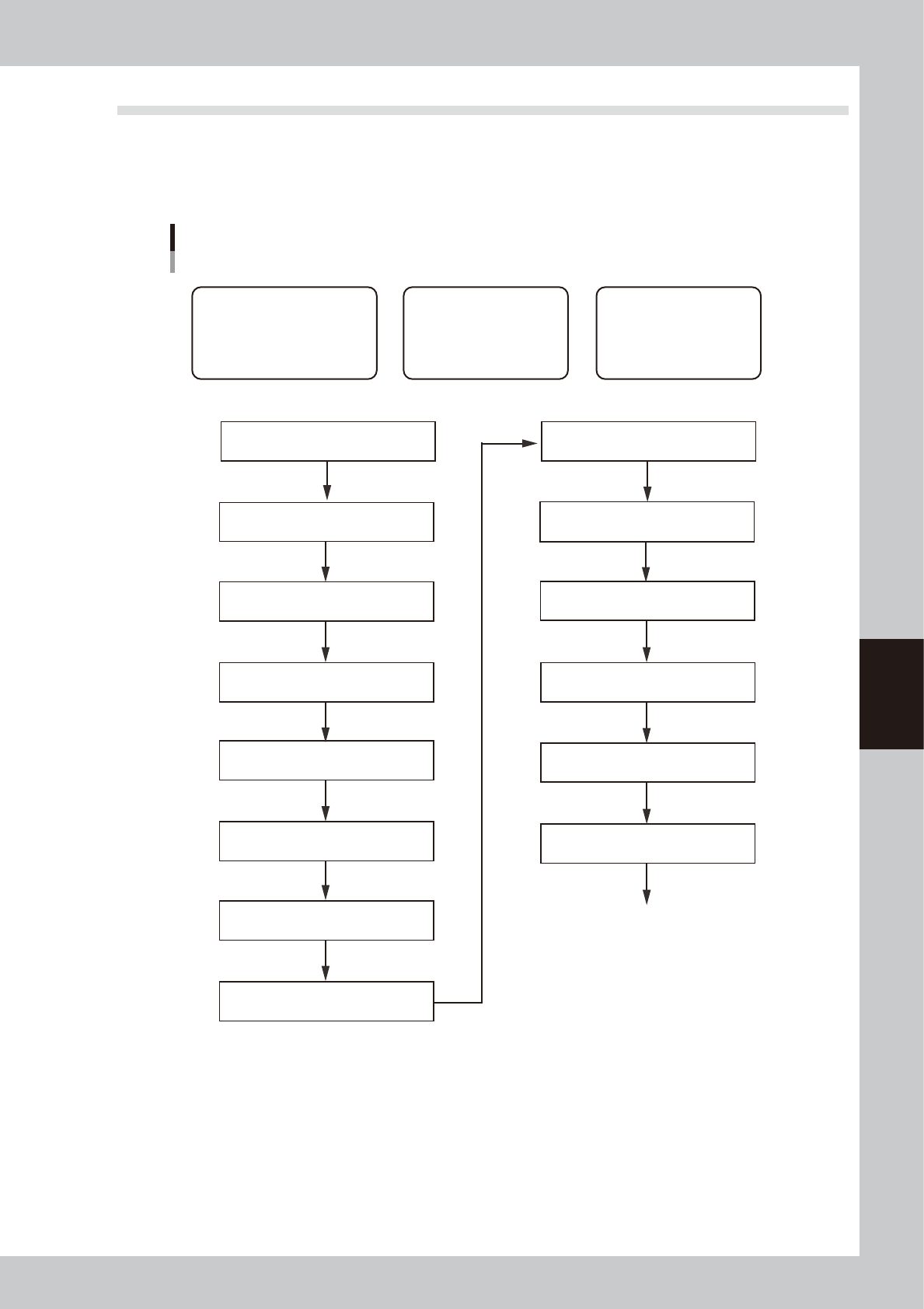
1.2 Creating the board data from CAD data
This section describes how to create dispenser board data from CAD data. As an example, converting only
mount information into dispenser data is explained. To perform ASCII data conversion, use the offline software.
Follow the steps below to create board data. Since the title of each step is the same as the heading of each
section in this manual, refer to the table of contents to find the information on the steps you want to know.
Basic procedure for creating data from CAD data
Example of converting mount data only
[1] Chapter 8, section 1.2
“Copying and moving the board data”
[2] Chapter 4, section 3
“Creating the predispense information”
[3] Chapter 5, section 5
“Creating the parts information”
Create parts data for dispensing
[3] Chapter 5, section 7.1
“Dispense distribution”
[1] Data related to board
• Basic information on nozzles,
temperature setting, etc.
• Information necessary to clamp
board and make corrections
[2] Predispensing operation
Information necessary to
ensure stable dispensing
[3] Dot dispensing operation
Information necessary to
dispense on board
[1] ASCII data conversion
Use offline software
[2] Chapter 4, section 4
“Position correction dispense function”
Perform dispensing test
[1] Chapter 5, section 4.3
“Offset parameters (Board)”
[1] Chapter 5, section 6
“Creating the mark information”
[1] Chapter 5, section 4.4
“Fiducial parameters (Board)”
[1] Chapter 7, section 3.1
“Converting VIOS data into YGX data”
* When board data is not YGX
[1] Chapter 5, section 4.1
“Board parameters (Board)”
[1] Chapter 5, section 3.1
“Nozzle information (Setup)”
[1] Chapter 5, section 3.2
“Temperature setting (Setup)”
[3] Chapter 7, section 4.2
“Deleting the dispensing points”
* When mount data contains parameters not requiring dispensing
63552-N7-00
5-4
5
Creating the board data
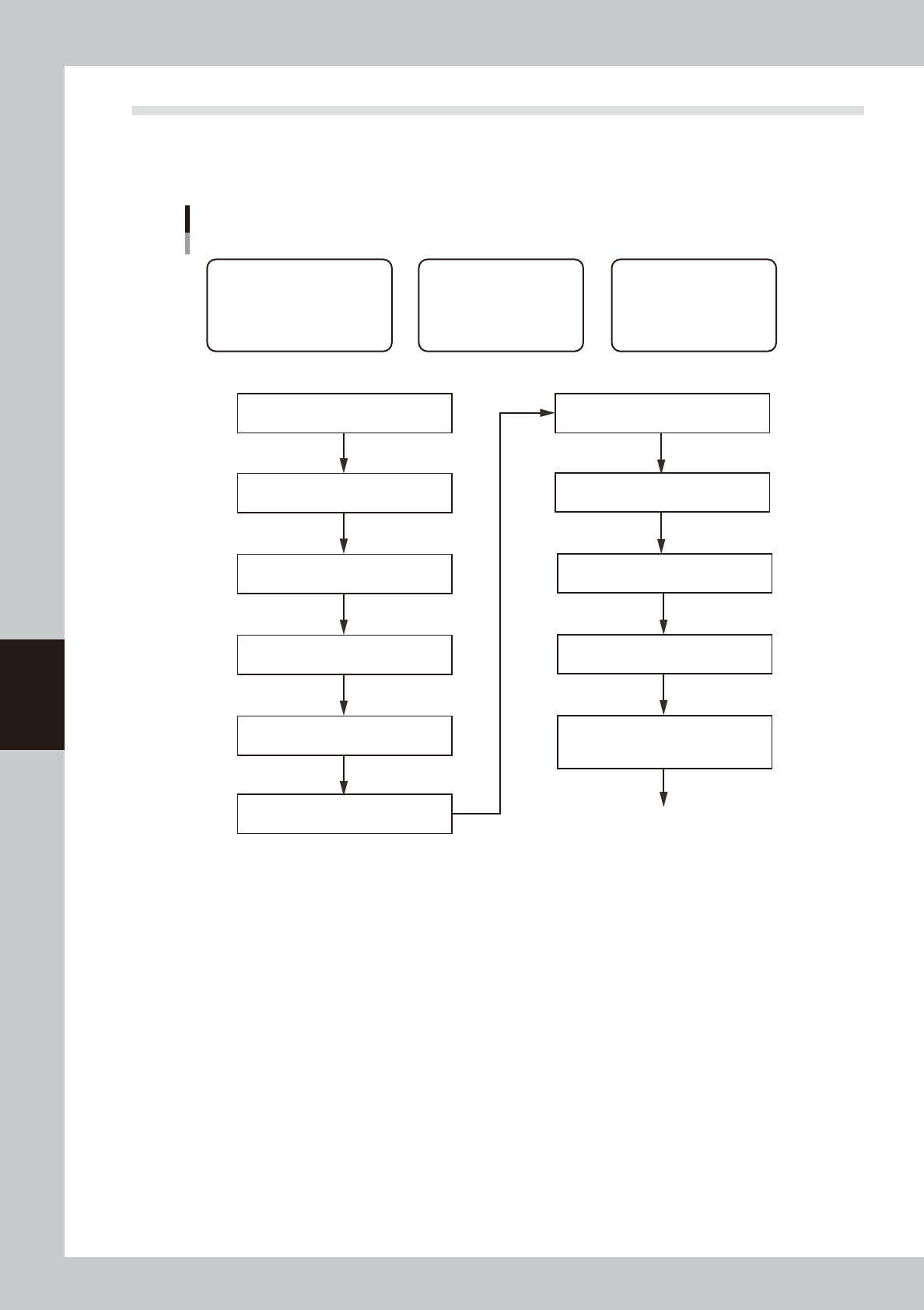
1.3 Creating the board data by manual input
This section describes how to create dispenser board data by manual input. Follow the steps below to create
board data. Since the title of each step is the same as the heading of each section in this manual, refer to the
table of contents to find the information on the steps you want to know.
Basic procedure for creating data by manual input
[1] Chapter 5, section 4.1
“Board parameters (Board)”
[1] Chapter 5, section 3.1
“Nozzle information (Setup)”
[1] Chapter 5, section 3.2
“Temperature setting (Setup)”
[1] Chapter 5, section 2.1
“Registering board names”
[1] Chapter 5, section 4.3
“Offset parameters (Board)”
[1] Chapter 5, section 6
“Creating the mark information”
[1] Chapter 5, section 6.5
“Mark Adjust mode”
[1] Chapter 5, section 4.4
“Fiducial parameters (Board)”
[2] Chapter 4, section 4
“Position correction dispense function”
[1] Data related to board
• Basic information on nozzles,
temperature setting, etc.
• Information necessary to clamp
board and make corrections
[2] Predispensing operation
Information necessary to
ensure stable dispensing
[3] Dot dispensing operation
Information necessary to
dispense on board
[2] Chapter 4, section 3
“Creating the predispense information”
[3] Chapter 4, section 4.9
“Dot dispense parameters (Board)
* After having entered the parameters,
perform a sort and other tasks for each head.
Perform dispensing test
63550-N7-00