YSD_Users_E.pdf - 第84页
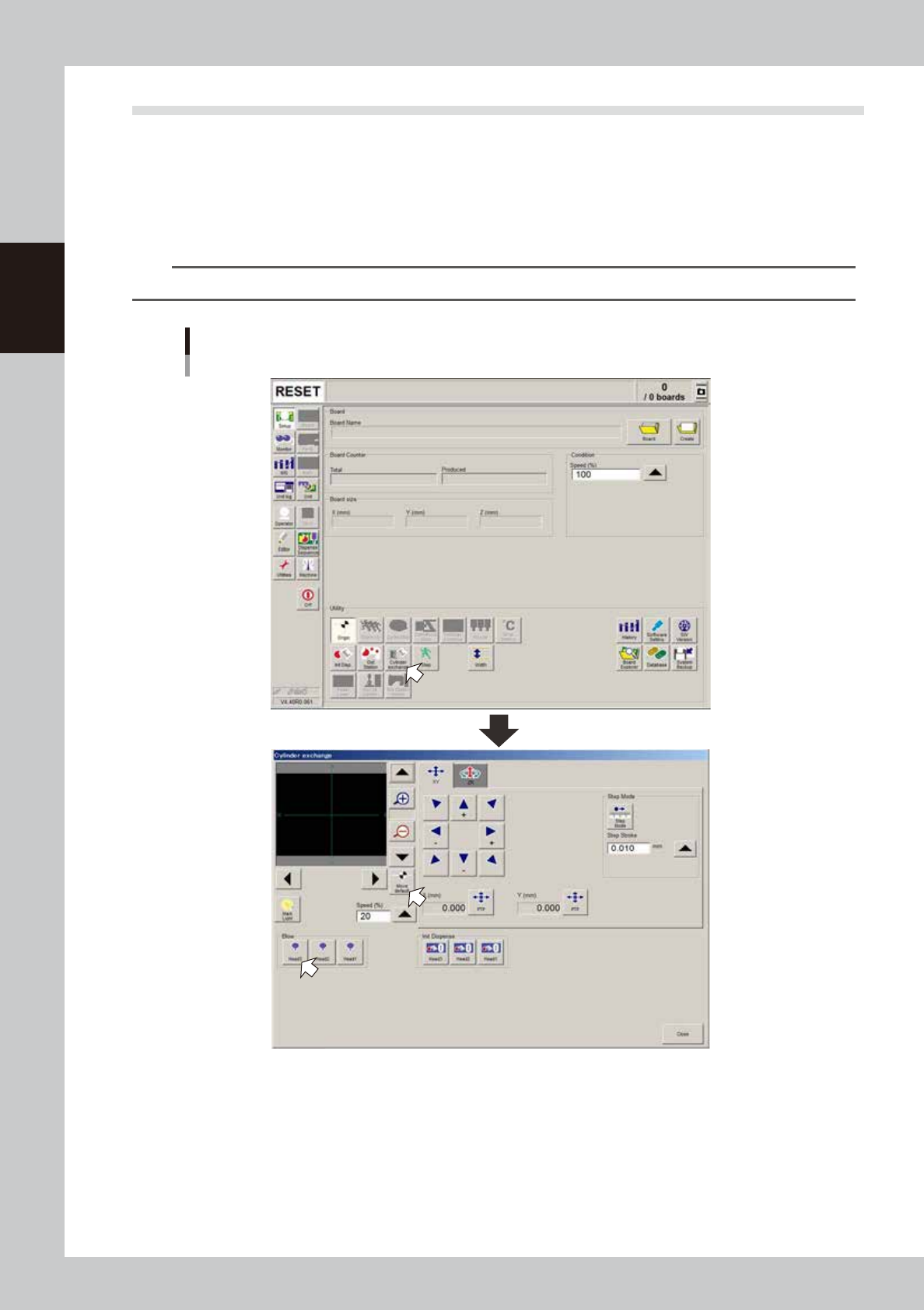
2-24 2 Basic operation 3.4 Head unit setup T his section explains how to set up the head unit and check the dispensing state. 1 Pr ess the [C ylinder ex change] button. The “Cylinder exchange” window appears. 2 Mo ve the…
2-23
2
Basic operation
6
Raise the push-up plate.
Check safety and press the [Push Up] button to raise the push-up plate. The board thickness input box
then appears. Enter the thickness of the board in millimeters and press the [OK] button. The push-up
plate moves up.
e
7
Check that the board is uniformly clamped on the conveyor.
After pressing the emergency stop button, open the safety cover. Then lightly tap on the board and also
check for warping of the board from the side. If the board is supported evenly with no warping, the
adjustment is okay.
At this point, if the tips of the push-up pins do not reach the bottom of the board or the pins are pushing
the board up too much, the push-up plate height should be adjusted.
8
Check that the board is clamped securely.
Close the safety cover and press the [Board Clamp] button on the [Unit]-[Conveyor] screen to clamp
the board. Then open the safety cover, lightly tap on the board, and check for warping of the board
from the side. If the board is supported evenly with no warping, the adjustment is okay.
c
CAUTION
The board clamp moves even in emergency stop. When manually operating the board clamp, close the safety cover
so that your fingers do not get pinched.
e
9
Remove the board.
Close the safety cover, release the emergency stop button, and press the [READY] button. Then press
the [RESET] button on the operation panel to make the board unclamped. Then press the emergency
stop button, open the safety cover, and remove the board.
0
Cancel emergency stop.
Close the safety cover, release the emergency stop button, and press the [READY] button.
TIP
It may be convenient to mark the positions of the push-up pins on the plate (with a label, magic marker, etc.) for each
board type.
2-24
2
Basic operation
3.4 Head unit setup
This section explains how to set up the head unit and check the dispensing state.
1
Press the [Cylinder exchange] button.
The “Cylinder exchange” window appears.
2
Move the head to the syringe replacement position.
Press the [Move default] button to move the head to the syringe replacement position.
TIP
You may press the emergency stop button and then move the head by hand to the syringe replacement position.
“Move axis” window
64205-N7-00
3
Check the nozzle type.
Check that the selected nozzle type is correct for production.
e
4
Open the safety cover.
Press the emergency stop button on the operation panel to stop the servo, and then open the safety
cover.
2-25
2
Basic operation
5
Attach a nozzle to the nozzle joint.
Use a hex wrench (1.5) to attach the nozzle to the nozzle joint.
6
Attach a nozzle to each nozzle.
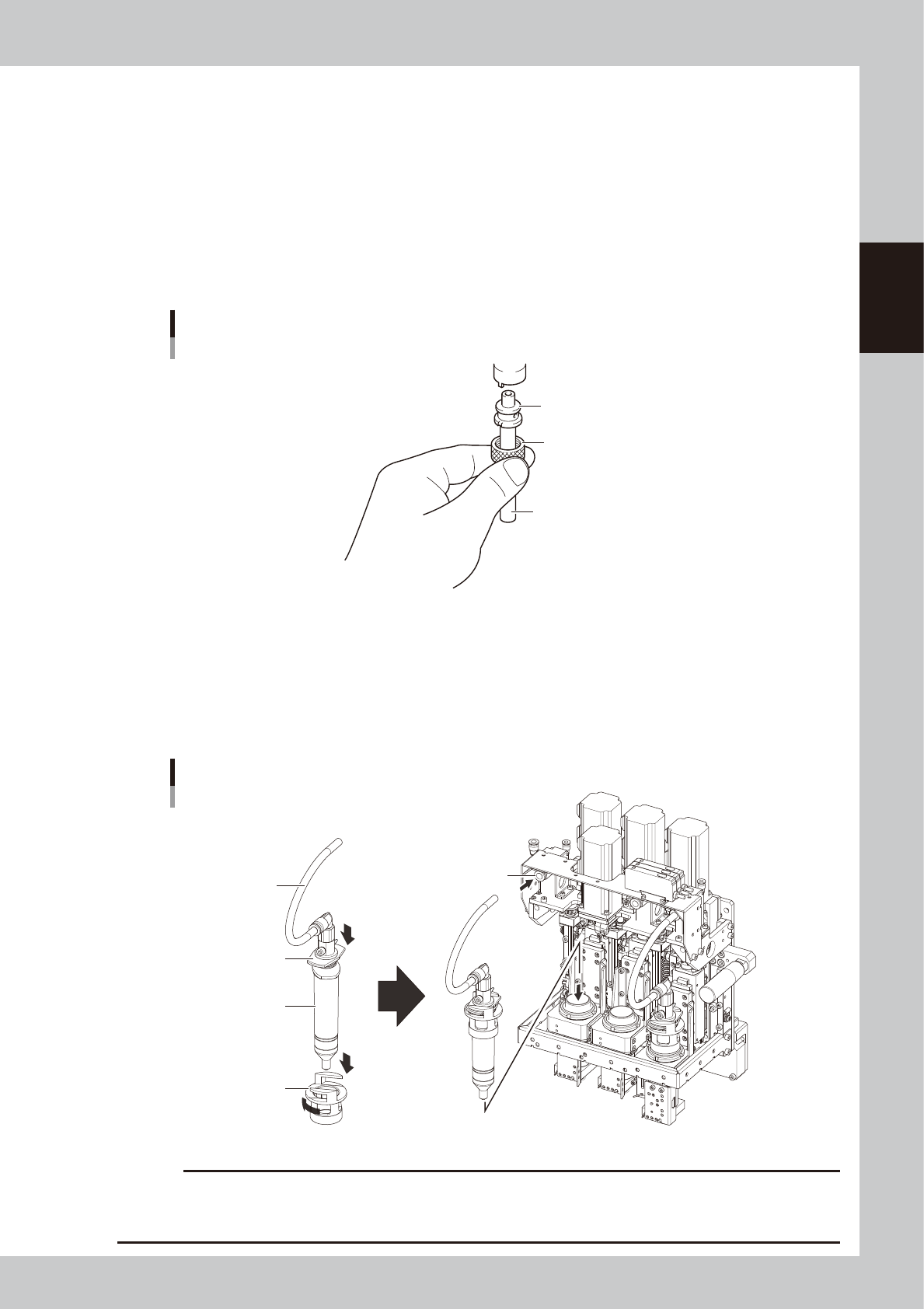
1. Hold the nozzle directly by hand or place the nozzle on the supplied air tube piece with the ring nut
passed along it as shown below.
2. Align the notch of the nozzle with the guide on the head shaft, then insert the nozzle into the head
shaft from the bottom.
3. Tighten the ring nut to secure the nozzle while pressing up the air tube against the nozzle so that it
does not drop.
Attaching a nozzle
Nozzle
Ring nut
Air tube piece (supplied)
63203-N7-00
7
Set the syringe.
1. Before installing the syringe in the head, attach the syringe adapter to the top of the syringe.
2. Insert the syringe into the adapter holder as shown.
3. Insert the syringe into the head.
4. Insert the air hose into the air fitting.
Setting the syringe in the adapter holder
Syringe adapter
Adapter holder
Syringe
Air hose
Air fitting
63204-N7-10
c
CAUTION
When a low-liquid sensor is used, if the product label affixed to the syringe is large, then peel if off at least the half from
the syringe tip. If the product label covers the lower part of the syringe where the low-liquid sensor is aligned, the
sensor cannot detect whether the liquid has run out or not.