YSD_Users_E.pdf - 第151页
4-23 4 Making the dispensing stable 3.1.6 Creating the dispense correction (map) Create the correction timer based on the mark data and predispense parameters y ou hav e created. Prepare a new syringe that provides very …
4-22
4
Making the dispensing stable
3.1.5 Checking the dispensing amount on the board
After setting the mark and adjusting the air pressure based on the results of the dispensing test on the dot
station, actually dispense adhesive on a board and check the difference in the dispensing amount between “on
the dot station” and “on the board”.
1
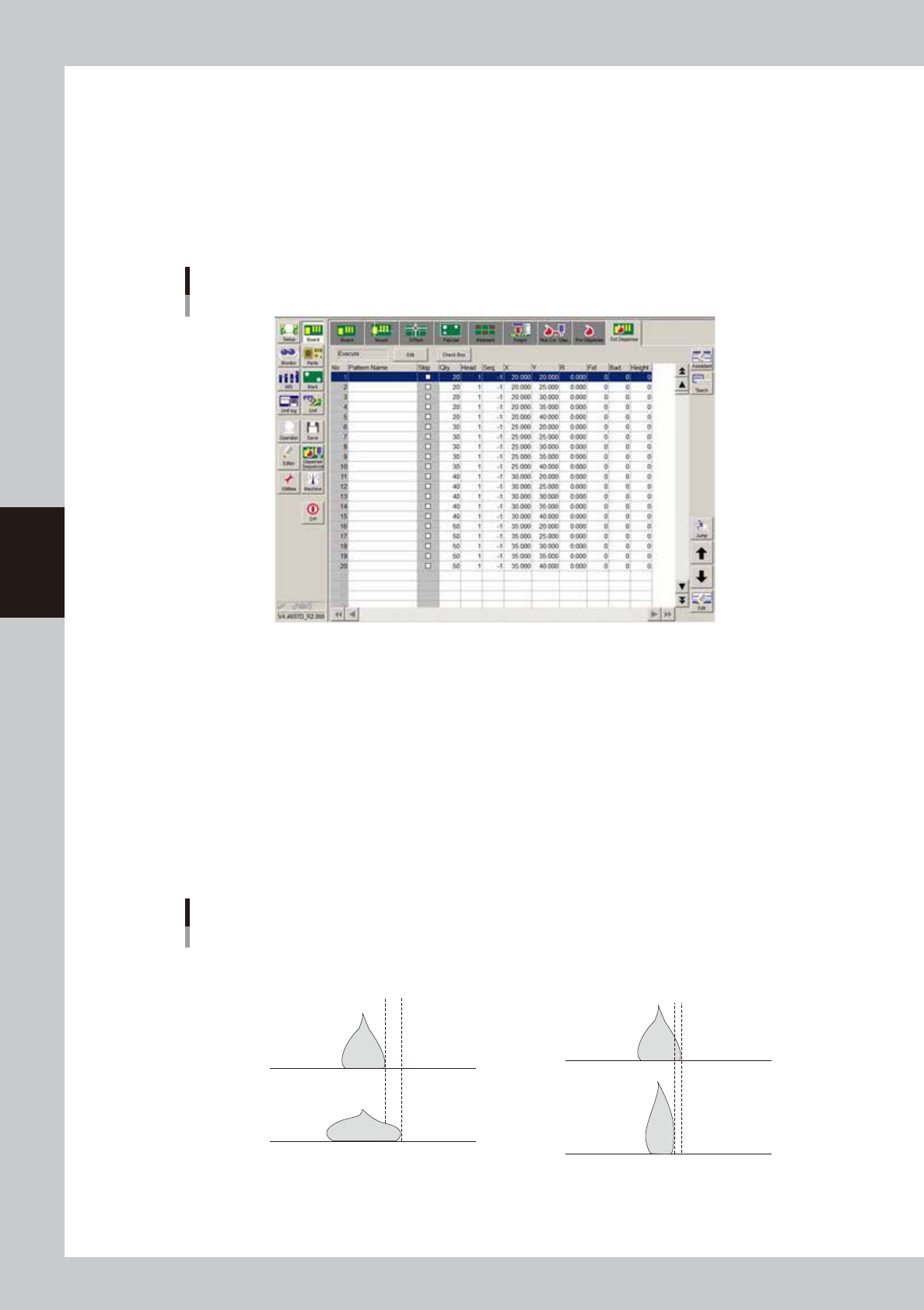
Enter the dot dispense parameters.
Open the [Board]-[Dot Dispense] screen and enter the parameters for checking the dispensing amount.
To check the stable dispensing amount, create five continuous points of liquid amount data.
Dot dispense parameter settings
Example
64439-N7-00
2
Dispense liquid on a board.
On the [Board]-[Pre Dispense] screen, press the [Edit] button and specify “Skip”. Then start automatic
operation to dispense liquid on a board. Repeat this process while changing the liquid amount until the
maximum desired dot size is dispensed on the board
3
Dispense liquid on the dot station.
Press the [Edit] button and return the setting to “On dot station”. Perform a dispensing test to dispense
each amount of liquid on the dot station.
4
Check the difference in the dispensing amount.
Check the liquid amounts dispensed on the board and on the dot station with eyes or with the moving
camera. When no problem is found, return the liquid amount of the predispense data to “20”.
Checking the dispensing state
Examples
Dispensing amount on board is greater
Dispensing amount on board is smaller
Dot station
Dot station
Board
Difference
Board
Difference
63411-N7-00
4-23
4
Making the dispensing stable
3.1.6 Creating the dispense correction (map)
Create the correction timer based on the mark data and predispense parameters you have created. Prepare a
new syringe that provides very stable dispensing. The syringe that was used in “3.1.4 Checking the dispensing
amount on the dot station” still holds a sufficient amount of liquid, then you may use it. This section describes
how to create the correction timer using a Type 111 nozzle as an example.
1
Change the number of predispensing points.
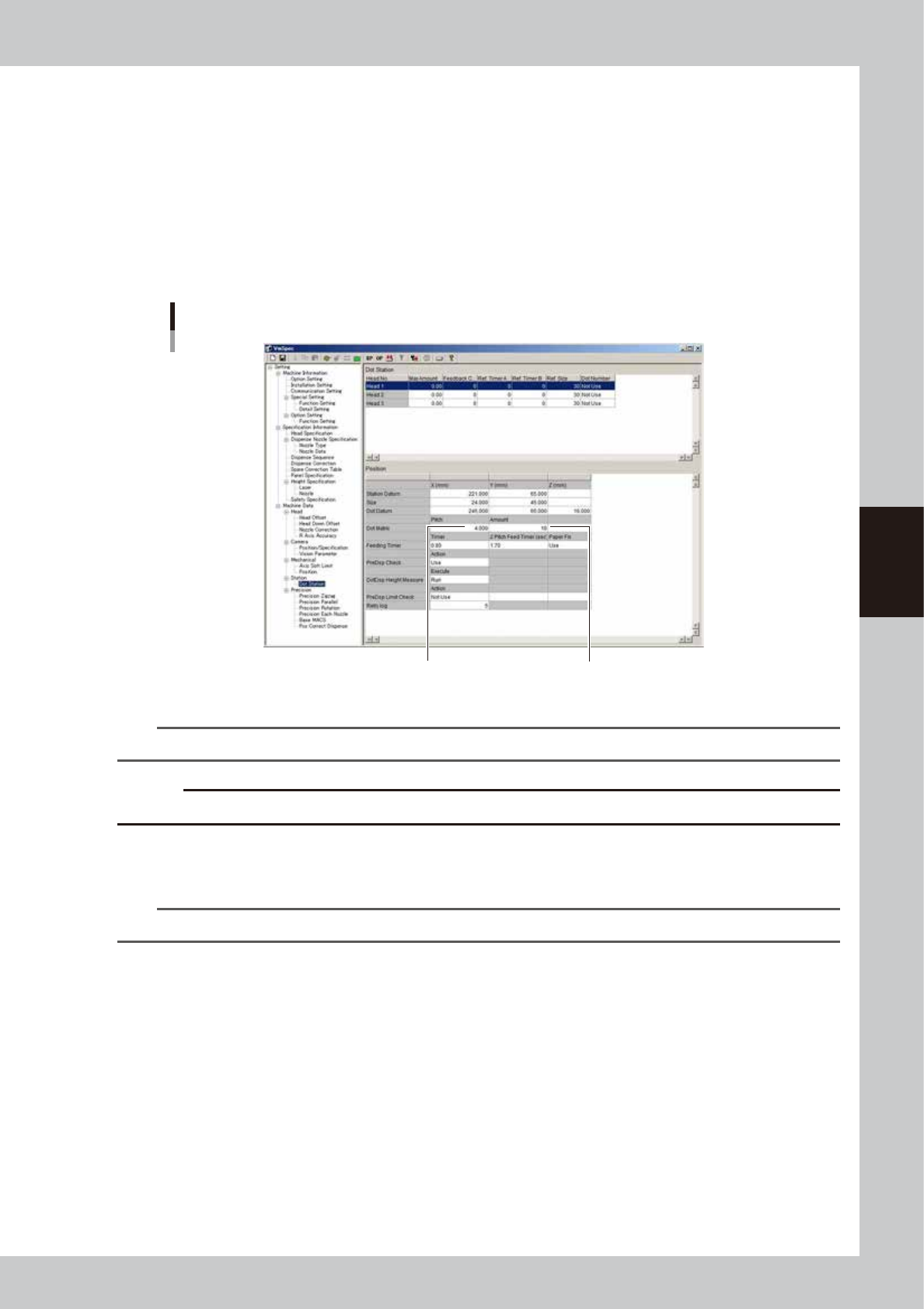
When using a standard nozzle, change the maximum number of predispensing points on the dot station.
On the [Machine] - “Machine Data” - “Dot Station / Position” screen, set “Dot Matrix - Pitch” to “4” and
“Dot Matrix - Amount” to “10”.
Changing the number of predispensing points
Set “Pitch” to “4.000”.
Set “Amount” to “10”.
64440-N7-00
n
NOTE
You can reduce paper consumption by changing the maximum number of predispensing points.
c
CAUTION
Do not change this setting when using a custom-made nozzle.
2
Reload the board data.
Press the [Board] button and then the [Select] button to reload the board data.
n
NOTE
After changing the machine data setting, the board data must be reloaded to enable the change.
3
Start the adjustment utility.
1. Press the [Utilities] button.
2. Select “Supervisor”, enter the password, and press the [OK] button.
3. Press the [Dispense Correction] button.
4-24
4
Making the dispensing stable
4
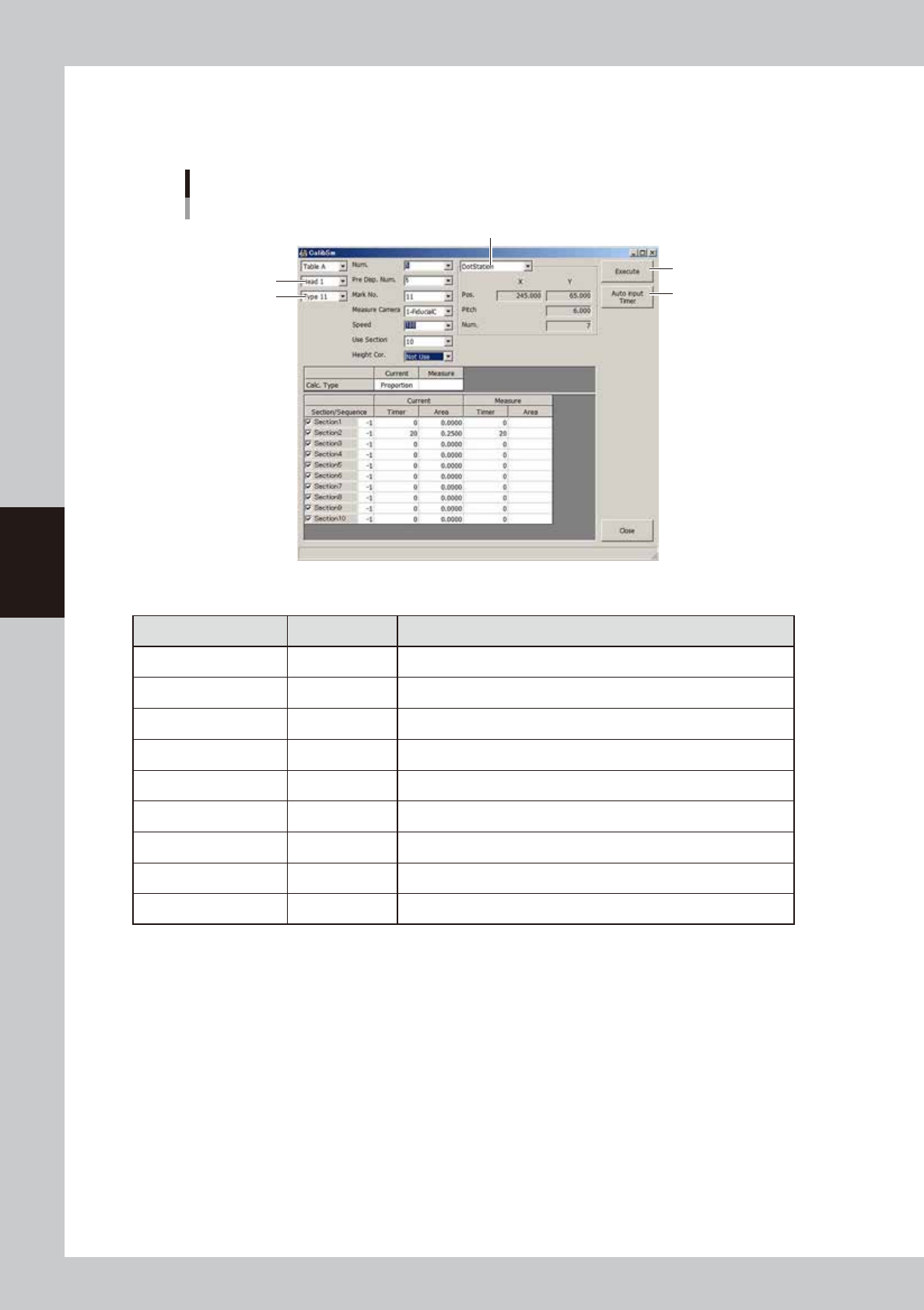
Set the parameters.
For the settings of each nozzle, see “
n
Nozzle settings” in “3.1 Using the dispense correction function” in
this chapter.
Parameter setting
Example for Type 111 nozzle
Dispensing location
[Auto Input Timer] button
[Execute] button
Type
Head
64441-N7-00
n
Example of settings for Type 111 nozzle
Parameter Setting Description
Head Head 1 Select the head to use for dispensing.
Type Type 11 Select the correction number to make settings.
Num. 5 Set the number of measurement points. (5 or more)
Pre. Disp. Num. 5 Set the number of predispensing points. (3 or more)
Mark No. 11 Set the mark No. used for recognition.
Speed 100 Set the speed to “100”.
Use Section 10 Set the number of sections to be corrected. (10 is recommended)
Height Cor. Not used If a non-contact nozzle is used, set this item to “Use”.
Dispensing location
Dot station.
Set the dispensing location.