YSD_Users_E.pdf - 第161页
4-33 4 Making the dispensing stable 3.1.8 Checking that each setting is consistent Check that eac h setting at the numbers below is consistent to ensure correction will be performed accurately . T he description here is …
4-32
4
Making the dispensing stable
n
Constant type
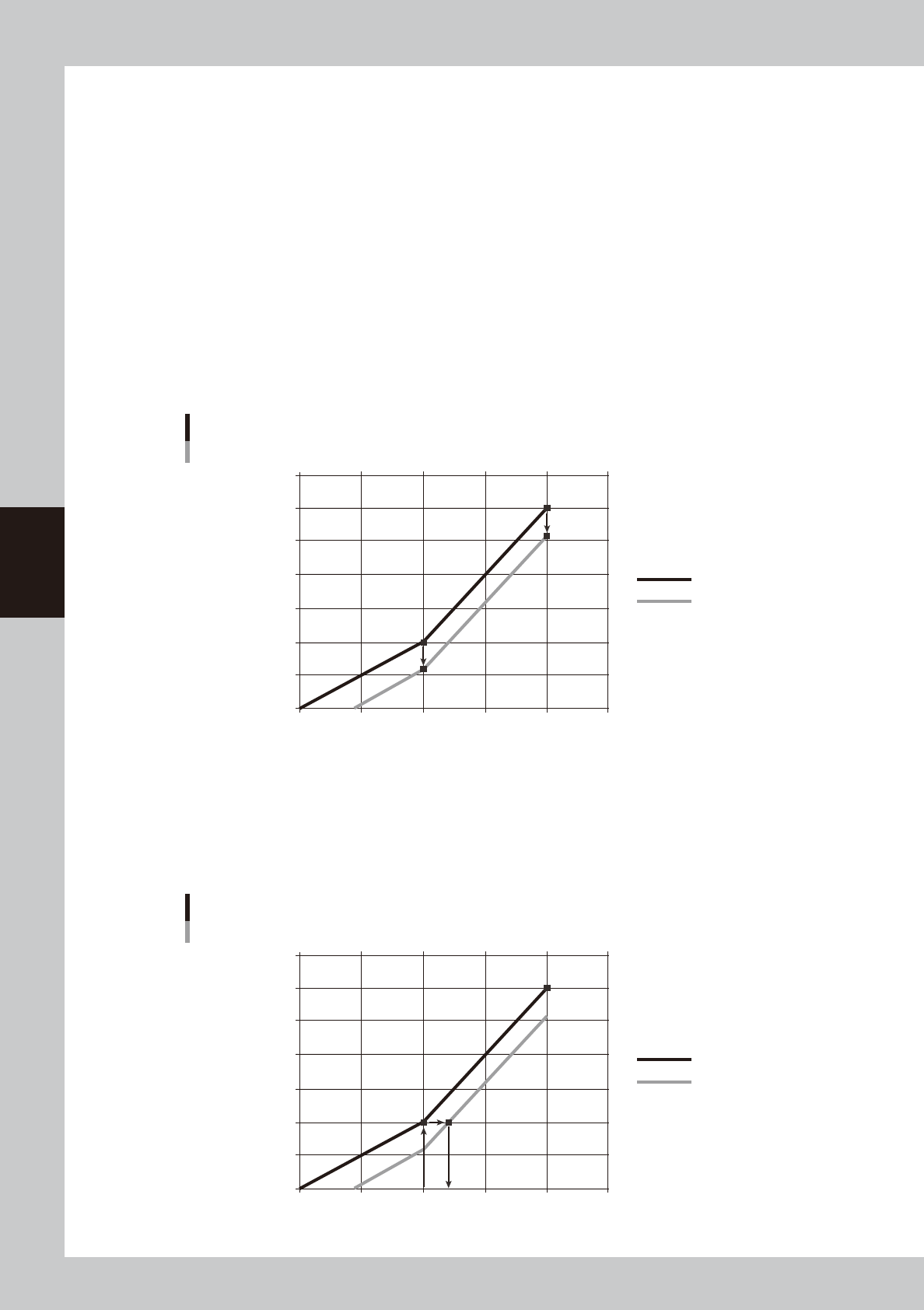
The constant type uses the following calculation formulas to calculate and correct the area. The dispensing liquid amount
is then corrected based on this calculated results.
(Additional value) = (Area obtained by recognition) - (Standard area calculated from liquid amount used)
(Correction area) = (Standard area of table) × (Additional value)
Example of constant type correction
For example, if a liquid amount of 20 is dispensed to check the dot area and the measured dot area is 0.60, then the
correction value is calculated as follows:
(Additional value) = (Area recognized) - (Standard area calculated from liquid amount timer used)
= 0.60 – 1.00
= −0.40
The correction ratio obtained is applied to all sections. The graph below shows the relation between the liquid amount
and the correction area.
0
0.5
1.0
1.5
2.0
2.5
3.0
3.5
0 10 20 30 40 50
Constant type correction graph
Example
Dispensing liquid amount [msec]
Dispensed area [mm2]
Standard area
−0.4
−0.4
Correction area
63415-N7-00
Dispense correction is automatically performed based on the standard area and correction area.
1. Find the standard area using the same dispensing liquid amount of 20 [msec] as used for checking the dispensed area.
(=1)
2. Find the point where the graph of the area found in step 1 intersects with the graph of the correction area.
3. The liquid amount at the point found in step 2 is the correction value.
0
0.5
1.0
1.5
2.0
2.5
3.0
3.5
0 10 20 30 40 50
Constant type correction graph 2
Example
Dispensing liquid amount [msec]
Dispensed area [mm2]
Standard area
Correction area
24
Correction value
1
2
3
63416-N7-00
4-33
4
Making the dispensing stable
3.1.8 Checking that each setting is consistent
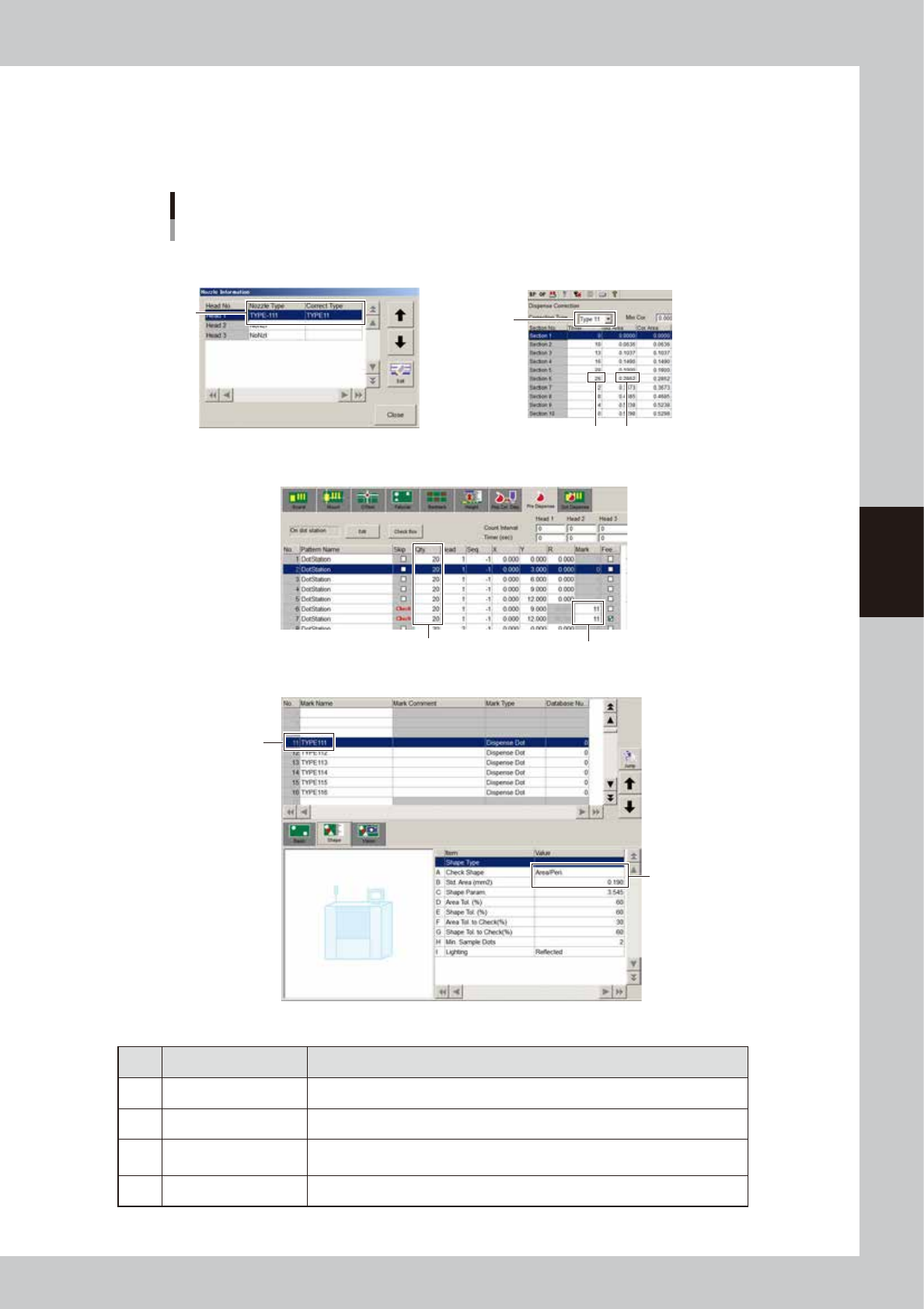
Check that each setting at the numbers below is consistent to ensure correction will be performed accurately.
The description here is given using a Type 111 nozzle as an example. If a setting was freely made, then adjust
it to match the other settings.
Check for each setting
Example for Type 111 nozzle
[Setup] - [Nozzle] screen
[Machine] - “Dispense Correction” screen
[Board] – [Pre Dispense] screen
[Mark] screen
1
1
4
4
3
3
2
2
64447-N7-00
n
Example of settings for Type 111 nozzle
Setting Description
1 Type -111: Type 11 Checks if correction type matches the target nozzle.
2 11 Checks if the mark No. to be used is correct.
3 Area/Per. : 0.19
Checks if “Check Shape” is set to “Area/Peri.” and the value for the standard
area is correct.
4 20 Checks if the liquid amount and timer values match.
4-34
4
Making the dispensing stable
4. Position correction dispense function
4.1 Overview and item restrictions
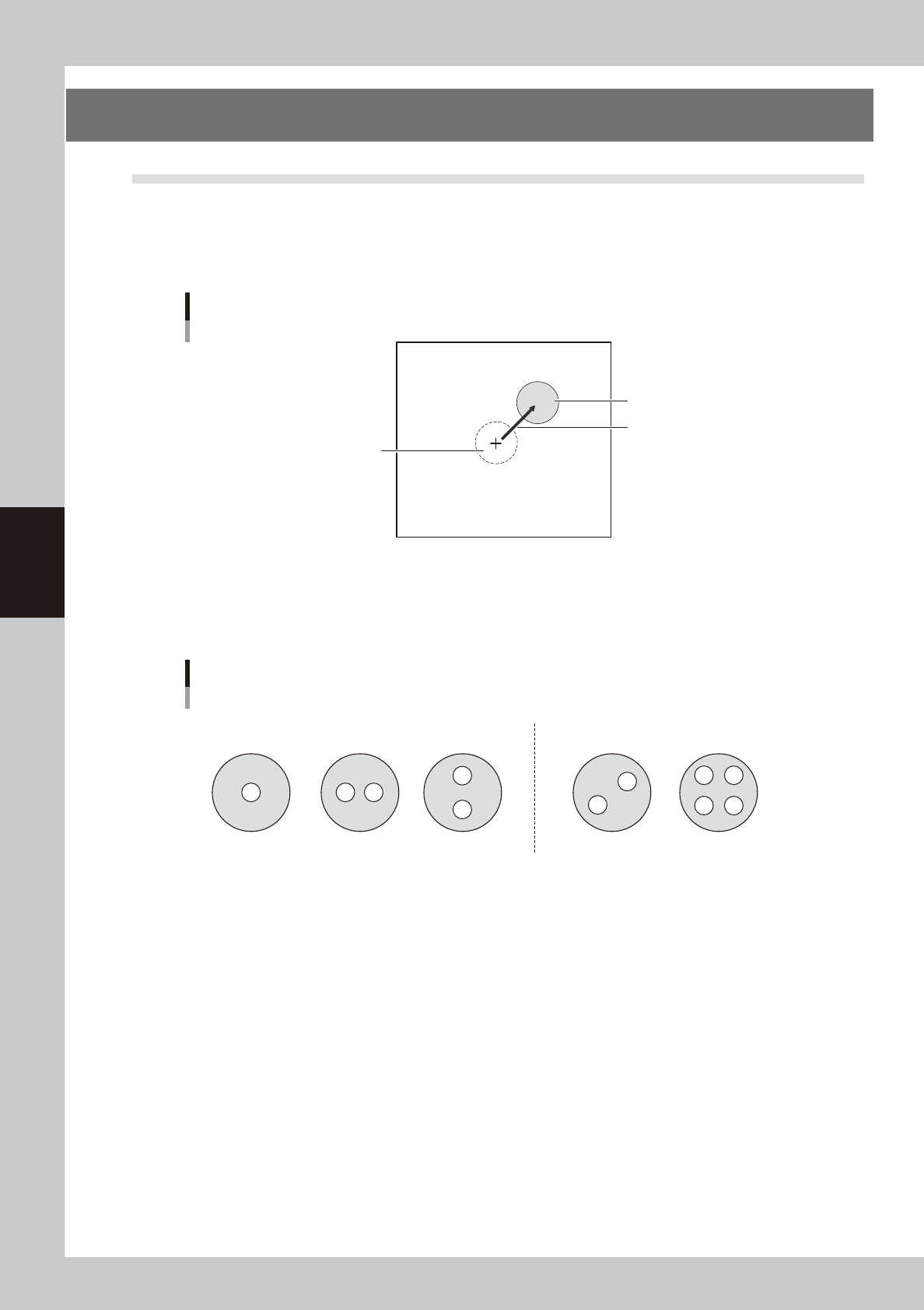
This function measures the deviation in dispensing position caused by the individual nozzle accuracy and the
rattle or play at the nozzle joint, and corrects it to improve the dispensing accuracy. This function recognizes
the dot dispensed on the dot station or dot plate, finds the deviation from the ideal dispensing position, and
corrects it when dispensing on the board.
Deviation from ideal dispensing position
Ideal dispensing position
Dispensing position
Amount of deviation
63402-N7-00
Nozzle shapes compatible with position correction dispensing are 1-shot and 2-shot nozzles (same for solder
nozzles). This function is not compatible with 2-shot nozzles whose hole position is offset in both X and Y
directions.
Example of compatible nozzles
Usable Not usable
63403-N7-00
• The “Execute after Board Data Loaded” and “Execute after Cover Opened” parameters on the [Machine] - “Setting”
- “Machine Data” - “Precision” - “Pos Correct Dispense” screen are supported by V4.42STD R1.000 or later versions.
• The dot plate is supported by V4.42STD R1.000 or later versions.
• When using a dispensing liquid whose dots are not recognizable, the liquid amount correction and position correction
may not be possible. (The dot plate in particular does not have backlighting, so dots may not be recognized even if
they are recognized on the dot station.)
• Position correction dispense data will be lost when board data is saved in machines (YGD, HSD-XG, etc.) or offline
software that do not support the board data containing position correction dispense data.
• Y.Fact is supported by V1.41STD R1.000 or later versions.