CM602all_EJM8AESM_Service Manual.pdf - 第186页
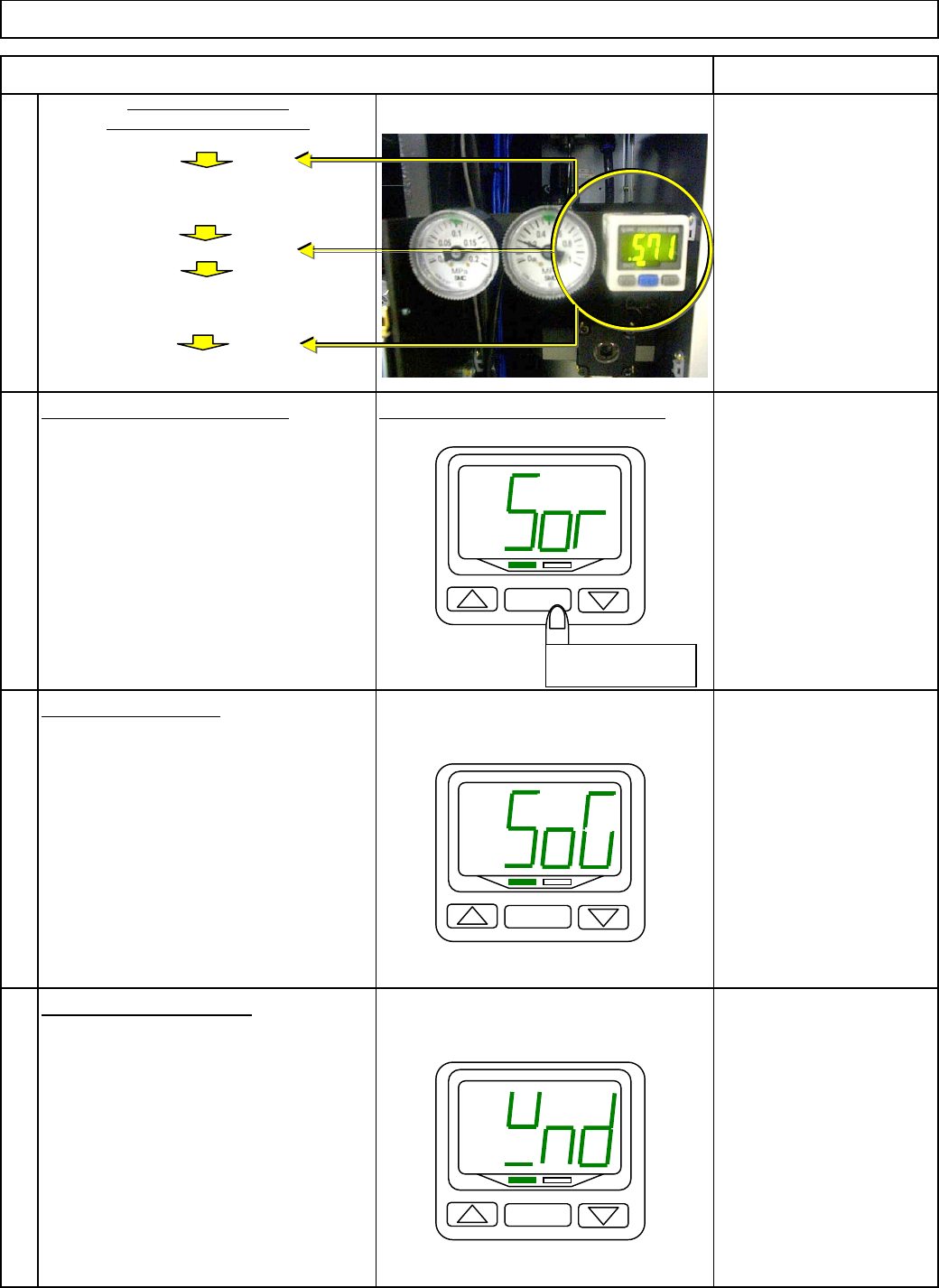
Maintenance Adjustment Main Body Beam Item Remark no ( normal o p en ) Determine the out p ut t yp e b y p ressin g nC ( normal closed ) [ SET ] . 17 The "out p ut t yp e" setu p screen is dis p la y ed. Determ…
Maintenance Adjustment Main Body Beam
Item Remark
13
can be set.
14
Sor
(
red/on
)
Determine the color b
y
p
ressin
g
[
SET
]
. SoG
(g
reen/on
)
rEd
(
red
)
15
The "O
p
eration mode" setu
p
screen
is dis
p
la
y
ed. Grn
(g
reen
)
H
y
s
(
H
y
steresis
)
Determine the o
p
eration mode b
y
wnd
(
wind com
p
arator
)
p
ressin
g
[
SET
]
.
16
The "Out
p
ut t
yp
e" setu
p
screen
is dis
p
la
y
ed.
Main Air Pressure and
Pressure-drop warning level
Display the initial setup screen.
Measurement mode
Initial setup
"Output type" and "Response time.
"
Specify the pressure.
Measurement mode
Specify "Operation mode."
pressure-drop warning signal is emitted.
Measurement mode
Specify the pressure at which a
Specify "Display color", "Operation mode
"
Hold down [SET] for 2 sec. or more.
Press [△] and [▽] as necessar
y
so that "SoG" is displayed on the monitor.
Press [△] and [▽] as necessar
y
Set up "Monitor color."
Hold down [SET] for 2 sec. or more.
"Sor" is displayed and "Display color
"
so that "wnd" is displayed on the monitor.
SET
Hold down for 2
sec. or more.
SET
SET
EJM8A-E-SMA040113-A01-00
Page 4-1-13-5
Maintenance Adjustment Main Body Beam
Item Remark
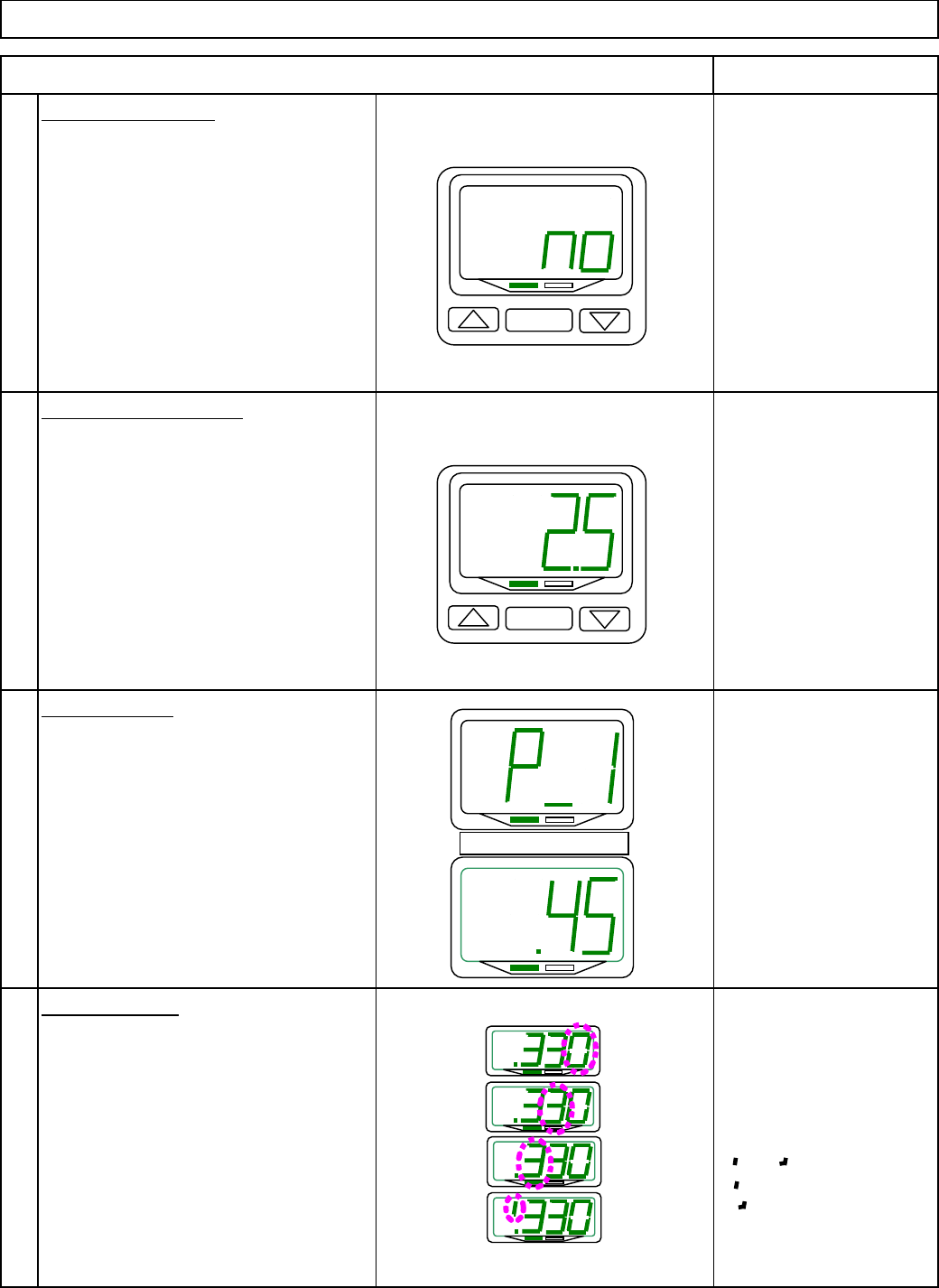
no
(
normal o
p
en
)
Determine the out
p
ut t
yp
e b
y
p
ressin
g
nC
(
normal closed
)
[
SET
]
.
17
The "out
p
ut t
yp
e" setu
p
screen
is dis
p
la
y
ed.
Determine the out
p
ut t
yp
e b
y
p
ressin
g
[
SET
]
.
18
Once the setu
p
is finished
,
the
measurement mode is returned.
---
that "P 1" and the
p
reset valu
e
flash alternatel
y
.
---
To
g
o into "Value Chan
g
e" mode
,
p
ress
[
△
]
or
[
▽
]
. ---
19
p
ress
[
SET
]
.
If no value is input for 10 sec.
[
△
]
and
[
▽
]
as necessar
y
.
in "value change" mode, the
currently displayed value will
To hi
g
hli
g
ht the next di
g
it
,
be set automatically and the
set value will be displayed.
20
flash.
)
When the 4th digit is 0:
or flashes.
means positive.
down
[
SET
]
for 1 sec. or more so
means negative.
returned.
press [SET] when the 4th
digit flashes.
Specify "Response time."
Set up pressure.
How to set value:
Specify your convenient value, usin
g
.45
Once the setup is finished, hold
Specify "Output type."
.05
2.5
20
so that "2.5" is displayed on the monitor.
1280
640
160
.60
To return to the 1st digit,
press [SET]. (The next digit will
that the measurement mode will be
To display the next preset value,
P_1
P_2
Press [SET] in measurement mode so
Press [△] and [▽] as necessar
y
so that "no" is displayed on the monitor.
Press [△] and [▽] as necessar
y
SET
SET
Flash alternately
H
(Hysteresis)
EJM8A-E-SMA040113-A01-00
Page 4-1-13-6
Maintenance Adjustment Main Body Beam
Item Remark
To dis
p
la
y
the current setu
p
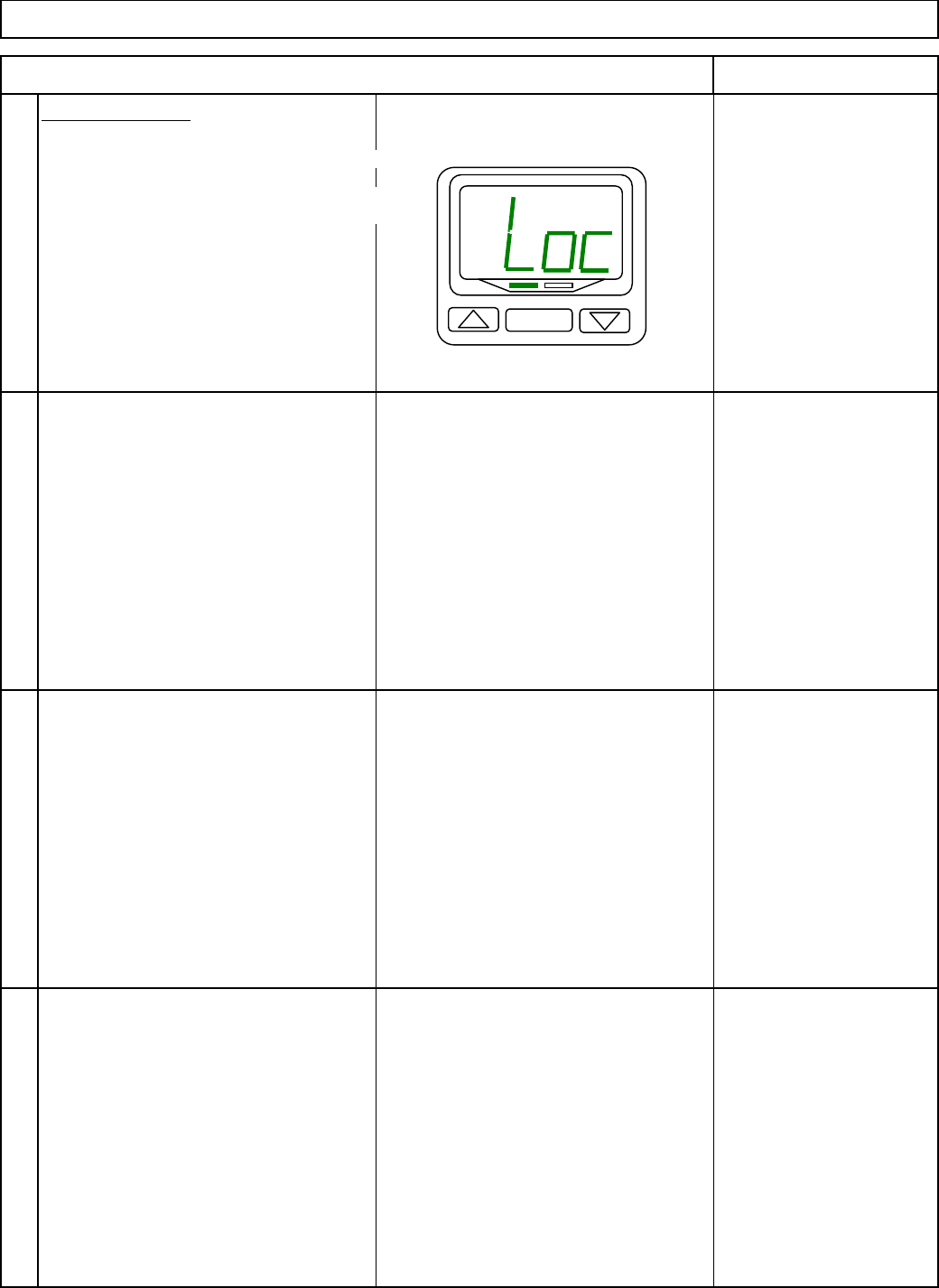
: "Loc" or
"UnL
,
" hold down
[
SET
]
for 4 sec. or more.
To avoid accidental value chan
g
e caused
b
y
careless button o
p
eration
,
select "Loc"
21
so that an
y
ke
y
o
p
eration is re
j
ected.
13
13
13
Specify "Key lock."
SET
EJM8A-E-SMA040113-A01-00
Page 4-1-13-7