Smart Graphical User Interface (SmartG) Overview_rev1.pdf - 第124页
Copyright © ViT rox All Rights Reserved . 124 Shortcut Key
Copyright © ViTrox All Rights Reserved.
Negative Test result Inspection
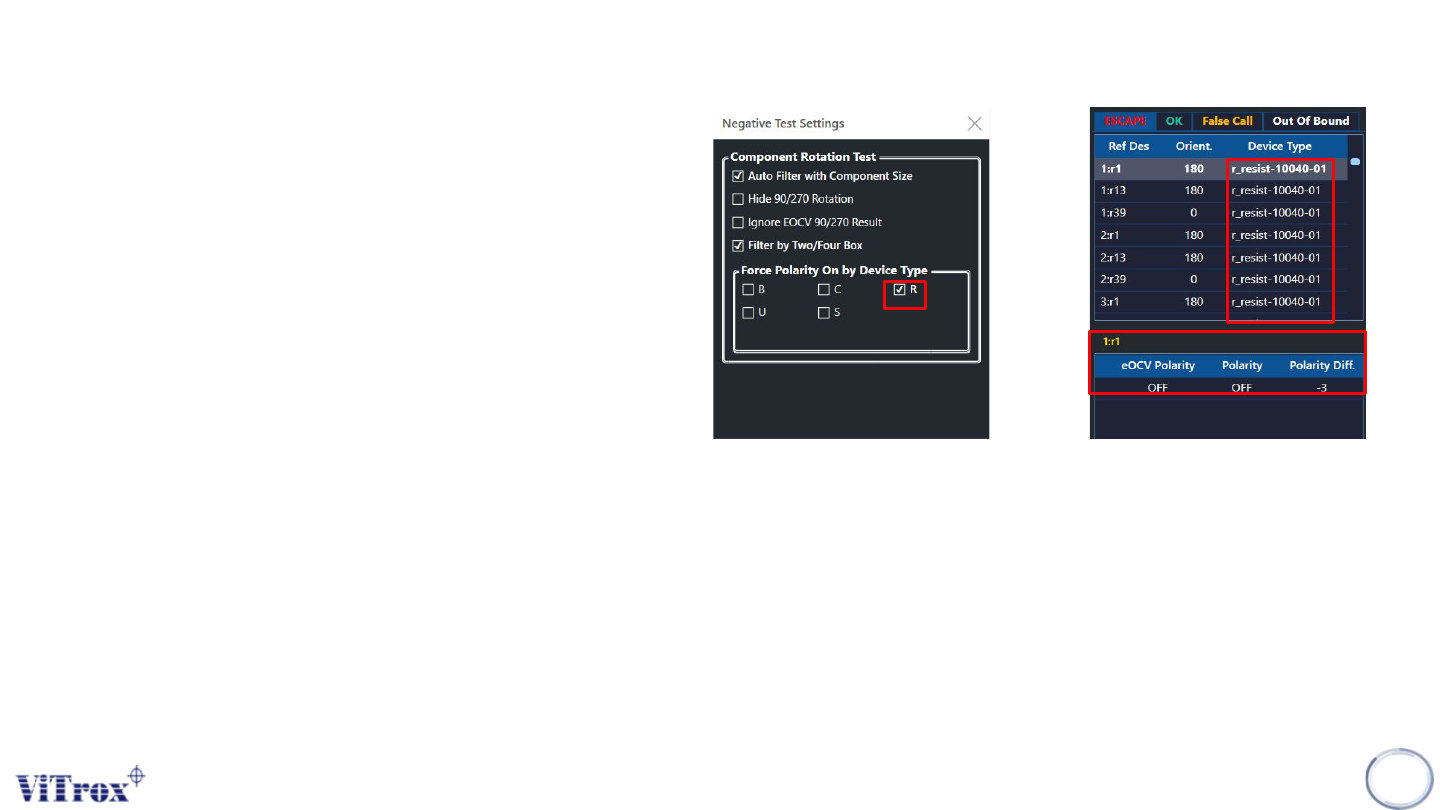
Force polarity on by device type
Force Polarity On by device type is used to force the
program to turn on polarity features on selected device
type. The selected device type will be forced to run, if the
polarity or OCV is not enabled, the reference designator
shows failed.
Figure shows the force polarity on by device type set to
r-type. The r-type reference designator without eocv
polarity and polarity is considered as escapee.
123
Figure 111: Force Polarity on r-type and r-type component fall into escapee

Copyright © ViTrox All Rights Reserved.
124
Shortcut Key
Copyright © ViTrox All Rights Reserved.
Shortcut Key
Shortcut key is used to perform actions by keyboard keys only.
125
Keyboards Description
Ctrl+A Inspect All fiducial
Ctrl+C Compile
Ctrl+G Don’t save failed image
Ctrl+H Save failed image
Ctrl+E Enter algorithm editor