VI User Manual.pdf - 第249页
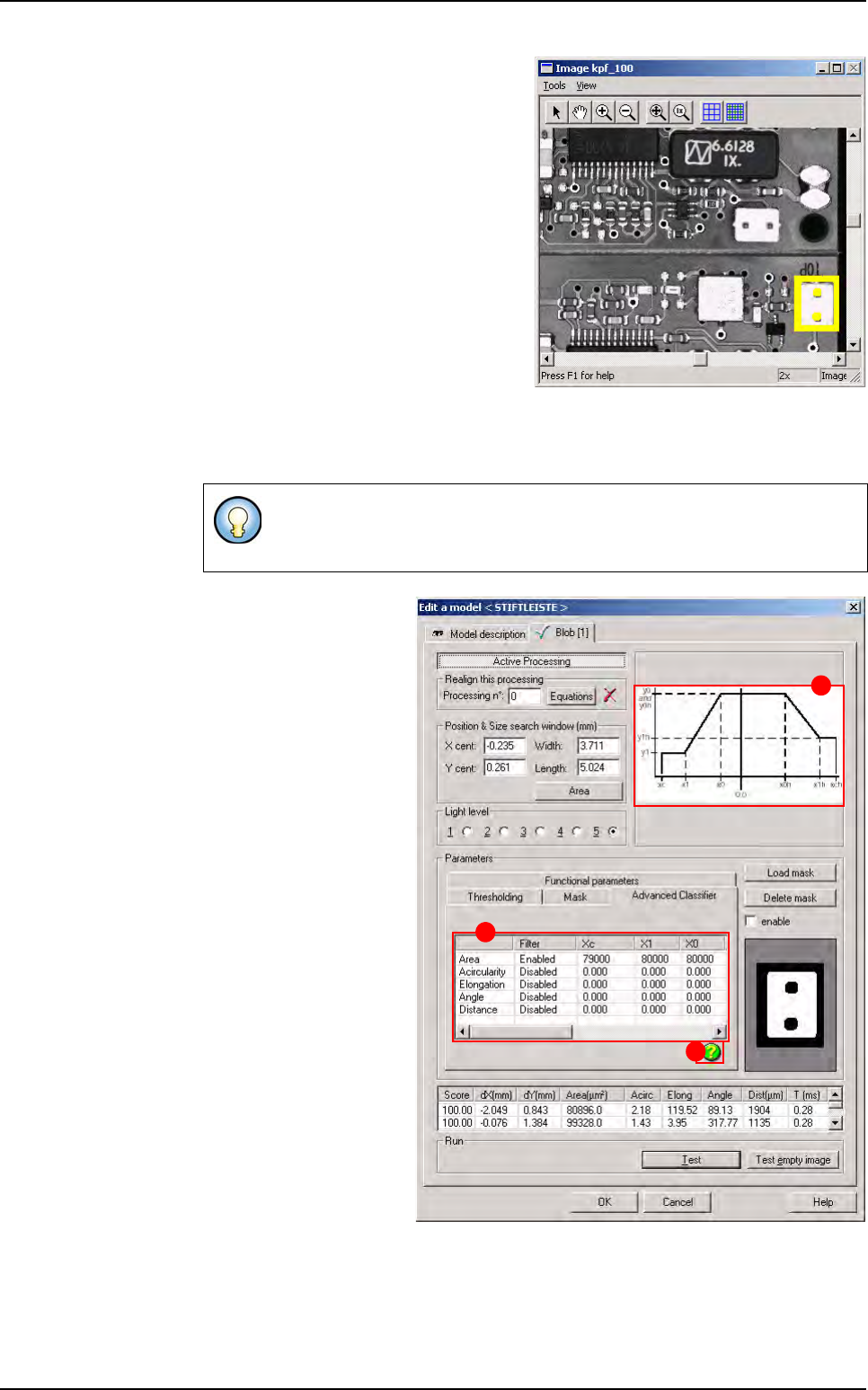
Tools library Vision 2007 4.10 User Manua l Rev 01 7 - 87 Feature values between xc and x1 are mapped to a score of y1. Featur e values bet ween x1 an d x0 are mapped linearly to the ran ge of scores between y1 and y…
Tools library
7 - 86 Vision 2007 4.10 User Manual Rev 01
2. Offset adjustment
Place the mask in the area with the
Off-
set X/Y [pixels]
(D) parameters.
Display or not the mask on the image
with the
Do not display the mask (E)
button.
The mask appears in yellow in the cam-
era window.
Advanced Classifier tab
This tool introduces scoring functions for each filter. Area, Acircularity, Elongation,
Angle, Distance
Click on the icon (
A) to
display the drawing (
B) in
order to choose the en-
abled parameters (
C).
Define a scoring function by defining values for xc, x1, x0, x0h, x1h, xch, y1, y1h, y0
and y0h.
The
Advanced Classifier
does not modify the functional parameters.
The values of the Advanced Classifier are independent of the values of the
functional parameters.
A
B
C
Blob
Tools library
Vision 2007 4.10 User Manual Rev 01 7 - 87
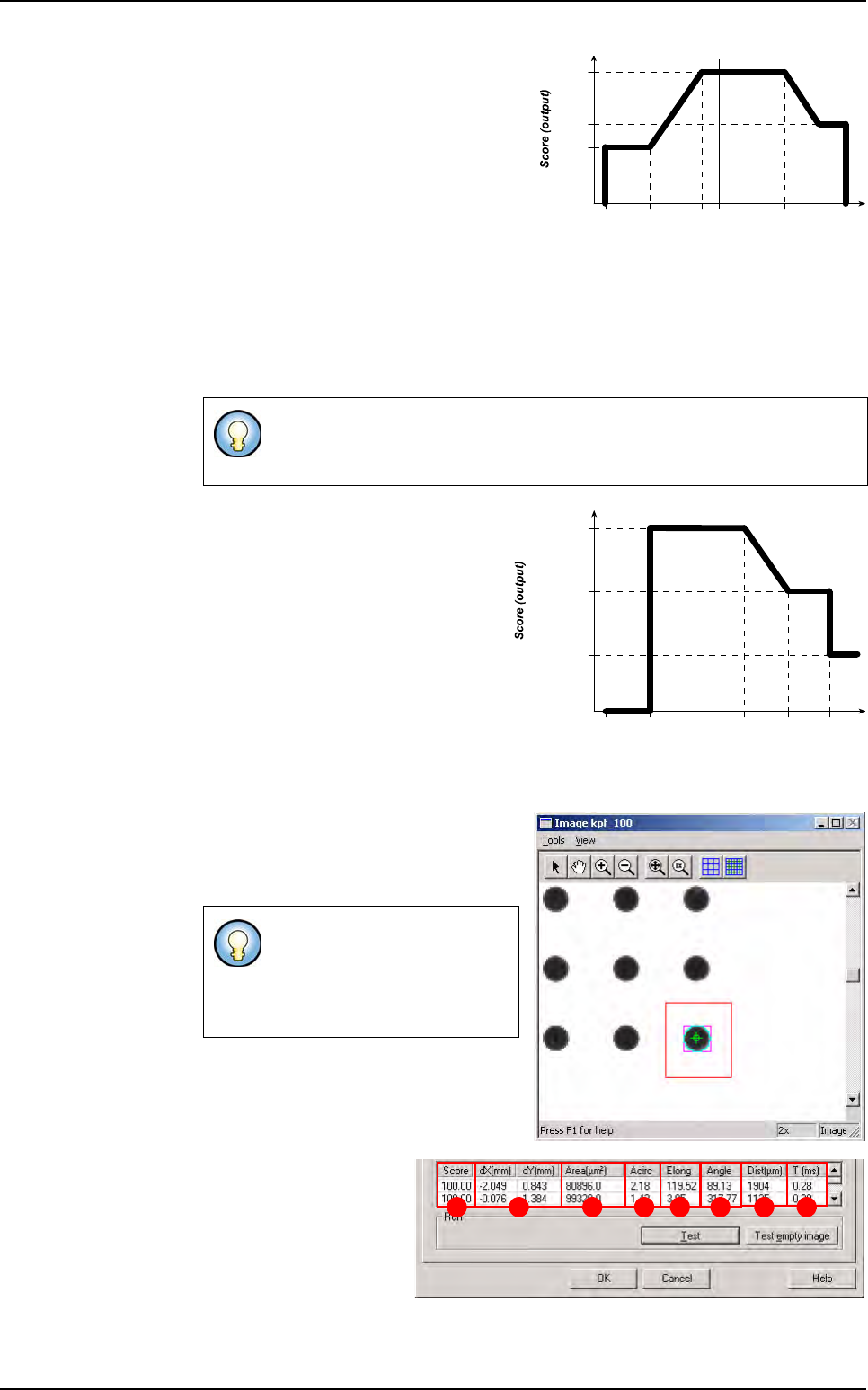
Feature values between xc and x1 are
mapped to a score of y1.
Feature values between x1 and x0 are
mapped linearly to the range of scores
between y1 and y0.
Feature values between x0 and x0h
are mapped to a score of y0 (here y0
= y0h).
Feature values between x0h and x1h are mapped linearly to the range of scores
between y0 and y1h.
Feature values between x1h and xch are mapped to a score of y1h.
While input values can have any values, output scores, must be in the range from 0.0
through 1.0.
Example:
7.14.3.2 Blob test
Click on Test button to apply all the in-
spection parameters to the model, then
a red box representing the tool’s search
area will appear in the camera window.
Score (A): score of the
tested tool (rate of detec-
tion success). The score
is either 100.00 % when
the blob tool finds a re-
sult, or 0.00 when no re-
sult found.
dX/Y[mm] (B): position in X and Y of the model found with respect to the center of
the model’s encompassing area.
The values are such as:
xc <= x1 <= x0 <= x0h <= x1h <= xch and y0 >= y1
(y0 can be equal to y0h and y1 can be equal to y1h )
If the tool finds a blob, it will
display a purple box (blob’s re-
sult box), and a blue line sur-
rounding the blob (blob’s
boundaries).
Feature value (input)
xc x1h
y0 & y0h
y1
y1h
x1 x0 x0h xch0.0
Area
xc = 0 x1h =
60 000
y0 & y0h = 1
y1 = 0.5
y1h = 0.8
x1 = x0 =
3 000
x0h =
30 000
xch =
126 000
BA C D E F G H
Blob

Tools library
7 - 88 Vision 2007 4.10 User Manual Rev 01
Area[µm²] (C): area of the shape in µm².
Acirc (D): the acircularity compares the average radius of the found blob with the ra-
dius of a circle which area is equivalent as the blob’s area. The closer this parameter
is to 1, the more circular the shape is.
Elong (E): the elongation is the ratio of the dispersion along the minor blob axis to
the dispersion along the major blob axis. When this parameter is close to 1, this
means the bounding box of the shape is a square.
Angle (F): the blob angle is the angle of its major axis with respect to the horizontal
axis.
Dist[µm] (G) The distance is the distance between the centre of the blob and the
centre of the area search.
T [ms] (H): inspection time.
Blob