VI User Manual.pdf - 第271页
Optical Character Verification Vision 2007 4.10 User Manua l Rev 01 8 - 9 8.2.4 Confusion algorithm explanation A Confusion algorithm can be auto- matically performed when verifyin g characters to avoid false detection 8…
Optical Character Verification
8 - 8 Vision 2007 4.10 User Manual Rev 01
7. To train each character individually, place the
cursor below the character, adjust the area and
use the buttons Add or Replace.
Click on Replace button to replace the existing
character by the current trained character.
Click on
Delete
button to delete the current
trained letter.
Parameters tab
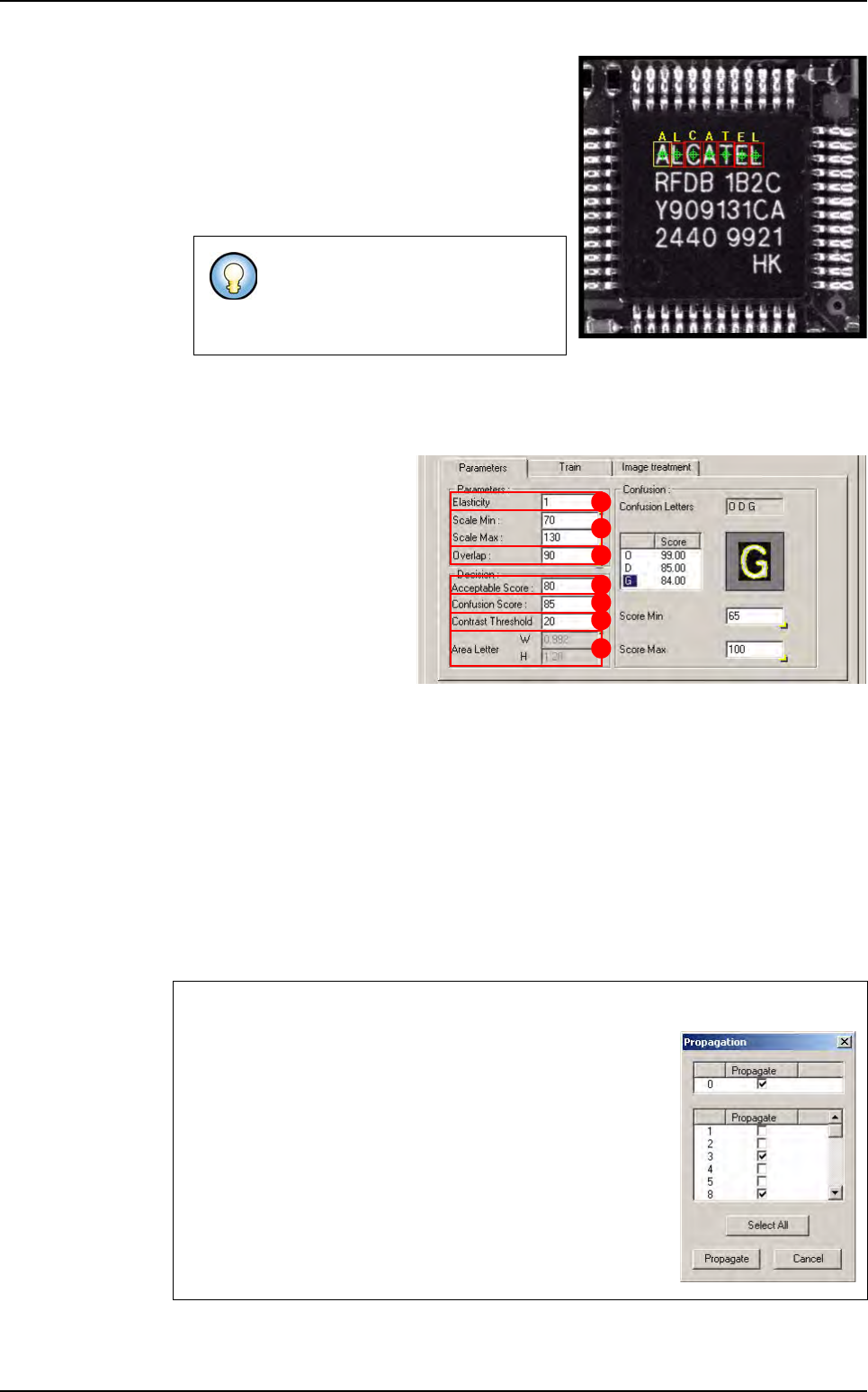
This tab gathers all parameters of the current letter necessary to the running.
Elasticity (A) is the parame-
ter used to determine the de-
gree of tolerance that OCV
will accept for non linearity of
the component. The elasticity
unit is the pixel. Elasticity is
used to stretch or reduce the
size of components in all di-
rections at once. Standard
setting: between 0 and 1.
Scale Min / Scale Max (B)
put the model letter on the letter with a different size. The scale unit is the percent.
Overlap (C) An amount by which model areas can overlap. If models overlap more than
this amount, they are considered to be the same model, and only 1 of them will be re-
turned from a search operation.
Acceptable Score (D) is the minimum score of the model: if the score of the model is
higher than the acceptable score, the letter is found.
Confusion Score (E) is the score from which the algorithm of confusion is launched.
Contrast Threshold (F) is the minimum value of the threshold at which a transition will
be accepted. Contrast is defined by a gray level value.
Area Letter (G) is the size of the trained letter.
The confusion part gathers the confusion letters and the score to find them.
Before testing the string or the char-
acter, define different running param-
eters for each character in the
parameters tab.
Propagation
To propagate the parameters to the others letters, right mouse
click in the value edit box and tick the Data Propagation
menu.
Then, right mouse click in the group box the Propagate menu
and be able to propagate all parameters of the group box.
A Propagation window allows you to select the character
which you want to propagate.
A
B
C
D
E
F
G
Creation procedure
Optical Character Verification
Vision 2007 4.10 User Manual Rev 01 8 - 9
8.2.4 Confusion algorithm explanation
A Confusion algorithm can be auto-
matically performed when verifying
characters to avoid false detection
8.2.4.1 Teaching
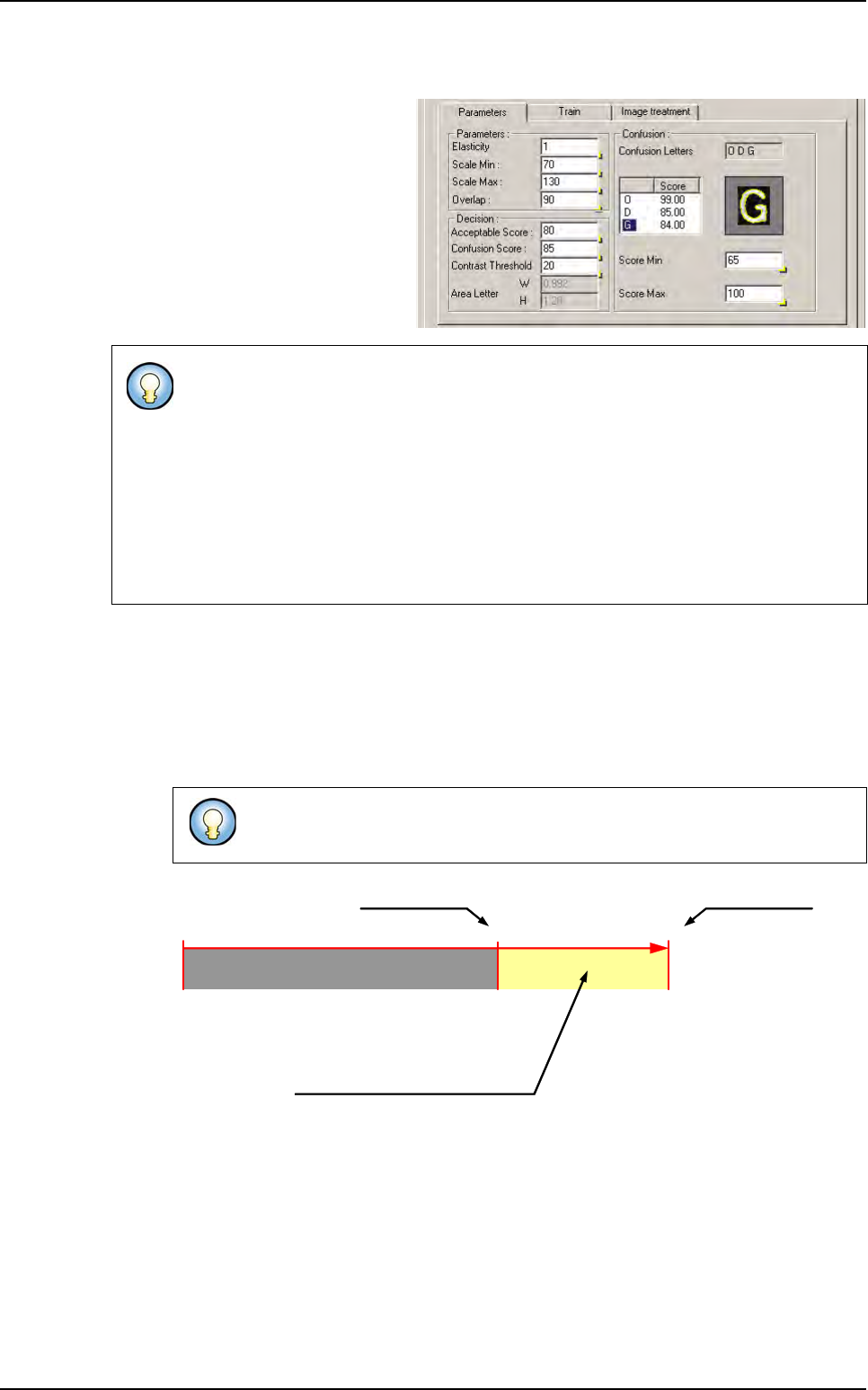
The definition of the characters that can be confused is totally automatic.
Example: for the letter O, there is 1 confusion letter: G.
When training the letter O, the score of the model G was 84 which is between 65 and
100. That is why G is a confusion letter.
The Confusion algorithm consists in trying models previously identified as Confusion
letters.
If the model of the Confusion letters returns a higher score than the model of the
letter we are about to verify the system returns an error.
Ex: the system verifies a O but in reality it a G.
On the real picture, the score of the model O = 82
On the real picture, the score of the model G = 84
So it is not a O, but it is a G! The system returns an error.
A maximum of 3 confusion letters is possible. They are ordered by the score
obtain during the test on the original picture.
0 100
Score minimum
If score of another model is between
these limits:
this model will be added in the list
of the confusion letters
Score maximum
Unacceptable score
65
Creation procedure
Optical Character Verification
8 - 10 Vision 2007 4.10 User Manual Rev 01
8.2.4.2 Running
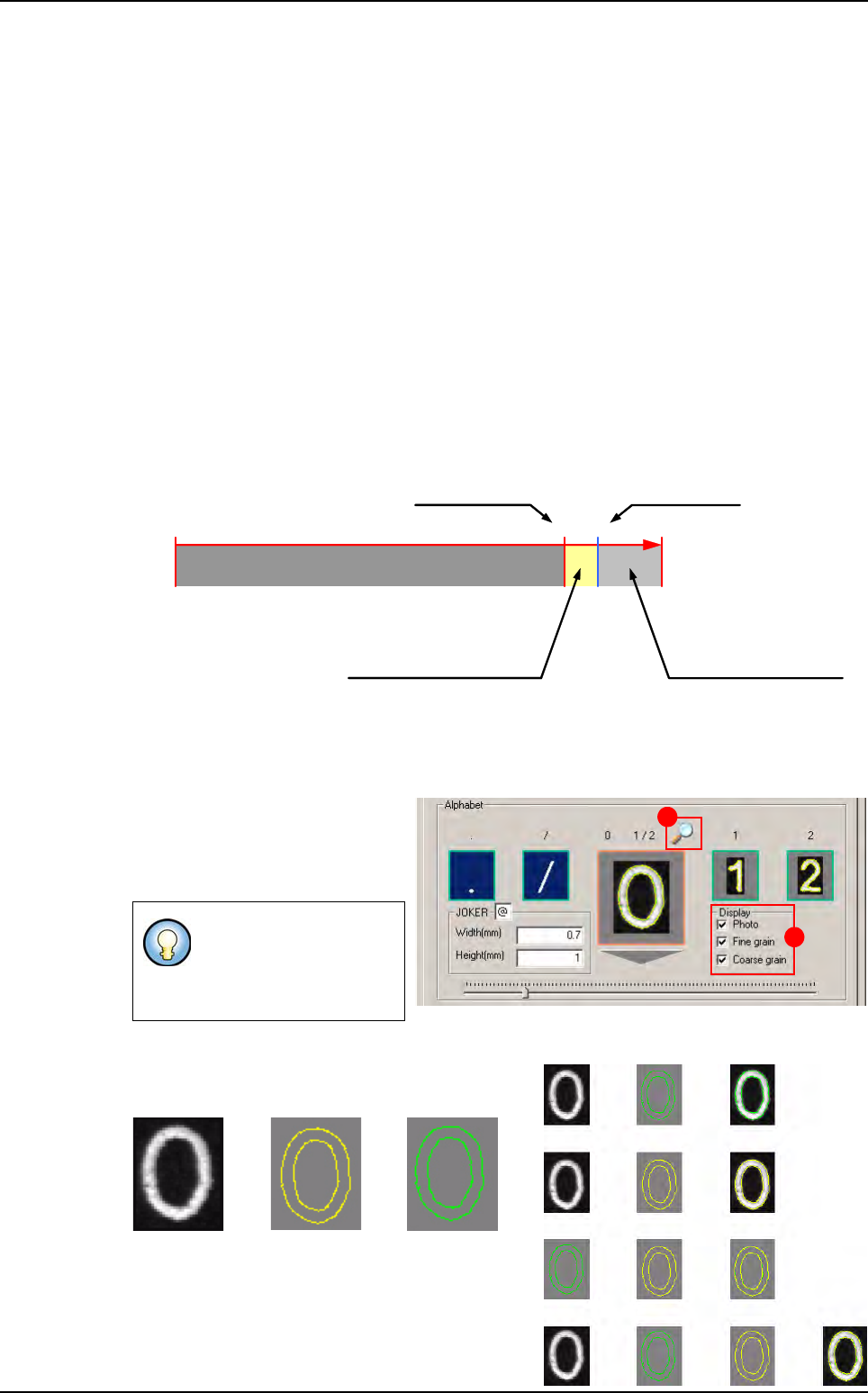
To reduce cycle time, the confusion algorithm is only executed in certain conditions.
Each letter has its own decision score to activate the Confusion algorithm; it is called
the Confusion score.
Example 1
The system verifies a O and it is really a O.
The score of the model O is higher than the Confusion score, the confusion algorithm
is not executed.
Example 2
The system verifies a O but in reality it a G.
The score of the model O is lower than the Confusion score, the confusion algorithm is
executed.
When to start the Confusion algorithm ?
8.2.5 Test of one letter
1. Select the picture.
2.
Scroll to the letter which you want
to test on the center of the alphabet
A Joker letter is a letter which is
not tested.
To change the character drawing, tick the 3 check
boxes (A):
Photo Coarse Grain Fine Grain
For example, if you deci-
de that A is a joker letter,
then all A in you text will
be not tested.
0 1008780
Acceptable score
Confusion algorithm executed
Confusion score
Unacceptable score
Confusion algorithm
NOT executed:
the letter has been found
with its model
A
B
+ =
+ =
+ =
+ + =
Photo + Fine grain
Photo + Coarse grain
Fine grain + Coarse grain
Photo + Fine grain + Coarse grain
Creation procedure