VI User Manual.pdf - 第250页
Tools library 7 - 88 Vision 2007 4.10 User Manual Re v 01 Area[µm²] ( C ): area of the shape in µm². Acirc ( D ): the acircular ity compares the avera ge radius of the foun d blob with the r a- dius of a circle which are…
Tools library
Vision 2007 4.10 User Manual Rev 01 7 - 87
Feature values between xc and x1 are
mapped to a score of y1.
Feature values between x1 and x0 are
mapped linearly to the range of scores
between y1 and y0.
Feature values between x0 and x0h
are mapped to a score of y0 (here y0
= y0h).
Feature values between x0h and x1h are mapped linearly to the range of scores
between y0 and y1h.
Feature values between x1h and xch are mapped to a score of y1h.
While input values can have any values, output scores, must be in the range from 0.0
through 1.0.
Example:
7.14.3.2 Blob test
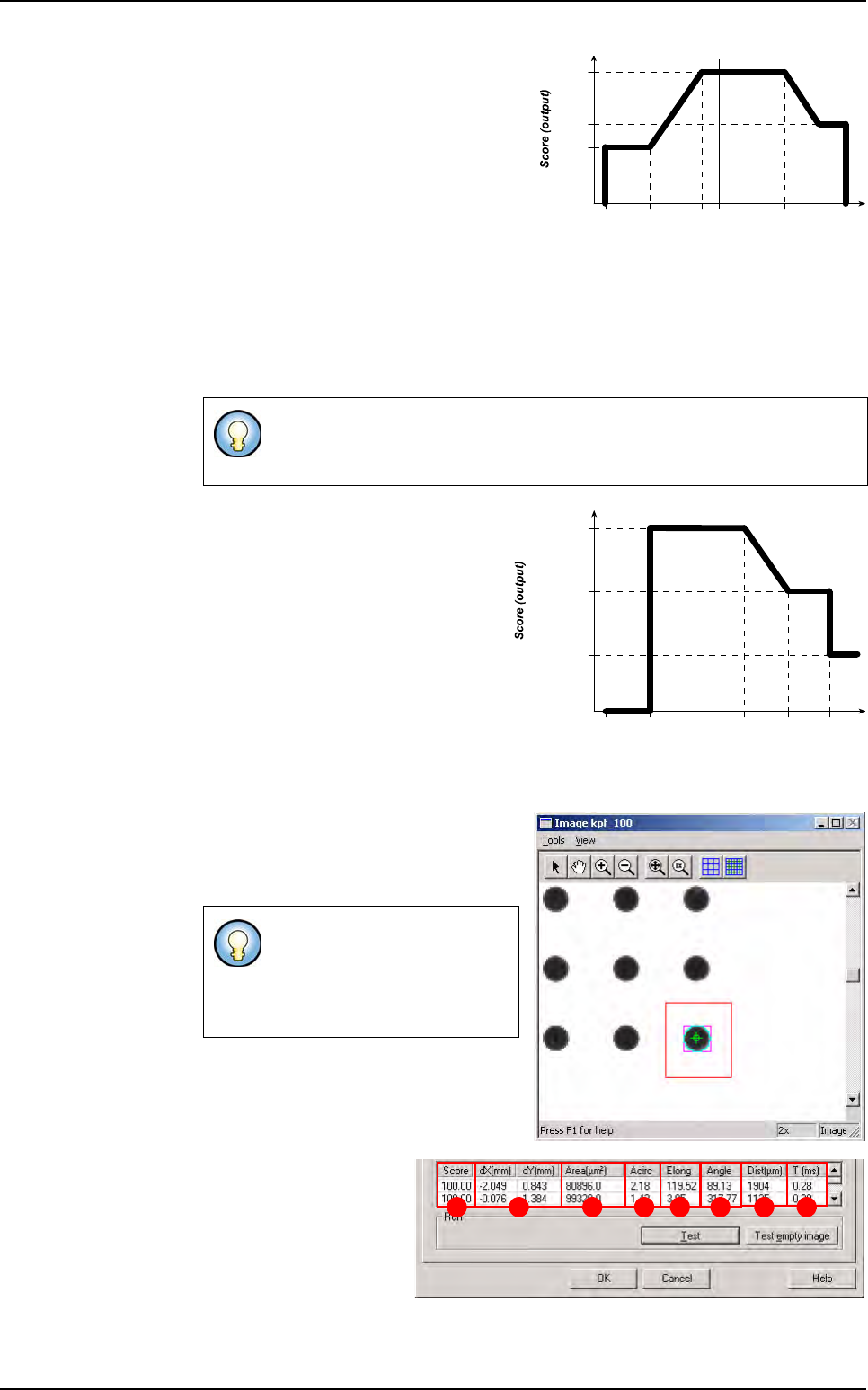
Click on Test button to apply all the in-
spection parameters to the model, then
a red box representing the tool’s search
area will appear in the camera window.
Score (A): score of the
tested tool (rate of detec-
tion success). The score
is either 100.00 % when
the blob tool finds a re-
sult, or 0.00 when no re-
sult found.
dX/Y[mm] (B): position in X and Y of the model found with respect to the center of
the model’s encompassing area.
The values are such as:
xc <= x1 <= x0 <= x0h <= x1h <= xch and y0 >= y1
(y0 can be equal to y0h and y1 can be equal to y1h )
If the tool finds a blob, it will
display a purple box (blob’s re-
sult box), and a blue line sur-
rounding the blob (blob’s
boundaries).
Feature value (input)
xc x1h
y0 & y0h
y1
y1h
x1 x0 x0h xch0.0
Area
xc = 0 x1h =
60 000
y0 & y0h = 1
y1 = 0.5
y1h = 0.8
x1 = x0 =
3 000
x0h =
30 000
xch =
126 000
BA C D E F G H
Blob

Tools library
7 - 88 Vision 2007 4.10 User Manual Rev 01
Area[µm²] (C): area of the shape in µm².
Acirc (D): the acircularity compares the average radius of the found blob with the ra-
dius of a circle which area is equivalent as the blob’s area. The closer this parameter
is to 1, the more circular the shape is.
Elong (E): the elongation is the ratio of the dispersion along the minor blob axis to
the dispersion along the major blob axis. When this parameter is close to 1, this
means the bounding box of the shape is a square.
Angle (F): the blob angle is the angle of its major axis with respect to the horizontal
axis.
Dist[µm] (G) The distance is the distance between the centre of the blob and the
centre of the area search.
T [ms] (H): inspection time.
Blob

Tools library
Vision 2007 4.10 User Manual Rev 01 7 - 89
7.15 Search
7.15.1 Search tool definition
The Search tool detects and locates previously trained patterns in the image. It identifies
groups of pixels of the search area that are similar to the trained model, using normalized cor-
relation.
7.15.1.1 Applications
The Search tool is mainly used to find pin tips for backplane or connector inspection.
7.15.1.2 Results
It returns presence, X, Y and Theta position of the best matching shape.
7.15.1.3 Search tool features
The Search tool can use 4 distinct algorithms to find instances of the model.
CNL normalized
When you perform a search using CNL normalized linear mode, it returns the loca-
tion of the part of the search image with pixel values that are the most closely corre-
lated to the pixel values in the model image. This type of searching is called intensity
correlation searching because the degree of similarity between the search image
and the model image is determined by calculating the correlation coefficient be-
tween the patterns of gray-scale pixel values in the two images. The method used
to compute the correlation coefficient between the two images is not affected by lin-
ear changes in brightness between the images.
CNL non linear
When you perform a search using CNL Search in nonlinear mode, it returns the lo-
cation of the part of the search region with the pattern of edges that most closely re-
sembles the pattern of edges in the model image. Because CNLSearch’s nonlinear
mode searches for patterns of edges instead of patterns of pixel values, CNLSearch
is immune to both linear and nonlinear brightness changes between the model im-
age and the search image, as long as the brightnesschanges do not affect the pat-
tern of edges in the search image.
When using non linear detection, you can specify the parameters of the edge detec-
tion (upper and lower thresholds). The edge thresholds set the edge strength (the
difference in pixel values across the edge) that CNL non linear uses to identify an
edge. All edges with strengths above the high threshold are included in the edge
map that will be compared to the runtime image. All edges with strengths below the
low threshold are excluded from the edge map. Edges with strengths between the
thresholds are included in the edge map if they are connected to another edge from
the edge map, either directly or through other edges with strengths between the
thresholds.
Normalized search
This algorithm is similar to CNL normalized but uses a more aggressive approach to
locating likely matches. Because of this, it may tend to discard some unpromising
locations prematurely.
Absolute search
This algorithm is similar to Normalized search, but the scoring function is based on
the correlation coefficient. It ignores the gray levels, considers only absolute con-
trast, and so accepts perfect mismatches as well as perfect matches.