VI User Manual.pdf - 第387页
.ini files Vision 2007 4.10 User Manua l Rev 01 A - 11 A.4.3 Computing tab INI section: [Computing] Mark Key name Initial value Min value Max value A Way 0 0 1 B Stretch(0,1) 0 0 1 C Mire Order 2 0 2 D Skip Order 1 0 2 E…
.ini files
A - 10 Vision 2007 4.10 User Manual Rev 01
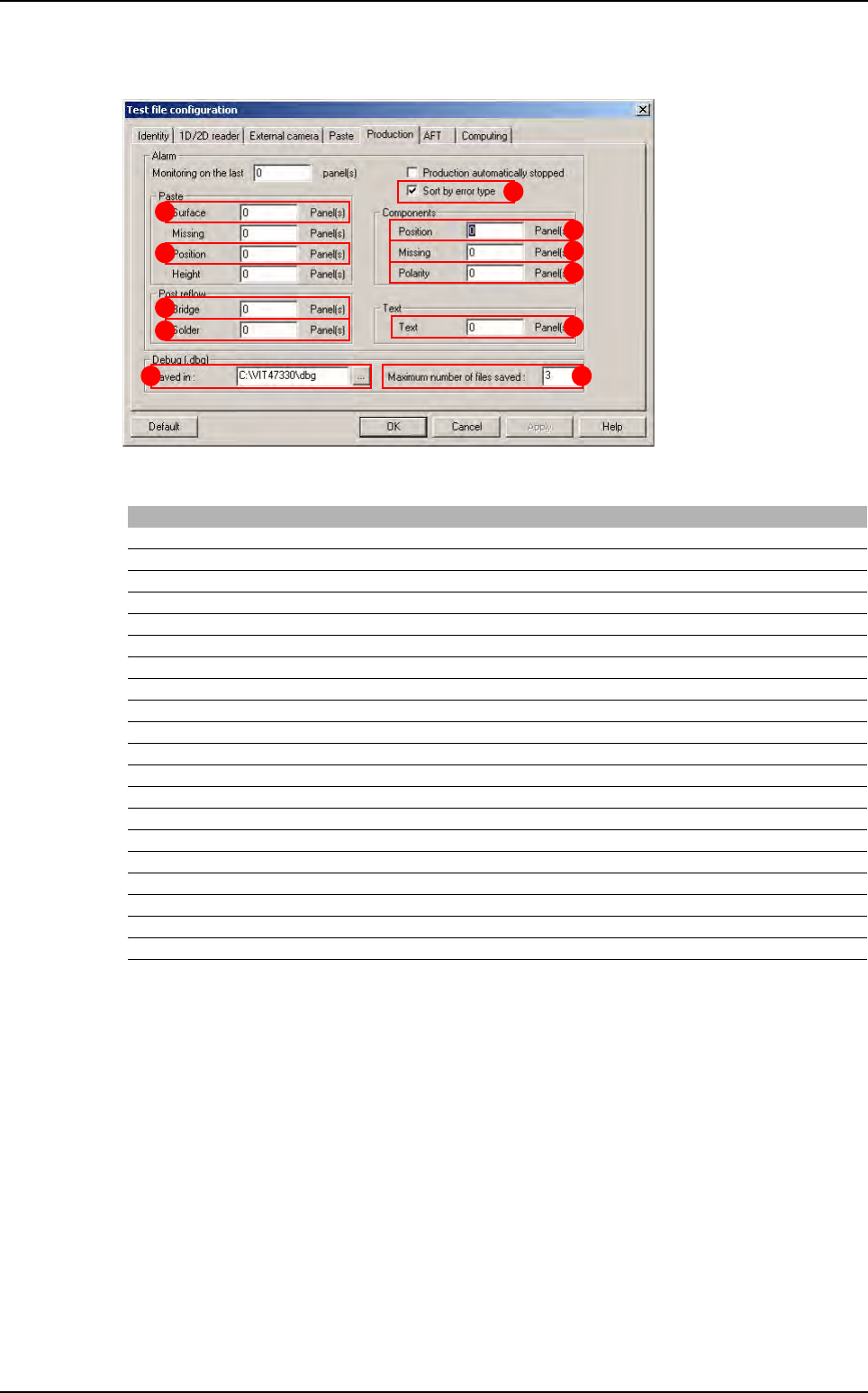
A.4.2 Production tab
INI section: [Production]
I This key defines the timeout when connecting the AOI system to the supervisor.
J This key defines the timeout when requesting repair station initialization.
K This key defines the timeout when sending panel errors to the supervisor database.
L This key defines the timeout when sending panel tolerances to the supervisor database.
M This key defines the FPY calculation mode (by panel or by board).
N When this value is set to 1, all the panel inspection data will be transferred to the supervisor
in Production mode (as if all the jedecs were in statistical monitoring).
O This key defines the number of retry cycles when the network communication between the
AOI system and the supervisor fails.
P Maximum number of .dbg files saved per panel.
Q Destination folder for .dbg files.
R Enable DBG each time you run production.
S Define the size of images sent to the repair station.
Mark Key name Initial value Min value Max value
A Position Fault 10 0 1000000
B Presence Fault 10 0 1000000
C Polarity Fault 10 0 1000000
D Text Fault 10 0 1000000
E Surface PROD Fault 10 0 1000000
F Position PROD Fault 10 0 1000000
G Bridge Fault 10 0 1000000
H Joint Fault 10 0 1000000
I
Time out: surpervisor connection (second
) 60 5 600
J Time out: basic query (second) 5 5 60
K Time out: save panel on surpervisor (second) 180 5 600
L Time out: save product data on surpervisor (second) 180 5 600
M FPY calculation (0 by panel, 1 by board) 1 0 1
N Send all results to supervisor 0 0 1
O Number of connection retry when Network failed 5 5 1000
P Number of dbg file 10 0 1000
Q Folder of dbg file C:\vit\dbg
R TraceFaults 0 0 1
S Sort by error (No: 0, Yes: 1) 1 0 1
T Reparation image scale 3 -10 1
H
G
E
F
A
B
C
D
PQ
S
.tst file default values
.ini files
Vision 2007 4.10 User Manual Rev 01 A - 11
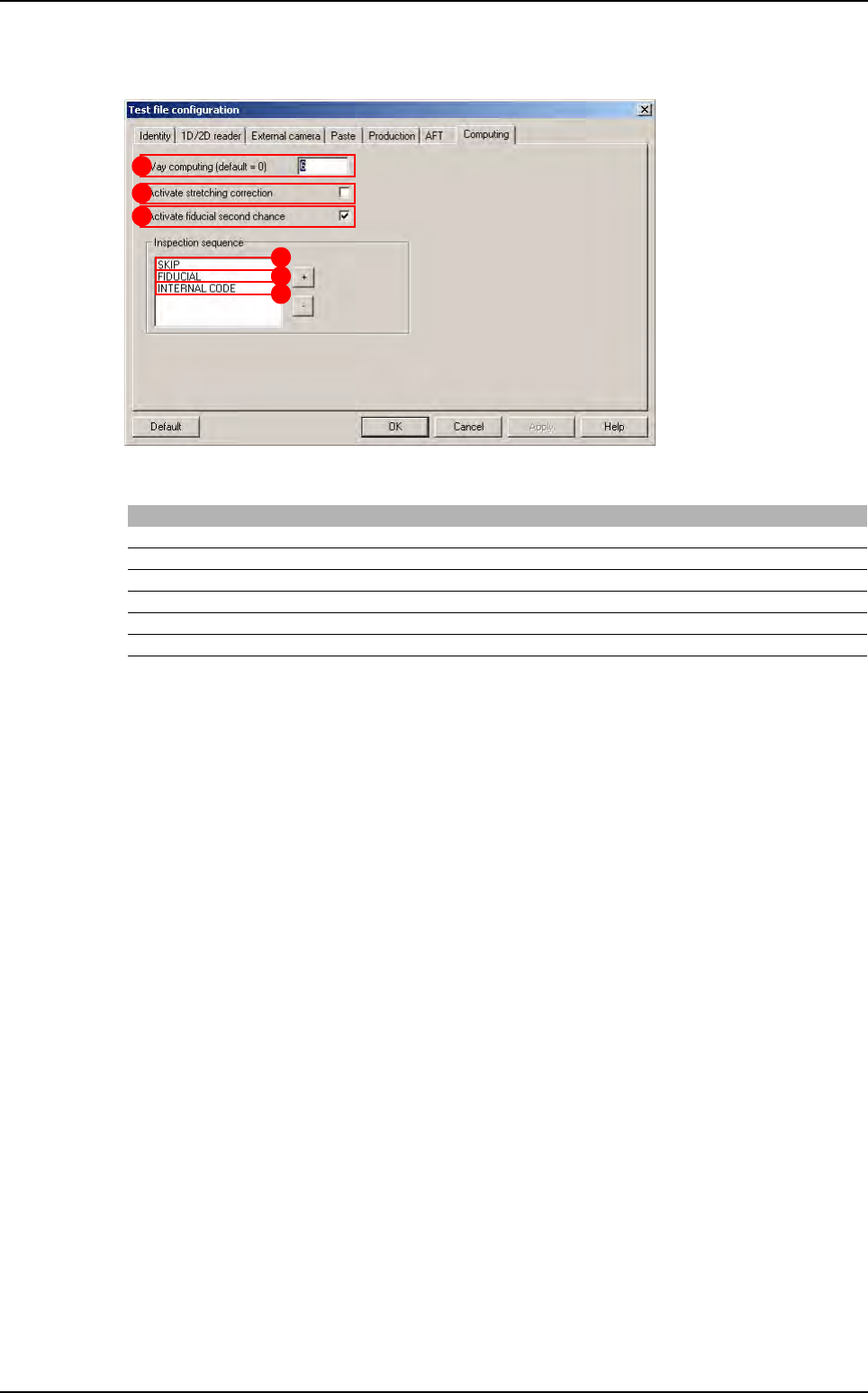
A.4.3 Computing tab
INI section: [Computing]
Mark Key name Initial value Min value Max value
A Way 0 0 1
B Stretch(0,1) 0 0 1
C Mire Order 2 0 2
D Skip Order 1 0 2
E Code Order 0 0 2
F Fiducial Second Chance 1 0 1
A
B
F
D
E
C
.tst file default values
.ini files
A - 12 Vision 2007 4.10 User Manual Rev 01
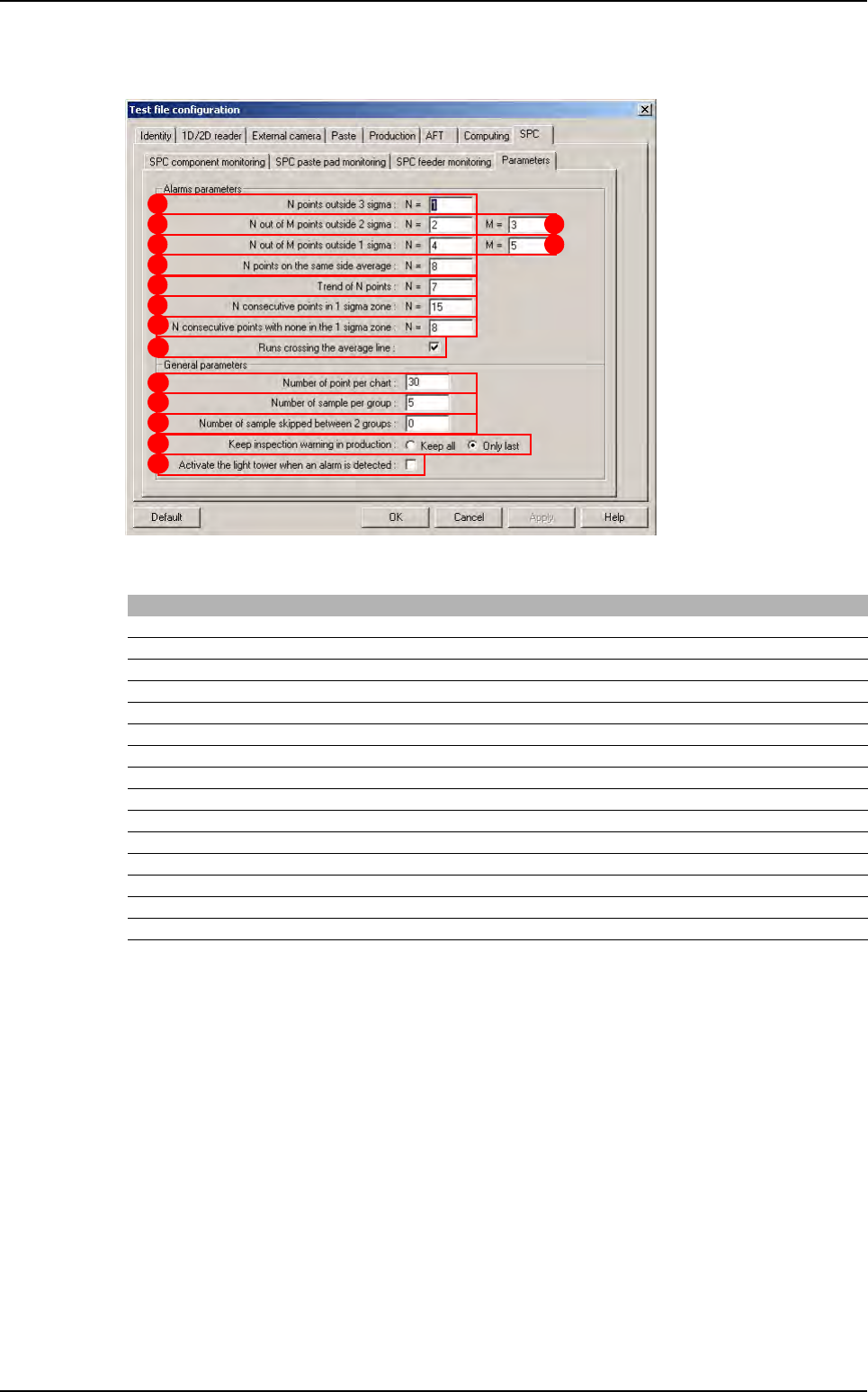
A.4.4 SPC tab: Parameters sub tab
INI section : [SPC]
Keys A to I define SPC warning setting.
J Number of points analyzed by the SPC engine.
K Number of sample to compute 1 SPC point.
L Number of sample skipped between 2 SPC point.
M Keep only the last inspection warning in the SPC warning box.
Mark Key name Initial value Min value Max value
A N_OUTSIDE_3_SIGMA 1 0 250
B N_OUTSIDE_2_SIGMA 2 0 250
C M_OUTSIDE_2_SIGMA 3 0 250
D N_OUTSIDE_1_SIGMA 4 0 250
E M_OUTSIDE_1_SIGM 5 0 250
F N_SAME_SIDE_AVERAGE 8 0 250
G N_TREND 7 0 250
H N_CONSECUTIVE_1_SIGMA 15 0 250
I N_CONSECUTIVE_OUT_SIGMA 8 0 250
J Number of point per chart 30 1 10000
K Number of sample per group 5 1 10000
L Number of sample skipped between 2 groups 0 0 10000
M Show only last inspection warning 1 0 1
N Light tower use 0 0 1
O Warning of runs crossing the average line use 1 0 1
A
B
D
F
G
H
I
J
K
L
M
C
E
O
N
.tst file default values