00198320-02_UM_ShuttleExtension-DE-EN-ZH.pdf - 第103页
Assembly and Instruction Manual 1 Introduction Shuttle Extension Edition 11/2018 1.1 Description 5 1 Introduction This manua l serves as a n instruction guide or reference documen t for the assembly, operation and config…
Contents Assembly and User Manual
Shuttle Extension Edition 11/2018
4
7.4.5
Step 5 . . . . . . . . . . . . . . . . . . . . . . . . . . . . . . . . . . . . . . . . . . . . . . . . . . . . . . . . . . . 83
7.4.6 Step 6 . . . . . . . . . . . . . . . . . . . . . . . . . . . . . . . . . . . . . . . . . . . . . . . . . . . . . . . . . . . 83
7.4.7 Step 7 . . . . . . . . . . . . . . . . . . . . . . . . . . . . . . . . . . . . . . . . . . . . . . . . . . . . . . . . . . . 84
7.4.8 Step 8 . . . . . . . . . . . . . . . . . . . . . . . . . . . . . . . . . . . . . . . . . . . . . . . . . . . . . . . . . . . 84
7.4.9 Step 9 . . . . . . . . . . . . . . . . . . . . . . . . . . . . . . . . . . . . . . . . . . . . . . . . . . . . . . . . . . . 85
7.4.10 Step 10 . . . . . . . . . . . . . . . . . . . . . . . . . . . . . . . . . . . . . . . . . . . . . . . . . . . . . . . . . . 86
7.4.11 Step 11 . . . . . . . . . . . . . . . . . . . . . . . . . . . . . . . . . . . . . . . . . . . . . . . . . . . . . . . . . . 87
7.4.12 Step 12 . . . . . . . . . . . . . . . . . . . . . . . . . . . . . . . . . . . . . . . . . . . . . . . . . . . . . . . . . . 88
7.4.13 Step 13 . . . . . . . . . . . . . . . . . . . . . . . . . . . . . . . . . . . . . . . . . . . . . . . . . . . . . . . . . . 89
7.4.14 Barcode readers - overview . . . . . . . . . . . . . . . . . . . . . . . . . . . . . . . . . . . . . . . . . . 90
7.4.15 Barcode readers - wiring connection . . . . . . . . . . . . . . . . . . . . . . . . . . . . . . . . . . . 91
7.4.16 Barcode reader orientations and tilted angle . . . . . . . . . . . . . . . . . . . . . . . . . . . . . 92
7.5 Software installation and configuration . . . . . . . . . . . . . . . . . . . . . . . . . . . . . . . . . . . . . . . . . . . . . 92
7.6 Machine configuration . . . . . . . . . . . . . . . . . . . . . . . . . . . . . . . . . . . . . . . . . . . . . . . . . . . . . . . . . . 93
Assembly and Instruction Manual 1 Introduction
Shuttle Extension Edition 11/2018 1.1 Description
5
1 Introduction
This manual serves as an instruction guide or reference document for the assembly, operation
and configuration of the shuttle extension for SIPLACE TX and SIPLACE SX1/SX2 V2 machines.
1.1 Description
The shuttle extension enables a SIPLACE TX or SIPLACE SX1/SX2 V2 placement machine to be
connected to another machine with a different conveyor mode. The shuttle extension balances the
positions of the fixed rail in the various conveyor modes (I-Placement to alternating) and regulates
the lane accuracy during transportation of the boards. It is also possible to connect a dual con
-
veyor to a single conveyor and vice versa. In addition, you can also connect a supplementary pro
-
duction device (such as a printer or furnace), which has a different conveyor mode to the SIPLACE
TX / SIPLACE SX1/SX2 V2.
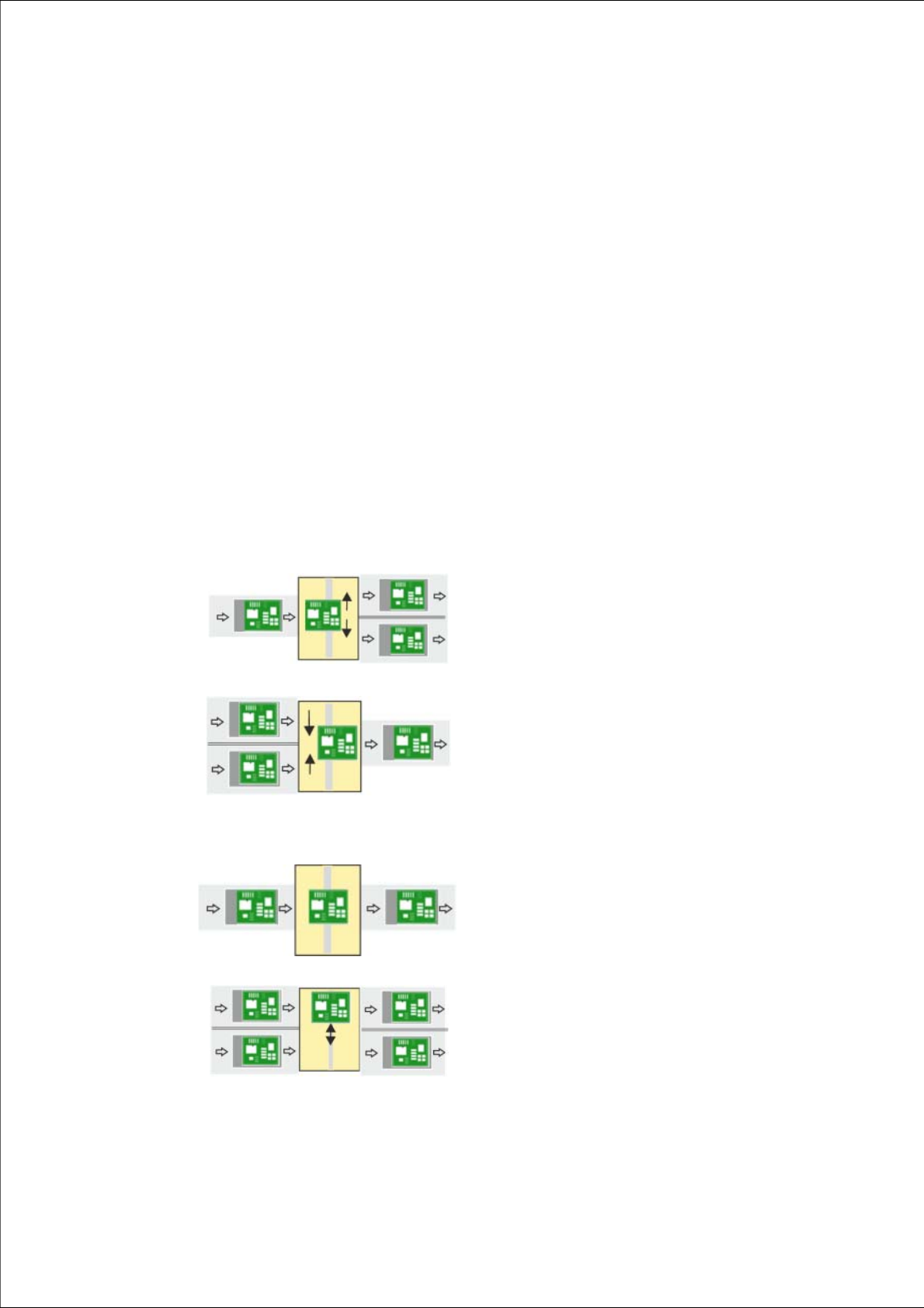
1
Single conveyor => dual conveyor
Usually, the following right and then left conveyor lane are
used in alternation. However, if a conveyor lane is
blocked, the other lane can also be used several times in
succession.
1
Dual conveyor => single conveyor
Usually, pickup is from the right and then the left conveyor
lane of the previous machine, in alternation. However, if
there is a problem at one lane or if there is no board
available, pickup can also be from the other lane several
times in succession. Precondition: the same product must
be produced on both lanes
1
Single conveyor => single conveyor
The boards are transported through.
A displacement of the two machines can, for example, be
compensated for in this case.
1
Dual conveyor => dual conveyor
Transfer of board with lane accuracy: The boards from
conveyor lane 1 are also transported in conveyor lane 1
of the next machine. Usually, the conveyor lanes are used
in alternation.
1 Introduction Assembly and Instruction Manual SIPLACE TX
1.1 Description Shuttle Extension Edition 11/2018
6
As an example, the following scenarios are possible:
– SIPLACE TX with dual conveyor (I-Placement) on a SIPLACE SX with dual conveyor (alter
-
nating mode).
– SIPLACE TX with dual conveyor on a printer or furnace.
– SIPLACE SX1/SX2 V2 with dual conveyor on a printer or furnace.
The shuttle extension is always fitted to a SIPLACE TX or SIPLACE SX1/SX2 V2. There is also a
shuttle extension available for the output side and a shuttle extension for the input side.