00198320-02_UM_ShuttleExtension-DE-EN-ZH.pdf - 第130页
2 Operational safety Assembly and Instruction Manual 2.3 Safety Shuttle Extension Edition 11/2018 32 2.3.2.2 Position of protective switch 2 Fig. 2.3 - 3 Position of protective switch (1) Electromagnetic lock (2) Top c o…
Assembly and Instruction Manual 2 Operational safety
Shuttle Extension Edition 11/2018 2.3 Safety
31
Function 2
If the top cover is opened upwards, the SIPLACE TX, SX1/SX2 V2 will automatically stop and the
power will be disconnected. A message will appear in the station software for the SIPLACE ma
-
chine.
Close the top cover and press the START button (item 2 in fig. 2.3 - 2), to continue operation.
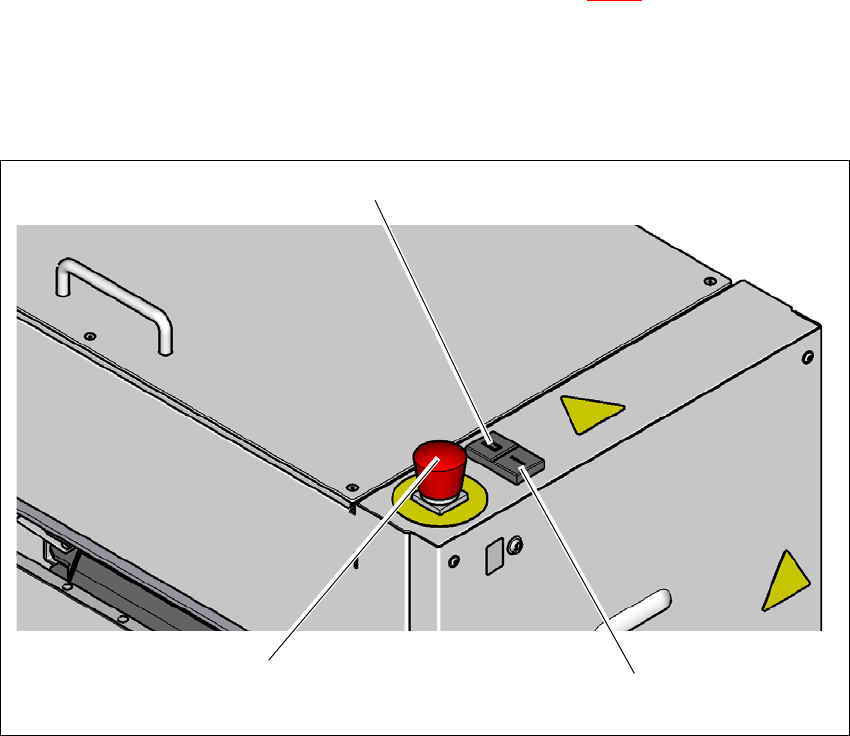
2.3.2 Switches and buttons
2.3.2.1 Positions of switches and buttons
2
Fig. 2.3 - 2 Position of switches and buttons
(1) Stop button (black)
(2) Start button (green)
(3) EMERGENCY STOP button
(3)
(1)
(2)
2 Operational safety Assembly and Instruction Manual
2.3 Safety Shuttle Extension Edition 11/2018
32
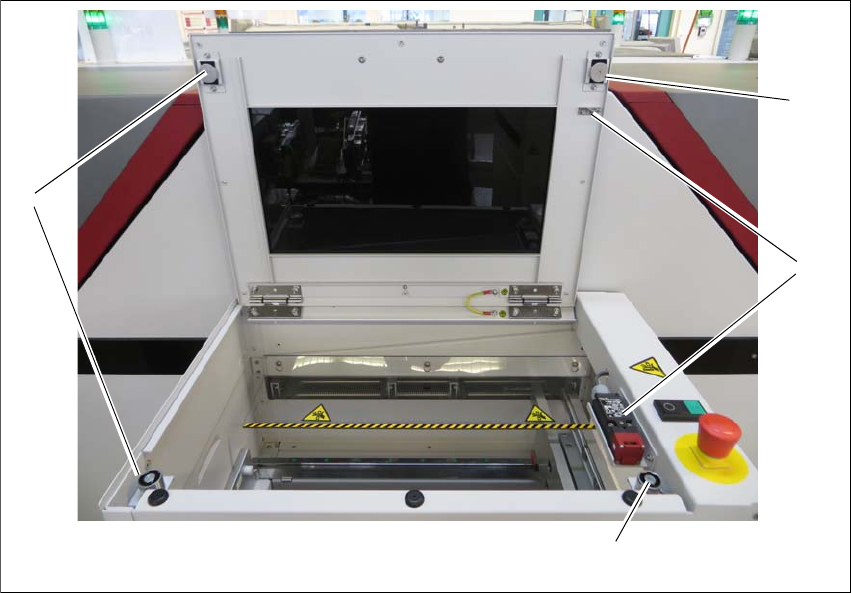
2.3.2.2 Position of protective switch
2
Fig. 2.3 - 3 Position of protective switch
(1) Electromagnetic lock
(2) Top cover protective switch
The top cover switches are mechanically locked during placement machine operation. The pro
-
tective covers can only be opened once the stop button has been pressed.
(1)
(1)
(2)
(1)

Assembly and Instruction Manual 2 Operational safety
Shuttle Extension Edition 11/2018 2.3 Safety
33
2.3.2.3 Description of functions
Stop button, black (item 1 in fig.
2.3 - 2, page 31 2
These button is used to stop the shuttle extension. The electromagnetic lock is released and the
top cover can be opened.
Start button, green (item 2 in fig. 2.3 - 2, page 31 2
Press the Start button for at least 200 ms, up to a maximum of 1500 ms, and then let go. The
shuttle extension is switched on and the top cover is locked when you let go of the button.
EMERGENCY STOP button with forced locking (item 3 in fig. 2.3 - 2, page 31 2
The EMERGENCY STOP button is red and latches in the ON position when pressed. When you
press the EMERGENCY STOP button, the switching contact of the EMERGENCY STOP circuit
of the shuttle extension opens and the shuttle extension stops. The signaling contact for the
EMERGENCY STOP button will open and a message will be shown in the station software for the
SIPLACE machine.
Top cover protective switch (item 2 in fig. 2.3 - 3, page 32) 2
This switch check whether the top cover is closed. If it is closed, the EMERGENCY STOP button
and the signaling contact will be closed. If the top cover is opened, the EMERGENCY STOP con
-
tact and the signaling contact will open.
Electromagnetic lock (item 1 in fig. 2.3 - 3, page 32) 2
The electromagnetic lock check whether the top cover is closed. If it is closed, the EMERGENCY
STOP button and the signaling contact will be closed.
Pulling the top cover downwards, the electromagnetic lock prevent operator to opening it. The
electromagnetic lock can be deactivated by pressing the stop button of the shuttle extension, or
breaking the safety loop by opening the safety switch or pressing the EMERGENCY STOP button.