00198320-02_UM_ShuttleExtension-DE-EN-ZH.pdf - 第169页
Assembly and Instruction Manual 6 Operate the shuttle extension Shuttle Extension Edition 11/2018 6.2 Shuttle extension on Statio n GUI 71 6 6 If there is a board in the shuttle extension, a board symbol wi ll be shown a…
6 Operate the shuttle extension Assembly and Instruction Manual
6.2 Shuttle extension on Station GUI Shuttle Extension Edition 11/2018
70
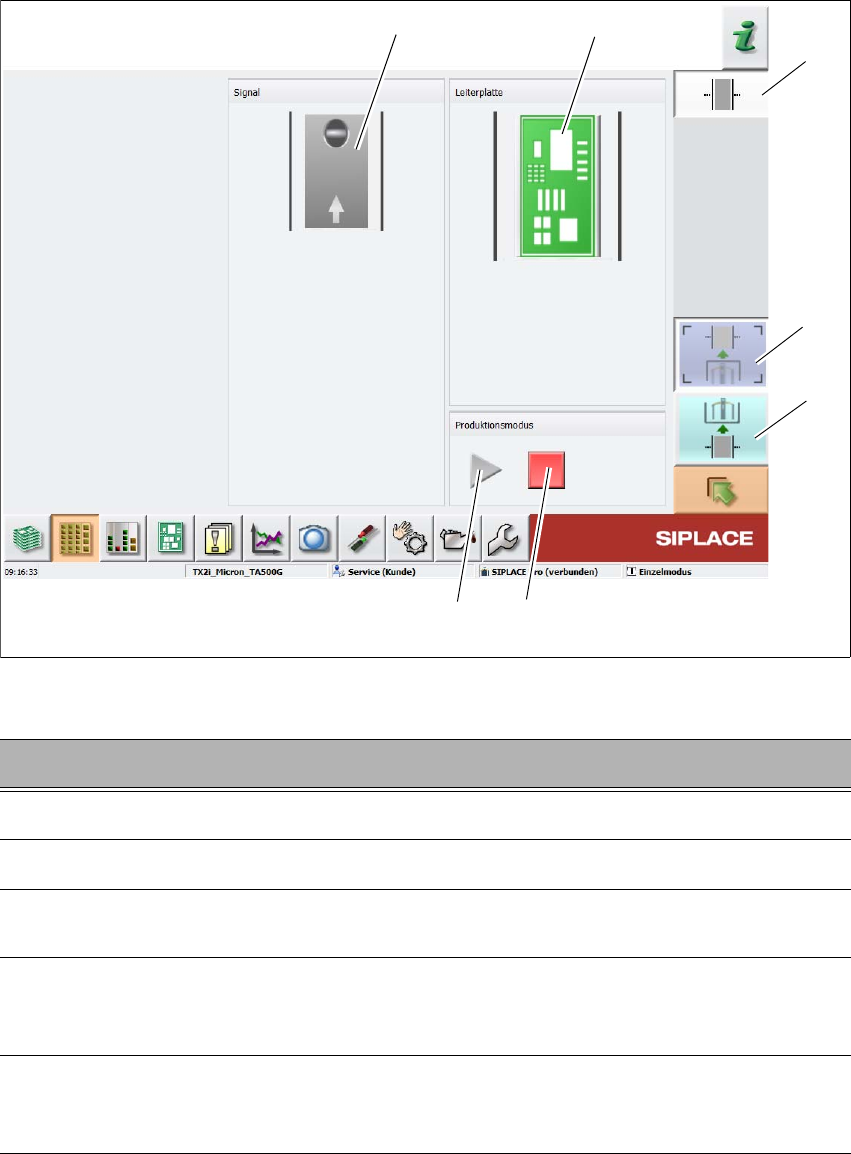
Fig. 6.2 - 2 Station software - "shuttle extension setup view
6
Key Description
1
Select the shuttle extension on output conveyor.
2
Select the shuttle extension on input conveyor.
3
Stops the automatic operation of the shuttle extension, single functions can be
executed.
4
Starts the automatic operation of the shuttle extension i.e. meaning that the boards
which arrive at the shuttle extension are transported through and then passed on to
the next machine, according to the configuration.
5
This shows the current state of the signal transmitter (laser light barrier). The LED
symbol shows whether there is a board in the shuttle extension or, in other words,
whether the signal transmitter (laser light barrier) has triggered.
(2)
(5)
(1)
(3)
(4)
(6)
(7)
Assembly and Instruction Manual 6 Operate the shuttle extension
Shuttle Extension Edition 11/2018 6.2 Shuttle extension on Station GUI
71
6
6
If there is a board in the shuttle extension, a board symbol will be shown as a button.
Click the board symbol and the dialog box Board options appears.
Cancelling the board
The selected board will no longer be processed.
Once you have cancelled the placement of a board, the board will be marked red in
the display
7
Shuttle extension setup view is selected.
Key Description
6 Operate the shuttle extension Assembly and Instruction Manual
6.2 Shuttle extension on Station GUI Shuttle Extension Edition 11/2018
72