00198320-02_UM_ShuttleExtension-DE-EN-ZH.pdf - 第164页
5 Calibration Assembly and Instruction Manual 5.2 Perform Calibration Shuttle Extension Edition 11/2018 66
Assembly and Instruction Manual 5 Calibration
Shuttle Extension Edition 11/2018 5.2 Perform Calibration
65
Step 2: Aligning the fixed rail 5
To make sure that the board can be taken accurately out of the previous machine and transported
to the next machine, the conveyor of the
shuttle extension must be precisely positioned at every
movement. To ensure that this works perfectly when transferring from the previous machine and
when transporting to the next machine, the conveyor must be aligned at each fixed rail and the
result saved.
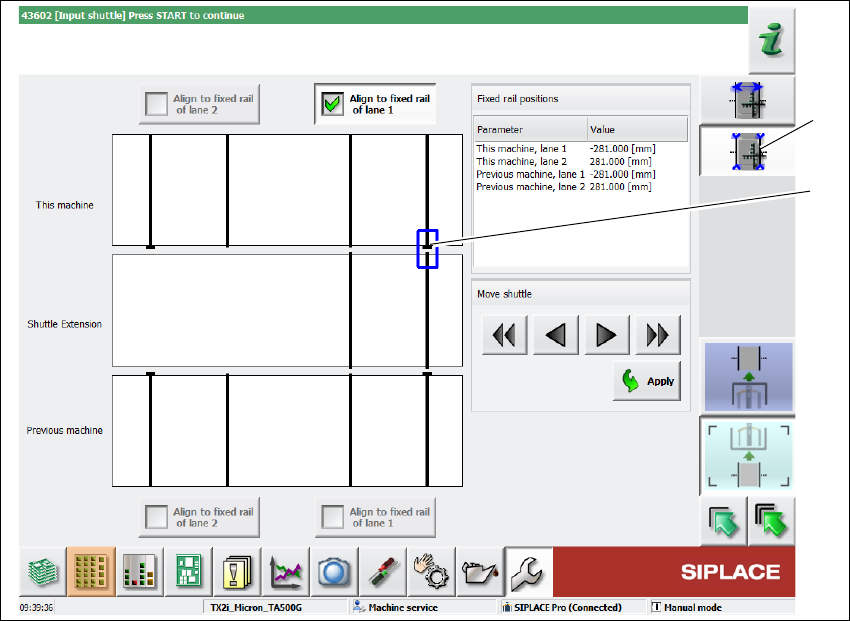
Fig. 5.2 - 4 Station software - "calibrate fixed rail" view (example)
Select the Calibrate fixed rail icon(1).
Select the conveyor side which should be aligned with the fixed rail of this machine.
If the position of the relevant conveyor edge for the shuttle extension corresponds to the cur-
rently selected fixed conveyor edge (2), complete the calibration process with the
Apply but-
ton. The position will be saved.
5
Push in the board and use the buttons (move shuttle) to adjust, until the board can be moved
by the shuttle to the adjacent machine and until the conveyor rails are aligned with one an
-
other.
Repeat the steps for each of the other fixed conveyor edges on the previous and this ma
-
chine.
(1)
(2)
5 Calibration Assembly and Instruction Manual
5.2 Perform Calibration Shuttle Extension Edition 11/2018
66
Assembly and Instruction Manual 6 Operate the shuttle extension
Shuttle Extension Edition 11/2018 6.1 Shuttle extension on SIPLACE Pro
67
6 Operate the shuttle extension
6
6.1 Shuttle extension on SIPLACE Pro
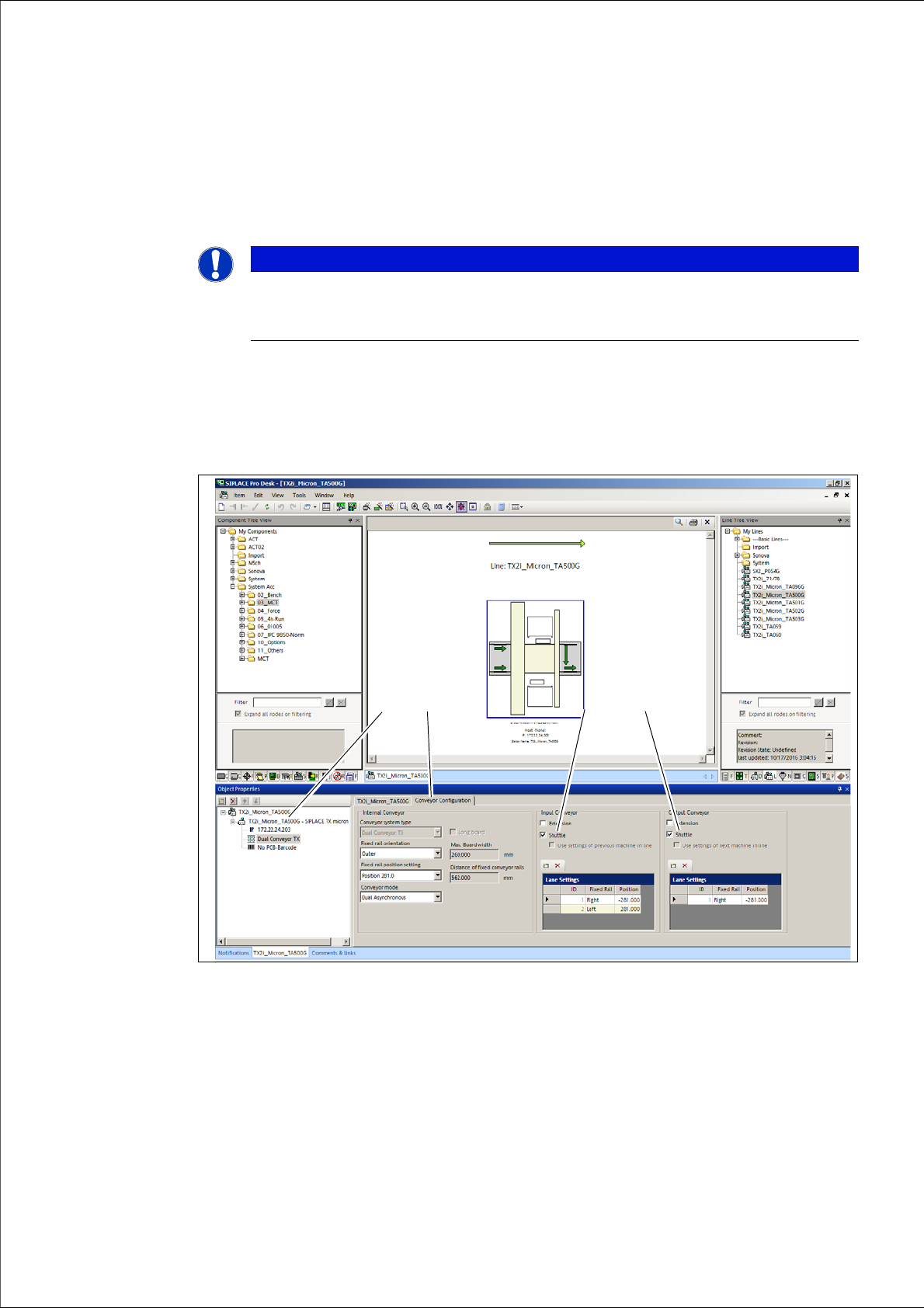
Open the SIPLACE Pro Line Editor.
SIPLACE Pro - "Line Editor"- Tab: "Conveyor configuration"
Select the Station (1) in the tree view.
Open the Conveyor Configuration tab.
Activate Shuttle check box (3) to configure the shuttle extension on input conveyor.
Activate Shuttle check box (4) to configure the shuttle extension on output conveyor.
PLEASE NOTE
Operation for the SIPLACE SX1/SX2
The following description shows screenshots for a SIPLACE TX. However, the descrip
-
tion applies equally to the SIPLACE SX1/SX2.
(3)
(2)
(1)
(4)