00198320-02_UM_ShuttleExtension-DE-EN-ZH.pdf - 第104页
1 Introduction Assembly and Instruction Manual SIPLACE TX 1.1 Description Shuttle Extension Edition 11/2018 6 As an exam ple, the fo llowi ng scenarios are possible: – SIPLACE TX with dual conve yor (I -Placeme nt) on a …
Assembly and Instruction Manual 1 Introduction
Shuttle Extension Edition 11/2018 1.1 Description
5
1 Introduction
This manual serves as an instruction guide or reference document for the assembly, operation
and configuration of the shuttle extension for SIPLACE TX and SIPLACE SX1/SX2 V2 machines.
1.1 Description
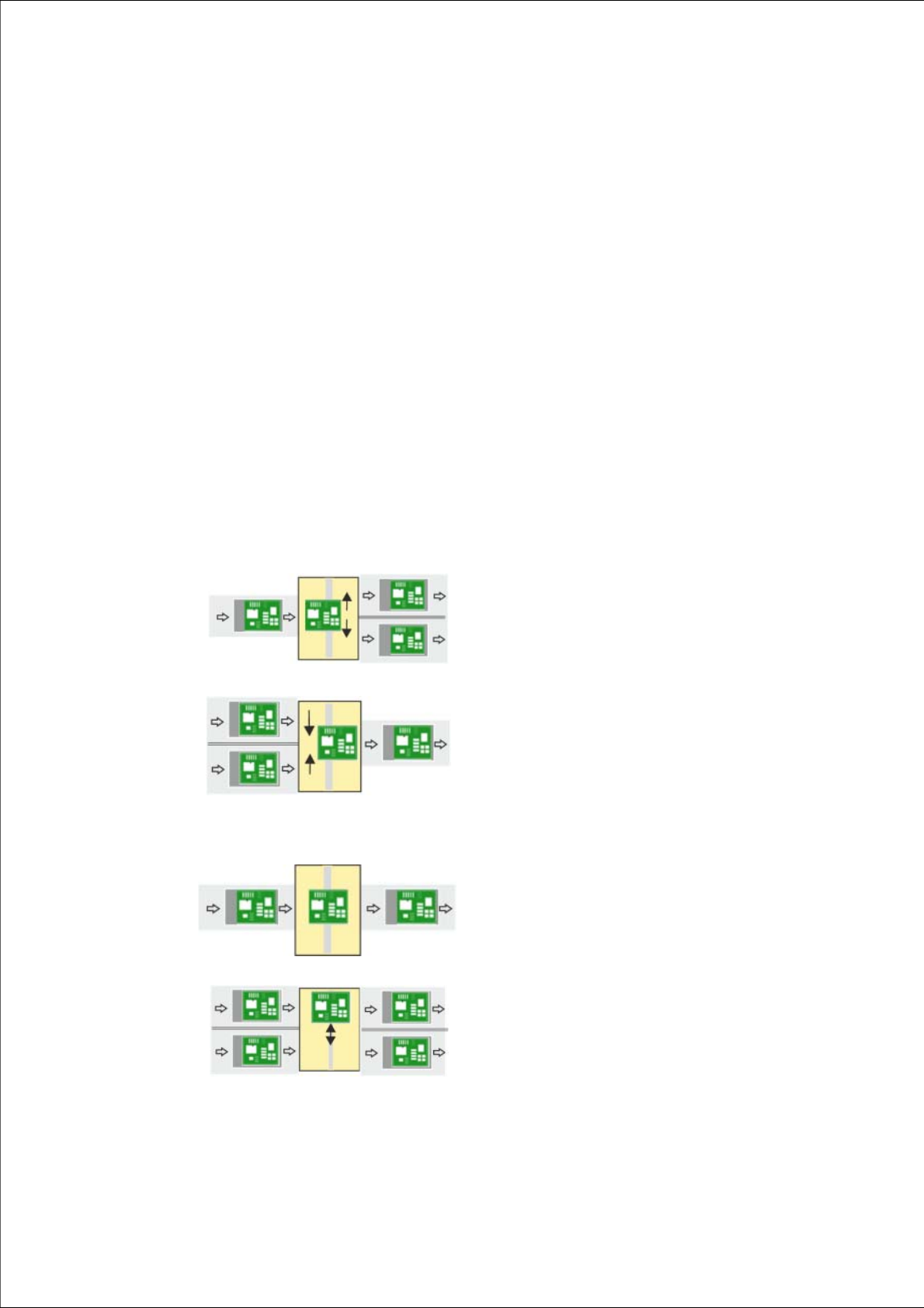
The shuttle extension enables a SIPLACE TX or SIPLACE SX1/SX2 V2 placement machine to be
connected to another machine with a different conveyor mode. The shuttle extension balances the
positions of the fixed rail in the various conveyor modes (I-Placement to alternating) and regulates
the lane accuracy during transportation of the boards. It is also possible to connect a dual con
-
veyor to a single conveyor and vice versa. In addition, you can also connect a supplementary pro
-
duction device (such as a printer or furnace), which has a different conveyor mode to the SIPLACE
TX / SIPLACE SX1/SX2 V2.
1
Single conveyor => dual conveyor
Usually, the following right and then left conveyor lane are
used in alternation. However, if a conveyor lane is
blocked, the other lane can also be used several times in
succession.
1
Dual conveyor => single conveyor
Usually, pickup is from the right and then the left conveyor
lane of the previous machine, in alternation. However, if
there is a problem at one lane or if there is no board
available, pickup can also be from the other lane several
times in succession. Precondition: the same product must
be produced on both lanes
1
Single conveyor => single conveyor
The boards are transported through.
A displacement of the two machines can, for example, be
compensated for in this case.
1
Dual conveyor => dual conveyor
Transfer of board with lane accuracy: The boards from
conveyor lane 1 are also transported in conveyor lane 1
of the next machine. Usually, the conveyor lanes are used
in alternation.
1 Introduction Assembly and Instruction Manual SIPLACE TX
1.1 Description Shuttle Extension Edition 11/2018
6
As an example, the following scenarios are possible:
– SIPLACE TX with dual conveyor (I-Placement) on a SIPLACE SX with dual conveyor (alter
-
nating mode).
– SIPLACE TX with dual conveyor on a printer or furnace.
– SIPLACE SX1/SX2 V2 with dual conveyor on a printer or furnace.
The shuttle extension is always fitted to a SIPLACE TX or SIPLACE SX1/SX2 V2. There is also a
shuttle extension available for the output side and a shuttle extension for the input side.
Assembly and Instruction Manual 1 Introduction
Shuttle Extension Edition 11/2018 1.2 Overview
7
1.2 Overview
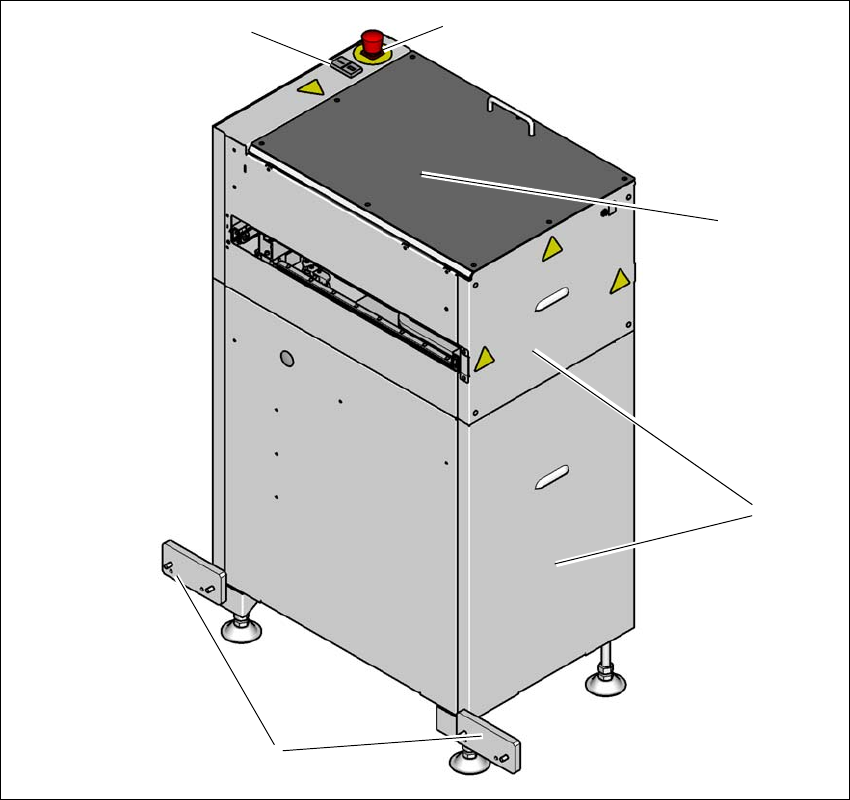
1.2.1 Shuttle extension at the output side of a SIPLACE machine
1
Fig. 1.2 - 1 Shuttle extension input side on the conveyor output of a SIPLACE machine
(1) Start and stop button
(2) EMERGENCY STOP button
(3) Top cover
(4) Side covers
(5) Connection fixtures on the conveyor output side of the SIPLACE machine
(1)
(5)
(2)
(3)
(4)