SL940-Install-Ops-Maintenance-7210918_B.pdf - 第122页
6- 14 Configuration a nd C haracte rization Table 6-1 Conveyor Set tings Prope rty Descripti on Default Value Belt Acce leration Rate at which the conve yor bel t accel erates. 2500 mm Belt Spee d Speed at which t he con…
Configuration and Characterization 6-13
6.10 Conveyor Configuration
To configure the conveyor:
1. Click on
Configure > Conveyor Settings from the ECXP Edit Screen.
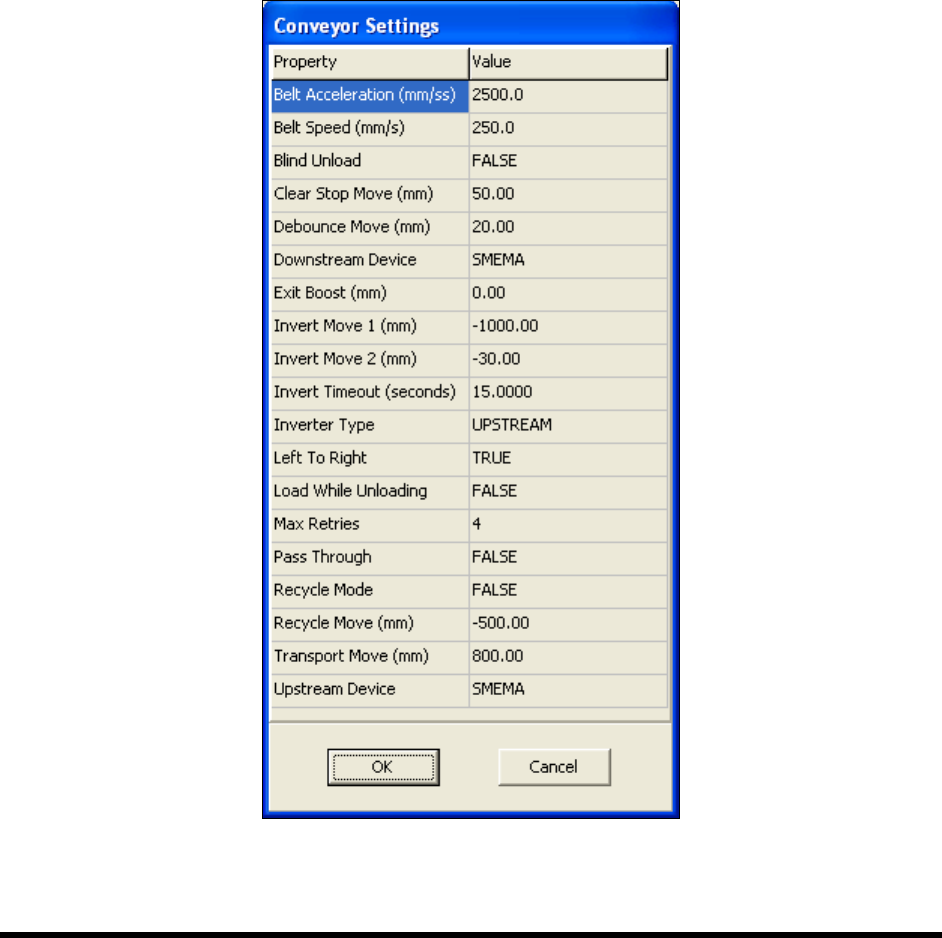
The Conveyor Settings dialog box shown in Figure 6-13 opens.
NOTE The Conveyor Settings dialog box also contains Inverter configuration settings. See
6.11 Inverter Configuration.
2. Enter the desired property values.
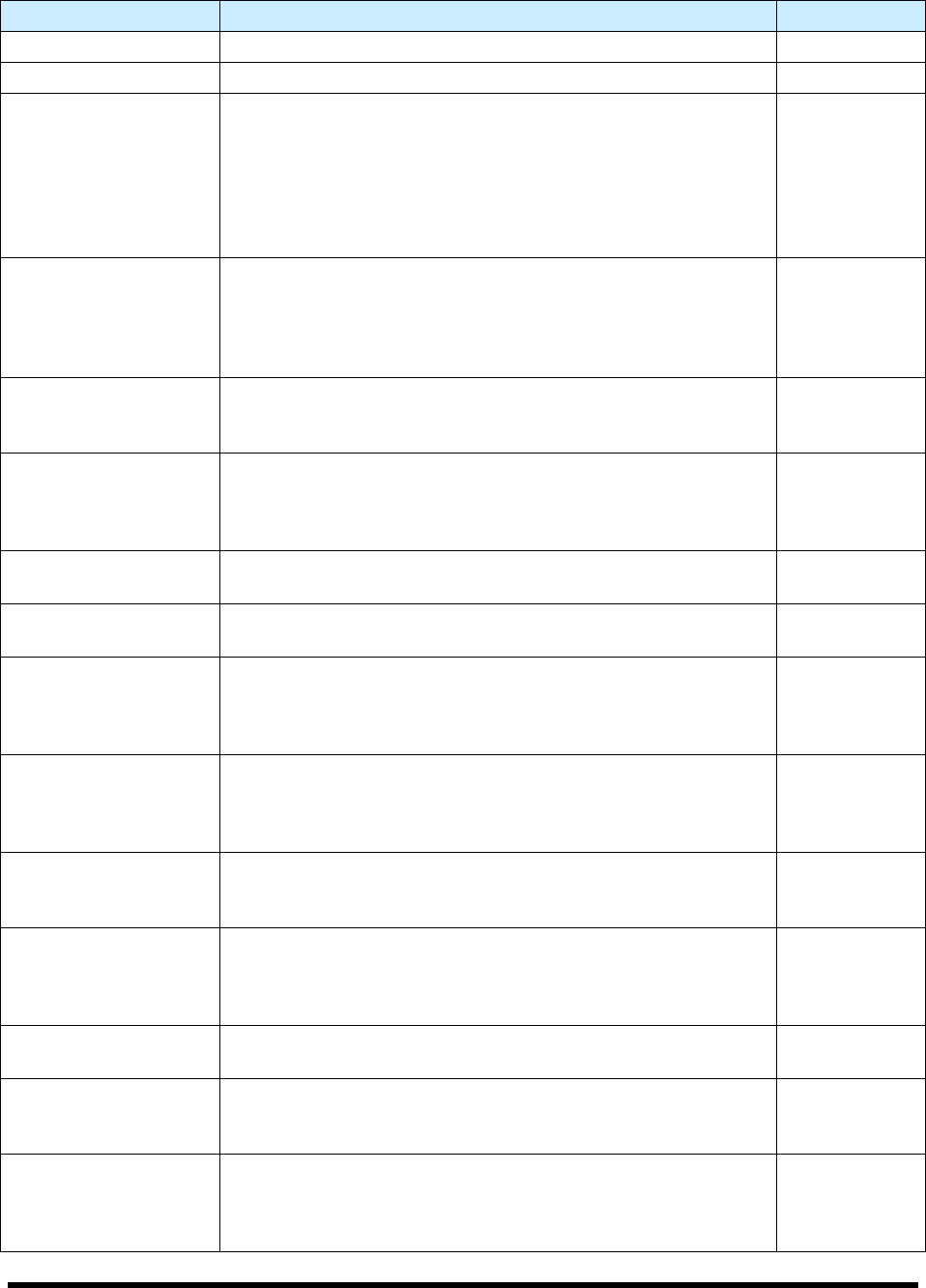
See Table 6-1 for a description and default value for each property.
3. Click
OK when done.
Figure 6-13 Conveyor Settings Dialog Box
6-14 Configuration and Characterization
Table 6-1 Conveyor Settings
Property Description Default Value
Belt Acceleration Rate at which the conveyor belt accelerates. 2500 mm
Belt Speed Speed at which the conveyor belt moves. 250 mm
Blind Unload
If True, only one attempt is made to unload the board to the
downstream machine. If no SMEMA acknowledgement is
received, then production continues. If False and no SMEMA
acknowledgement is received, an error occurs and production
stops. Typically, this property is set to True to avoid product
unload errors when the downstream machine is a non-
SMEMA device, such as a curing oven.
False
Clear Stop Move
Distance to move the board to clear the board stop. During a
manual unload, the conveyor stops when the fixture sensor no
longer detects the board, however the board may not clear the
stop. Use this setting to move the board the additional
distance required to move it from under the stop.
50 mm
Debounce Move
Distance to move the board to the board stop after the
transport move is completed and the fixture sensor detects the
board. This ensures that the board is tight against the stop.
20 mm
Downstream Device
Select SMEMA when there is a downstream machine. Select
Sensor when a conveyorized system is being unloaded
manually. Select Jumper when there is no downstream
machine and the SMEMA connectors are jumpered.
SMEMA
Exit Boost
Distance to move board to help transfer it to the next conveyor
in the system. Use to help speed production.
0.00
Left to Right
If True, the conveyor moves from left to right. If False, the
conveyor moves from Right to Left.
True
Load While Unloading
If False, this function is turned off. If True, the Robot Controller
sends a signal to the upstream machine requesting a new
board at the same time it is moving the just-processed board
to the downstream machine.
False
Max Retries
Number of times conveyor controller attempts to load a board
into workcell fixture. If the fixture sensor does not detect a
board after the designated number of tries, production is
stopped and an error message is displayed.
4
Pass Through
If False, boards are processed before being passed to the
downstream machine. If True, boards are passed to the
downstream machine without processing.
False
Recycle Mode
If False, boards are conveyed to the downstream machine
after processing. If True, the conveyor reverses and moves
the board back to the beginning where it is reloaded for
another processing cycle. The distance is the Recycle Move.
False
Recycle Move
Distance to move the board upstream before reloading when
Recycle Mode is set to True.
-500 mm
Transport Move
Distance to move the conveyor when loading a board into the
fixture. This distance should be greater than the distance from
the beginning of the conveyor to the board stop.
800 mm
Upstream Device
Select SMEMA when there is an upstream machine. Select
Sensor when a conveyorized system is being loaded
manually. Select Jumper when there is no upstream machine
and the SMEMA connectors are jumpered.
SMEMA
Configuration and Characterization 6-15
6.11 Inverter Configuration
NOTE You may configure the Inverter through the Conveyor Configuration dialog box or
through the Reconfigure feature. The recommended method is through the Conveyor
Configuration dialog box. If you use the Reconfigure feature, all conveyor settings are
reset to the factory defaults. You will then have to restore any customized settings. The
following procedure uses the Conveyor Configuration dialog box. The Reconfigure
method is detailed in 6.4.2 ECXP Reconfiguration.
To configure the Inverter:
1. Click on
Configure > Conveyor Settings from the ECXP Edit Screen menu bar.
The Conveyor Settings dialog box shown in Figure 6-13 opens.
2. Enter the desired values.
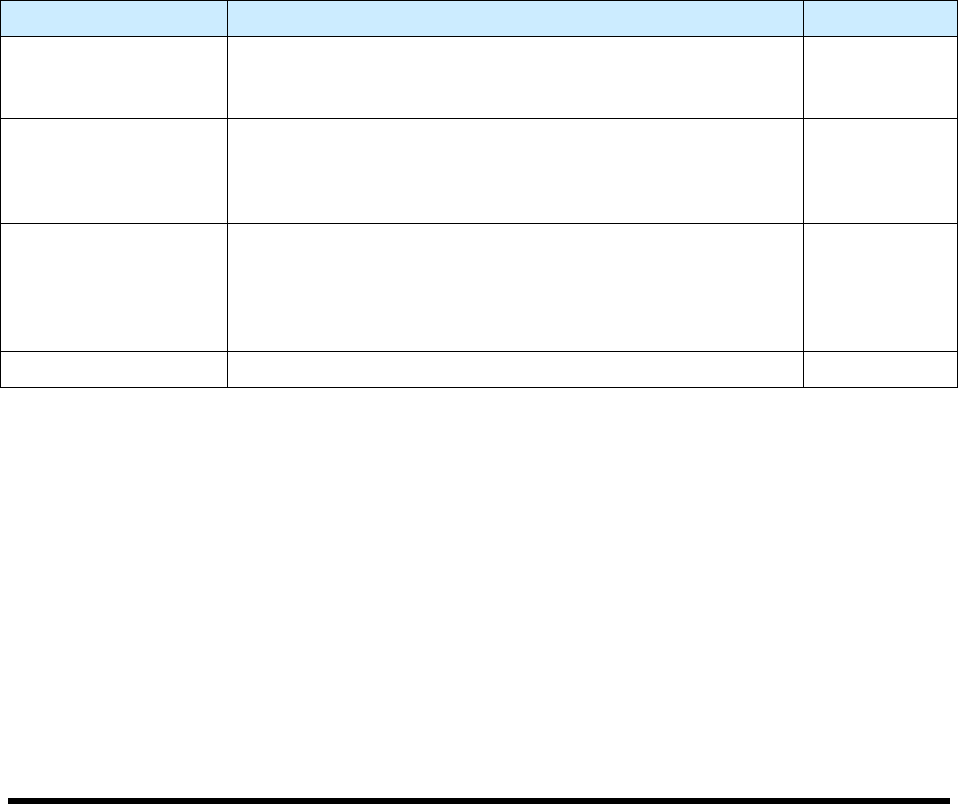
See Table 6-2 for a description and default value for each property.
3. Click
OK when done.
Table 6-2 Inverter Configuration
Property Description Default Value
Invert Move 1
Distance to move the board into the Inverter. This move is
used when the Inverter is upstream of workcell. If the Inverter
is upstream, must be a negative value.
-1000 mm
Invert Move 2
Distance to move the board upstream after it passes the
fixture sensor. This move is only used when the Inverter is
downstream of the workcell. This move is a safety factor to
prevent damage to the board. Must be a negative value.
-30 mm
Inverter Time Out
Time to wait for the board to be sent to the Inverter and return.
The timeout counter starts when the conveyor sends the
board to the Inverter. If the inverted board fails to load into the
fixture before the timeout interval expires, production stops
and the "Board Failed To Load" error message appears.
15 sec.
Inverter Type Upstream or Downstream configurations are supported. Upstream