SL940-Install-Ops-Maintenance-7210918_B.pdf - 第125页
Configuration a nd C haract erization 6- 17 6.12.2.2 Product Frame Product Fr am es (See Figur e 6-14 , R ectangle B) exist w ithin the B ase Fr ame. ECXP uses fixture constraint coordinat es, plus the length a nd width …
6-16 Configuration and Characterization
6.12 Robot Configuration
6.12.1 Home
The Home position of the Robot is a known position within its workspace defined by X, Y, and Z
coordinate limit switches. When the Robot is at the Home position, the coordinates of the tool flange in
the Base Frame are X=0, Y=0, Z=3.5 inches. The Z-axis is all the way up in the Home position, and all
the way down when at the origin position. See 6.12.2 Reference Frames for additional information.
If the Robot loses track of its current position, it performs a homing operation, which is a sequence of
slow motions to the Home position, where the limit switches sense the Robot's arrival. The Robot then
resets its position to the Home position. To ensure coating accuracy, you can add a Position Verify
instruction to a product program or procedure.
6.12.2 Reference Frames
All positioning in the workcell is done with reference to sets of position coordinates, called Reference
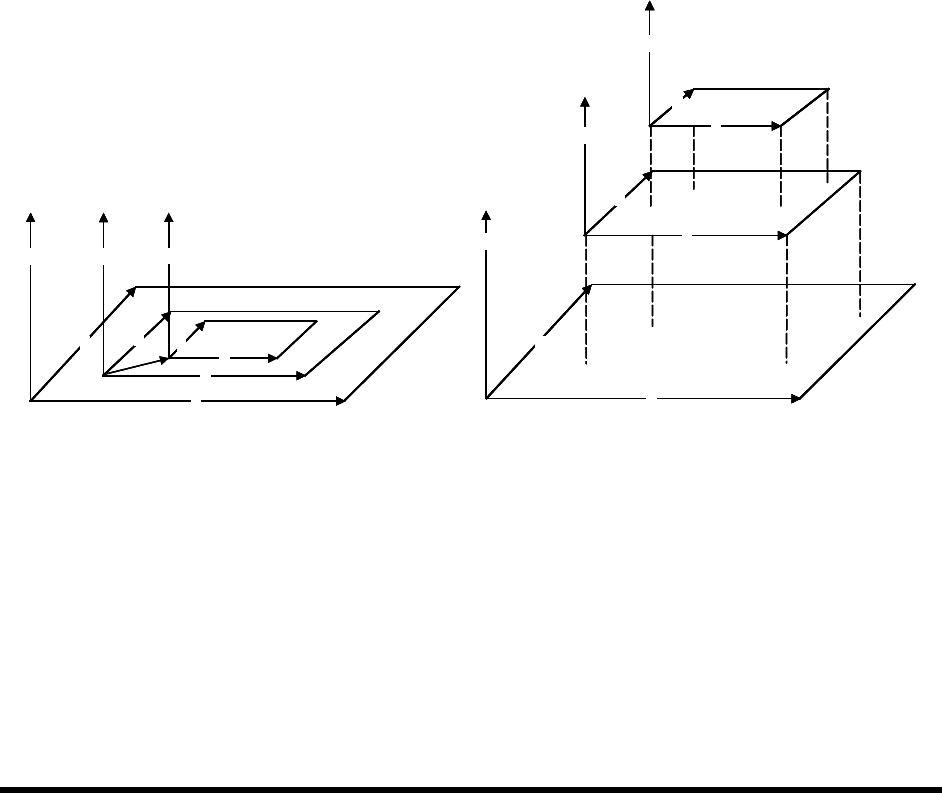
Frames. In ECXP, three different sets of Reference Frames are used: Base Frame, Product Frame, and
Pattern Frame. See Figure 6-14. As you face the front of the workcell, the X-axis is left to right, the Y-
axis is front to rear, and the Z-axis is up and down. The X, Y, and Z limit switches at the front left corner
of the Base Frame define the Home or Origin position of the Robot. The Z-axis is all the way up in the
Robot Home position.
A
X
Y
Z
B
X
Y
Z
C
X
Y
Z
0,0,0
A
X
Y
Z
C
X
Y
Z
B
X
Y
Z
A
X
Y
Z
B
X
Y
Z
C
X
Y
Z
0,0,0
A
X
Y
ZZ
B
X
Y
ZZ
C
X
Y
Z
0,0,0
A
X
Y
Z
C
X
Y
Z
B
X
Y
Z
A
X
Y
Z
A
X
Y
Z
C
X
Y
Z
C
X
Y
Z
C
X
Y
Z
C
X
Y
Z
B
X
Y
Z
B
X
Y
Z
Figure 6-14 Reference Frames
6.12.2.1 Base Frame
The Base Frame (See Figure 6-14, Rectangle A) is the set of coordinates (X, Y, and Z) that define the
Robot's travel. The origin (Home) of the Base Frame is a known point in the workspace, defined by a set
of limit switches. In the Base Frame, the Z-axis is all the way down. When you configure the fixture, you
teach the Z offset from the Base Frame Z by teaching Z with the nozzle touching the substrate. See 6.9
Fixture Configuration. Items that reference the Base Frame are:
• All procedures (maintenance subroutines)
• Fixture Constraint Location
• Safe Z Height
Base Frame
Product Frame
Frame
Pattern
Actual View
Exploded View
Configuration and Characterization 6-17
6.12.2.2 Product Frame
Product Frames (See Figure 6-14, Rectangle B) exist within the Base Frame. ECXP uses fixture
constraint coordinates, plus the length and width of the product, to calculate the coordinates of the
Product Frame within the Base Frame. The Product Frame origin is the calculated Main Pattern Edit
Frame.
NOTE A product can be a board or a pallet (carrier) containing one or more boards. If a pallet
is used, the dimensions of the pallet are used to calculate the Product Frame.
6.12.2.3 Pattern Frame
The origin coordinates of patterns (See Figure 6-14, Rectangle C) other than the Main Pattern are
expressed as a set of coordinates in the Product Frame. The pattern origin coordinates are stored in the
Pattern Edit Frame when the pattern is created.
6.12.3 Robot Settings
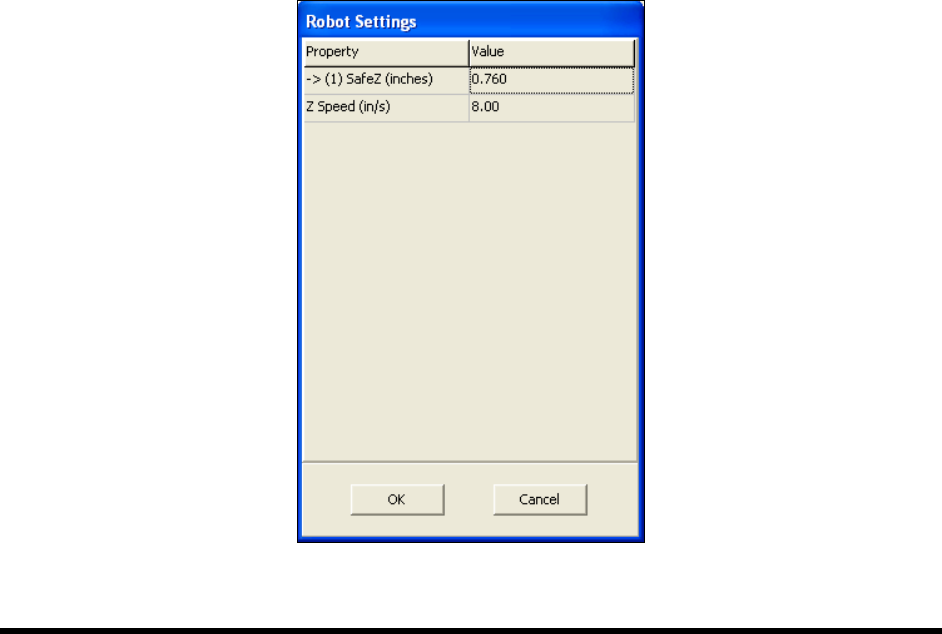
The Robot Settings dialog box in ECXP is used to set the Safe Z Height and Z-Speed.
To set the Safe Z Height and Z-Speed:
NOTE The Z-Height should be set using the Base Reference Frame which represents the entire
robot travel area. See 6.12.2.1 Base Frame.
1. Click on
Configure > Robot Settings from the ECXP Edit Screen menu bar.
The Robot Settings dialog box opens. See Figure 6-15.
Figure 6-15 Robot Settings Dialog Box

6-18 Configuration and Characterization
2. Move the robot until the tool tip is above all components on the boards you are coating, and
any other component in the workcell with which the tool tip could collide.
3. Select the
Safe Z Height value field.
When you click on the Safe Z Height value field, the
Teach Field button appears.
4. Click on the
Teach Field button.
The value entered is the current Z coordinate of the tool tip, and should be negative.
If you wish to edit this value manually, select the property field and enter a new value.
5. Enter the desired Z-Speed.
6. Click on
OK.
6.13 Bar Code/DataMatrix Scanner Configuration
If your system is equipped with the optional Bar Code/DataMatrix Scanner, you will need to perform a
Scanner configuration. For additional information, refer to the appropriate Scanner User Manual or
contact your Asymtek representative.
6.14 Characterization
NOTE A characterization must be performed for each tool and each coating material used or as
required to ensure quality and consistent dispensing.
Many variables, such as material type, temperature, viscosity, substrate type, robot velocities, and
dispenser response times affect the coating process. Characterization improves coating placement
accuracy and repeatability. The Characterization Wizard helps you adjust program values to compensate
for these variables. The characterization process consists of defining the following values:
• On/Off Response Times
• Coating Height
• Coating Speed (Velocity)
• Coating Width
NOTE All of these variables are interrelated. Make your selections based on the results you want
to achieve. Refer to the ECXP User Guide or Online Help or contact your Asymtek
representative for additional information.
The characterization automatically calculates dispensing ON and OFF times. Characterization
compensates for such variables as:
• Change in air pressure
• Fluid viscosity
• Coating applicator velocity
When you perform a characterization, the coating applicator will dispense three stripes of material. You
will then be prompted to select the best pass for both the start and end values. The values will be stored in
the robot controller. The coating applicator will then dispense three additional stripes of material. These
lines should correspond to the best pass previously selected. This is your characterization.