SL940-Install-Ops-Maintenance-7210918_B.pdf - 第151页
Parts Replacement 9-3 9.5 Cleaning a nd Inspec tion A lways clea n the a rea m ade visib le after a failed pa rt is rem ov ed from the coating sy stem . Inspect the area for s igns of w hat m ay hav e caused th e part to…

9-2 Parts Replacement
9.4 Parts Ordering Information
9.4.1 Placing Your Order
Customers can order spare parts by contacting Asymtek Customer Service. Your Customer Service
Representative can take your order or assist you in setting up an account to purchase spare parts through
our Internet Web Store. When ordering parts, be prepared to provide the following information:
Your Company Name Billing Address
Shipping Address Part Number and Description of Part
Purchase Order Number Quantity
Coating System Serial Number
(found on back panel)
Shipping Instructions with Collect
Account Number
NOTE Find Customer Service contact information in the front of this manual or click on
Customer Service on Asymtek web page www.asymtek.com.
9.4.2 Shipping Instructions
When ordering parts, specify which carrier you prefer to use and provide your shipping account number.
If no instructions are received, Asymtek will determine the best shipping method and items will be
shipped prepaid with the shipping charge added to the invoice.
9.4.3 Warranty
Contact Asymtek Technical Support for any warranty issues pertaining to spare parts.
9.4.4 Credit and Exchanges
Contact Asymtek Customer Service for credit or exchanges of recommended spare parts or refurbished
components (components restored to original specifications but not sold as new).
9.4.5 Return Material Authorization
Contact Asymtek Technical Support to obtain a Return Material Authorization (RMA) before returning
any parts
.
NOTE Find your local Technical Support contact on the Asymtek web page,
www.asymtek.com/support.htm.
Parts Replacement 9-3
9.5 Cleaning and Inspection
Always clean the area made visible after a failed part is removed from the coating system. Inspect the
area for signs of what may have caused the part to fail. This may help prevent future part damage.
While removing parts that will be reinstalled, visually inspect them for damage. If found undamaged,
retain them for reinstallation. Replace damaged parts and hardware as appropriate.
9.6 Unpacking and Inspecting Replacement Parts
Replacement parts are shipped to distributor or customer facilities in individual shipping cartons. Review
the packing slip to ensure that the correct parts were received. Contact Asymtek Technical Support if any
discrepancies are discovered.
Before unpacking your spare parts, visually inspect the carton for damage. If applicable, check the
ShockWatch and the Tip N’ Tell stickers for indications of improper shipping and handling. Inform the
freight carrier of any damage.
TIP Save shipping materials for returning failed parts.
WARNING! Parts replacement should only be performed by a trained service technician.
Asymtek assumes no liability for personal injury or property damage that may
occur as a result of spare parts being replaced by other than Asymtek-trained
technicians.
9-4 Parts Replacement
9.7 Gaining Access to Coating System Components
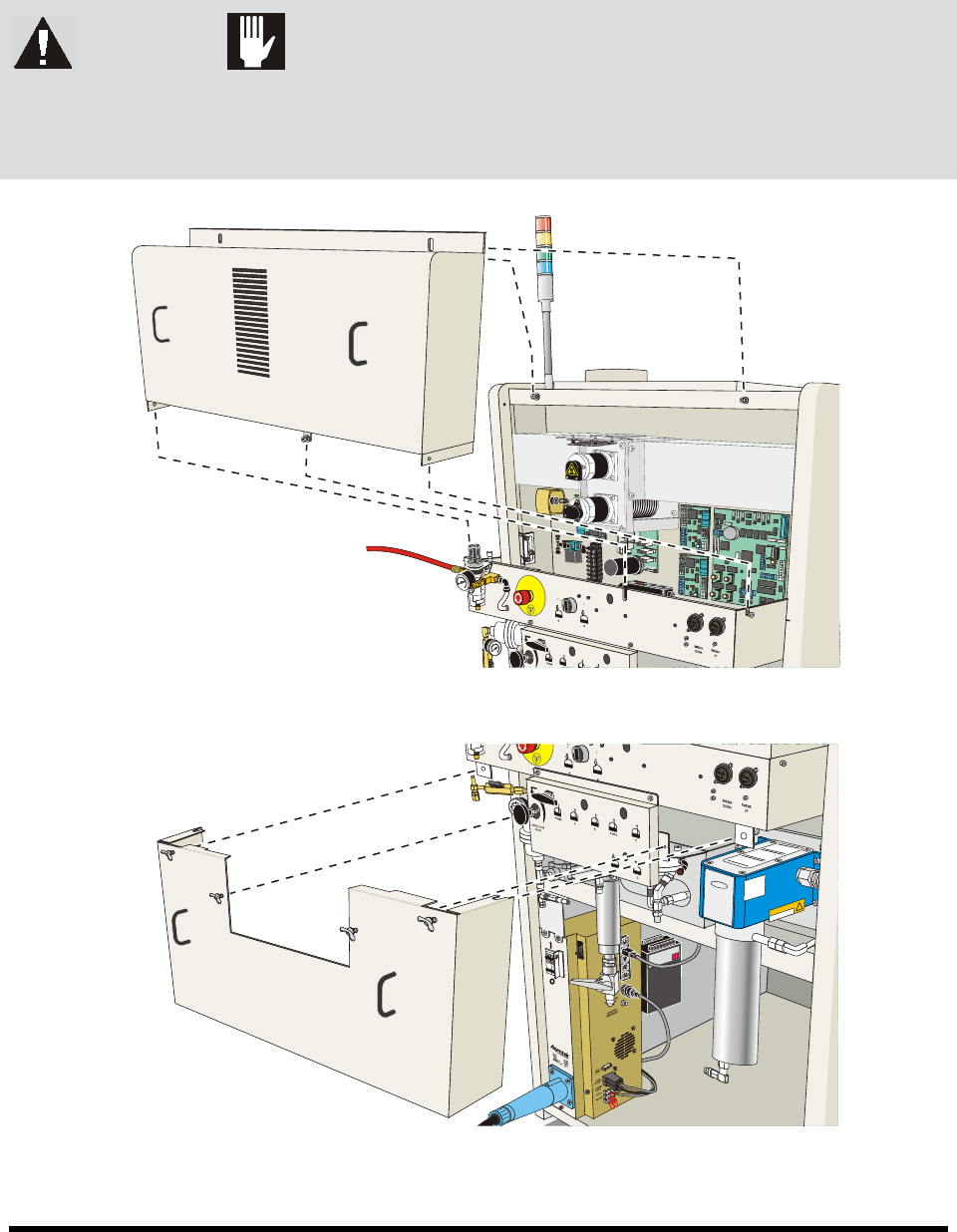
In order to gain access to some areas of the coating system, it will be necessary to remove covers, doors,
and access panels. Figure 9-1 shows the location of these features.
WARNING! CAUTION!
Make sure that the coating system has been completely shut down before
attempting to remove any panel. Remove doors, covers, and panels carefully to
avoid damaging underlying components.
Figure 9-1 Removing the Upper Rear Access Panel
Figure 9-2 Removing the Middle Rear Access Panel