SL940-Install-Ops-Maintenance-7210918_B.pdf - 第61页
Pow er - up an d Test in g 4-1 4 P ow er - up and T esting 4.1 Overvi ew This sec tion des cribes th e pow er - up and testing proced ures for m aking sure that all system components are functioning and communicating pro…
3-10 Installation
3.8 Installing the Optional Genie Camera
NOTE The Genie Framework Software is installed at the factory prior to shipping.
To connect the camera:
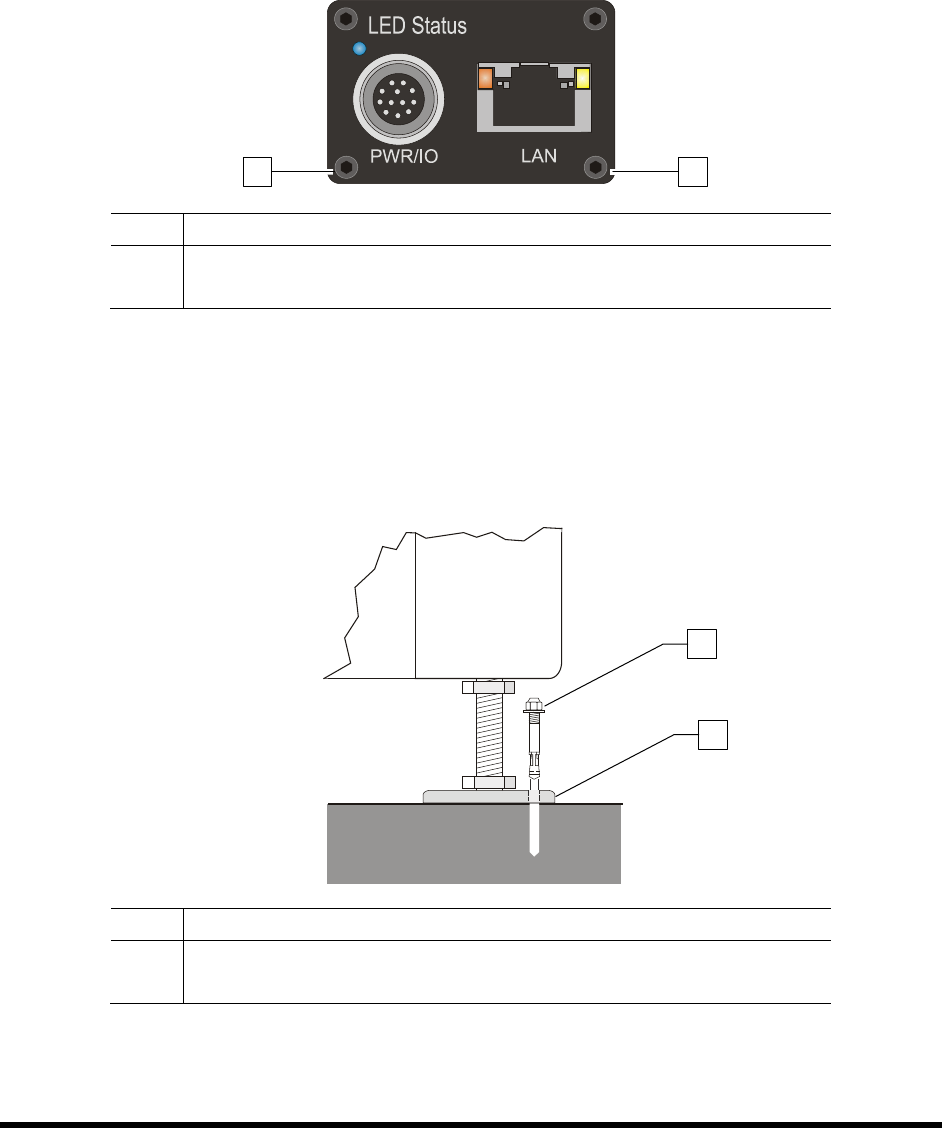
1. Connect a power supply to the Genie camera (Figure 3-11).
2. Connect an RJ5 Ethernet cable from the camera to the laptop computer.
Item Description
1 Power Connection
2 Ethernet Connection
Figure 3-11 Camera (Rear View)
3.9 Anchoring the Coating System
To prevent movement that could cause injury to personnel and damage to the coating system and facility,
each coating system leveler (foot) should be anchored to the floor with one wedge anchor (Figure 3-12).
Refer to Facility Specification SL94XE (P/N 7218847).
Item Description
1 Wedge Anchor
2 Leveler
Figure 3-12 Anchoring the Coating System
NOTE You may also use the shipping brackets to anchor the coating system.
1
2
2
1
Power-up and Testing 4-1
4 Power-up and Testing
4.1 Overview
This section describes the power-up and testing procedures for making sure that all system components
are functioning and communicating properly. This section covers the following topics:
•
Pneumatic Connections
•
Testing the System
•
Electrical Connections
•
Robot/Conveyor I/O
•
Exhaust Connection •
Pneumatics
•
Connecting Power and Air Supply
•
Robot (Dispensing Head) Function
•
Powering On the System •
Conveyor Function
•
Camera States
•
Coating System Options
• Starting Easy Coat for Windows (ECXP)
4.2 Safety First
Operation of your SL-940E/SL-941E Series Conformal Coating System involves heat, air pressure,
electrical power, mechanical devices, and the use of hazardous materials. It is essential that every person
servicing or operating the coating system fully understands all hazards, risks, and safety precautions.
Refer to Section 2 - Safety for additional information.
WARNING! CAUTION!
To ensure optimal performance and safety, it is necessary to install the coating
system in a facility that meets the necessary requirements listed in Section 10 -
Specifications. If you have any questions, please contact Asymtek Technical
Support.
4.3 Pneumatic Connections
Depending on system configuration, the SL-940E/SL-941E requires 85 to 90 psi (586 to 620 kPa) up to
0.34 m
3
/min (12 SCFM) max. of clean, dry air delivered through a 12.7 mm (0.5 inch) pipe or hose.
Connect the air supply to the ¼ -inch NPT quick-disconnect fitting at the Main Air Inlet (Figure 4-1).
NOTE The maximum air supply pressure should not exceed 90 psi (620 kPa). The system is
equipped with a 100 psi relief valve.
WARNING! CAUTION!
All system pneumatic connections should be checked before the main air
is connected.
Refer to Appendix B for SL-940E/SL-941E pneumatic diagrams.

4-2 Power-up and Testing
4.4 Electrical Connections
The coating system requires 200/240 VAC 50/60Hz, 10A.
NOTE Refer to Section 10 - Specifications for more information on electrical requirements.
Contact your Asymtek representative for your particular system requirements.
Refer to Appendix B for SL-940E/SL-941E electrical diagrams and electronic connections.
4.5 Exhaust Connection
The coating system requires a 15.3 cm (6 inch) diameter exhaust duct capable of drawing a minimum of
17 m
3
/min @ 25.4 mm water column (600 SCFM air at 1.0 inch water column) static pressure.
NOTE Refer to Section 10 - Specifications for more information on exhaust requirements.
Contact your Asymtek representative for your particular system requirements.