SL940-Install-Ops-Maintenance-7210918_B.pdf - 第94页
5- 14 Operation 5.11 System Sta rtup/Shu tdown This subse ction d etails ba sic st art - up and shutdown pro cedures based on d ifferent lev els of operation. T he following procedu res are offer ed as g eneral r ecomm e…
Operation 5-13
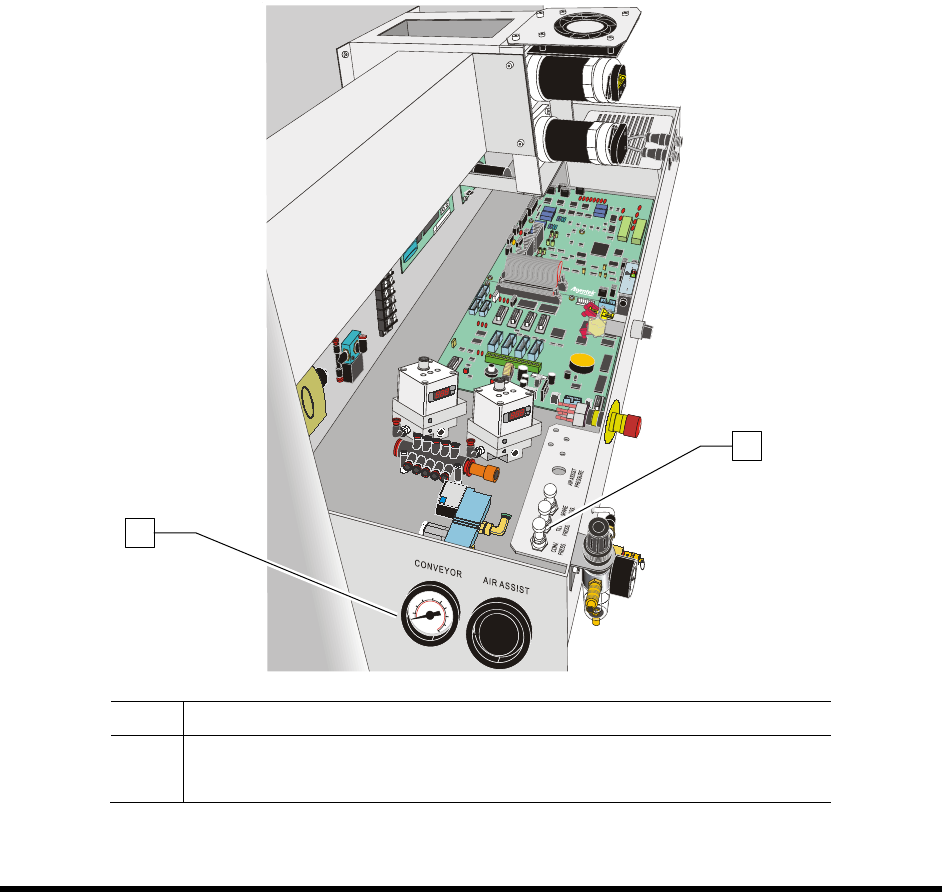
5.10.4 Conveyor Air Regulator and Gauge
NOTE The Conveyor Air Regulator and Gauge is preset at the factory.
To adjust the conveyor air pressure:
1. Locate the Conveyor Air Regulator adjustment knob inside the rear cover of the coating
system (Figure 5-10).
2. With the Main Air Pressure ON, check the gauge reading. It should read 40 psi (± 5psi).
3. If the Conveyor Air Regulator needs adjustment, loosen the jam nut to unlock the regulator.
4. Rotate the regulator counterclockwise until the Conveyor Air Gauge registers 0 psi.
5. Rotate it clockwise until the Conveyor Air Gauge registers 40 psi (276 kPa).
6. When the desired air pressure is set, tighten the jam nut on the Conveyor Air Regulator.
Item Description
1 Conveyor Air Gauge
2 Conveyor Air Regulator
Figure 5-10 Conveyor Air Regulator and Gauge
1
2

5-14 Operation
5.11 System Startup/Shutdown
This subsection details basic start-up and shutdown procedures based on different levels of operation. The
following procedures are offered as general recommendations and suggestions when starting and/or
shutting down your Select Coat SL-940E/SL-941E Series Conformal Coating System. Your actual start-
up and shutdown procedures may vary.
WARNING! Only authorized service technicians or process engineers should connect power
cables to the power source. Operators should not attempt to make electrical
connections.
5.11.1 Startup
If necessary, refer to the figures in Section 1 - Introduction to identify system components.
To start the coating system:
1. Close the coating system front hood.
2. Power on the coating system as described in 4.7 Powering On the System.
NOTE Ensure that all items on the Daily Routine Checklist have been completed prior to starting
the production run. Refer to 5.12 Daily Routine Procedures.
To Start ECXP:
1. Start ECXP as described in 4.9 Starting Easy Coat for Windows.
2. Refer to 5.17 Loading a Program and 5.18 Running a Program for detailed instructions on
system setup and running production.

Operation 5-15
5.11.2 Shutdown
5.11.2.1 Emergency Shutdown
In case of an emergency or malfunction, press one of the EMO buttons. The EMO buttons are the large
red buttons located on the front panel and rear of the coating system. For more information, see 2.10
Emergency Shutdown.
WARNING! Power is still available to the power supply and to the Power Manager after an
Emergency Shutdown. To fully remove power to the system, all power cords
must be disconnected.
5.11.2.2 Routine Shutdown
Routine shutdown may vary depending on your particular requirements. The system may be left in the
power-on state at the end of the day or turned off completely. However, it is recommended that you
incorporate the following procedure into your production shutdown routine:
To shut down at the end of a production shift (overnight):
If you are using a coating material without pot life limitations, follow these steps for shutdown:
1. Wait for the dispensing program to complete.
2. Verify that all motion has stopped.
3. Unload all boards from the conveyor.
4. Exit ECXP.
5. Turn the Reservoir Air Pressure Switch (Figure 1-8) to the OFF
(0) position.
6. Press the
Stop (0) button on the front panel.
7. Remove the nozzle from the coating applicator.
8. To prevent material from curing inside the coating applicator nozzle, immerse the applicator
in the appropriate solvent in the stainless steel solvent cup.
If necessary, use an Asymtek nozzle brush (P/N 901905) to remove build-up.
9. Dry the nozzle and inspect the orifice for blockage.
10. Immerse the nozzle in solvent and store it in a safe place.