SL940-Install-Ops-Maintenance-7210918_B.pdf - 第49页
Safety 2- 15 2.14 Light Bea con The Light B eacon is a dev ice th at disp lays sy stem status and can wa rn the op erator w hen fau lt cond itions exist. The beacon h as red, yellow, g reen, and blue light s that can be …
2-14 Safety
3. Rotate the Main Air Pressure knob counterclockwise until the gauge reads 0 psi and then
disconnect the main air supply by the quick release fitting.
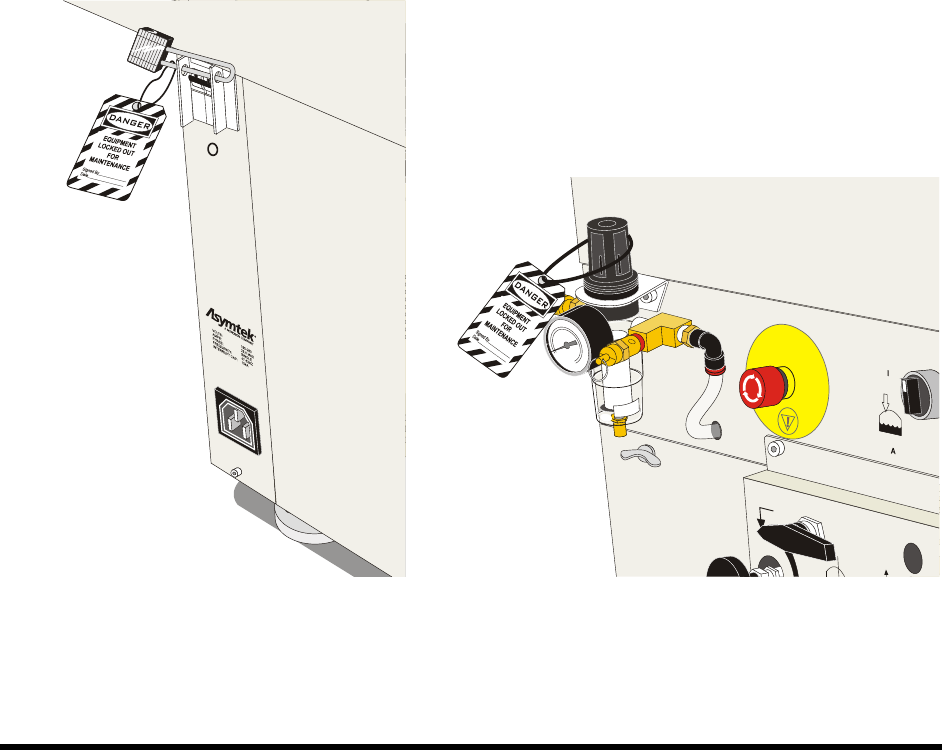
4. Install an approved, keyed lock on the locking flange of the Main Circuit Breaker so it cannot
be turned on; tag it with an approved tag.
Ensure that the owner, date, reason, and estimated time for repair are clearly marked on
the tag.
5. Install an approved lockout clamp and keyed lock onto the power connector so it cannot be
reconnected to the Power Manager, and attach an approved tag.
Ensure the owner, date, reason, and estimated time to repair are clearly marked on the
tag.
6. Install an approved lockout clamp and keyed lock onto the pneumatic fitting so it cannot be
reconnected to the Main Air Regulator, and attach an approved tag. Ensure the owner, date,
reason, and estimated time to repair are clearly marked on the tag.
NOTE Warning tags document the name of the technician taking the equipment out of operation,
the date, and other facility-required information. It is a warning that the equipment cannot
be put back into operation until the authorized technician has removed the tag.
Figure 2-8 Lockout of Electrical Power Figure 2-9 Lockout of Pneumatic Pressure
Safety 2-15
2.14 Light Beacon
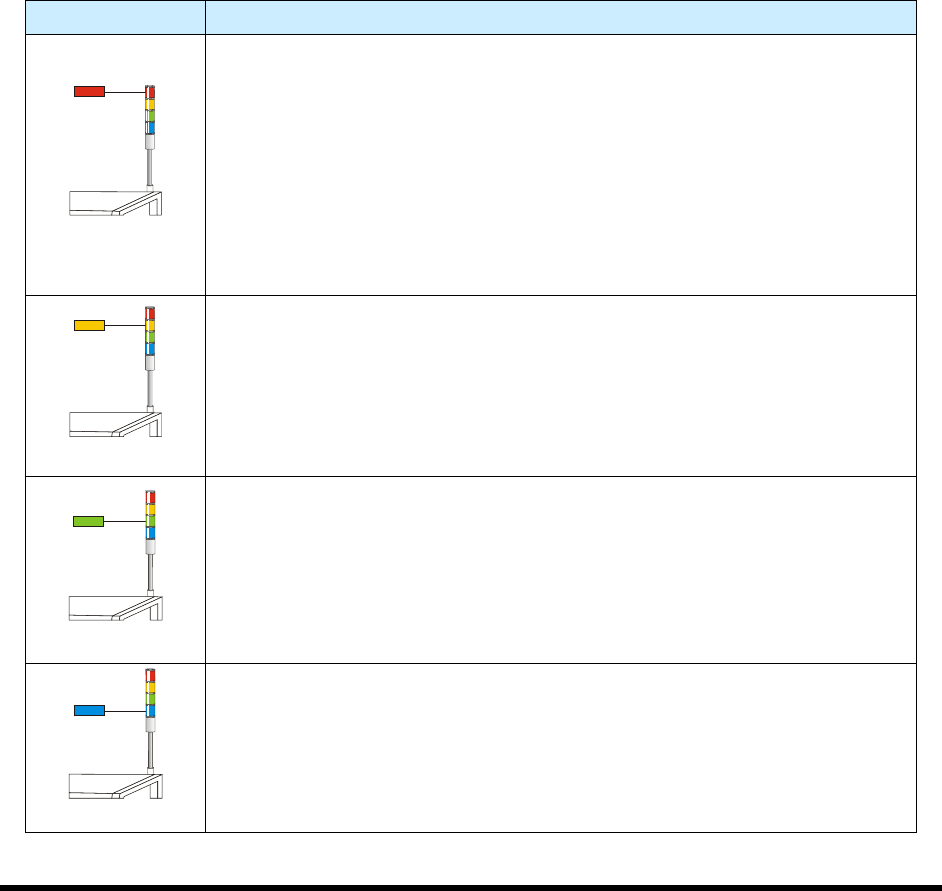
The Light Beacon is a device that displays system status and can warn the operator when fault conditions
exist. The beacon has red, yellow, green, and blue lights that can be solid or flashing. The beacon also has
an audible alarm. Table 2-3 provides possible reasons for each color indication.
Software and hardware share control of the beacon lights. Sometimes, hardware-driven displays override
those caused by software conditions and sometimes software-driven displays override those caused
hardware conditions. Safety critical conditions always have priority. Flashing light software commands
have priority over solid light commands.
NOTE Light beacon action can be custom configured using the beacon control feature. Refer
to the Easy Coat User Guide for details.
Refer to Section 8 - Troubleshooting for suggested recovery from common fault
conditions.
Table 2-3 Beacon Color Indications
Beacon Color System Status
RED
ALERT
All motion, outputs, dispensing valve, and motion controls are disabled until
the fault is cleared.
One of the following conditions may exist:
A. Solid – Emergency stop condition.
B. Flashing – Exhaust failure. Loss of power to machine. Software driven
error message is displayed on the computer monitor.
C. Solid or Flashing - Software has been configured to display a solid or
flashing red light.
YELLOW
CAUTION
System in a low power state or lacks sufficient air pressure.
One of the following conditions may exist:
A. Solid – Door is open (Interlock activated).
B. Solid or Flashing - Software has been configured to display a solid or
flashing yellow light.
GREEN
OPERATION
One of the following conditions may exist:
A. Solid – The system is fully operational with the door closed.
B. Solid or Flashing – Software has been configured to display a solid or
flashing green light.
BLUE
USER DEFINED
A. Solid – When low fluid is detected.
B. Flashing – Software has been configured to display a flashing blue light.