编带机说明书-含图纸ttm402.pdf - 第100页
5-2 TM-403 User’s Guide Quick Start: Vision Setup D292105.16c.fm Quick Star t: Vision Setup The following is an outline of the basic step s required to configure inspection on the TM- 402. More det ailed instructions fol…

Chapter 5: Vision Setup
Contents
Quick Start: Vision Setup . . . . . . . . . . . . . . . . . . . . . . . . . . . . . . . . . . . . .5-2
Connect Vision. . . . . . . . . . . . . . . . . . . . . . . . . . . . . . . . . . . . . . . . . . . . . .5-3
Setup HMI . . . . . . . . . . . . . . . . . . . . . . . . . . . . . . . . . . . . . . . . . . . . . . . . . . . . 5-3
Connect Computer. . . . . . . . . . . . . . . . . . . . . . . . . . . . . . . . . . . . . . . . . . . . . . 5-5
Connect Keyence Monitor . . . . . . . . . . . . . . . . . . . . . . . . . . . . . . . . . . . . . . . . 5-9
Configure Inspection. . . . . . . . . . . . . . . . . . . . . . . . . . . . . . . . . . . . . . . . .5-10
Configure Computer. . . . . . . . . . . . . . . . . . . . . . . . . . . . . . . . . . . . . . . . . . . . . 5-10
Configure Keyence Monitor . . . . . . . . . . . . . . . . . . . . . . . . . . . . . . . . . . . . . . . 5-28

5-2 TM-403 User’s Guide
Quick Start: Vision Setup D292105.16c.fm
Quick Start: Vision Setup
The following is an outline of the basic steps required to configure inspection on the TM-
402. More detailed instructions follow in the next section of this chapter.
1. Load Vision Software (user supplied computer only)
2. Connect Vision Computer/Monitor to Camera
3. Configure Inspection
If the optional laptop was purchased for vision configuration V-
TEK, Inc. recommends users create a computer Recovery
Disk prior to operation and conduct periodic back-ups as
needed. Visit the computer manufacturer’s website for instruc-
tions on creating a recovery disk.
V-TEK, Inc. does not create or maintain recovery information for
this laptop. Creating a recovery disk is solely the users’
responsibility.
D292105.16c.fm Connect Vision
Chapter 5: Setup 5- 3
Connect Vision
Note: The TM-402 vision system can be run with a computer or a Keyence IV-G
Monitor. These options are not included with the TM-402. They can be purchased
separately from V-TEK, Inc. or the user may provide their own computer.
System requirements for the vision computer follow:
• Operating system: Microsoft® Windows XP
TM
(32 bit), Windows Vista
TM
(32bit),
or Windows 7
TM
(32 or 64 bit)
• 128 MB RAM
• 1024 x 768 (96 DPI) or 1280 x 1024 (120 DPI display
• Ethernet port
If vision is enabled for a job, the vision computer/monitor must be connected to the Key-
ence IV-G Camera and the camera must be trained to inspect the part before the job can
be run.
Setup HMI
Follow the steps below to enable Vision Inspection on the TM-402.
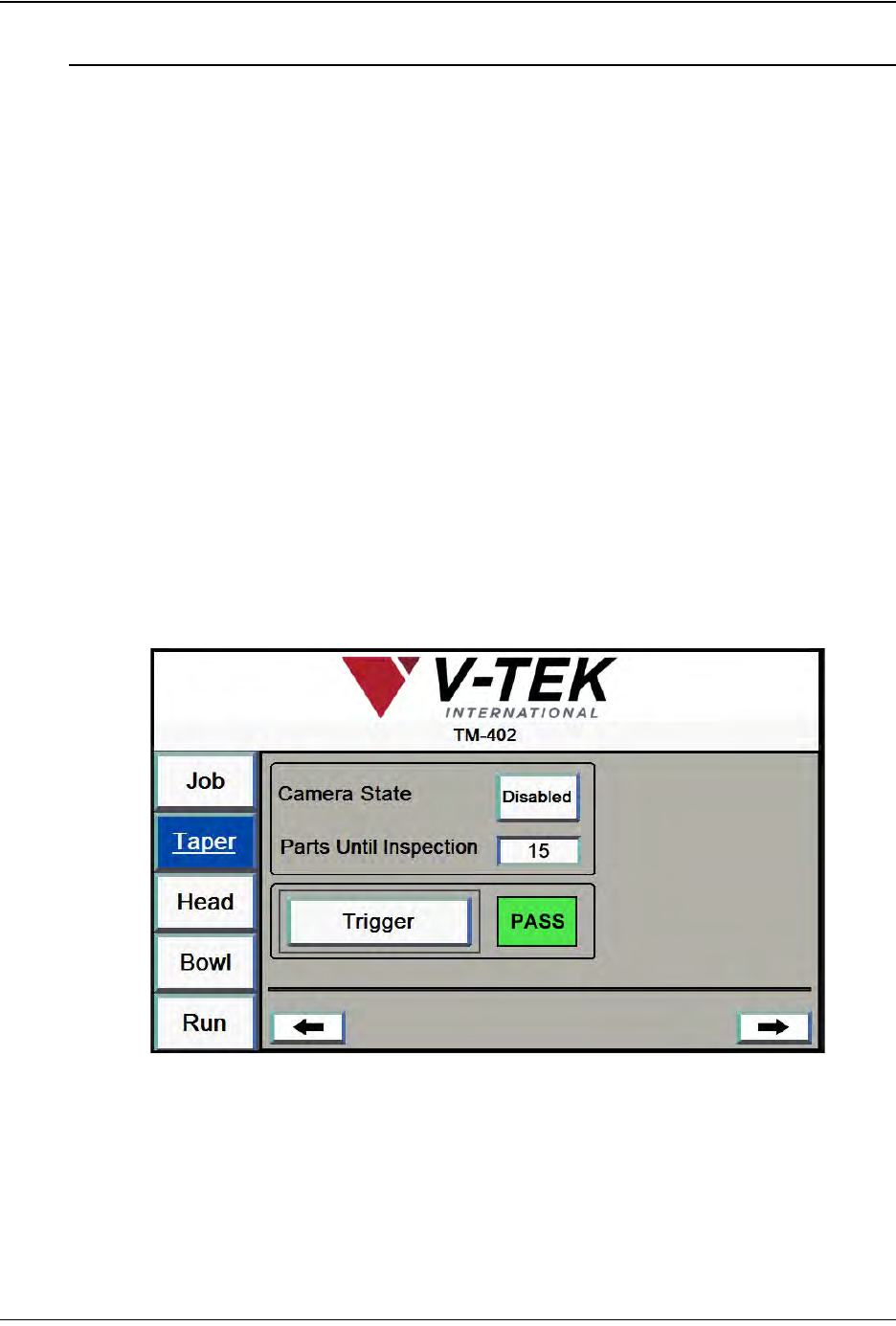
1. On the TM-402 HMI, open the Taper Tab. Press the right Arrow button to advance
to the second Taper screen.Ensure the Camera State is set to Enabled.
2. Using the M12 ethernet cable which was provided with the TM-402 system,
connect the vision computer to the Keyence camera.
Step 1:
Vision
Setup
CONNECT