编带机说明书-含图纸ttm402.pdf - 第157页
Cha pter 7: T r oubleshooting Content s Emergency St op . . . . . . . . . . . . . . . . . . . . . . . . . . . . . . . . . . . . . . . . . . . . . 7-2 Activating an Emergency S top . . . . . . . . . . . . . . . . . . . . …

6-12 TM-403 User’s Guide
Preparing to Run a Pre-programmed Job D292105.8b.fm

Chapter 7: Troubleshooting
Contents
Emergency Stop. . . . . . . . . . . . . . . . . . . . . . . . . . . . . . . . . . . . . . . . . . . . .7-2
Activating an Emergency Stop. . . . . . . . . . . . . . . . . . . . . . . . . . . . . . . . . . . . . 7-2
Clearing an Emergency Stop . . . . . . . . . . . . . . . . . . . . . . . . . . . . . . . . . . . . . . 7-3
System Alarm Messages. . . . . . . . . . . . . . . . . . . . . . . . . . . . . . . . . . . . . .7-6
Error Message Table . . . . . . . . . . . . . . . . . . . . . . . . . . . . . . . . . . . . . . . . . . . . 7-21
Adjusting Nozzle Vacuum Sensors . . . . . . . . . . . . . . . . . . . . . . . . . . . . .7-23
Tips on Part Placement . . . . . . . . . . . . . . . . . . . . . . . . . . . . . . . . . . . . . . .7-24
Sensor Adjustments . . . . . . . . . . . . . . . . . . . . . . . . . . . . . . . . . . . . . . . . .7-27
Adjusting the Low Cover Sensor . . . . . . . . . . . . . . . . . . . . . . . . . . . . . . . . . . . 7-27
Adjusting the Tape Jam Sensor . . . . . . . . . . . . . . . . . . . . . . . . . . . . . . . . . . . . 7-27
Adjusting Heat Seal Quality . . . . . . . . . . . . . . . . . . . . . . . . . . . . . . . . . . .7-28
Heat Seal Shoe Temperature. . . . . . . . . . . . . . . . . . . . . . . . . . . . . . . . . . . . . . 7-28
Seal Pressure. . . . . . . . . . . . . . . . . . . . . . . . . . . . . . . . . . . . . . . . . . . . . . . . . . 7-29
Sealer Dwell Time . . . . . . . . . . . . . . . . . . . . . . . . . . . . . . . . . . . . . . . . . . . . . . 7-29
Adjusting PSA Seal Quality. . . . . . . . . . . . . . . . . . . . . . . . . . . . . . . . . . . .7-30
Materials Used. . . . . . . . . . . . . . . . . . . . . . . . . . . . . . . . . . . . . . . . . . . . . . . . . 7-30
Seal Roller Pressure . . . . . . . . . . . . . . . . . . . . . . . . . . . . . . . . . . . . . . . . . . . . 7-30
7-2 TM-403 User’s Guide
Emergency Stop D292105.9b.fm
Emergency Stop
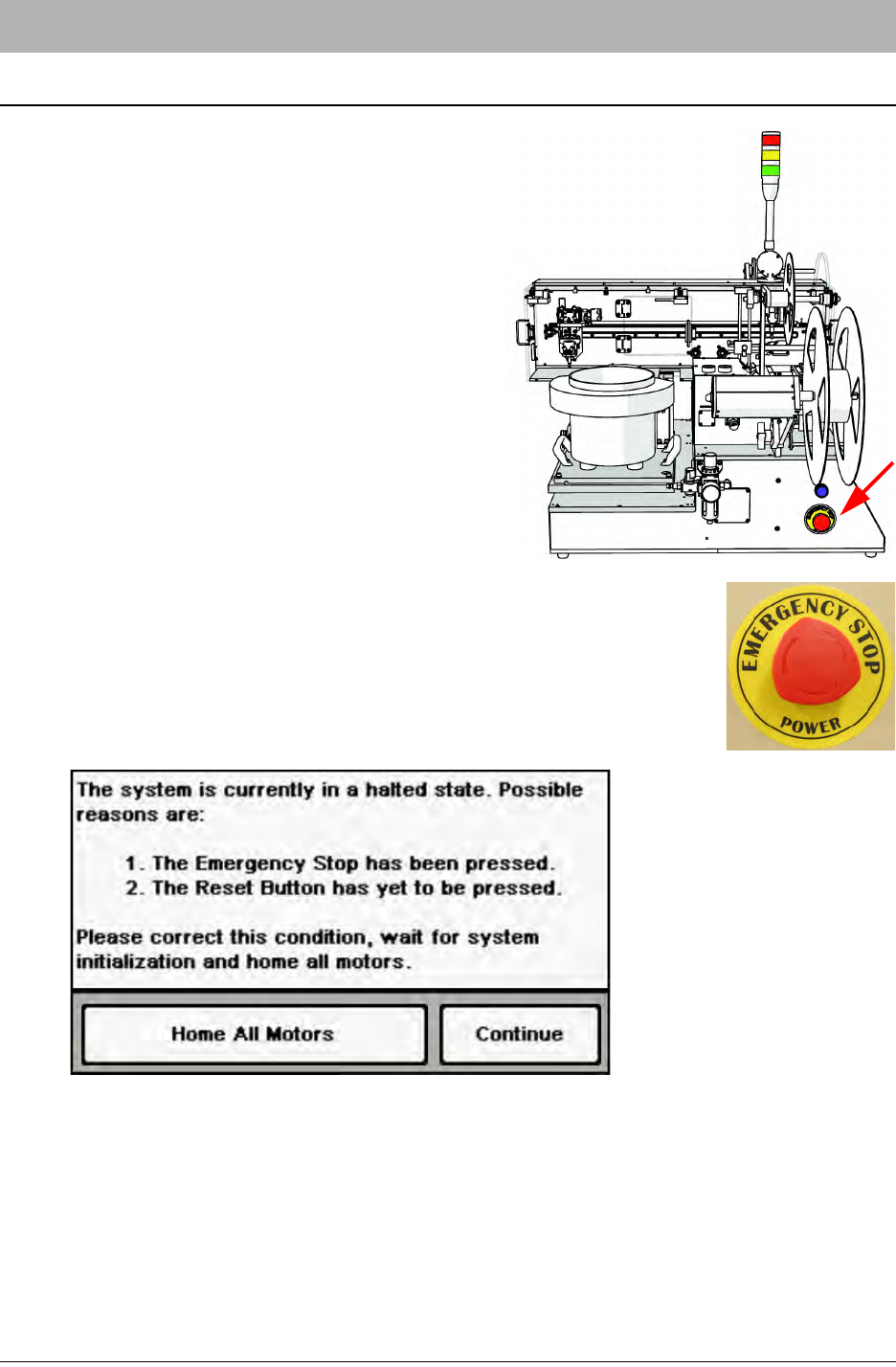
The Emergency Stop Button is located on the left
side of the TM-402.
If the Emergency Stop is pushed, the TM-402 will
automatically enter an Emergency Stop state.
When an Emergency Stop is triggered, the Tower
Light switches to red and all operations cease.
Activating an Emergency Stop
If emergency stop condition occurs, follow the steps below to resolve the
failure.
1. Press the red E-Stop button to place the TM-402 into an Emergency
Stop state. The Tower Light will switch to red and all operations will
cease. On the HMI, a Halted State message will appear.
2. Resolve the problem.(See tips on resolving error conditions which follow.)