00194440-10_SM_X-Series_Customer_en.pdf - 第165页
Service Work 3.6.7 Replacing the Conveyor Toothed Belt (2.5 mm Width) Modular PCB Conveyor System Service Manual SIPLACE X Series 165 Installation CAUTION Check the toothed bel t before fitting it. ► Hold the toothed bel…
Service Work
Modular PCB Conveyor System 3.6.7 Replacing the Conveyor Toothed Belt (2.5 mm Width)
164 Service Manual SIPLACE X Series
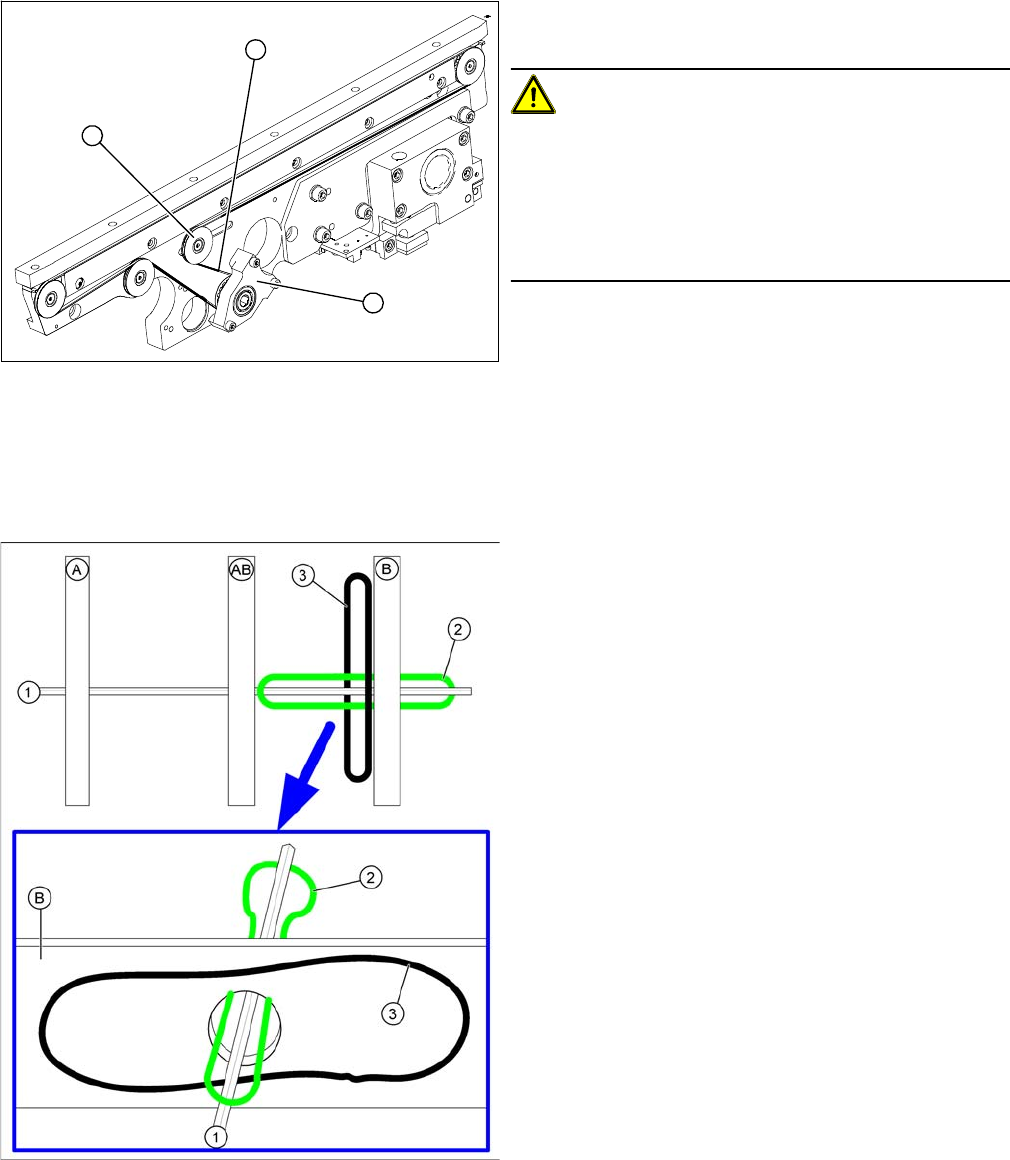
► Loosen the deflection pulley (2) with the slot and re-
lieve the tension on the conveyor toothed belt (3).
CAUTION!
The deflection pulleys have been assembled with sliding
nuts.
The screw for the deflection pulley should only be loos-
ened! If the screw is removed, the sliding nut will fall be-
hind the conveyor cheek side cover. You then need to
dismantle the cover to retrieve the nut.
► Loosen the three screws fastening the drive unit or
tape drive (holder), so that this can be moved on the
hexagonal shaft. In the case of a drive unit, you also
need to strip off the heat-shrinkable hose, mark and
loosen the cable.
► Carefully pull off the tape drive (mount) (1) or the
drive unit, while also gently unthreading the conveyor
toothed belt (3). (See next diagram).
Unthreading the conveyor toothed belt
A, AB, B: Conveyor sides
1. Hexagonal shaft
2. Conveyor belt to be unthread on edge AB
3. Loosened conveyor belt on edge B
1
3
2
Service Work
3.6.7 Replacing the Conveyor Toothed Belt (2.5 mm Width) Modular PCB Conveyor System
Service Manual SIPLACE X Series 165
Installation
CAUTION
Check the toothed belt before fitting it.
► Hold the toothed belt between two fingers and let it hang down. The toothed belt should be
roughly O shaped and when hanging freely may not turn by more than 90°!
CAUTION
Do not damage the toothed belt!
The toothed belts must not be stretched or bent!
The minimum radius of the toothed belt is 16 mm.
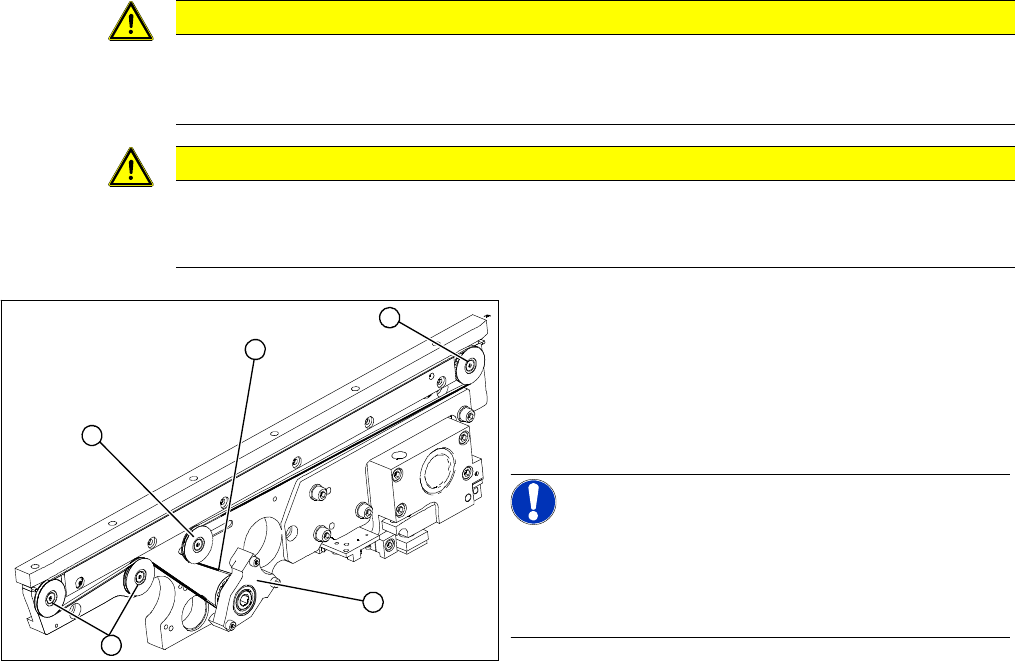
► Feed the new conveyor toothed belt (2) into the drive
unit and weave it round the deflection pulleys (3).
► Insert the tape drive (mount) or drive unit (1) with the
conveyor toothed belt (2) and fasten. In the case of
a drive unit, you will need to restore the cable connec-
tions.
NOTICE!
When replacing the belt on the passive side (tape drive
without drive unit), set the track width to 50 mm. The tape
drive must be aligned towards the active side, allowing
smooth axial movement of the hexagonal shafts.
► Tighten the fastening screws.
► Adjust the belt tension.
► Once you have loosened the drive unit cables, check
their direction of rotation.
3
3
1
3
2
Service Work
Modular PCB Conveyor System 3.6.8 Replacing the Lifting Table Unit
166 Service Manual SIPLACE X Series
3.6.8
3.6.8 Replacing the Lifting Table Unit
Replacing the Lifting Table Unit
Parts
▪ Lifting table unit for single conveyor [03029170-xx],
backwards compatible to [00358653-xx]
▪ Lifting table unit for dual conveyor [03029171-xx],
backwards compatible to [00358654-xx]
▪ Lifting table unit for dual conveyor of X4I and quad lane [03059051-xx]
▪ Lifting table unit for single conveyor of X4I [03065192-xx]
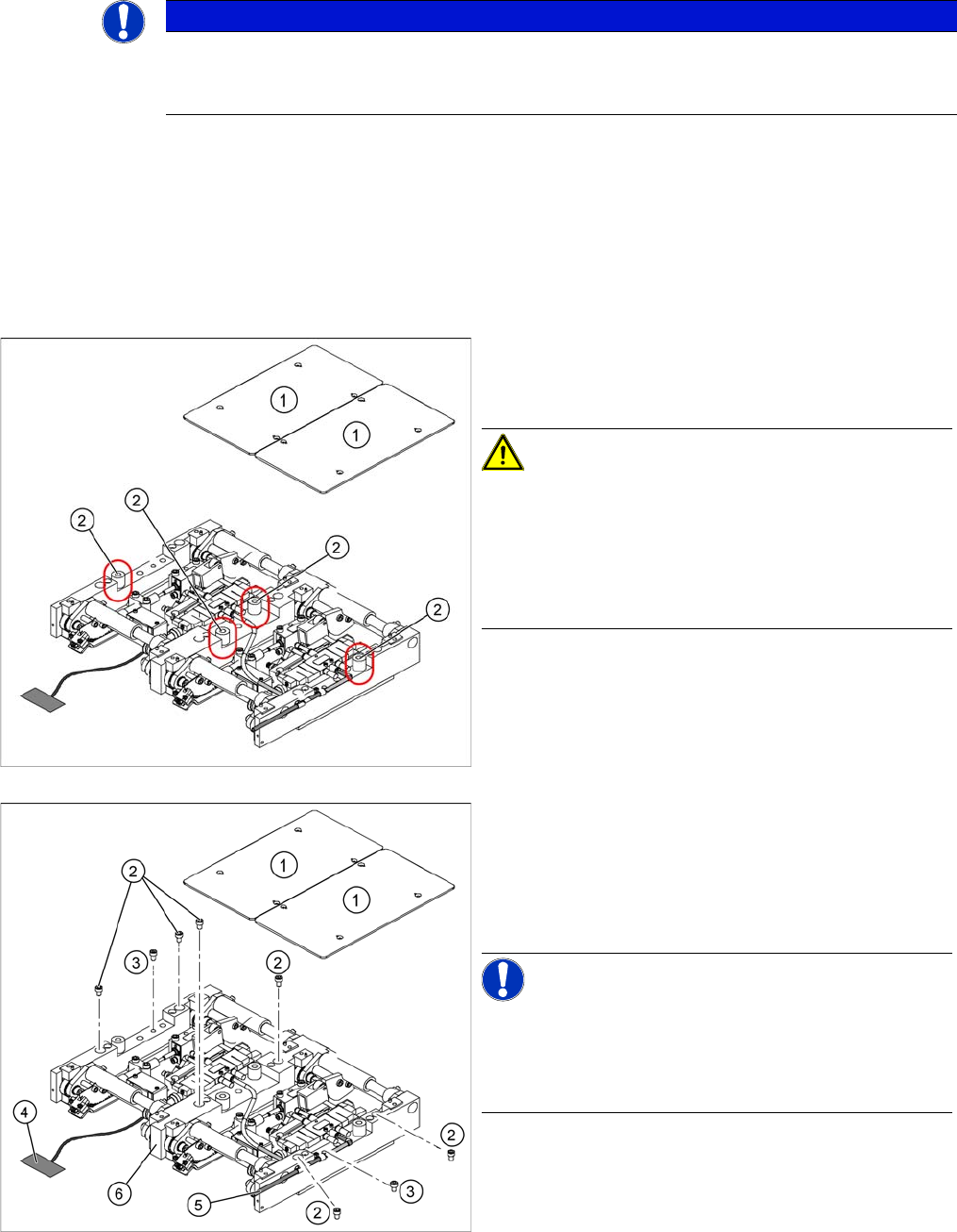
► Loosen the screws fastening the lifting table plate (1) diagonally and evenly and then remove the
lifting table plate from the lifting table unit.
NOTICE
Single, dual and quad lane conveyor
The replacement is shown here using the example of the lifting table unit for the dual or quad
lane conveyor (QC). Replacement of the lifting table unit for the single conveyor is the same.
New lifting table bumper for SIPLACE X4I
The bumpers (2) under the lifting table plate (1) are now
35 mm long.
CAUTION!
Loosen the lifting table plate screws diagonally and even-
ly!
The screws fixing the lifting table plate of the SIPLACE
X4I and any future lifting tables with a bumper length of
35 mm must be loosened evenly, otherwise the lifting ta-
ble plate will be subjected to excessive tension.
1. Lifting table plates (dual conveyor shown here)
2. Six fastening screws for lifting table (M8x100)
3. Two fastening screws for lifting table (M6x50)
► Move the PCB conveyor to a suitable position from
which you have best access to the lifting table unit.
NOTICE!
Quad lane conveyor
When using a quad lane conveyor, it is advisable to move
the first conveyor edge to one side and the second to fifth
edges as far as possible to the other side.