00194440-10_SM_X-Series_Customer_en.pdf - 第345页
Settings 5.4.8 Lifting Table Functions Conveyor Settings Service Manual SIPLACE X Series 345 5.4.8.5 5 . 4 . 8 . 5 A d ju s t in g t h e C la m p in g o f t h e L if t in g T a b le Adjusting the Clamping of the Lifting …
Settings
Conveyor Settings 5.4.8 Lifting Table Functions
344 Service Manual SIPLACE X Series
5.4.8.4
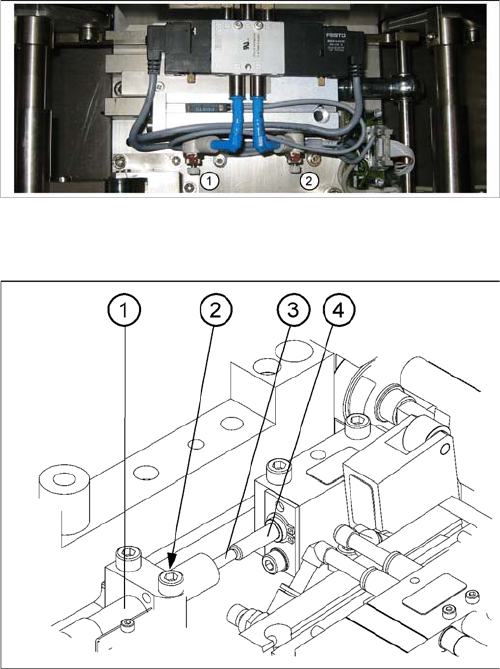
5.4.8.4 Setting the Lifting Table Unit [00358684-05]
Setting the Lifting Table Unit [00358684-05]
1. Lower
2. Raise
Turn adjustment valve left:
Reduce of lifting table travel time
Turn adjustment valve right:
Increase lifting table travel time
Setting the damping unit
The damping unit (1) allows the lifting table to move gen-
tly upwards. When the PCB is clamped, it also prevents
excessive bounce by the PCB.
► Check whether the damping unit is fixed with the lock-
nut (2) in the mounting block and that the plunger (3)
of the damping unit is just touching the actuator (4).
In this default setting, the lifting table should move up
gently.
► If this is not the case, loosen the locknut at the mount-
ing block and turn the damping unit approx. one rota-
tion into the mounting block..
► Move the lifting table upwards, with the help of the
software.
► The lifting table should move gently upwards.
The PCB clamping should not engage audibly and
there should be no PCB clamping error message.
► Check the speed of the lifting table and correct where
necessary.
Settings
5.4.8 Lifting Table Functions Conveyor Settings
Service Manual SIPLACE X Series 345
5.4.8.5
5.4.8.5 Adjusting the Clamping of the Lifting Table
Adjusting the Clamping of the Lifting Table
Parts, equipment and tools
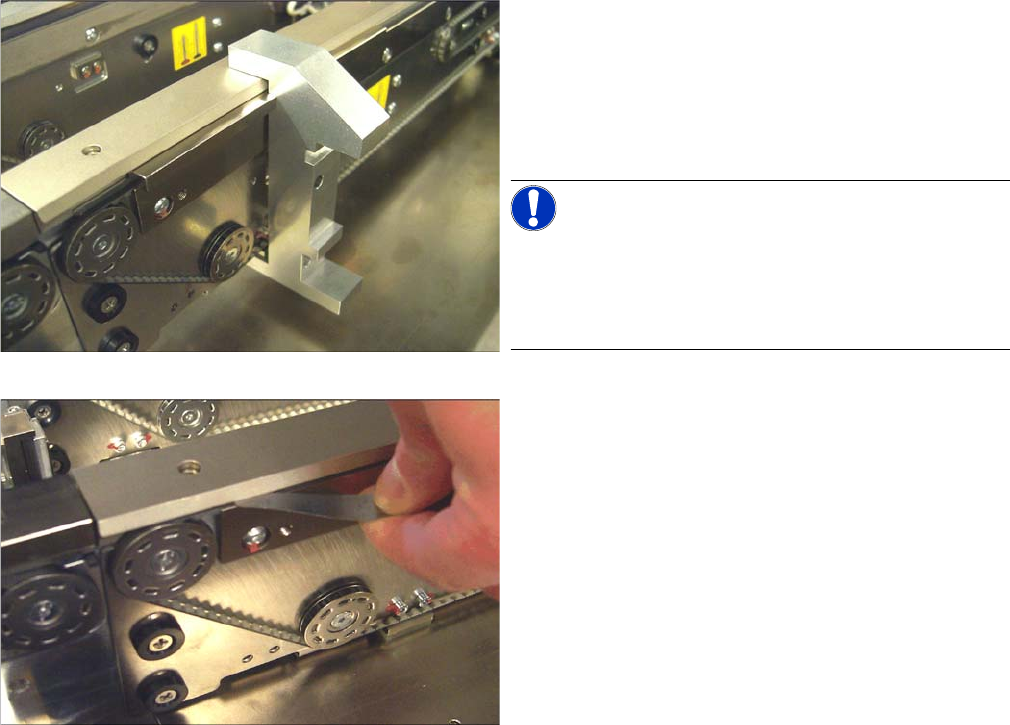
▪ Setting gauge PCB clamping [00369202-xx]
Prerequisite
The lifting table must not be clamped.
Setting
The adjustment is performed in two steps:
1. Preadjustment using the setting gauge
► Slide the setting gauge over the actuator.
► Check the position of the actuator. If the actuator is
not adjusted correctly, loosen its two fastening
screws and readjust it using the setting gauge.
Retighten the fastening screws in doing so.
NOTICE!
Quad lane
On Quad Lane conveyors the cabling of the stopper must
be opened for track 1L, 1R, 2L and 2R each. If necessary,
the stopper has to be removed completely.
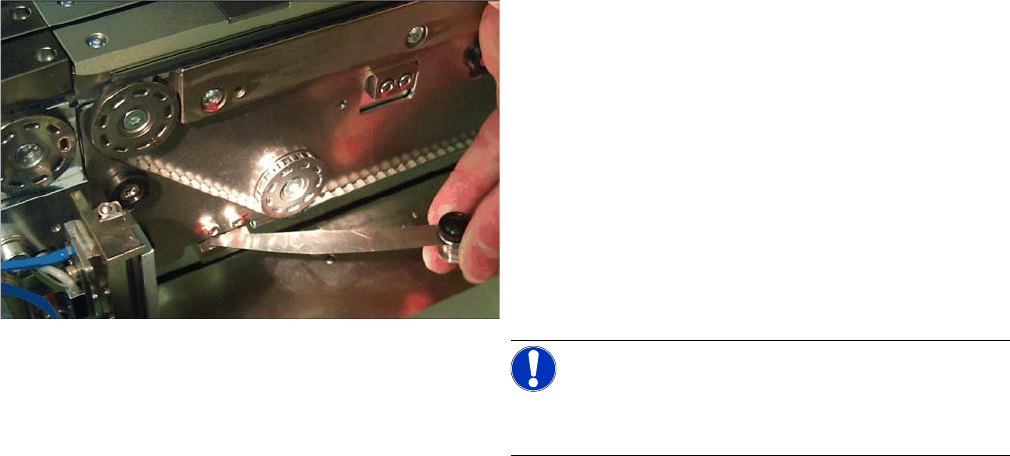
2. Checking the clamping
► Move the lifting table into the upper position without a
board.
► Check the clearance using a feeler gauge (0.1 mm).
For this purpose, move the feeler gauge coming from
the end of the belt (deflection pulley) between belt
and clamping edge.
⇨ If you notice a resistance, the clamping is adjusted
correctly.
⇨ If no resistance is noticeable on a clamped lifting
table and/or the clearance is greater than 0.1 mm,
this fact has to be compensated for at the actuator.
(See below)
► Perform this check on all four actuators of a track.
The clearance must not exceed 0.1 mm on any track.
Settings
Conveyor Settings 5.4.9 Checks After Mechanical Work on the Conveyor
346 Service Manual SIPLACE X Series
Troubleshooting
See also
3.6.21 Replacing and Setting the Stopper (QC) [03069271-xx] [ ➙ 189]
5.4.9
5.4.9 Checks After Mechanical Work on the Conveyor
Checks After Mechanical Work on the Conveyor
Check: The distance between the top edge of the conveyor belt and the top stop should be 6 mm.
Compensation of an overlarge clearance
If the clearance exceeds 0.1 mm at one point, this can be
compensated for at the actuator. For this purpose, per-
form the following steps:
► Determine the clearance between belt and clamping
edge. (e. g. 0.4 mm – This corresponds to a misad-
justment of 0.3 mm)
► Determine the distance between actuator and clam-
ing plate (see the picture). (e. g. 0.3 mm)
► Readjust the distance between actuator and clamp-
ing plate using the feeler gauge. (0.6 mm in the ex-
ample)
NOTICE!
Use feeler gauges or thin plates in the size of the actua-
tor.
► Clamp the lifting table and recheck the clearance on
all four actuators.